
1. Svarbi saugos informacija
Please read this manual carefully before operating the appliance and keep it for future reference. Failure to follow these instructions may result in electric shock, fire, or injury.
- Įsitikinkite, kad maitinimo šaltinis atitinka tūrįtage nurodyta reitingo etiketėje.
- Nenaudokite įrenginio su pažeistu laidu arba kištuku.
- Saugokite prietaisą nuo šilumos šaltinių ir tiesioginių saulės spindulių.
- Neužblokuokite oro įleidimo ir išleidimo angų.
- This appliance contains R290 refrigerant. Handle with care and ensure proper ventilation during installation and maintenance.
- Prieš valydami arba atlikdami techninę priežiūrą, visada ištraukite įrenginį iš elektros tinklo.
- Valymui nenaudokite cheminių tirpiklių.
- Šis prietaisas nėra skirtas naudoti asmenims (įskaitant vaikus), kurių fizinės, jutimo ar psichikos negalios arba neturintys patirties ir žinių, nebent už jų saugumą atsakingas asmuo juos prižiūrėtų arba instruktuotų, kaip naudoti prietaisą.
2. Pakuotės turinys
Išpakuodami patikrinkite, ar visi daiktai yra pakuotėje ir nepažeisti.
- 1 x Klarstein Kraftwerk Smart Portable Air Conditioner
- 1x nuotolinio valdymo pultas
- 1 x Window Sealing Kit (for tilt windows)
- 1 x Exhaust Hose with Connectors
- 1 x Water Drainage Hose
- 1 x Naudotojo vadovas (anglų kalba)

Image: Contents of the delivery, including the air conditioner unit, remote control, window sealing kit, exhaust hose, and drainage hose.
3. Sąranka ir diegimas
3.1 Įrenginio padėties nustatymas
Place the air conditioner on a flat, stable surface. Ensure there is at least 30 cm (12 inches) of space around the unit for proper airflow. The integrated castors allow for easy movement between rooms.

Image: The portable air conditioner with integrated wheels for easy transport.
3.2 Išmetimo žarnos montavimas
- Pritvirtinkite išmetimo žarną prie oro išleidimo angos įrenginio gale.
- Ištieskite žarną iki artimiausio lango ar angos.
- Use the provided window sealing kit to secure the exhaust hose in the window opening, preventing hot air from re-entering the room.

Image: Quick installation with the window kit, showing the exhaust hose and window seal.
3.3 Drainage Hose (Dehumidifier Mode)
For continuous dehumidification, connect the drainage hose to the designated outlet and route it to a suitable drain or container. In cooling mode, water typically evaporates, but manual drainage may be required if the internal tank fills.
4. Naudojimo instrukcijos
4.1 Valdymo skydelis ir nuotolinio valdymo pultas
The unit can be controlled via the touch control panel on top of the unit or the included remote control. The remote control requires 2x AAA batteries (not included).
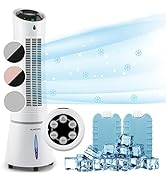
Image: Digital display and remote control for the air conditioner.
4.2 Darbo režimai
- Aušinimo režimas: Reduces room temperature. Set desired temperature and fan speed.
- Sausintuvo režimas: Pašalina drėgmės perteklių iš oro.
- Ventiliatoriaus režimas: Cirkuliuoja orą be aušinimo. Pasirinkite norimą ventiliatoriaus greitį.
- Miegojimo rezimas: Operates quietly with reduced fan speed and gradually increases temperature for comfortable sleep.
4.3 Smart Control (App & Alexa)
The Klarstein Kraftwerk Smart can be controlled via the Klarstein app on your smartphone and is compatible with Amazon Alexa and Google Home. Follow the app's instructions for pairing the device.

Image: Simple and practical use with the Klarstein app, compatible with Amazon Alexa and Google Home.
4.4 Laikmačio funkcija
Use the timer function to set the unit to turn on or off automatically after a specified period.
5. Priežiūra
Reguliarus techninis aptarnavimas užtikrina optimalų veikimą ir pailgina oro kondicionieriaus tarnavimo laiką. Prieš atlikdami bet kokią techninę priežiūrą, visada atjunkite įrenginį nuo elektros tinklo.
5.1 Oro filtro valymas
The air filter should be cleaned every two weeks or more frequently depending on usage. A dirty filter reduces efficiency.
- Išjunkite ir atjunkite įrenginį.
- Suraskite ir nuimkite oro filtrą nuo įrenginio galo arba šono.
- Clean the filter with a vacuum cleaner or wash it with warm water and mild detergent.
- Prieš vėl įdėdami filtrą, leiskite jam visiškai išdžiūti.
5.2 Įrenginio išorės valymas
Nuvalykite įrenginio išorę minkšta, damp audiniu. Nenaudokite stiprių cheminių medžiagų, abrazyvinių medžiagų ar tirpiklių.
5.3 Sezoninis sandėliavimas
Jei įrenginys bus sandėliuojamas ilgesnį laiką:
- Išleiskite iš įrenginio susikaupusį vandenį.
- Išvalykite oro filtrą.
- Uždenkite įrenginį, kad apsaugotumėte jį nuo dulkių.
- Laikyti sausoje, vėsioje vietoje.
6. Problemų sprendimas
Prieš kreipdamiesi į klientų aptarnavimo tarnybą, žr. toliau pateiktą lentelę, kurioje pateikiamos dažniausiai kylančios problemos ir jų sprendimai.
| Problema | Galima priežastis | Sprendimas |
|---|---|---|
| Įrenginys neįsijungia. | No power, power cord unplugged, fuse blown. | Patikrinkite maitinimo jungtį, sieninį lizdą ir grandinės pertraukiklį. |
| Nepakankamas aušinimas. | Nešvarus oro filtras, užsikimšusi oro įsiurbimo/išleidimo anga, per didelis kambarys, atidaryti langai/durys, netinkamai sumontuota išmetimo žarna. | Clean filter, clear obstructions, ensure proper room size for unit capacity, close windows/doors, check exhaust hose installation. |
| Įrenginys triukšmingas. | Įrenginys nestatytas ant lygaus paviršiaus, vidiniai komponentai vibruoja. | Ensure unit is on a level surface. Some operational noise is normal for portable AC units. |
| Vandens nutekėjimas. | Drainage plug not properly sealed, drainage hose blocked or improperly connected. | Check drainage plug and hose connections. Clear any blockages in the drainage hose. |
| „Wi-Fi“ ryšio problemos. | Incorrect Wi-Fi settings, 5GHz network used, temporary glitch. | Ensure you are connecting to a 2.4GHz Wi-Fi network. Try unplugging the unit for 10 seconds, then reconnecting. Refer to the app's pairing instructions. |
7. Specifikacijos
| Funkcija | Detalė |
|---|---|
| Prekės ženklas | KLARŠTEINAS |
| Modelio pavadinimas | Kraftwerk Smart |
| Aušinimo talpa | 10,000 2.9 BTU (XNUMX kW) |
| Sausinimo galimybė | 23 litrai |
| Oro srauto tūris | 440 m³/val |
| Rekomenduojamas kambario dydis | 29-49 m² |
| Triukšmo lygis | 50 dB (Min) / 65 dB (Max) |
| Energijos vartojimo efektyvumo klasė | A |
| Šaldymo agentas | R-290 |
| Energijos suvartojimas | 1150 vatų |
| ttage | 220 voltų |
| Matmenys (G x P x A) | 38P x 35.5lx 82.2A cm |
| Svoris | 26 kilogramo |
| Kontrolės metodas | Nuotolinio valdymo pultas, programų valdymas |
| Filtro tipas | Anglis |

Image: Energy efficiency label for the product.
Image: Technical drawing with product dimensions.
8. Garantija ir klientų aptarnavimas
8.1 Informacija apie garantiją
This product comes with a limited warranty. Please refer to the warranty card included in your package or contact customer support for detailed terms and conditions. The warranty covers manufacturing defects under normal use.
8.2 Pagalba klientams
For technical assistance, spare parts, or any questions regarding your Klarstein Kraftwerk Smart air conditioner, please contact Klarstein customer support. Contact details can typically be found on the official Klarstein websvetainėje arba pirkimo dokumentuose.
Before contacting support, please have your model number (Kraftwerk Smart) and purchase date available.