
AMENKER F30
AMENKER Handheld & Portable Mini Fan User Manual
Modelis: F30
Įvadas
Thank you for choosing the AMENKER Handheld & Portable Mini Fan. This versatile device combines a powerful personal fan with a 3000mAh power bank and a cell phone stand, offering convenience and comfort wherever you go. Its foldable design allows for use as a handheld fan, neck fan, or desktop fan, providing strong airflow and quiet operation for up to 12 hours.
Produkto savybės
- Daugiafunkcinis dizainas: Can be used as a handheld fan, neck fan, or desktop fan. Features a dual-clip design for waist attachment.
- Integruota išorinė baterija: Built-in 3000mAh battery allows you to charge your cell phone on the go.
- Cell Phone Stand: Conveniently holds your smartphone for hands-free viewing while enjoying the fan's airflow.
- Trys reguliuojami greičiai: Choose from low, mid, or high speed settings for customized airflow.
- Ilgos darbo valandos: Provides up to 12 hours of continuous operation on low speed, 7 hours on mid speed, and 4 hours on high speed.
- Tylus veikimas: Designed for low noise (less than 36dB), ensuring minimal disturbance.
- Nešiojamas ir sulankstomas: Compact and lightweight design (5.3 ounces) makes it easy to carry in a bag or pocket. Features 180° tilting for adjustable airflow.
- Įkraunamas USB: Easily recharges in approximately 2 hours using any USB power source (laptop, power bank, car charger, wall socket).
Kas yra dėžutėje
- AMENKER Handheld & Portable Mini Fan (Model: F30)
- C tipo USB įkrovimo laidas
- Kaklo diržas
- Vartotojo vadovas (šis dokumentas)
Sąranka
Ventiliatoriaus įkrovimas
Before first use, fully charge the fan. The fan has a built-in 3000mAh battery.
- Locate the USB Type-C charging port on the side of the fan (near the USB output port).
- Connect the provided USB Type-C cable to the fan's charging port.
- Connect the other end of the USB cable to a compatible USB power source (e.g., computer USB port, wall adapter, power bank).
- The indicator lights near the power button will illuminate to show charging status. Once fully charged (approximately 2 hours), all indicator lights will be solid.

Figure 1: Charging the fan and using it as a power bank. The image shows the fan's USB output port and a phone being charged by the fan.
Attaching the Neck Lanyard
To use the fan as a neck fan, attach the provided lanyard:
- Locate the hanging hole on the bottom of the fan's handle.
- Thread the loop of the neck lanyard through the hanging hole.
- Pass the rest of the lanyard through the loop and pull to secure.
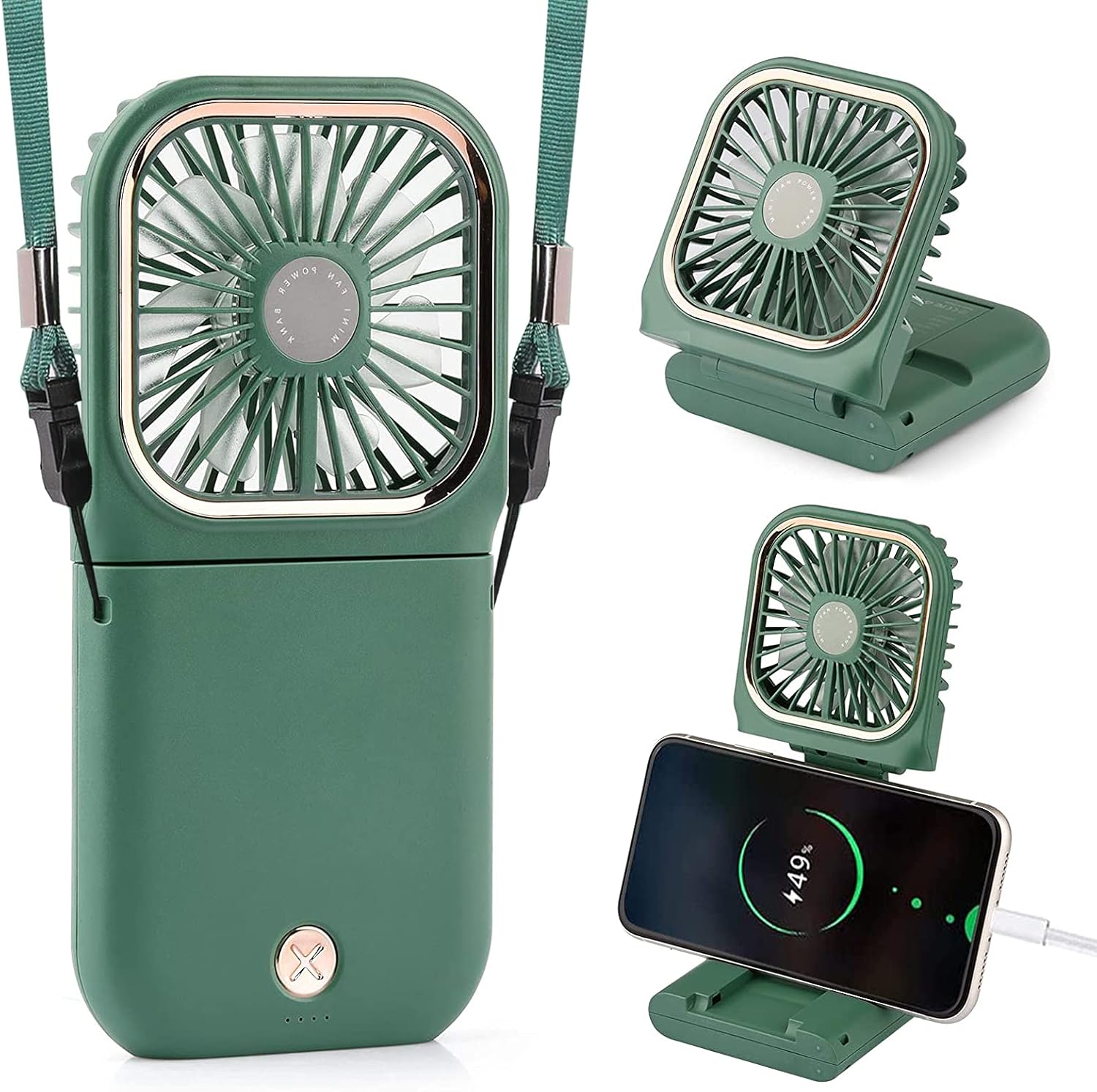
Figure 2: The AMENKER mini fan in various configurations: handheld, worn around the neck, and standing on a desk.
Naudojimo instrukcijos
Įjungimas / išjungimas ir greičio reguliavimas
The fan features a single power button for all controls.
- Power On (Low Speed): Press the power button once to turn on the fan at low speed.
- Vidutinis greitis: Press the power button a second time to switch to medium speed.
- Didelis greitis: Press the power button a third time to switch to high speed.
- Išjungti: Norėdami išjungti ventiliatorių, ketvirtą kartą paspauskite maitinimo mygtuką.
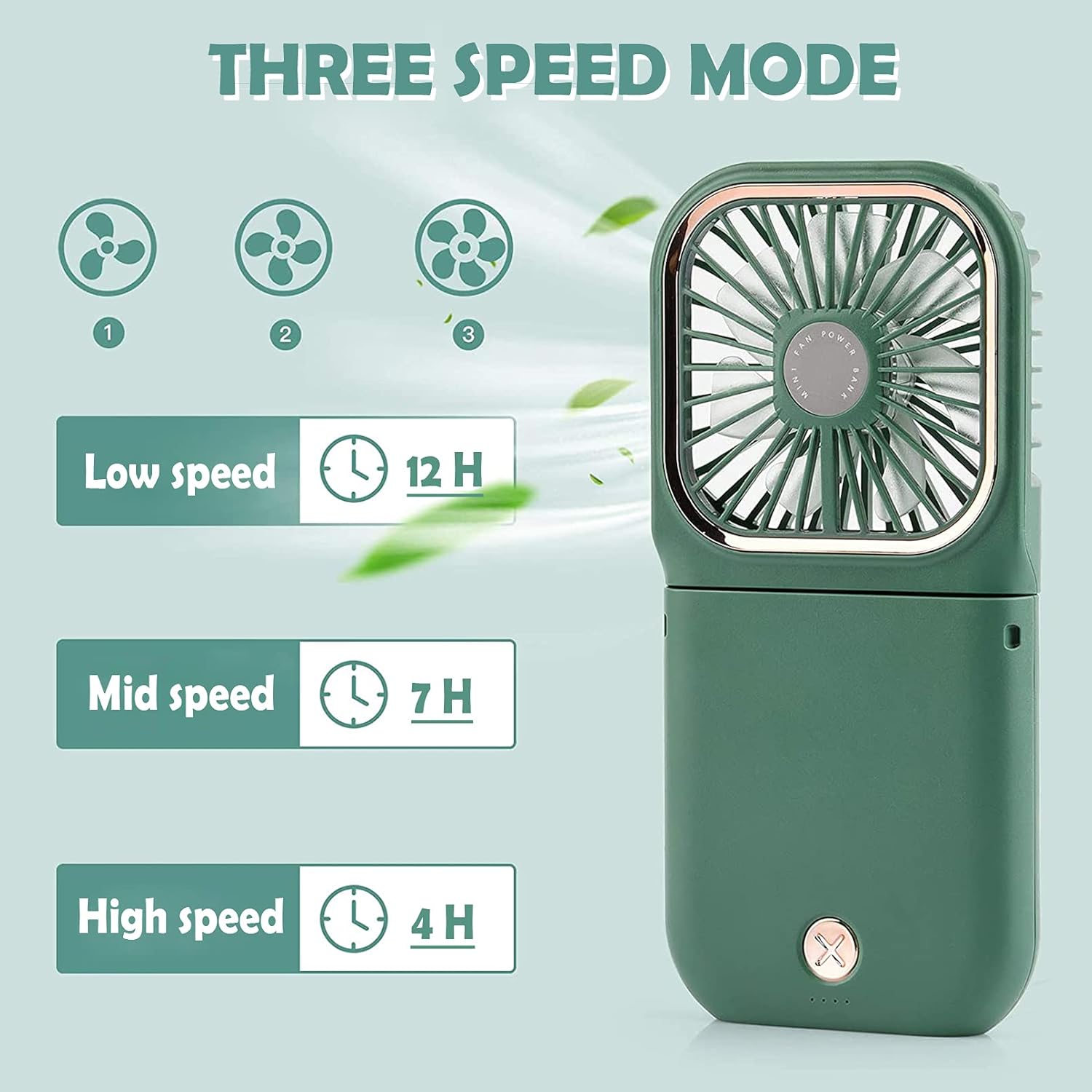
Figure 3: Fan speed settings and approximate battery life: Low (12H), Mid (7H), High (4H).
Using as a Handheld Fan
Hold the fan by its handle. The fan head can be adjusted 180 degrees to direct airflow as needed.

Figure 4: The fan's versatile design allows for use as a neck fan, desktop fan, or handheld fan.
Using as a Neck Fan
With the lanyard attached, hang the fan around your neck. Adjust the fan head to provide airflow towards your face or chest. The fan can be folded to point upwards for neck cooling.

Figure 5: The portable neck fan allows for hands-free cooling, easily carried in a bag or worn.
Using as a Desktop Fan / Cell Phone Stand
Fold the fan to create a stable base. The fan head can be angled to provide airflow while the base acts as a stand for your cell phone.

Figure 6: The fan's integrated stand supports a cell phone, ideal for video calls or media consumption.
Naudojimas kaip maitinimo bankas
The fan can provide emergency power to your mobile devices.
- Įsitikinkite, kad ventiliatorius įkrautas.
- Connect your device's charging cable to the USB output port on the fan.
- Your device should begin charging.
Figure 7: The fan can act as a power bank to charge your phone via its USB output port.
Priežiūra
- Valymas: Use a soft, dry cloth to wipe the fan's exterior. Do not use harsh chemicals or abrasive cleaners. Do not immerse the fan in water.
- Saugykla: When not in use for extended periods, store the fan in a cool, dry place away from direct sunlight. Ensure the battery is partially charged (around 50%) before storage to prolong battery life.
- Akumuliatoriaus priežiūra: To maintain battery health, avoid fully discharging the battery frequently. Recharge the fan regularly, even if not in constant use.
Trikčių šalinimas
| Problema | Galima priežastis | Sprendimas |
|---|---|---|
| Ventiliatorius neįsijungia. | Baterija išsikrovusi. | Visiškai įkraukite ventiliatorių naudodami pridedamą USB C tipo laidą. |
| Silpnas oro srautas. | Fan is on low speed; Fan blades are obstructed. | Increase the fan speed. Ensure nothing is blocking the fan blades or air intake. |
| Phone not charging from fan. | Fan battery is low; Incorrect cable or connection. | Ensure the fan is sufficiently charged. Use a compatible USB cable and ensure it's securely connected to the fan's USB output port and your phone. |
| Ventiliatorius skleidžia neįprastą triukšmą. | Obstruction in fan blades; Internal issue. | Turn off the fan and check for any foreign objects obstructing the blades. If the noise persists, discontinue use and contact customer support. |
Specifikacijos
- Prekinis ženklas: AMENKER
- Modelio pavadinimas: F30
- Spalva: Žalia
- Elektrinio ventiliatoriaus dizainas: Nešiojamas ventiliatorius
- Maitinimo šaltinis: USB
- Gaminio matmenys: 0.79 "D x 3.15" P x 6.54" A
- Ypatinga funkcija: Nešiojamas, lengvas, sulankstomas
- Triukšmo lygis: 30 dB
- Vattage: 5 vatų
- ttage: 5 voltų
- Jungiklio tipas: Mygtukas
- Prekės svoris: 5.3 uncijos (150 gramų)
- Įtraukti komponentai: Laidas
- Naudojimas viduje / lauke: Vidinis
- Kontrolės metodas: Palieskite
- Ašmenų medžiaga: Plastikiniai
- Pakartotinis naudojimas: Įkraunamas
- Galios lygių skaičius: 3
- Baterija: Reikalinga 1 ličio jonų baterija (pridedama)
Oficialus produkto vaizdo įrašas
Video: Demonstrates the features and various uses of the AMENKER Portable Neck Fan, including its foldable design, hands-free operation, and power bank functionality.
Garantija ir palaikymas
For warranty information or technical support, please contact AMENKER customer service through the retailer where the product was purchased or visit the official AMENKER websvetainėje. Prašome išsaugoti pirkimo įrodymą garantiniams reikalavimams.
Kontaktinė informacija: Refer to your purchase receipt or the AMENKER brand store on Amazon for the most current support details.
Internetiniai ištekliai: For additional information and FAQs, please visit the AMENKER store page: AMENKER Store
Ask a question about this manual
Ask about setup, troubleshooting, compatibility, parts, safety, or missing instructions. Manuals+ will review the question and use this page’s manual context to help answer it.