
Įvadas
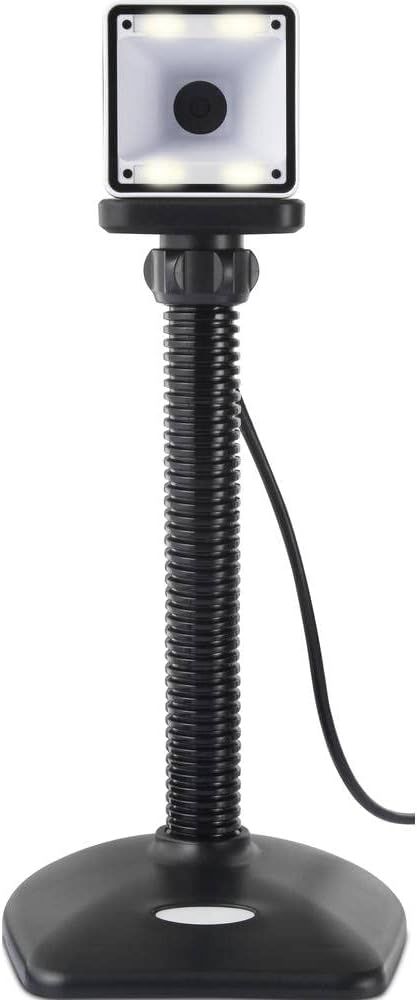
Thank you for choosing the Renkforce RF-SBS-500 2D Wired Barcode Scanner. This device is designed for efficient and reliable scanning of both 1D and 2D barcodes from various surfaces, including paper and smartphone screens. Its omnidirectional scanning capability and hands-free operation make it suitable for a wide range of applications. This manual provides essential information for the proper setup, operation, and maintenance of your scanner.
Saugos instrukcijos
- Nelaikykite skaitytuvo ekstremalioje temperatūroje, drėgmėje ar tiesioginiuose saulės spinduliuose.
- Venkite skaitytuvo numetimo ir stiprių smūgių.
- Do not attempt to disassemble or modify the scanner. This will void the warranty.
- Keep the scanning window clean to ensure optimal performance. Use a soft, dry cloth.
- Ensure the USB cable is connected securely to prevent accidental disconnection.
Pakuotės turinys
- Renkforce RF-SBS-500 2D Wired Barcode Scanner
- Integrated USB-A Cable
- Vartotojo vadovas (šis dokumentas)
Sąranka
Follow these steps to set up your Renkforce RF-SBS-500 barcode scanner:
- Išpakuokite skaitytuvą: Atsargiai išimkite skaitytuvą iš pakuotės.
- Prisijunkite prie kompiuterio: Plug the integrated USB-A cable from the scanner into an available USB port on your desktop or laptop computer.
- Tvarkyklės diegimas: The scanner is typically plug-and-play. Your operating system (Windows, macOS, Linux) should automatically detect and install the necessary drivers. Wait for the installation to complete.
- Vieta: Place the scanner on a stable, flat surface. The flexible neck allows for adjustment of the scanning head angle for optimal positioning.

Skaitytuvo valdymas
The Renkforce RF-SBS-500 is designed for ease of use with its omnidirectional and hands-free capabilities.
- Maitinimas: Once connected via USB, the scanner will power on automatically. The LED indicators on the scanner head may illuminate briefly.
- Brūkšninio kodo nuskaitymas: Position the barcode within the scanning area of the scanner head. The scanner will automatically detect and read the barcode.
- Vaizdinis ir garsinis atsiliepimas: Upon successful scanning, the integrated buzzer will emit a short beep, and the LED display on the scanner will flash or change color, indicating a successful read.
- Omnidirectional Reading: The scanner can read barcodes regardless of their orientation, eliminating the need to align the barcode precisely.
- Hands-Free Mode (Presentation Mode): The scanner operates continuously in a presentation mode, allowing you to simply pass items with barcodes in front of the scanning window without pressing any buttons. This saves time and improves workflow efficiency.
- Palaikomi brūkšniniai kodai: The scanner supports both 1D (e.g., EAN, UPC, Code 39) and 2D (e.g., QR Code, Data Matrix, PDF417) barcode types.
Priežiūra
Tinkama priežiūra užtikrina jūsų skaitytuvo ilgaamžiškumą ir optimalų veikimą.
- Skenavimo lango valymas: Reguliariai valykite nuskaitymo langą minkštu, nepūkuotu skudurėliu. Jei nešvarumai sunkiai įveikiami, šiek tiek nuvalykite.ampNuvalykite šluostę vandeniu arba švelniu, neabrazyviniu valikliu. Nepurkškite valiklio tiesiai ant skaitytuvo.
- Bendras valymas: Nuvalykite skaitytuvo išorę sausa arba šiek tiek drėgna šluoste.amp audinys. Venkite naudoti stiprių cheminių medžiagų ar abrazyvinių medžiagų.
- Saugykla: Kai nenaudojate, laikykite skaitytuvą švarioje, sausoje vietoje, apsaugotoje nuo tiesioginių saulės spindulių ir ekstremalių temperatūrų.
Trikčių šalinimas
Jei kyla problemų dėl skaitytuvo, žr. toliau pateiktas dažniausiai pasitaikančias problemas ir sprendimus:
| Problema | Galima priežastis | Sprendimas |
|---|---|---|
| Skaitytuvas neįsijungia. | USB cable not connected properly or faulty USB port. | Ensure the USB cable is firmly connected to both the scanner and the computer. Try a different USB port. |
| Skaitytuvas neskaito brūkšninių kodų. | Barcode damaged, scanning window dirty, or incorrect barcode type. | Check the barcode for damage. Clean the scanning window. Ensure the barcode type is supported (1D/2D). Adjust the distance and angle of the barcode to the scanner. |
| No beep or LED feedback after scanning. | Barcode not read successfully. | Refer to the "Scanner does not read barcodes" solution. If the issue persists, contact support. |
| Nuskaityti duomenys rodomi neteisingai. | Keyboard layout mismatch or software issue. | Ensure your computer's keyboard layout matches the expected output. Test with a simple text editor. |
If the problem persists after trying these solutions, please contact Renkforce customer support.
Specifikacijos
| Funkcija | Specifikacija |
|---|---|
| Modelio numeris | RF-4679568 |
| Nuskaitymo galimybė | 1D ir 2D brūkšniniai kodai |
| Ryšio technologija | USB-A (laidinis) |
| Nuskaitymo greitis | 60 vaizdų per sekundę |
| Nuskaitymo režimas | Omnidirectional, Hands-free (Presentation Mode) |
| Atsiliepimai | Integrated Buzzer, LED Display |
| Suderinami įrenginiai | Desktop Computer, Laptop, Smartphone (via appropriate adapter if needed) |
| Matmenys (I x P x A) | 150 x 5.2 x 5.2 cm |
| Prekės svoris | 102 gramų |
| Maitinimo šaltinis | USB veikia |
| Kilmės šalis | Vokietija |
Garantija ir palaikymas
Renkforce products are manufactured to high-quality standards and come with a standard warranty. Please refer to your purchase documentation or the Renkforce official websvetainėje, kurioje rasite konkrečias jūsų regione taikomas garantijos sąlygas.
For technical support, troubleshooting assistance, or warranty claims, please contact Renkforce customer service. Contact details can typically be found on the Renkforce websvetainėje arba ant jūsų produkto pakuotės.