
1. Produktas baigtasview
Discover the ForceClima 12300 Connected Heating portable air conditioner, designed to adapt to your needs at any time with its portable design and five operating modes. It ventilates, cools, heats, and dehumidifies any room in your home, or allows for peaceful rest with its night mode. Featuring Wi-Fi control, a remote control, a touch panel, and an LED screen, it ensures you can enjoy the optimal environment with maximum comfort.

1.1 vaizdas: priekis view of the Cecotec ForceClima 12300 portable air conditioner.

Image 1.2: Another perspective of the Cecotec ForceClima 12300 portable air conditioner.
2. Saugos įspėjimai
Please read all safety warnings and instructions carefully before using the appliance to prevent personal injury or damage to the product. Keep this manual for future reference.
- Išpakavimas: Remove the product from its box and remove all packaging materials. Ensure all components are present and undamaged.
- Vieta: Place the unit on a stable, flat surface. Ensure adequate clearance around the unit for proper airflow.
- Maitinimas: Connect the appliance only to a grounded power outlet with the correct voltage kaip nurodyta gaminio etiketėje.
- Vaikai ir augintiniai: Prietaiso veikimo metu laikykite vaikus ir naminius gyvūnus toliau nuo prietaiso.
- Priežiūra: Nebandykite patys taisyti ar modifikuoti prietaiso. Dėl remonto kreipkitės į kvalifikuotus techninės priežiūros darbuotojus.
- Vanduo: Do not immerse the appliance in water or other liquids. Avoid spilling liquids on the unit.
- Vėdinimas: Ensure the exhaust hose is properly installed and vented outdoors to prevent heat buildup.
3. Produkto ypatybės
- High Cooling/Heating Capacity: Portable air conditioner with a powerful 12000 BTU capacity, suitable for quickly and efficiently reaching desired temperatures in areas up to approximately 25 m². Features a heat pump for effective heating during winter.
- „Wi-Fi“ ryšys: Configure the appliance remotely via Wi-Fi connection, allowing full control from your smartphone from anywhere.
- Keli greičiai: Three fan speeds (Low, Medium, High) to adapt operation according to immediate needs.
- Nuotolinio valdymo pultas: Includes a remote control for convenient operation from any location without needing to approach the unit.
- Intuitive Display and Control: LED screen displays all possible configurations and highlights current settings for easy control. The top touch control panel provides practical and simple operation.
- Penki veikimo režimai: Offers Fan mode, Cooling mode, Heating mode, Dehumidification mode, and Night mode.
- Didelis sausinimo pajėgumas: Dehumidification mode can capture up to 26 liters per day, contributing to a healthier environment in your home.

12000 BTU Capacity

Šildymas ir aušinimas

„Wi-Fi“ valdymas

Nuotolinis ir jutiklinis valdymas

LED ekranas

5 Darbo režimai

3 ventiliatoriaus greičiai

Drėgmės pašalinimas
4. Sąranka ir diegimas
Proper setup is crucial for the optimal performance of your portable air conditioner. Follow these steps for installation:
- Išpakuoti: Carefully remove the air conditioner and all accessories from the packaging. Ensure you have the unit, exhaust hose, window kit, and remote control.
- Padėties nustatymas: Place the unit on a firm, level surface near a window and a grounded electrical outlet. Ensure there is at least 20 cm (8 inches) of space around the unit for proper air circulation.
- Langų komplekto montavimas:
- Assemble the window sealing plate kit according to your window type (sliding or casement).
- Pritvirtinkite lango komplektą atvirame lange, užtikrindami sandarų sandarumą, kad nepratekėtų oras.
- Pritvirtinkite išmetimo žarną:
- Prijunkite vieną išmetimo žarnos galą prie oro išleidimo angos įrenginio gale.
- Connect the other end of the exhaust hose to the adapter in the window kit. Extend the hose as little as possible and avoid sharp bends to maximize efficiency.
- Drainage (Dehumidification/Cooling): For continuous drainage during dehumidification or cooling in high humidity, connect a drain hose (not included) to the continuous drain port and lead it to a floor drain or suitable container. Otherwise, the internal water tank will collect condensate and require manual emptying.
- Maitinimo jungtis: Prijunkite maitinimo laidą į įžemintą 230 voltų elektros lizdą.

Image 4.1: Proper placement of the unit with the exhaust hose connected to a window.
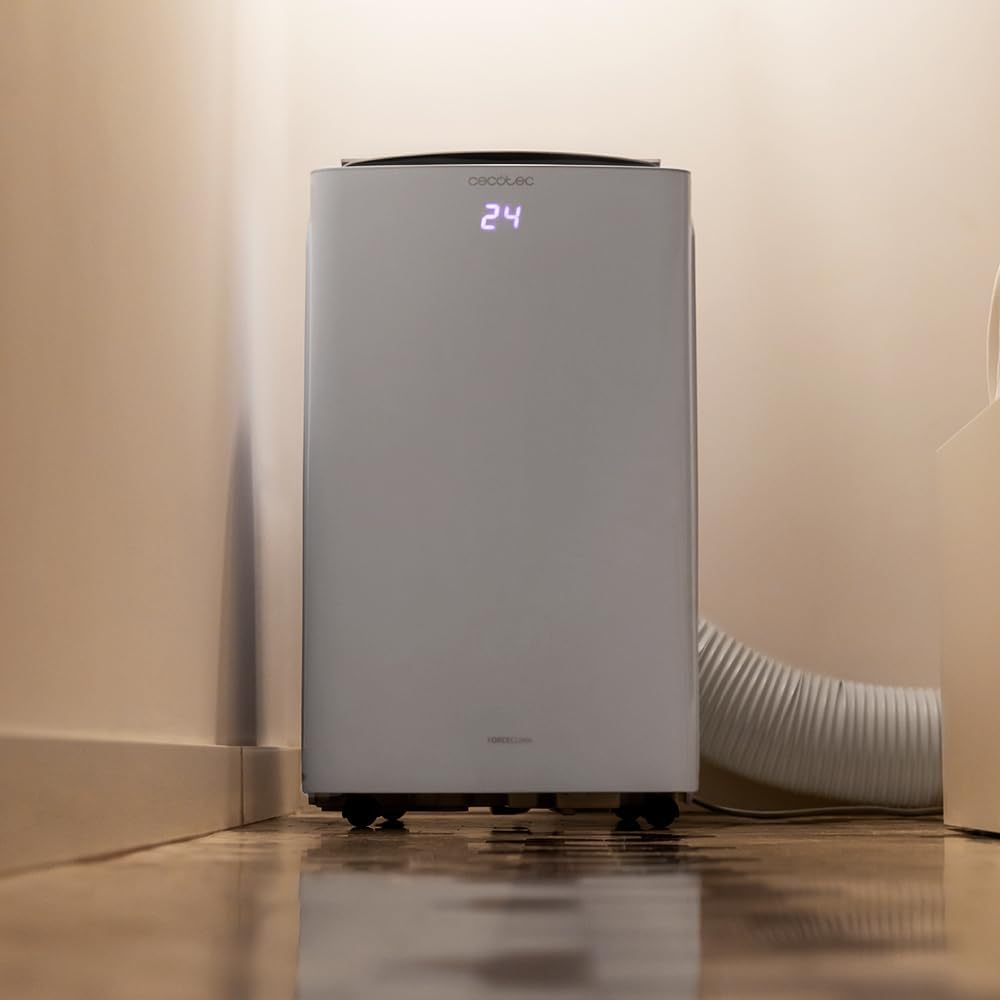
Image 4.2: Close-up of the exhaust hose connection at the base of the unit.
5. Naudojimo instrukcijos
Your ForceClima 12300 offers various ways to control its functions:
5.1. Valdymo skydelio veikimas
The touch control panel on top of the unit allows direct access to all functions.

Image 5.1: User interacting with the top control panel of the air conditioner.
- Maitinimo mygtukas: Paspauskite, kad įjungtumėte arba išjungtumėte įrenginį.
- Režimo mygtukas: Cycle through the 5 operating modes: Cooling, Heating, Fan, Dehumidification, and Night.
- Ventiliatoriaus greičio mygtukas: Select desired fan speed: Low, Medium, or High.
- Temperatūros reguliavimas: Norėdami nustatyti norimą temperatūrą, naudokite rodykles aukštyn / žemyn.
- Laikmačio mygtukas: Nustatykite automatinio įjungimo/išjungimo laikmatį.
5.2. Nuotolinio valdymo pultas
Pridedamas nuotolinio valdymo pultas užtikrina patogų valdymą per atstumą.

Image 5.2: Remote control for the Cecotec ForceClima 12300.
- All functions available on the control panel can be accessed via the remote control.
- Ensure the remote control is pointed towards the receiver on the unit.
- Install batteries (not included) as per the markings inside the battery compartment.
5.3. „Wi-Fi“ ir programėlių valdymas
Control your air conditioner from anywhere using the dedicated smartphone application.

Image 5.3: Smartphone displaying the Cecotec control application.
- Atsisiųskite oficialią „Cecotec“ programėlę iš savo išmaniojo telefono programėlių parduotuvės.
- Follow the in-app instructions to pair your ForceClima 12300 unit with your Wi-Fi network.
- Once connected, you can remotely adjust modes, temperature, fan speed, and set schedules.

Image 5.4: The air conditioner seamlessly integrated into a home environment.
6. Priežiūra
Reguliarus oro kondicionieriaus aptarnavimas užtikrina jo ilgaamžiškumą ir efektyvų veikimą.
- Oro filtro valymas:
- Prieš valydami įrenginį išjunkite ir ištraukite.
- Remove the air filter (location typically on the back or side, refer to diagrams in the full manual if available).
- Clean the filter with a vacuum cleaner or wash it gently with lukewarm water and mild detergent. Rinse thoroughly and allow it to air dry completely before reinserting.
- Clean the air filter every two weeks or more frequently if the unit is used often or in dusty environments.
- Vandens nuleidimas:
- When the internal water tank is full, the unit will stop operating and an indicator light will illuminate.
- Padėkite negilų keptuvę arba padėklą po išleidimo anga įrenginio apačioje gale.
- Remove the drain plug to allow water to flow out. Replace the plug once the tank is empty.
- Įrenginio išorės valymas: Išorę nuvalykite minkšta, damp audiniu. Nenaudokite stiprių cheminių medžiagų, abrazyvinių medžiagų ar tirpiklių.
- Saugykla: If storing the unit for an extended period, ensure the water tank is completely drained and the unit is clean and dry. Store it in a cool, dry place, preferably in its original packaging.
7. Problemų sprendimas
Prieš kreipdamiesi į klientų aptarnavimo tarnybą, peržiūrėkite šias dažniausiai pasitaikančias problemas ir jų sprendimus:
| Problema | Galima priežastis | Sprendimas |
|---|---|---|
| Įrenginys neįsijungia. | Nėra elektros, maitinimo laidas atjungtas, suveikė grandinės pertraukiklis. | Patikrinkite maitinimo jungtį, iš naujo nustatykite grandinės pertraukiklį. |
| Unit is running but not cooling/heating. | Air filter dirty, exhaust hose blocked/disconnected, room too large, doors/windows open. | Clean air filter, check hose connection, close doors/windows, ensure unit is sized for the room. |
| Vandens nutekėjimas. | Drain plug loose, continuous drain hose blocked or improperly connected, water tank full. | Ensure drain plug is secure, check drain hose, empty water tank. |
| Įrenginys triukšmingas. | Įrenginys nestatytas ant lygaus paviršiaus, užblokuotas ventiliatorius. | Place on a level surface, check for obstructions in fan area. |
| Nuotolinio valdymo pultas neveikia. | Baterijos išsikrovė arba įdėtos neteisingai, yra kliūtis tarp nuotolinio valdymo pulto ir įrenginio. | Pakeiskite baterijas ir užtikrinkite, kad įrenginio imtuvas būtų matomas tiesiogiai. |
8. Specifikacijos
Detailed technical specifications for the Cecotec ForceClima 12300 Connected Heating Portable Air Conditioner:
| Specifikacija | Vertė |
|---|---|
| Prekės ženklas | Cecotec |
| Modelio numeris | 05959 |
| Gaminio matmenys (I x P x A) | 47.5 x 40.5 x 88 cm |
| Svoris | 27 kilogramo |
| Energijos vartojimo efektyvumo įvertinimas | A |
| Metinis energijos suvartojimas | 1.1 kilovatvalandės |
| Aušinimo talpa | 12000 XNUMX BTU |
| Galia | 1350 vatų |
| ttage | 230 voltų |
| Triukšmo lygis | 65 dB |
| Sausinimo galimybė | Iki 26 litrų per dieną |
| Aprėpties sritis | apytiksliai 25 m² |
| Diegimo tipas | Langas |
| Tipas | Nešiojami |
| Ypatingos savybės | Dehumidifier, Heating, Wi-Fi Control, Remote Control, LED Display |
| Spalva | Baltas |
| Medžiaga | Plastikiniai |
| Įtraukti komponentai | 1 x Air conditioner; 1 x Window kit; 1 x Remote control; 1 x User manual |

Image 8.1: EU Energy Label for the ForceClima 12300, showing A-rated energy efficiency.
9. Garantija ir palaikymas
For warranty information, technical support, or spare parts availability, please refer to the warranty card included with your product or contact Cecotec customer service directly. Information regarding spare parts availability was not provided at the time of this manual's creation.
You can typically find contact details for Cecotec customer support on their official websvetainėje arba produkto pakuotėje.