
1. Įvadas
Thank you for choosing the MEDION X64060 Party Speaker. This manual provides essential information for the safe and efficient use of your device. Please read it thoroughly before operating the speaker and keep it for future reference.
The MEDION X64060 is a versatile party speaker designed for various entertainment needs, featuring powerful audio output, integrated DJ and karaoke functions, and dynamic light effects.
2. Saugos instrukcijos
- Prieš naudodami atidžiai perskaitykite visas instrukcijas.
- Garsiakalbį saugokite nuo vandens, drėgmės ir ekstremalių temperatūrų.
- Neuždenkite vėdinimo angų.
- Use only the power cord supplied with the device.
- Nebandykite patys taisyti įrenginio. Visus techninės priežiūros darbus patikėkite kvalifikuotiems specialistams.
- Ensure the speaker is placed on a stable, level surface to prevent tipping.
- Venkite ilgalaikio didelio garsumo poveikio, kad nepažeistumėte klausos.
3. Pakuotės turinys
Patikrinkite pakuotę, ar joje yra šie daiktai:
- MEDION X64060 Party Speaker
- 1x mikrofonas
- Maitinimo laidas
- Vartotojo vadovas (šis dokumentas)
4. Produktas baigtasview
Familiarize yourself with the main components and controls of your MEDION X64060 Party Speaker.

Image: Control Panel Overview
This image displays a close-up of the speaker's top control panel, showing various knobs and buttons for audio adjustments, DJ functions, and input selections.

Image: Speaker Dimensions and Connections
This image illustrates the overall dimensions of the speaker (980mm height, 350mm width, 340mm depth) and highlights the available connection ports: 1x USB, 2x Microphone (6.3 mm), 1x Guitar (6.3 mm), 1x Audio Input (3.5 mm), and 1x Audio Input (RCA).
4.1 Priekinis skydelis
- Garsiakalbiai: Two main speakers with integrated LED lighting.
- Šviesos efektai: Dynamic LED lights that synchronize with music.
4.2 Viršutinis valdymo skydelis
- Maitinimo mygtukas: Norėdami įjungti / išjungti garsiakalbį.
- Garsumo valdikliai: Main volume, microphone volume (MIC1 VOL, MIC2 VOL), guitar volume (GUITAR VOL), and echo volume (ECHO VOL).
- Ekvalaizeris (EQ): 5-band equalizer for sound adjustment.
- Įvesties parinkikliai: Buttons for Bluetooth, USB, AUX.
- DJ Functions: Cross-fader, scratch wheel, drum pads (HI-HAT, SNARE, BASS DRUM, CYMBAL, TOM1, TOM2), and record function.
- USB prievadas: USB atkūrimui.
- Mikrofono įėjimai: Two 6.3 mm jack inputs.
- Gitaros įvestis: One 6.3 mm jack input.
- AUX įvestis: 3.5 mm jack input.
4.3 Galinis skydelis
- Maitinimo įvestis: Maitinimo laido prijungimui.
- RCA garso įvestis: Additional audio input.
4.4 Mobilumo funkcijos
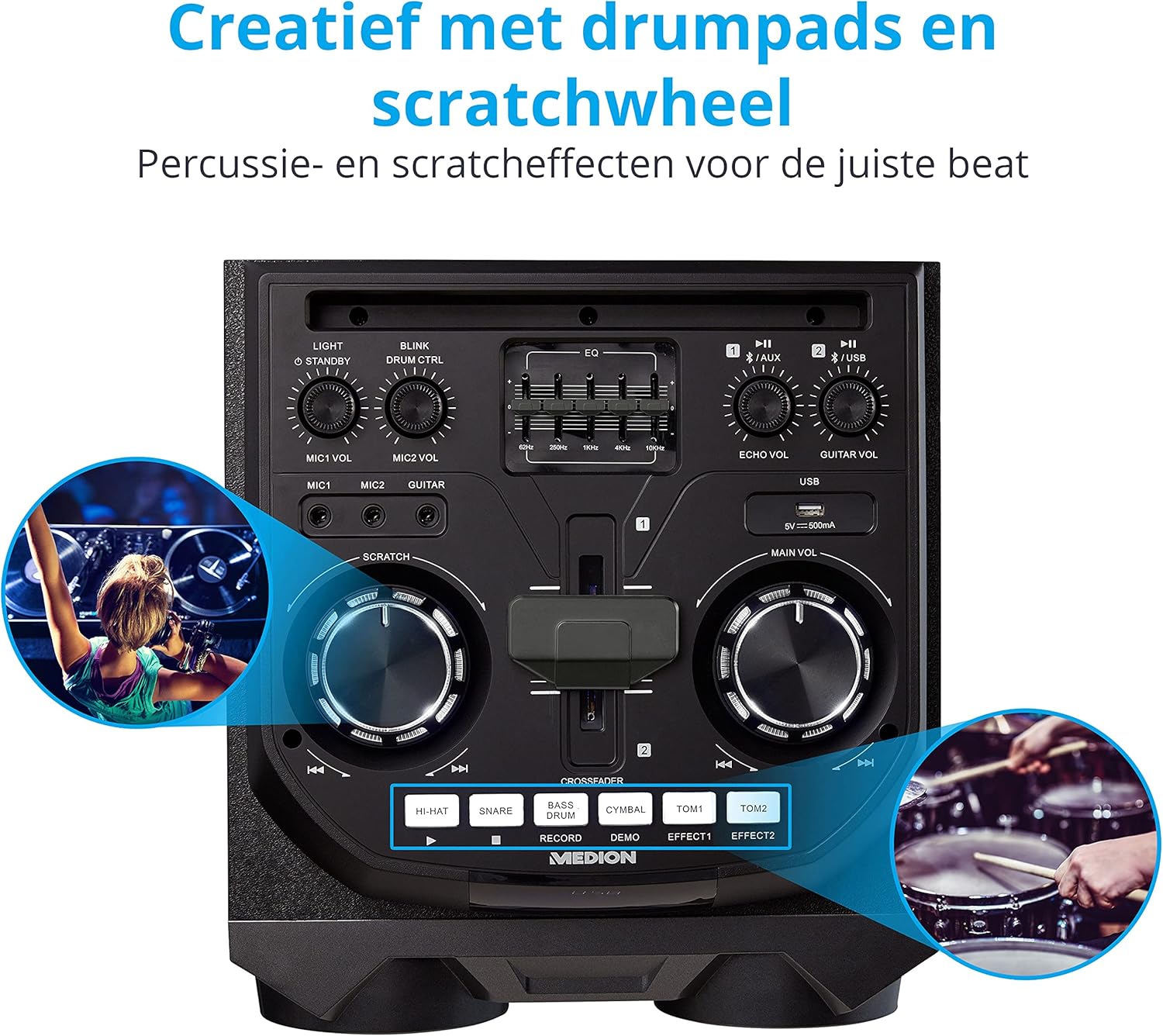
Image: Integrated Wheels for Portability
This image shows the back of the speaker, highlighting the integrated wheels at the bottom, designed for easy transport.
- Integruoti ratai: For easy transportation of the speaker.
- Rankenos: Ergonomic handles for lifting and moving.
5. Sąranka
5.1 Pradinis išdėstymas
Place the speaker on a stable, flat surface. Ensure there is adequate ventilation around the unit. Avoid placing it near heat sources or in direct sunlight.
5.2 Maitinimo jungtis
- Connect the supplied power cord to the power input on the rear of the speaker.
- Kitą maitinimo laido galą prijunkite prie tinkamo sieninio lizdo.
- Press the power button on the top control panel to turn on the speaker. The LED lights will illuminate.
5.3 Connecting a Microphone or Guitar
For karaoke or live instrument performance:
- Plug your microphone(s) into the MIC1 or MIC2 6.3 mm jack inputs on the top panel.
- Plug your guitar into the GUITAR 6.3 mm jack input on the top panel.
- Adjust the respective volume knobs (MIC1 VOL, MIC2 VOL, GUITAR VOL) and ECHO VOL to your preference.
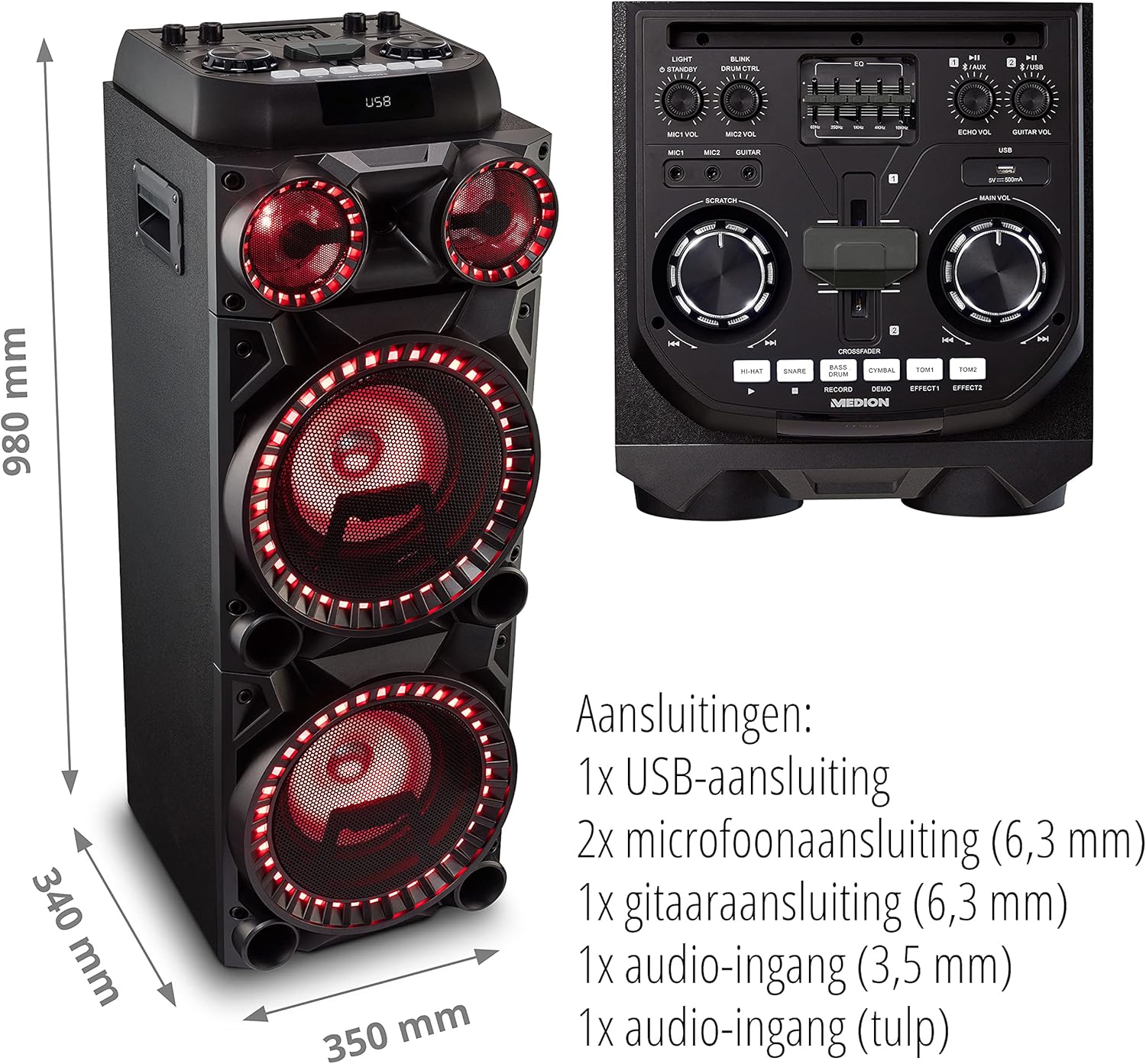
Image: Microphone and Guitar Connection for Karaoke
This image shows individuals enjoying karaoke, demonstrating the use of a microphone connected to the speaker for singing.
6. Naudojimo instrukcijos
6.1 Bluetooth ryšys
- Paspauskite Bluetooth button on the control panel. The Bluetooth indicator will blink.
- Įjunkite „Bluetooth“ savo išmaniajame telefone, planšetiniame kompiuteryje ar kitame garso įrenginyje.
- Ieškokite "MEDION X64060" in your device's Bluetooth settings and select it to pair.
- Once connected, the Bluetooth indicator will stop blinking and remain solid. You can now play music wirelessly.

Image: Bluetooth Music Playback
This image shows a smartphone displaying a music application, indicating a wireless Bluetooth connection to the speaker for audio streaming.
6.2 USB atkūrimas
- Įdėkite USB atmintinę su garso įrašu files into the USB port on the top panel.
- Paspauskite USB mygtuką, norėdami pasirinkti USB režimą.
- The speaker will automatically detect and begin playing audio files from the USB drive. Use the playback controls (play/pause, skip track) on the control panel.
6.3 AUX įvestis
- Connect an external audio device (e.g., MP3 player, laptop) to the 3.5 mm AUX input or the RCA audio input on the rear panel using an appropriate audio cable (not included).
- Paspauskite AUX mygtuką, kad pasirinktumėte AUX režimą.
- Play audio from your connected device. The speaker will output the sound.
6.4 DJ Functions
The MEDION X64060 includes various DJ features for creative sound mixing.

Image: DJ Function Controls
Šis paveikslėlis pateikia išsamų view of the DJ control section, including the cross-fader, scratch wheel, and various drum pads.
- Cross-fader: Use the cross-fader to smoothly transition between different audio sources or effects.
- Scratch Wheel: Manipulate the scratch wheel for classic DJ scratch effects.
- Būgnų trinkelės: Paspauskite HI-Ą, KLAIDOS, BOSINIS BŪGNAS, CIMBALAS, TOM1, ir TOM2 pads to add drum sound effects to your music.
- Įrašymo funkcija: Naudokite ĮRAŠAS button to record your drum pad sequences.
6.5 Karaoke funkcija
Connect a microphone as described in section 5.3. Play your chosen karaoke track via Bluetooth, USB, or AUX. Adjust the microphone and echo volumes for the desired effect.
6.6 Šviesos efektai
The speaker features dynamic LED light effects that respond to the music. These lights automatically activate when the speaker is on. There may be a dedicated button (e.g., "LIGHT" or "BLINK") to control or cycle through different light modes, refer to the control panel for specific options.

Image: Dynamic Blue Light Effects
This image showcases the speaker with its blue LED lights illuminated, demonstrating the atmospheric light effects.

Image: Dynamic Red Light Effects
This image shows the speaker with its red LED lights illuminated, highlighting another color option for the atmospheric light effects.
7. Priežiūra
7.1 Valymas
- Prieš valydami visada atjunkite garsiakalbį nuo maitinimo lizdo.
- Išoriniams paviršiams valyti naudokite minkštą, sausą šluostę.
- Do not use liquid cleaners, aerosols, or abrasive materials, as these can damage the finish or internal components.
7.2 Saugykla
When not in use for extended periods, store the speaker in a cool, dry place, away from direct sunlight and extreme temperatures. Cover the unit to protect it from dust.
8. Problemų sprendimas
| Problema | Galima priežastis | Sprendimas |
|---|---|---|
| Nėra galios | Power cord not connected properly; Power outlet not working. | Ensure the power cord is securely plugged into both the speaker and a working wall outlet. Test the outlet with another device. |
| Nėra garso | Volume too low; Incorrect input selected; Device not paired (Bluetooth); Cable not connected (AUX/Guitar/Mic). | Increase the main volume and individual input volumes. Select the correct input source (Bluetooth, USB, AUX). Re-pair Bluetooth device. Check all cable connections. |
| „Bluetooth“ ryšys nepavyksta | Garsiakalbis neporavimo režime; Įrenginys per toli; Trukdžiai. | Ensure the speaker is in Bluetooth pairing mode (blinking indicator). Move your device closer to the speaker. Avoid obstacles and other wireless devices. |
| Mikrofonas / gitara neveikia | Volume too low; Cable faulty; Incorrect input. | Increase MIC/GUITAR VOL. Check microphone/guitar cable. Ensure the instrument is properly connected. |
9. Specifikacijos
| Prekės ženklas | MEDIONAS |
| Modelio numeris | X64060 | MD44060 |
| Išėjimo galia | 2 x 100 W RMS (2 x 1000 W max. music output power) |
| Ryšio technologija | Bluetooth 5.0, USB, AUX (3.5mm, RCA) |
| Garso įėjimai | 2 x Microphone (6.3 mm), 1 x Guitar (6.3 mm), 1 x AUX (3.5 mm), 1 x RCA |
| Ekvalaizeris | 5 juostų |
| Spalva | Juoda |
| Medžiaga | Plastikiniai |
| Gaminio matmenys (I x P x A) | 38.8 x 35 x 101 cm |
| Prekės svoris | 15 kg |
| Montavimo tipas | Grindų stovėjimas |
| Maitinimo šaltinis | Su laidu elektra |
| Suderinami įrenginiai | Nešiojamasis kompiuteris, išmanusis telefonas |
10. Garantija ir palaikymas
For warranty information and technical support, please refer to the warranty card included with your product or visit the official MEDION websvetainėje. Išsaugokite pirkimo įrodymą, jei prireiktų pateikti garantinį ieškinį.
MEDION Customer Service: For assistance, please contact MEDION customer support through their official channels. Contact details can typically be found on the MEDION websvetainėje arba produkto pakuotėje.