
1. Įvadas
Ačiū, kad pirkoteasing the Soundsation MIOMIX 404FXM 6-Channel Mixer. This versatile mixer is designed for a wide range of audio applications, including home recording, live performances, and podcasting. It combines professional audio quality with portability, featuring low-noise preamplifiers, digital effects, a USB media player/recorder, and Bluetooth connectivity. This manual provides essential information for safe operation, setup, and optimal use of your MIOMIX 404FXM mixer.
2. Saugos instrukcijos
ĮSPĖJIMAS: Kad sumažintumėte gaisro ar elektros smūgio pavojų, nelaikykite šios įrangos lietuje ar drėgmėje.
- Prieš naudodami įrenginį, atidžiai perskaitykite šias instrukcijas.
- Išsaugokite šį vadovą ateityje.
- Laikykitės visų įspėjimų ir vykdykite visas instrukcijas.
- Nenaudokite šio prietaiso šalia vandens.
- Valykite tik sausa šluoste.
- Neužblokuokite jokių ventiliacijos angų. Montuokite pagal gamintojo instrukcijas.
- Nemontuokite šalia jokių šilumos šaltinių, pvz., radiatorių, šilumokaičių, viryklių ar kitų įrenginių (įskaitant ampkeltuvai), kurie gamina šilumą.
- Nepažeiskite poliarizuoto arba įžeminto kištuko saugos tikslo. Poliarizuotas kištukas turi du ašmenis, kurių vienas platesnis už kitą. Įžeminimo tipo kištukas turi dvi mentes ir trečią įžeminimo šakelę. Platus ašmenys arba trečioji šakelė yra jūsų saugumui. Jei pateiktas kištukas netelpa į jūsų elektros lizdą, kreipkitės į elektriką, kad pakeistų pasenusį lizdą.
- Saugokite maitinimo laidą, kad ant jo neužeitų ar nesuspaustų, ypač prie kištukų, patogių lizdų ir toje vietoje, kur jie išeina iš aparato.
- Naudokite tik gamintojo nurodytus priedus/priedus.
- Atjunkite šį įrenginį žaibuojant arba kai nenaudojate ilgą laiką.
- Visus techninės priežiūros darbus patikėkite kvalifikuotam techninės priežiūros personalui. Techninė priežiūra reikalinga, kai aparatas buvo kaip nors pažeistas, pvz., pažeistas maitinimo laidas arba kištukas, į aparatą išsiliejo skystis ar įkrito daiktai, aparatas buvo paveiktas lietaus ar drėgmės, neveikia normaliai. , arba buvo numestas.
3. Pakuotės turinys
Please check that all items listed below are included in the package:
- Soundsation MIOMIX 404FXM Mixer
- Maitinimo adapteris
- Vartotojo vadovas
4. Produkto ypatybės
- 6-channel mixer with digital multi-effect processor.
- Integrated USB player/recorder supporting WAV, MP3, WMA, and FLAC formats.
- Wireless Bluetooth audio streaming.
- 4 Mic/Line channels with low-noise preamps and Combo connectors.
- Selectable Hi-Z inputs for guitars and other high-impedance instruments.
- +48V Phantom Power for condenser microphones.
- Peak indicators on input channels.
- 1 stereo line channel with 6.3mm jacks and +4/-10 dB pad adapter.
- 2-band EQ on channels 1-4.
- 24-bit/48 kHz digital effects processor with 16 presets (Reverb, Delay, Echo, Chorus, etc.) and TAP-Tempo function.
- USB player level control.
- Ausinių išvestis su lygio valdymu.
- XLR main outputs with volume control.
- Stereo VU Meter with 2 x 6 LED bars.
5. Valdikliai ir funkcijos
5.1 Priekinio skydelio viršusview

Image: Front panel of the Soundsation MIOMIX 404FXM mixer, showing all input channels, EQ controls, effect section, USB/Bluetooth media player, and main output controls.
Input Channels (MIC/INST 1-4)
- MIC/INST Input (Combo Jack): Connect XLR microphones or 1/4" instrument/line cables.
- +48V fantominė galia: Activates phantom power for condenser microphones. Use with caution.
- Hi-Z Switch: Engages high impedance input for direct connection of guitars or basses.
- GAIN rankenėlė: Reguliuoja prijungto mikrofono arba instrumento įvesties jautrumą.
- AUKŠTO dažnio rankenėlė: Adjusts the high-frequency equalization (treble).
- Žemo dažnio rankenėlė: Adjusts the low-frequency equalization (bass).
- FX Knob: Controls the amount of signal sent to the internal digital effects processor.
- PAN rankenėlė: Adjusts the stereo position (left/right) of the channel.
- VOL rankenėlė: Adjusts the output volume of the individual channel.
- PK (Peak) LED: Šviečia, kai įvesties signalas yra per stiprus, o tai rodo galimą iškraipymą.
Stereo Line Input (CH 5-6)
- L/Mono, R Inputs (1/4" Jacks): Connect stereo line-level devices (keyboards, CD players, DJ consoles, etc.). The L/Mono input can be used alone for a mono signal.
- +4/-10dB Switch: Adjusts input sensitivity for different line-level devices.
- PAN rankenėlė: Reguliuoja kanalo stereofoninę poziciją.
- VOL rankenėlė: Adjusts the output volume of the stereo channel.
- PK (Peak) LED: Illuminates when the input signal is too high.
USB & Bluetooth Media Player
- USB prievadas: Connect a USB drive for playing audio files arba įrašymas.
- Ekranas: Rodo dabartinį režimą, takelio informaciją ir nustatymus.
- Up/Rewind Button: Navigates up in menus or rewinds current track.
- Down/Forward Button: Navigates down in menus or fast-forwards current track.
- Play/Pause/Enter Button: Plays/pauses audio or confirms menu selections.
- MENIU mygtukas: Accesses media player menu options (BT streaming, music player, audio recorder, selection).
- MP3 PLAYER LVL Knob: Controls the output level of the USB/Bluetooth media player.
Digital Effects Processor (24-bit/48 kHz)
- Efekto ekranas: Shows the selected effect number and parameter values.
- PROGRAM Knob: Rotates to select one of the 16 built-in digital effects. Press to confirm selection.
- TAP TEMPO mygtuką: Tap multiple times to set the tempo for time-based effects (e.g., Delay).
- LEVEL rankenėlė: Adjusts the overall wet/dry mix of the effects.
Output & Monitoring Section
- PHONES Jack (1/4"): Prijunkite ausines stebėjimui.
- PHONES LVL Knob: Reguliuoja ausinių išvesties garsumą.
- MAIN OUT L/R (XLR): Balanced XLR outputs for connecting to powered speakers, ampkeltuvai arba įrašymo įrenginiai.
- MAIN OUT rankenėlė: Valdo bendrą pagrindinio mikso išvesties garsumą.
- VU Meter (LED): Displays the stereo output level of the main mix.
5.2 Užpakalinis skydelisview
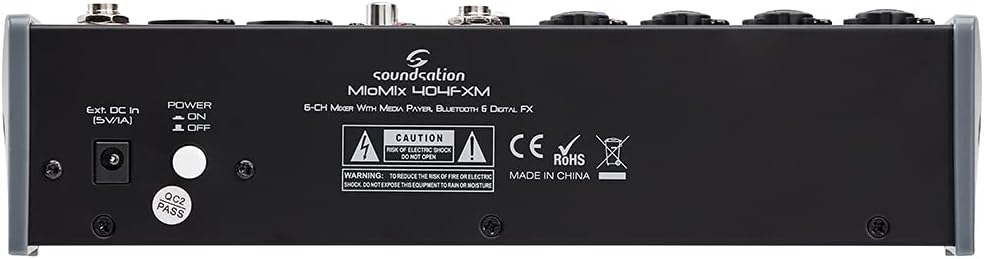
Image: Rear panel of the Soundsation MIOMIX 404FXM mixer, showing the power input, power switch, and main output connections.
- Ext. DC In (5V/1A): Power input for connecting the provided external power adapter.
- MAITINIMO ĮJUNGIMO/IŠJUNGIMO jungiklis: Turns the mixer's power on or off.
- REC OUT L/R (RCA): Unbalanced RCA outputs for connecting to recording devices.
6. Sąranka
- Išpakuokite maišytuvą: Carefully remove the MIOMIX 404FXM from its packaging.
- Vieta: Pastatykite maišytuvą ant stabilaus, lygaus paviršiaus, užtikrindami tinkamą vėdinimą aplink jį.
- Maitinimo jungtis: Ensure the mixer's POWER switch is in the OFF position. Connect the provided power adapter to the "Ext. DC In (5V/1A)" port on the rear panel, then plug the adapter into a suitable power outlet.
- Pradinis įjungimas: Flip the POWER switch to the ON position. The mixer's indicators should light up, and the display should activate.
- Prijunkite išėjimus: Connect the MAIN OUT XLR outputs to your powered speakers, amplifier, or audio interface. Connect headphones to the PHONES jack for monitoring.
- Prijunkite įvestis: Connect your microphones, instruments, and line-level devices to the appropriate input channels.
7. Naudojimo instrukcijos
7.1 Garso šaltinių prijungimas
- Mikrofonai: Connect dynamic microphones via XLR cables to the MIC/INST Combo jacks. For condenser microphones, connect via XLR and activate the +48V Phantom Power switch for the respective channel.
- Instruments (Guitars/Basses): Connect directly using a 1/4" TS cable to the MIC/INST Combo jack and engage the Hi-Z switch for that channel.
- Line-Level Devices (Keyboards, CD Players): Connect using 1/4" TS cables to the MIC/INST Combo jacks (for mono) or to the CH 5-6 L/Mono and R inputs (for stereo). Adjust the +4/-10dB switch on CH 5-6 as needed.
7.2 Adjusting Channel Levels and EQ
- Set all GAIN, VOL, and MAIN OUT knobs to their minimum positions before starting.
- Speak into the microphone or play your instrument. Slowly increase the GAIN knob for the respective channel until the PK LED flashes only occasionally during the loudest parts.
- Adjust the HIGH and LOW EQ knobs to shape the tone of your sound.
- Use the PAN knob to position the sound in the stereo field.
- Slowly increase the channel's VOL knob to blend it into the overall mix.
7.3 Using the USB Media Player/Recorder
- Atkūrimas: Insert a USB drive containing WAV, MP3, WMA, or FLAC files into the USB port. The display will show the file list. Use the Up/Down buttons to navigate and Play/Pause/Enter to select and play. Adjust the MP3 PLAYER LVL knob to control its volume in the mix.
- Įrašas: In the media player menu (accessed via MENU button), select the 'Audio Recorder' function. Ensure your USB drive has enough free space. Press Play/Pause/Enter to start and stop recording. The mixer records the main stereo mix.
7.4 „Bluetooth“ ryšys
- Press the MENU button on the media player and select 'BT Streaming'. The display will show 'Bluetooth' and indicate it's searching.
- On your smartphone or Bluetooth device, search for available devices and select 'MIOMIX 404FXM'.
- Once paired, you can stream audio from your device to the mixer. Control the volume using your device and the MP3 PLAYER LVL knob on the mixer.
7.5 Applying Digital Effects
- Turn the FX knob on the desired input channel to send signal to the effects processor.
- Rotate the PROGRAM knob to browse through the 16 available effects. Press the PROGRAM knob to select an effect.
- Adjust the LEVEL knob in the FX section to control the overall amount of effect applied to the mix.
- For time-based effects, use the TAP TEMPO button to synchronize the effect to your music.
7.6 Monitoring and Main Output
- Ausinės: Connect headphones to the PHONES jack and adjust the PHONES LVL knob for comfortable monitoring.
- Pagrindinė išvestis: Slowly increase the MAIN OUT knob to send the mixed audio to your connected speakers or amplifier. Monitor the VU Meter to ensure levels are not clipping (avoiding red LEDs).
8. Priežiūra
- Valymas: Use a soft, dry cloth to clean the mixer's surface. Do not use liquid cleaners or solvents.
- Saugykla: Jei maišytuvas nenaudojamas ilgesnį laiką, jį laikykite vėsioje, sausoje vietoje, toliau nuo tiesioginių saulės spindulių ir ekstremalių temperatūrų.
- Vėdinimas: Įsitikinkite, kad ventiliacijos angos nėra užblokuotos, kad išvengtumėte perkaitimo.
9. Problemų sprendimas
- Nėra garso išvesties:
- Check all power connections and ensure the mixer is turned ON.
- Verify that all channel VOL knobs, MAIN OUT knob, and PHONES LVL knob are turned up.
- Ensure your speakers/amplifier are powered on and connected correctly.
- Check input source connections and ensure GAIN knobs are set appropriately.
- Iškraipytas garsas:
- Reduce the GAIN knob for the input channel.
- Check if the PK LED is constantly lit; if so, reduce the input level.
- Lower the MAIN OUT volume if the VU Meter is consistently in the red.
- Fantominė galia neveikia:
- Ensure the +48V switch is engaged for the specific channel.
- Verify that you are using an XLR cable, as phantom power is only supplied via XLR.
- „Bluetooth“ neprisijungia:
- Ensure the mixer's media player is in 'BT Streaming' mode.
- Make sure your device's Bluetooth is enabled and it's searching for devices.
- Pabandykite atjungti ir vėl susieti įrenginį.
- USB Playback/Recording Issues:
- Ensure the USB drive is formatted correctly (FAT32 is generally recommended).
- Patikrinkite, ar garsas files are in a supported format (WAV, MP3, WMA, FLAC).
- For recording, ensure the USB drive has sufficient free space.
10. Specifikacijos
| Funkcija | Specifikacija |
|---|---|
| Gamintojas | Garsas |
| Modelio numeris | E923E |
| Kanalų skaičius | 6 |
| Prekės svoris | 1900 gramų |
| Ryšio technologija | USB, Bluetooth |
| Maitinimo šaltinis | Elektros kabelis |
| Išvesties jungties tipas | XLR |
| Garso įvestis | XLR, 1/4 colio lizdas |
| ttage | 48 voltai (fantominė maitinimas) |
| Skaitmeniniai efektai | 16 Presets, 24-bit/48 kHz |
| Palaikomi USB garso formatai | WAV, MP3, WMA, FLAC |
11. Garantija ir palaikymas
Soundsation products are designed and manufactured to the highest quality standards. For information regarding warranty coverage, service, or technical support, please refer to the warranty card included with your product or visit the official Soundsation websvetainėje. Išsaugokite pirkimo kvitą kaip pirkimo įrodymą bet kokiems garantiniams prašymams.