
Įvadas
Thank you for choosing the Hbada Ergonomic Gaming Chair. This manual provides essential information for the safe and efficient assembly, operation, and maintenance of your new chair. Please read these instructions carefully before use and retain them for future reference.

Image: The Hbada Ergonomic Gaming Chair in a modern gaming environment, showcasing jo dizainą ir išvaizdą.
Saugos informacija
- Prieš surinkdami įsitikinkite, kad visi komponentai yra ir nepažeisti. Nenaudokite, jei trūksta dalių arba jos yra sulūžusios.
- Tiksliai laikykitės surinkimo instrukcijų. Neteisingas surinkimas gali sukelti nestabilumą ir sužalojimus.
- Nestokite ant kėdės. Naudokite ją tik sėdėjimui.
- Neviršykite maksimalaus svorio limito (žr. specifikacijas).
- Surinkimo metu laikykite vaikus ir naminius gyvūnus atokiau nuo kėdės.
- Venkite kėdės tiesioginių saulės spindulių ar ekstremalių temperatūrų, kad nesugadintumėte medžiagos.
Gaminio matmenys
Understanding the dimensions of your chair is important for proper placement and comfortable use. Below are the key measurements:
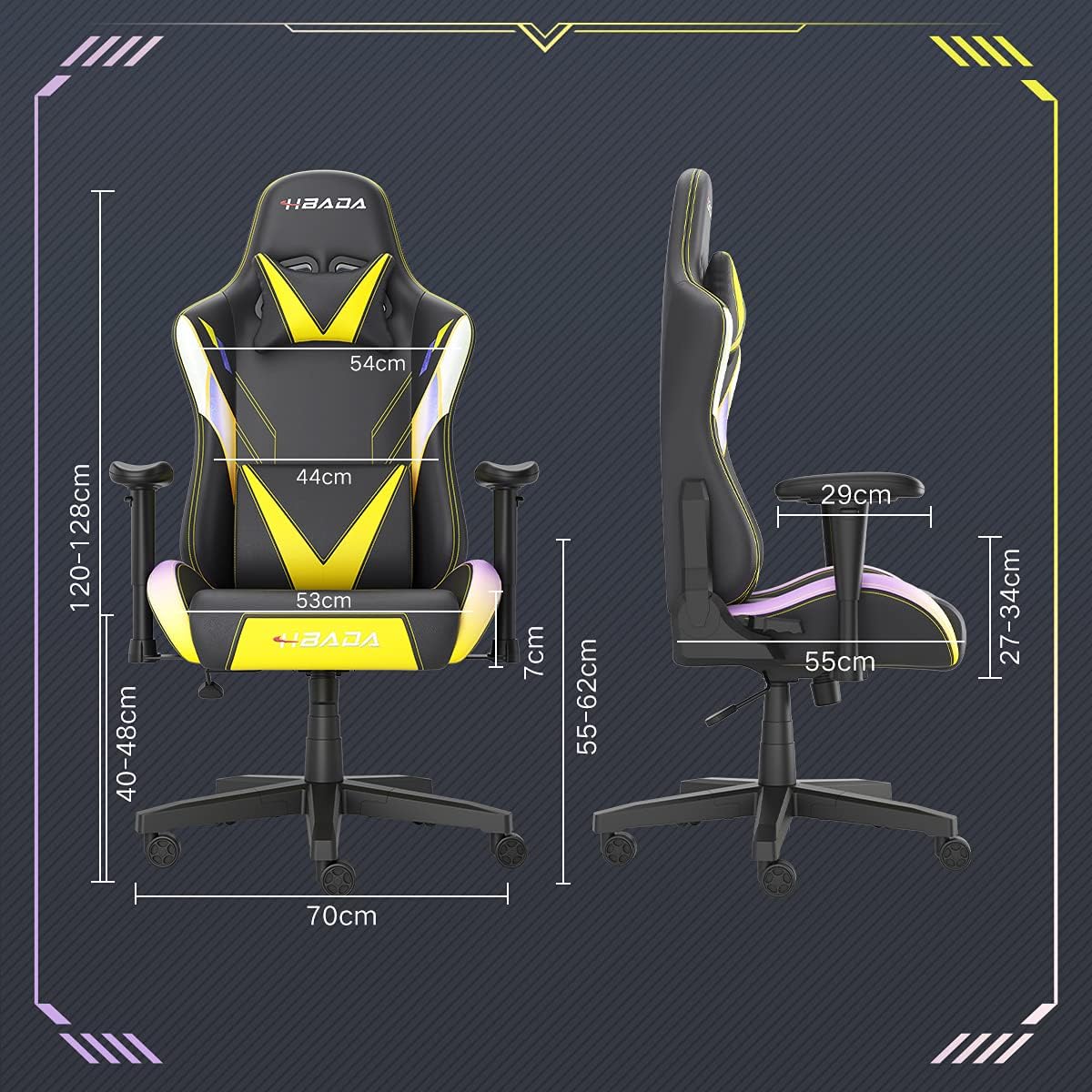
Image: A detailed diagram illustrating the various dimensions of the Hbada Gaming Chair, including height, width, and depth measurements.
- Bendras aukštis: 120–128 cm (reguliuojamas)
- Sėdynės aukštis: 40–48 cm (reguliuojamas)
- Sėdynės plotis: 53 cm
- Sėdynės gylis: 55 cm
- Atlošo plotis: 54 cm (shoulder area), 44 cm (lumbar area)
- Porankių aukštis (nuo sėdynės): 7 cm (adjustable)
- Pagrindo skersmuo: 70 cm
Sąranka ir surinkimas
Please follow these steps carefully to assemble your Hbada Gaming Chair. It is recommended to have a clear, spacious area for assembly.
Surinkimo žingsniai:
- Step 1: Assemble the Base and Wheels
Insert the five casters into the holes on the star base. Then, place the gas lift cylinder into the center hole of the base.

Image: Illustration of attaching the five casters to the chair's star-shaped base and inserting the gas lift cylinder.
- Step 2: Attach the Seat and Backrest
Connect the backrest to the seat using the provided screws and mounting plates. Ensure all screws are tightened securely.

Image: Diagram showing the process of securing the backrest to the seat cushion using screws and brackets.
- 3 veiksmas: Įdiekite porankius
Attach the armrests to the sides of the seat using the designated screws. Make sure they are firmly attached.

Image: Visual guide for attaching the armrests to the chair's seat base.
- Step 4: Connect Seat to Base
Carefully place the assembled seat onto the gas lift cylinder, ensuring it is properly seated and stable.

Image: Depiction of lowering the assembled seat onto the gas lift cylinder, connecting the upper and lower parts of the chair.
- Step 5: Attach Headrest and Lumbar Pillow
Secure the detachable headrest and lumbar support pillow to the chair as desired for optimal comfort.

Image: Instructions for attaching the headrest and lumbar support pillows to the gaming chair.
Naudojimo instrukcijos
Your Hbada Gaming Chair is designed with several adjustable features to provide personalized comfort and support.
Key Adjustable Functions:
- Adjustable Sitting Height: Use the lever located under the seat on the right side to raise or lower the chair. Pull the lever up to adjust the height, then release it at your desired position. The seat has an 8 cm elevation range.
- Reclining Backrest (90° to 155°): The backrest can be reclined from 90 degrees (upright) to 155 degrees (nearly flat). Use the recline lever on the side of the chair to adjust the angle. Lean back to your preferred position and lock the lever.
- Reguliuojami porankiai: The armrests can be adjusted in height by 7 cm. Locate the button or lever on the side of each armrest to unlock, adjust, and then lock them into your desired height.
- 360° Free Swivel: The chair features a full 360-degree swivel function, allowing for easy movement and access to your surroundings without needing to move the entire chair.
- Detachable Headrest and Lumbar Support: The chair includes a removable headrest pillow and lumbar support cushion for enhanced ergonomic comfort. Adjust their positions or remove them based on your preference.

Paveikslėlis: Viršview of the chair's ergonomic systems, highlighting adjustable sitting height, armrests, 155° reclining, 360° swivel, cool racing casters, and durable base.

Image: The Hbada Gaming Chair demonstrated in its 155-degree reclined position, illustrating the recline controller.
Priežiūra
Regular maintenance will help prolong the life and appearance of your Hbada Gaming Chair.
- Cleaning the PU Leather: PU odos paviršius nuvalykite minkšta, d šluosteamp šluoste. Įsisenėjusioms dėmėms naudokite švelnų muilo tirpalą, o tada nuvalykite švaria šluoste.amp audiniu. Venkite stiprių cheminių medžiagų ar abrazyvinių valiklių, nes jie gali pažeisti medžiagą.
- Ratukų priežiūra: Periodically check the casters for accumulated dust or hair. Clean them with a brush or vacuum cleaner to ensure smooth movement and prevent damage to your flooring.
- Rėmas ir komponentai: Regularly inspect all screws and bolts to ensure they are tight. Re-tighten if necessary to maintain stability.
- Venkite tiesioginių saulės spindulių: Prolonged exposure to direct sunlight can cause the PU leather to fade and crack. Position your chair away from direct sunlight when possible.
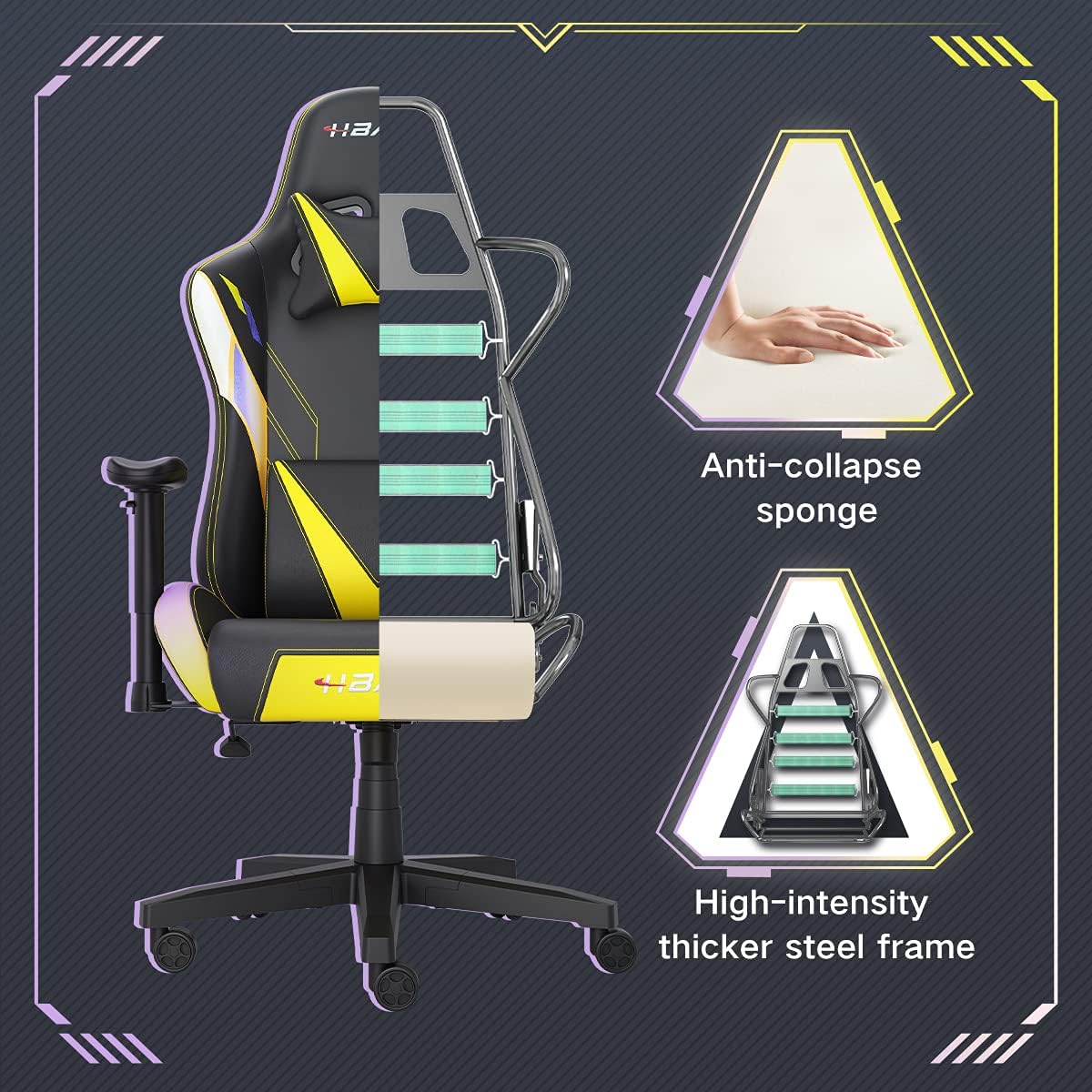
Paveikslėlis: Pjūvis view of the chair's internal structure, highlighting the anti-collapse sponge padding and the high-intensity thicker steel frame, indicating durable construction.
Trikčių šalinimas
If you encounter any issues with your Hbada Gaming Chair, refer to the following common problems and solutions:
| Problema | Galima priežastis | Sprendimas |
|---|---|---|
| Kėdės aukštis nereguliuojamas | Dujinio keltuvo gedimas arba neįjungta svirtis. | Įsitikinkite, kad aukščio reguliavimo svirtis yra visiškai įjungta. Jei problema išlieka, gali tekti pakeisti dujinį keltuvą. Susisiekite su klientų aptarnavimo tarnyba. |
| Kėdė nestabili arba nestabili | Atsilaisvinę varžtai arba netinkamas surinkimas. | Check all assembly screws and bolts, and tighten them securely. Refer to the assembly instructions. |
| Ratukai nesisuka sklandžiai | Šiukšlės (plaukai, dulkės), įstrigusios ratukuose. | Apverskite kėdę ir pašalinkite visas šiukšles nuo ratukų. |
| Atlošas neatlenkiamas arba neužsifiksuoja | Užstrigo atlošo mechanizmas arba neįjungta svirtis. | Įsitikinkite, kad atlošo svirtis yra visiškai įjungta. Patikrinkite, ar aplink mechanizmą nėra jokių kliūčių. |
Specifikacijos
| Funkcija | Detalė |
|---|---|
| Prekės ženklas | Hbada |
| Modelio numeris | W203YMA/EU |
| ASIN | B095PSFLKX |
| Spalva | Geltona |
| Medžiaga | PU Leather, Metal Frame |
| Gaminio matmenys | 70 x 70 x 128 cm (ilgis x plotis x aukštis) |
| Produkto svoris | 22 kilogramo |
| Ypatingos savybės | Ergonomic, Swivel, Casters, Headrest Support, Adjustable Recline (90°-155°), Adjustable Seat Height (8cm range), Adjustable Armrests (7cm range) |
| Vienetų skaičius | 1.0 Skaičius |
Garantija ir palaikymas
Your Hbada Gaming Chair comes with a vienerių metų garantija nuo įsigijimo datos. Ši garantija taikoma gamybos defektams ir medžiagų trūkumams, atsiradusiems įprasto naudojimo sąlygomis.
If you experience any issues during use, including problems with installation, damage, or missing parts, please do not hesitate to contact Hbada customer service. We are committed to providing reliable service and can offer free exchanges for covered issues.
For support, please visit the official Hbada websvetainėje arba susisiekite su savo pardavėju.