
1. Produktas baigtasview
The Spigen GlasTR EZ FIT Privacy Screen Protector is designed to provide superior protection and privacy for your compatible iPhone model. This tempered glass protector features 9H hardness for durability, a privacy filter to keep your screen content confidential from side views, and an innovative auto-alignment installation kit for a simple, bubble-free application.
Suderinami įrenginiai: iPhone 17e, iPhone 16e, iPhone 14, iPhone 13 Pro, iPhone 13.

This image illustrates the compatible iPhone models: iPhone 17e, 16e, 14, 13, and 13 Pro. It also highlights that the protector is not compatible with iPhone 14 Pro, 14 Pro Max, 14 Plus, or 13 Pro Max.
2. Pakuotės turinys
Your Spigen GlasTR EZ FIT Privacy Screen Protector package includes the following items:
- Spigen GlasTR EZ FIT Privacy Screen Protector (2 units)
- Automatic Alignment Installation Kit (EZ Fit Tray)
- Cleaning Wipes (Alcohol wipe, Microfiber cloth)
- Dulkių šalinimo lipdukas
3. Installation Guide (EZ Fit)
The EZ Fit installation kit simplifies the application process, ensuring precise alignment and a bubble-free finish. Follow these steps carefully for optimal results.
Paruošimas:
- Išvalykite savo įrenginį: Power off your iPhone. Use the included alcohol wipe to thoroughly clean the screen surface, removing all dirt, oil, and smudges.
- Išdžiovinkite ekraną: Use the microfiber cloth to dry the screen completely. Ensure no lint or moisture remains.
- Pašalinkite dulkes: Use the dust removal sticker to dab the entire screen surface, picking up any remaining dust particles. Work in a dust-free environment if possible.
Taikymas:
- Position the EZ Fit Tray: Place the EZ Fit tray onto your iPhone. The tray is designed to fit perfectly over your device, ensuring correct alignment.
- Remove Protector Film: Carefully peel off the protective film from the adhesive side of the screen protector. Avoid touching the adhesive surface.
- Užtepkite ekrano apsaugą: Align the screen protector with the top edge of the EZ Fit tray. Gently lower the screen protector onto your iPhone screen. The tray will guide it into the correct position.
- Press and Slide: Once the protector is resting on the screen, press firmly along the center line of the EZ Fit tray and slide your finger across to initiate adhesion. Wait approximately 30 seconds for the adhesive to spread.
- Nuimkite dėklą: Carefully remove the EZ Fit tray from your iPhone.
- Paskutiniai prisilietimai: Use the microfiber cloth to gently press out any remaining small bubbles towards the edges of the screen. Minor bubbles typically disappear within 24-48 hours as the adhesive fully settles.

This image illustrates the components of the EZ Fit installation kit, including the EZ Fit Tray, Alignment Film, and Tempered Glass, demonstrating how they work together for simple application.

A visual guide showing the three main steps of installation: preparing the screen, placing the alignment tray, and pressing down to apply the screen protector.
4. Produkto savybės ir naudojimas
4.1 Privatumo filtras
The integrated privacy filter ensures that your screen content is visible only to the person directly in front of the device. From side angles, the screen appears darkened, protecting your sensitive information from prying eyes. This feature is ideal for use in public spaces.
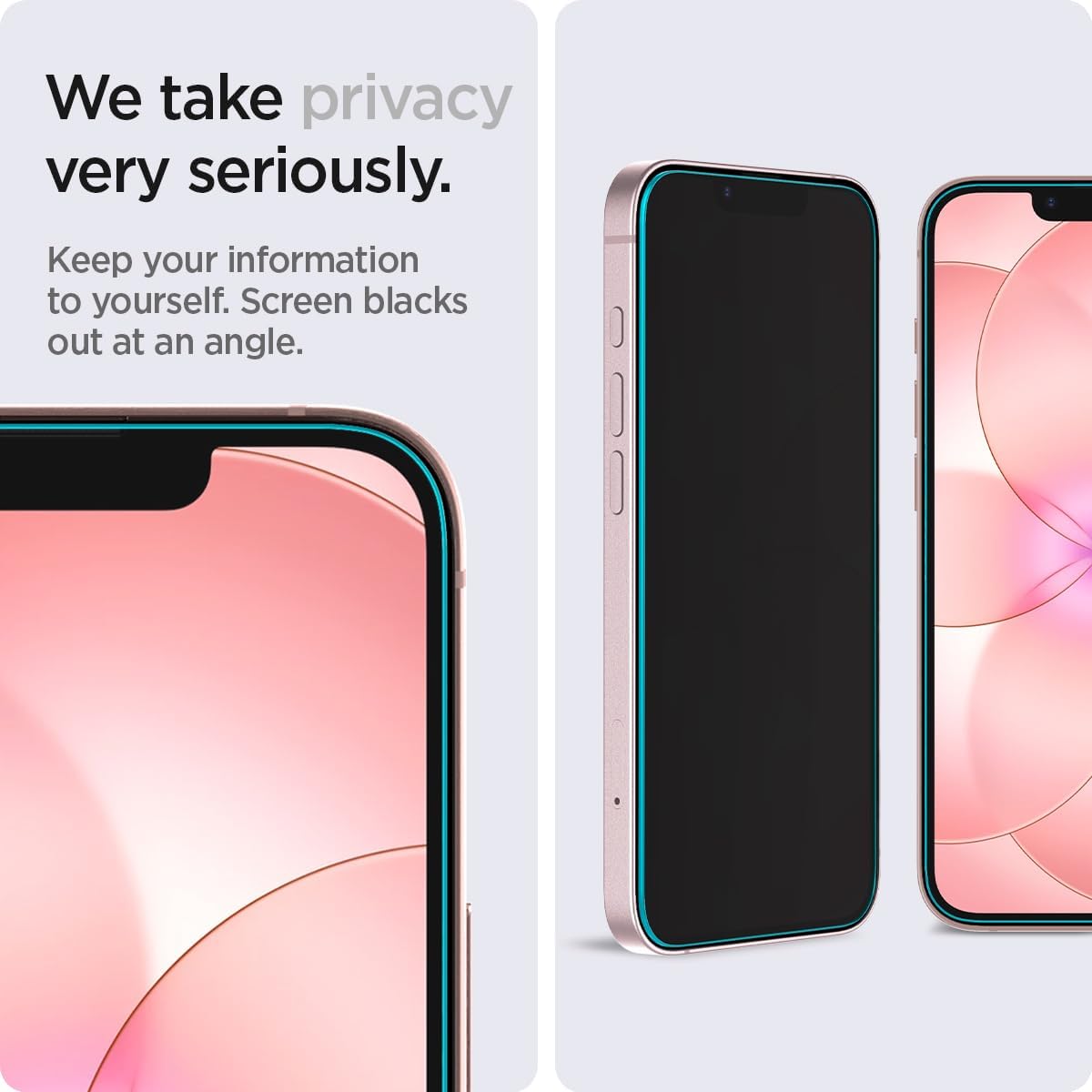
This image illustrates the privacy feature, where the screen appears blacked out when viewed from an angle, ensuring your information remains private.
4.2 True Touch Responsiveness
The GlasTR EZ FIT maintains the original touch sensitivity of your iPhone screen, providing a seamless user experience. You will experience no delay or reduction in responsiveness during normal use.

This image depicts a user interacting with their iPhone, emphasizing that the screen protector allows for true touch responsiveness, feeling and responding like the original screen.
4.3 Crystal Clarity
Despite the privacy feature, the screen protector offers high-definition clarity when viewed directly, ensuring your display quality is preserved without added blemishes.

This image showcases an iPhone screen with the protector applied, displaying a high-quality image to demonstrate the crystal clarity and true tone quality.
4.4 Bylos suderinamumas
The Spigen GlasTR EZ FIT Privacy Screen Protector is designed to be compatible with all Spigen iPhone 17e/16e/14/13 Pro/13 cases, ensuring a perfect fit and comprehensive protection without interference.

This image displays an iPhone with the screen protector installed, alongside different Spigen cases, highlighting the product's compatibility with the entire Spigen case collection.
5. Priežiūra
To maintain the clarity and effectiveness of your screen protector, follow these simple maintenance tips:
- Reguliarus valymas: Use a soft, lint-free cloth (like the included microfiber cloth) to gently wipe the screen protector. For stubborn smudges, slightly dampNuvalykite šluostę vandeniu arba elektronikos ekranams skirtu valikliu.
- Venkite stiprių cheminių medžiagų: Do not use abrasive cleaners, alcohol-based solutions (other than the initial cleaning wipe), or solvents, as these can damage the privacy coating or the oleophobic layer.
- Apsaugokite nuo įbrėžimų: While the protector is highly durable (9H hardness), avoid placing your phone with sharp objects (keys, coins) in pockets or bags to prevent unnecessary wear.
6. Problemų sprendimas
Jei diegimo metu arba po jo kyla problemų, žr. šiuos dažniausiai pasitaikančius sprendimus:
- Burbulai po įdiegimo: Small bubbles are common immediately after application. Gently push them towards the edges with a microfiber cloth. Most minor bubbles will naturally disappear within 24-48 hours as the adhesive fully cures. If large bubbles persist, it may indicate dust trapped underneath, requiring re-application with a new protector.
- Sutapimas: The EZ Fit tray is designed for precise alignment. If the protector is significantly misaligned, it may be due to incorrect placement of the tray or not following the application steps carefully. Re-application with a new protector might be necessary.
- Sumažintas lietimo jautrumas: Ensure the screen protector is fully adhered without any air gaps. If touch sensitivity is still an issue, verify that your device's touch settings are optimized.
- Privacy Effect Appears Dim: The privacy filter darkens the screen from side angles. If the screen appears too dim even when viewed directly, ensure your device's brightness settings are adjusted appropriately.
7. Specifikacijos
| Funkcija | Detalė |
|---|---|
| Modelio numeris | AGL03388 |
| Medžiaga | Grūdintas stiklas |
| Elemento kietumas | 9H |
| Ypatingos savybės | 9H+ Surface Hardness, High Definition Clarity, High Sensitivity Touch, Privacy Filter |
| Suderinami įrenginiai | iPhone 17e / iPhone 16e / iPhone 14 / iPhone 13 Pro / iPhone 13 |
| Gaminio matmenys | 5.63 x 2.67 x 0.03 colio |
| Prekės svoris | 4.9 uncijos |
| Spalva | Skaidrus |
| Atsparumo vandeniui lygis | Atsparus vandeniui |
| Vienetų skaičius | 2.0 Skaičius |
8. Garantija ir palaikymas
Spigen products are designed for quality and durability. For any questions, concerns, or support regarding your GlasTR EZ FIT Privacy Screen Protector, please visit the official Spigen websvetainėje arba susisiekite tiesiogiai su jų klientų aptarnavimo tarnyba. Išsaugokite pirkimo įrodymą, jei galėtumėte pateikti pretenzijas dėl garantijos.
Spigen Official Websvetainė: www.spigen.com