
EuroFone S2 Black
EuroFone S2 Motorcycle Bluetooth Headset User Manual
Model: S2 Black
1. Įvadas
The EuroFone S2 Motorcycle Bluetooth Headset is designed to provide seamless communication and entertainment for motorcycle riders. Featuring Bluetooth 5.1 technology, it offers stable connections, clear audio, and a range of functions including rider-to-rider intercom, hands-free calling, music playback, and FM radio. Its robust IP67 waterproof and dustproof design ensures reliable performance in various weather conditions.
2. Pagrindinės savybės
- 2-Rider Full Duplex Intercom: Communicate with a riding partner up to 800 meters away.
- IP67 atsparus vandeniui ir dulkėms: Designed to withstand rain, dust, snow, and low temperatures.
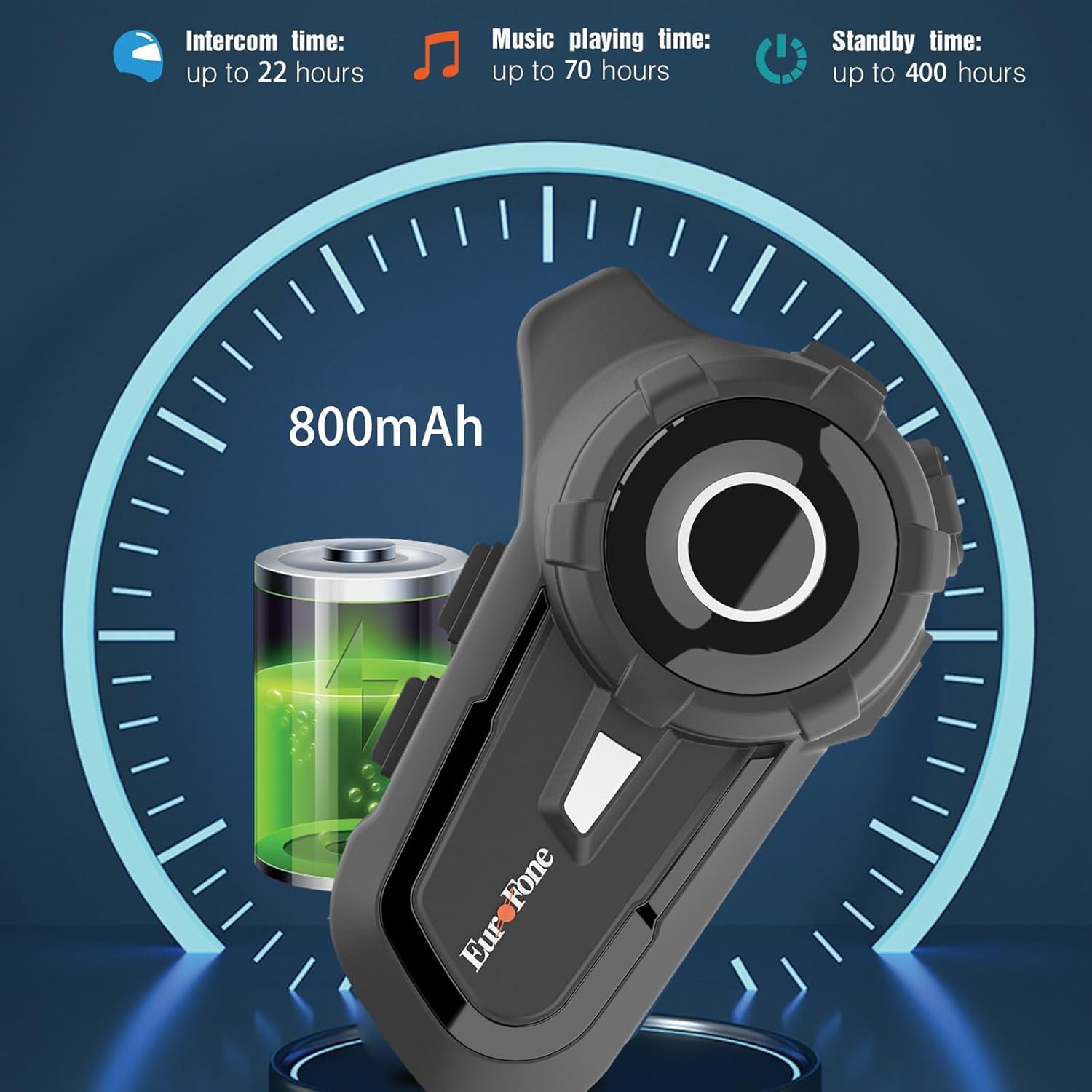
- Ilgas baterijos veikimo laikas: 800 mAh battery provides up to 20 hours of working time and 18 months standby.
- Auto Answer & Voice Control: Automatically answers calls in 10 seconds and supports voice assistant/Siri.
- Noise Reduction & Hi-Fi Stereo Sound: CVC advanced noise cancellation for clear audio and high-fidelity sound quality.
- "Bluetooth 5.1": Užtikrina stabilų ir efektyvų belaidį ryšį.
- FM radijas: Built-in FM radio for entertainment on the go.
- GPS padėties nustatymas: Can connect to GPS devices for navigation.
3. Pakuotės turinys
Patikrinkite, ar pakuotėje yra visi reikalingi daiktai:
- EuroFone S2 Bluetooth Headset Unit
- Hard Microphone (Boom Mic)
- Soft Microphone (Wired Mic)
- Garsiakalbių rinkinys
- C tipo USB įkrovimo laidas
- Montavimas Clamp
- Velcro pagalvėlės garsiakalbiams
- Vartotojo vadovas

4. Sąranka ir diegimas
4.1 Įrenginio įkrovimas
Before first use, fully charge the EuroFone S2 headset. Connect the provided USB Type-C cable to the charging port on the unit and to a USB power source. The indicator light will show charging status. A full charge takes approximately 2.5 hours.

4.2 Installing into Helmet
Follow these steps to install the headset into your motorcycle helmet:
- Paruoškite šalmą: Carefully remove the internal padding of your helmet to access the ear pockets and inner shell.
- Prijunkite garsiakalbius: Use the provided velcro pads to attach the speakers inside the helmet's ear pockets. Ensure they are positioned directly over your ears for optimal sound quality. Route the speaker wires neatly under the lining.
- Mikrofono įrengimas: Choose either the hard boom microphone (for open-face/modular helmets) or the soft wired microphone (for full-face helmets). Attach the microphone to the helmet lining near your mouth using the adhesive base. Route the microphone cable along with the speaker wires.
- Pagrindinio įrenginio tvirtinimas: Secure the main headset unit to the side of the helmet using the mounting clamp. Tighten the screws to ensure a firm attachment.
- Prijunkite kabelius: Plug the speaker and microphone cables into the corresponding ports on the main headset unit. Ensure connections are secure.
- Surinkite šalmą: Carefully reinsert the helmet's internal padding, ensuring all wires are tucked away and do not interfere with comfort or safety.

5. Naudojimo instrukcijos
5.1 Valdymas baigtasview
The EuroFone S2 features intuitive controls for easy operation:
| Kontrolė | Funkcija |
|---|---|
| Įjungimo / išjungimo raktas | Maitinimo įjungimas/išjungimas |
| Daugiafunkcis raktas | Play/Pause music, Answer/End calls, Activate voice assistant |
| Knob (Jog Dial) | Rotate clockwise for Volume Up, Counter-clockwise for Volume Down. Short press rotate for Next/Previous track. |
| FM raktas | Activate/Deactivate FM Radio |
| Talkback Key (Intercom Button) | Initiate/End intercom communication |
| Charging Port & K-wire Interface | Skirta išorinių įrenginių įkrovimui ir prijungimui. |
| Telefono lizdas | For wired audio connection (if applicable). |

5.2 „Bluetooth“ susiejimas (telefonas)
To pair your EuroFone S2 headset with your mobile phone:
- Įsitikinkite, kad laisvų rankų įranga išjungta.
- Vienu metu paspauskite ir palaikykite Domofono mygtukas ir Daugiafunkcis mygtukas for approximately 5 seconds until you hear a "di di" voice prompt indicating factory settings restoration. Release the buttons.
- Turn on the power button until you hear a voice prompt. The indicator light will flash blue and red, indicating pairing mode.
- On your mobile phone, go to Bluetooth settings and search for available devices.
- Select "S2" from the list of Bluetooth devices.
- Once paired, the headset will confirm with a voice prompt, and the indicator light will show a steady blue light or slow flashes.
5.3 Intercom Pairing (Two Units)
To pair two EuroFone S2 units for intercom communication:
- Ensure both headsets are powered off.
- On the first headset, turn on the power button and press and hold the Domofono mygtukas for approximately 5 seconds until the indicator flashes with a quick blue light. You will hear a "pairing mode" voice prompt.
- On the second headset, turn on the power button and press and hold the Domofono mygtukas for approximately 5 seconds until the indicator flashes with a quick blue light. You will also hear a "pairing mode" voice prompt.
- Wait for a few seconds. The two headsets will automatically pair with each other. The indicator lights will change to a steady blue or slow flashes once connected.
5.4 Reconnecting Intercom
If the intercom connection is lost or you wish to re-establish it:
- Short click the Daugiafunkcis mygtukas on either headset to hear the prompt "end intercom".
- Dukart spustelėkite Domofono mygtukas on any one of the headsets.
- Tada spustelėkite Daugiafunkcis mygtukas. You will hear the "start intercom" voice prompt again, indicating the connection is re-established.
5.5 Muzikos atkūrimas
After pairing with your phone, you can control music playback:
- Leisti / pristabdyti: Spustelėkite Daugiafunkcis mygtukas leisti ar pristabdyti muziką.
- Garsumo valdymas: Pasukite Jog Dial clockwise to increase volume, counter-clockwise to decrease volume.
- Kitas / ankstesnis takelis: Short press and rotate the Jog Dial counter-clockwise to play the next song. Short press and rotate clockwise to play the previous song.
5.6 Telefoniniai skambučiai
Manage phone calls hands-free:
- Atsiliepti į skambutį: The headset will automatically answer incoming calls after 10 seconds. You can also click the Daugiafunkcis mygtukas to answer immediately.
- Baigti skambutį: Spustelėkite Daugiafunkcis mygtukas to end an ongoing call.
- Atmesti skambutį: Paspauskite ir palaikykite Daugiafunkcis mygtukas 2 sekundes, kad atmestumėte gaunamą skambutį.
- Balso asistentas / Siri: Paspauskite Daugiafunkcis mygtukas twice to activate your phone's voice assistant (Siri, Google Assistant, etc.).
5.7 FM radijas
Norėdami naudoti integruotą FM radiją:
- Įjungti / išjungti FM: Spustelėkite FM raktas to activate or deactivate the FM radio.
- Skenavimo stotys: While FM is on, press and hold the FM raktas automatiškai nuskaityti ir išsaugoti galimas stotis.
- Keisti stotį: Pasukite Jog Dial to switch between saved FM stations.
6. Priežiūra ir priežiūra
- Valymas: Ausinių įrenginį nuvalykite minkšta, d šluosteamp audinys. Nenaudokite stiprių cheminių medžiagų ar abrazyvinių valiklių.
- Vandens ekspozicija: While IP67 waterproof, avoid prolonged submersion. Ensure charging port cover is securely closed when not charging.
- Saugykla: Laikykite ausines vėsioje, sausoje vietoje, toliau nuo tiesioginių saulės spindulių ir ekstremalių temperatūrų.
- Akumuliatoriaus priežiūra: Norėdami optimalaus akumuliatoriaus veikimo laiko, reguliariai kraukite įrenginį, net jei juo nesinaudojate dažnai. Venkite ilgo visiško akumuliatoriaus iškrovimo.
7. Problemų sprendimas
| Problema | Galima priežastis | Sprendimas |
|---|---|---|
| Įrenginys neįsijungia. | Senka baterija. | Visiškai įkraukite įrenginį. |
| Nepavyksta susieti su telefonu. | Headset not in pairing mode; phone Bluetooth off; previously paired device interfering. | Ensure headset is in pairing mode (flashing blue/red). Turn phone Bluetooth off/on. Forget previous pairings on phone. Perform factory reset on headset. |
| Domofonas neprisijungia. | Headsets not in intercom pairing mode; out of range. | Ensure both headsets are in intercom pairing mode. Move closer to each other. Re-initiate intercom connection as per section 5.4. |
| Nėra garso arba garsas per mažas. | Volume too low; speakers not positioned correctly; loose connections. | Increase volume using the Jog Dial. Adjust speaker position in helmet. Check all cable connections. |
| Prasta garso kokybė / triukšmas. | Microphone not positioned correctly; excessive wind noise; interference. | Adjust microphone position. Ensure microphone foam cover is in place. Reduce speed if wind noise is excessive. |
8. Specifikacijos
| Funkcija | Detalė |
|---|---|
| Modelio pavadinimas | S2 juodas |
| Bluetooth versija | 5.1 |
| Intercom diapazonas | Up to 800 meters (2-riders) |
| Baterijos talpa | 800 mAh |
| Įkrovimo laikas | 2.5 valandų |
| Working Time (Intercom) | Iki 22 valandų |
| Working Time (Music) | Iki 70 valandų |
| Budėjimo laikas | Iki 18 mėnesių |
| Atsparumo vandeniui lygis | IP67 Waterproof & Dustfree |
| Triukšmo valdymas | Aktyvus triukšmo slopinimas (CVC) |
| Matmenys | 3.35 x 2.17 x 0.98 colio |
| Prekės svoris | 12.7 uncijos |
| Gamintojas | Shenzhen Goldstar Electronics Co., Ltd |
9. Garantija ir palaikymas
For warranty information and technical support, please refer to the official EuroFone websvetainėje arba susisiekite tiesiogiai su jų klientų aptarnavimo tarnyba. Išsaugokite pirkimo kvitą kaip pirkimo įrodymą bet kokiems garantiniams prašymams.
Galite aplankyti EuroFone Store on Amazon daugiau informacijos apie produktą ir pagalbos išteklių.
Ask a question about this manual
Ask about setup, troubleshooting, compatibility, parts, safety, or missing instructions. Manuals+ will review the question and use this page’s manual context to help answer it.