
1. Įvadas
This manual provides detailed instructions for the installation, operation, and maintenance of your CPVAN BC01-Pro Outdoor Security Camera. Please read this manual thoroughly before using the product to ensure proper functionality and safety. Keep this manual for future reference.
2. Kas yra dėžutėje
Įsitikinkite, kad pakuotėje yra visi komponentai:
- CPVAN BC01-Pro Outdoor Security Camera
- Solar Panel (3.3W with 3-meter charging cable)
- Adjustable Wall Mount (for camera)
- Mounting Bracket (for solar panel)
- Tvirtinimo varžtai ir sieniniai inkarai
- USB įkrovimo laidas
- Vartotojo vadovas (šis dokumentas)
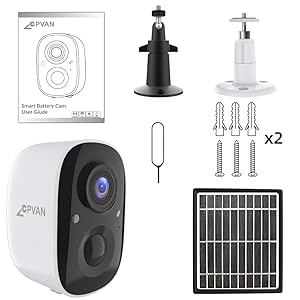
Figure 2.1: All components included in the CPVAN BC01-Pro package.
3. Sąranka
3.1 Pradinis įkrovimas
Before first use, fully charge the camera's built-in 5200mAh rechargeable battery using the provided USB cable. The charging indicator light will change to indicate a full charge.
3.2 Kameros ir saulės baterijos montavimas
Choose an outdoor location with optimal sunlight exposure for the solar panel and a clear view for the camera. The camera features a 360° adjustable wall mount for flexible positioning.
- Secure the camera's wall mount to a desired surface using the provided screws and anchors.
- Attach the camera to the mounted bracket.
- Saulės bateriją montuokite ten, kur visą dieną būtų kuo daugiau tiesioginių saulės spindulių.
- Connect the solar panel's charging cable to the camera's charging port. Ensure the port cover is securely closed after connection to maintain weather resistance.

3.1 pav. Pvzample installation of the camera and solar panel on an exterior wall.
3.3 Prisijungimas prie „Wi-Fi“ ir programėlės
Download the VicoHome APP from your smartphone's app store. Follow the in-app instructions to connect your camera to your Wi-Fi network and complete the setup process. This typically involves scanning a QR code displayed on your phone with the camera.
4. Fotoaparato valdymas
4.1 Tiesiogiai View ir dvipusis garsas
Access the live video feed through the VicoHome APP. The camera supports two-way audio, allowing you to listen and speak through the camera's built-in speaker and microphone.

Figure 4.1: VicoHome App interface for live view and two-way audio communication.
4.2 Judesio aptikimas ir aktyvumo zonos
The camera features AI PIR motion detection to reduce false alarms. You can define specific activity zones within the camera's view via the VicoHome APP. Smart AI recognition (subscription required) can differentiate between people, cars, pets, and packages, sending real-time alerts to your device.
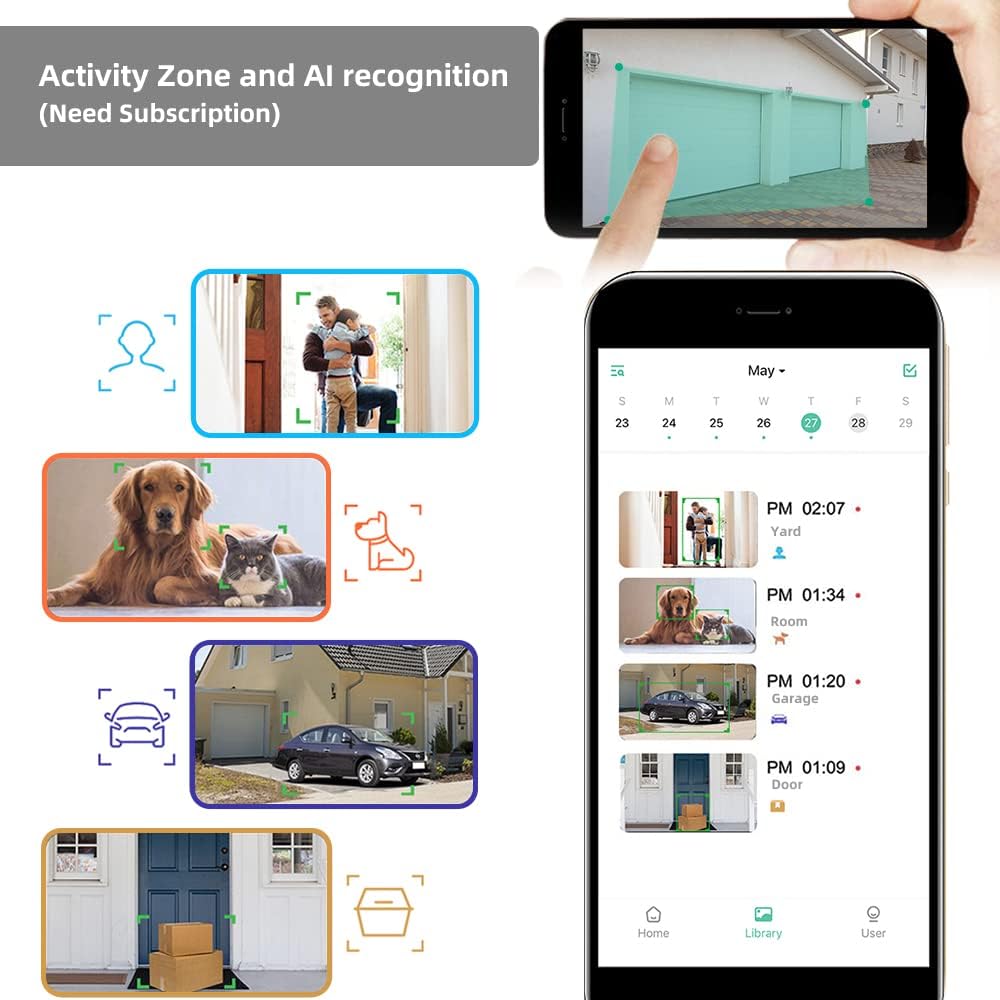
Figure 4.2: Configuring activity zones and viewing AI-detected events in the app.

Figure 4.3: Camera's field of view and motion detection capabilities.
4.3 Naktinis matymas
The camera offers 1080P HD video quality day and night. It automatically activates night vision mode using 8 IR LEDs in low light conditions. A powerful spotlight can be manually activated to provide full-color night vision.

Figure 4.4: Visual comparison of night vision modes.
4.4 Įrašymas ir saugojimas
The camera supports event recording. A 7-day rolling cloud storage is permanently free, with a 30-day trial of advanced cloud features available (subscription required). Local storage via Micro SD card is also supported.

Figure 4.5: Cloud service and local storage options.
5. Priežiūra
5.1 Akumuliatoriaus valdymas
The solar panel continuously recharges the camera's battery, minimizing the need for manual recharging. Ensure the solar panel is clean and positioned for maximum sun exposure.


Figure 5.1: Solar power ensures continuous battery charge.
5.2 Cleaning and Environmental Protection
The camera has an IP65 waterproof rating, protecting it from dust and water splashes. Periodically clean the camera lens and solar panel surface with a soft, damp cloth to ensure clear images and efficient charging. Avoid using harsh chemicals.

Figure 5.2: The camera's IP65 rating ensures durability in various weather conditions.
5.3 Firmware atnaujinimai
Regularly check the VicoHome APP for available firmware updates. Keeping your camera's firmware updated ensures optimal performance, security, and access to new features.
6. Problemų sprendimas
- Kamera neprisijungia prie „Wi-Fi“: Ensure your Wi-Fi network is 2.4GHz (5GHz is not supported). Check Wi-Fi signal strength at the camera's location. Restart your router and camera.
- Prasta vaizdo kokybė: Nuvalykite kameros objektyvą. Įsitikinkite, kad kameros matymo lauke nėra jokių kliūčių. viewPatikrinkite savo interneto ryšio greitį.
- Baterija nekraunama: Verify the solar panel is receiving direct sunlight and is clean. Check the connection between the solar panel and the camera. Ensure the camera is within the recommended operating temperature range (-4°F to 122°F).
- Klaidingi judesio įspėjimai: Adjust motion detection sensitivity in the app. Define specific activity zones to exclude irrelevant areas.
- No audio or poor two-way audio: Check microphone and speaker settings in the app. Ensure your smartphone's volume is up.
7. Specifikacijos
| Funkcija | Detalė |
|---|---|
| Modelis | BC01-Pro |
| Vaizdo raiška | 1080p HD (1920x1080 pixels) |
| Veiksminga nejudančioji raiška | 2 MP |
| Laukas View | 110 laipsnių plačiakampis |
| Naktinis matymas | 8 IR LEDs, Color Night Vision (with spotlight) |
| Judesio aptikimas | AI PIR Motion Detection, Activity Zone support |
| Maitinimo šaltinis | Rechargeable Battery (5200mAh), Solar Panel (3.3W) |
| Ryšys | „Wi-Fi“ (2.4 GHz) |
| Sandėliavimas | Cloud Storage (7-day free rolling, subscription for advanced features), Micro SD Card |
| Garsas | Two-Way Audio, Built-in Siren |
| Atsparumas oro sąlygoms | IP65 Atsparus vandeniui |
| Darbinė temperatūra | -4°F iki 122°F (nuo -20°C iki 50°C) |
| Matmenys | 2.64 x 2.28 x 3.5 colio |
| Svoris | 400 gramų (14.1 uncijos) |
| Kontrolės metodas | VicoHome programa |
8. Garantija ir palaikymas
For warranty information and technical assistance, please refer to the official CPVAN website or contact customer support. We are committed to providing the best possible experience with our products and typically respond to inquiries within 24 hours.