
1. Įvadas
Thank you for choosing the AIYIMA A05 TPA3221 Power Amplifier. This compact 2.0 channel stereo amplifier is designed to deliver high-fidelity audio to passive speakers, featuring both Bluetooth and RCA input options. This manual provides detailed instructions for setup, operation, and maintenance to ensure optimal performance and longevity of your device.
2. Saugos instrukcijos
- Maitinimas: Use only the specified power adapter (DC 12-32V) to prevent damage. Ensure the power outlet voltage yra suderinamas.
- Vėdinimas: Padėkite amplifier in a well-ventilated area. Do not block ventilation openings. Avoid placing it on soft surfaces that may obstruct airflow.
- Drėgmė: Keep the device away from water, humidity, and liquids. Do not operate with wet hands.
- Šiluma: Avoid direct sunlight, heat sources, or extreme temperatures.
- Valymas: Prieš valydami atjunkite maitinimą. Naudokite minkštą, sausą šluostę. Nenaudokite skystų ar aerozolinių valiklių.
- Aptarnavimas: Nebandykite patys taisyti ar ardyti įrenginio. Visus techninės priežiūros darbus patikėkite kvalifikuotiems specialistams.
- Vaikai: Laikyti vaikams nepasiekiamoje vietoje.
3. Pakuotės turinys
Patikrinkite pakuotę, ar joje yra šie daiktai:
- AIYIMA A05 Bluetooth 5.0 Ampkeltuvas x 1
- Bluetooth antena x 1
- Vartotojo vadovas x 1
- Garantijos talonas x 1
- DC 32V maitinimo adapteris x 1

3.1 vaizdas: Contents of the AIYIMA A05 ampgelbėjimo paketas, įskaitant amplifier unit, Bluetooth antenna, user manual, warranty card, and power adapter.
4. Produktas baigtasview
4.1 Priekinio skydelio valdikliai
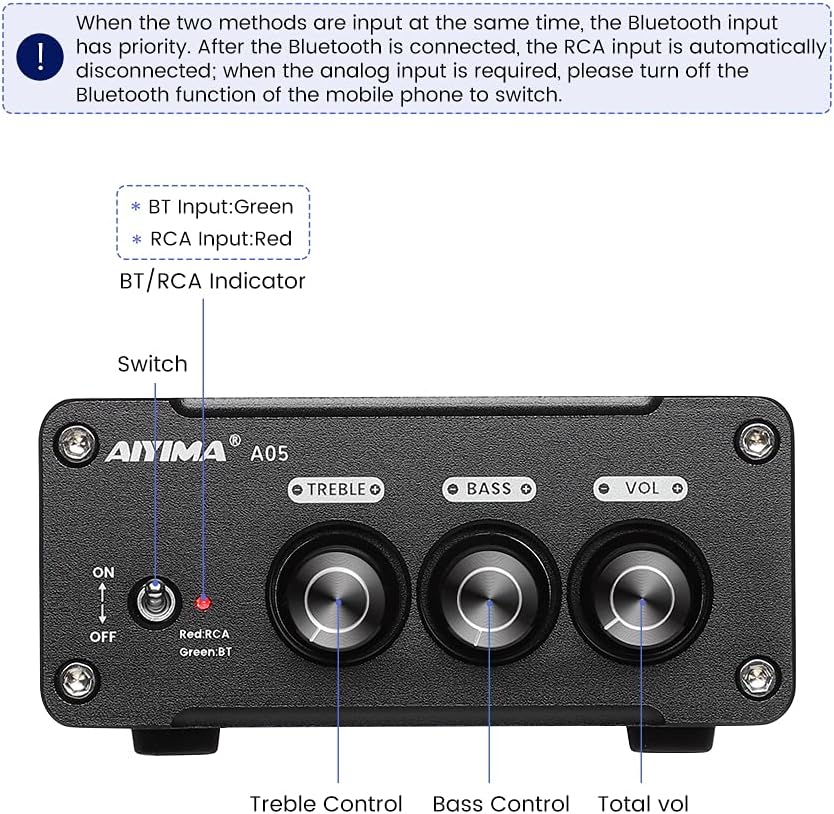
4.1 vaizdas: Front panel of the AIYIMA A05 amplifier, showing the power switch, input indicator, treble, bass, and volume controls.
- Maitinimo jungiklis (ON/OFF): Perjungia ampkeliamoji galia.
- BT/RCA Indicator: Displays the active input source. Green indicates Bluetooth (BT) input, Red indicates RCA input.
- Aukštųjų dažnių valdymas: Reguliuoja aukšto dažnio garso išvestį.
- Žemųjų dažnių valdymas: Reguliuoja žemo dažnio garso išvestį.
- Garsumo valdymas: Reguliuoja bendrą garso išvesties lygį.

4.2 vaizdas: Iš arti view of the power switch and the BT/RCA input indicator on the front panel.

4.3 vaizdas: Iš arti view of the Treble, Bass, and Volume control knobs.
4.2 Galinio skydelio jungtys

4.4 vaizdas: Rear panel of the AIYIMA A05 amplifier, showing the Bluetooth antenna port, RCA audio input, speaker outputs, and DC power input.
- ANT (Bluetooth Antenna Port): Connect the included Bluetooth antenna here for wireless audio reception.
- AUDIO IN (RCA Input): Connect audio sources (e.g., CD player, TV, DAC) using RCA cables.
- SPEAKER (Audio Output): Connect passive speakers using speaker wires. Ensure correct polarity (+ to + and - to -).
- DC 24-32V (Power Input): Connect the provided DC power adapter.
5. Sąrankos instrukcijos
Norėdami nustatyti savo AIYIMA A05, atlikite šiuos veiksmus ampgyvybingesnis:
- Prijunkite „Bluetooth“ anteną: Screw the included Bluetooth antenna into the ANT port on the rear panel.
- Prijunkite garsiakalbius: Connect your passive speakers to the SPEAKER output terminals on the rear panel. Ensure the positive (+) terminal of the amplifier connects to the positive (+) terminal of the speaker, and the negative (-) terminal connects to the negative (-).
- Connect Audio Source (RCA): If using a wired audio source, connect it to the AUDIO IN (RCA) ports on the rear panel using appropriate RCA cables.
- Prijunkite maitinimą: Connect the DC power adapter to the DC 24-32V input port on the rear panel, then plug the adapter into a wall outlet.
- Maitinimas: Flip the power switch on the front panel to the "ON" position. The input indicator will light up.

5.1 vaizdas: Galinis skydelis amplifier with Bluetooth antenna, RCA cables, speaker wires, and power adapter connected.
6. Naudojimo instrukcijos
6.1 Įjungimas / išjungimas
Norėdami įjungti amplifier, flip the front panel switch to the "ON" position. To power off, flip the switch to the "OFF" position.
6.2 Bluetooth ryšys
- Užtikrinti, amplifier is powered on and the BT/RCA indicator is green, indicating Bluetooth mode. If it's red, ensure no RCA cable is connected or disconnect it.
- Mobiliajame įrenginyje (telefone, planšetiniame kompiuteryje ir kt.) įjunkite „Bluetooth“ ir ieškokite galimų įrenginių.
- Select "AIYIMA A05" from the list of devices to pair.
- Once paired, the indicator light will remain green, and you can play audio from your device through the ampgyvesnis.
6.3 RCA Input Usage
- Connect your audio source to the RCA input ports on the rear panel.
- Užtikrinti, amplifier is powered on. The BT/RCA indicator should be red, indicating RCA input mode.
- If the indicator is green (Bluetooth mode), ensure Bluetooth is disconnected on any paired device, or turn off Bluetooth on your mobile device to switch to RCA input.
6.4 Adjusting Audio
- Apimtis: Rotate the "VOL" knob clockwise to increase volume and counter-clockwise to decrease.
- Aukštas dažnis: Rotate the "TREBLE" knob to adjust high-frequency sounds to your preference.
- Bosas: Rotate the "BASS" knob to adjust low-frequency sounds to your preference.
7. Priežiūra
- Valymas: Disconnect the power adapter before cleaning. Use a soft, dry, lint-free cloth to wipe the surface of the amplifier. Do not use harsh chemicals or abrasive materials.
- Saugykla: If not in use for an extended period, store the ampLaikyti vėsioje, sausoje vietoje, toliau nuo tiesioginių saulės spindulių ir ekstremalių temperatūrų.
- Jungtys: Reguliariai tikrinkite visas kabelių jungtis, kad įsitikintumėte, jog jos yra tvirtos ir be korozijos.
8. Problemų sprendimas
Jei kyla problemų dėl AIYIMA A05 amplifier, žr. šias dažniausiai pasitaikančias problemas ir jų sprendimus:
| Problema | Galima priežastis | Sprendimas |
|---|---|---|
| Nėra garso išvesties |
|
|
| Iškraipytas arba zvimbiantis garsas |
|
|
| Bluetooth neprisijungia |
|
|
| Loud noise/ticking on startup |
|
|
If the problem persists after trying these solutions, please contact AIYIMA customer support for further assistance.
9. Specifikacijos

9.1 vaizdas: AIYIMA A05 matmenys amplifier: 107mm (4.2in) width, 87mm (3.4in) depth, 36mm (1.4in) height.
| Funkcija | Specifikacija |
|---|---|
| Modelis | A05 |
| Išėjimo galia | 105 Watts (at 4 Ω) |
| Kanalų skaičius | 2.0 (Stereo) |
| Bluetooth versija | QCC3034 APTX Bluetooth 5.0 |
| Lustų rinkinys | TPA3221 |
| Minimali tiekimo apimtistage | 12 volto (DC) |
| Didžiausia tiekimo apimtistage | 32 volto (DC) |
| Prekės svoris | 500 gramų |
| Matmenys (apytiksliai) | 107 mm (P) x 87 mm (D) x 36 mm (A) |
10. Garantija ir palaikymas
The AIYIMA A05 amplifier comes with a warranty. Please refer to the included Warranty Card for specific terms and conditions. For technical support, troubleshooting assistance, or warranty claims, please contact AIYIMA customer service through the retailer where the product was purchased or visit the official AIYIMA websvetainę.
Internetiniai ištekliai: For additional information and support, you may visit the AIYIMA store page: Oficiali AIYIMA parduotuvė