
Įvadas
The Poly DA75 is a versatile USB-A/USB-C digital adapter designed to connect Poly Quick Disconnect (QD) headsets to computers. It ensures clear audio quality for call center environments, supporting both USB-A and USB-C connections for compatibility with various systems. This adapter is engineered to work seamlessly with platforms such as Avaya, Genesys, and Cisco, providing a reliable audio solution for professionals.
Pagrindinės funkcijos:
- Universalus ryšys: Equipped with both USB-A and USB-C connectors on the cable for broad compatibility with new and legacy equipment.
- Intelligent Headset Recognition: Automatically adjusts audio performance to the specific Poly Quick Disconnect headset for optimized call quality.
- Akustinė apsauga: Incorporates features to manage safe volume levels, protecting user hearing.
- Platformos integracija: Fully compatible with leading call center platforms including Avaya, Genesys, and Cisco.
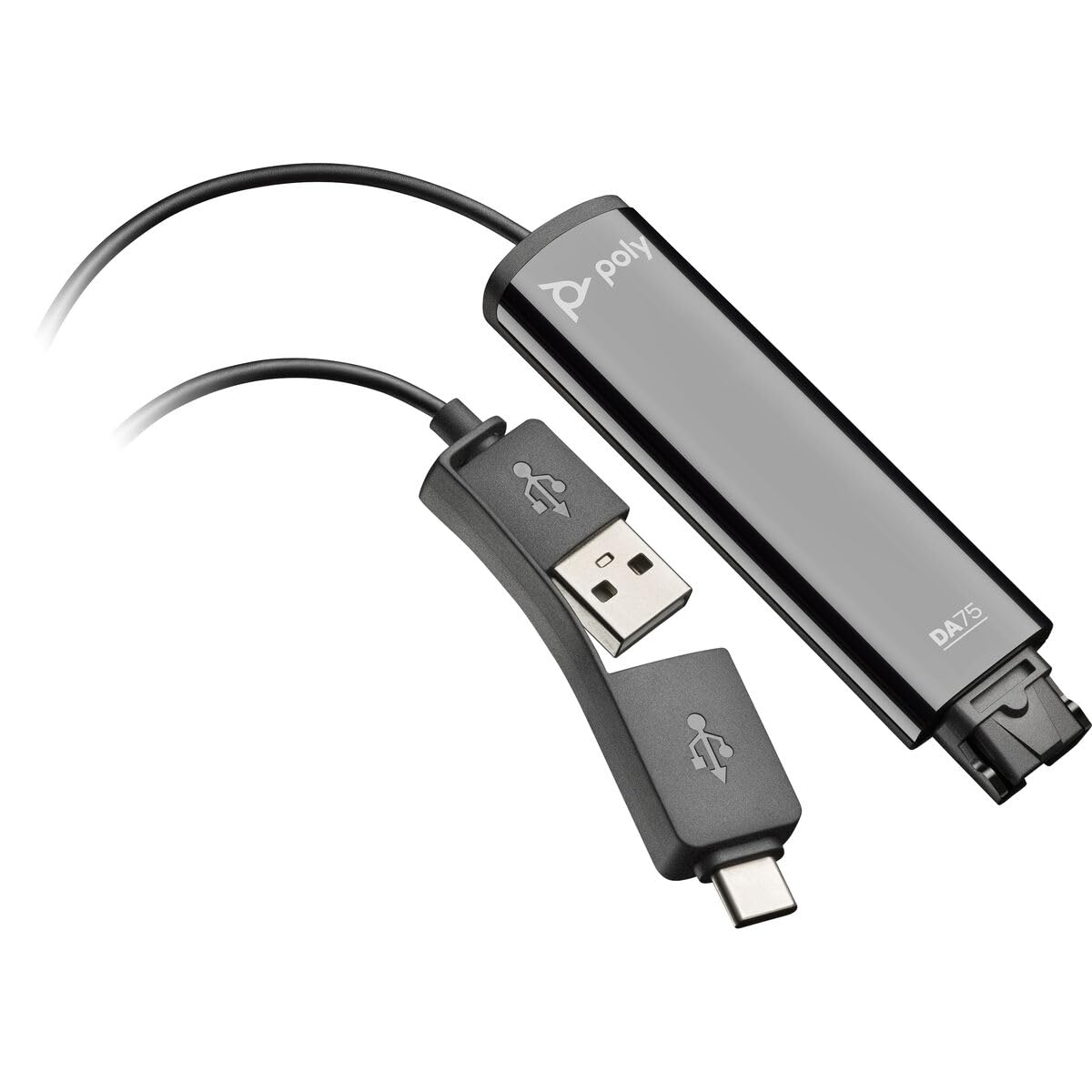
Image: The Poly DA75 USB-A/USB-C Digital Adapter, showing its dual USB-A and USB-C connectors and the Quick Disconnect port for headsets.
Kas yra dėžutėje
The Poly DA75 package typically includes the following items:
- Poly DA75 USB-A/USB-C Digital Adapter
- Dokumentacija (greito paleidimo vadovas, saugos informacija)
Note: Headsets are sold separately and are not included with the DA75 adapter.
Sąranka
Follow these steps to set up your Poly DA75 Digital Adapter:
- Prijungti ausines: Connect your Poly Quick Disconnect (QD) headset to the QD port on the Poly DA75 adapter. Ensure the connection is secure.
- Prisijunkite prie kompiuterio:
- If your computer has a USB-A port, use the USB-A connector on the DA75 cable.
- If your computer has a USB-C port, use the USB-C connector on the DA75 cable.
Plug the appropriate USB connector into an available USB port on your computer.
- Tvarkyklės diegimas: The DA75 is a plug-and-play device. Your operating system (Windows, macOS) should automatically detect the device and install the necessary drivers. This process may take a few moments.
- Patikrinkite įrenginio atpažinimą:
- „Windows“: Eikite į Settings > System > Sound or Valdymo skydas > Garsas. The Poly DA75 should appear as an audio input and output device.
- macOS: Eikite į System Settings > Sound. The Poly DA75 should appear as an input and output device.
Select the Poly DA75 as your default communication device for both playback and recording.
- Programinės įrangos konfigūracija: If you are using communication software (e.g., Avaya, Genesys, Cisco, Microsoft Teams, Zoom), ensure that the Poly DA75 is selected as the audio device within the application's settings.
Naudojimo instrukcijos
The Poly DA75 adapter facilitates audio communication through your connected Poly QD headset. Its operation is primarily managed through your computer's operating system and communication software.
- Skambinimas / skambučių priėmimas: Use your communication software to initiate or answer calls. The audio will be routed through your connected Poly QD headset via the DA75 adapter.
- Garsumo valdymas: Adjust the listening volume using your computer's system volume controls or the volume controls within your communication application.
- Mikrofono nutildymas: Mute and unmute your microphone using the controls provided by your communication software.
- Audio Optimization: The DA75 automatically optimizes audio for your specific Poly QD headset. No manual adjustments are typically required for audio profiles.
Priežiūra
To ensure the longevity and optimal performance of your Poly DA75 Digital Adapter, follow these maintenance guidelines:
- Valymas: Gently wipe the adapter with a soft, dry, anti-static cloth. Do not use liquid cleaners or abrasive materials.
- Saugykla: Adapterį laikykite vėsioje, sausoje vietoje, apsaugotoje nuo tiesioginių saulės spindulių ir ekstremalių temperatūrų.
- Tvarkymas: Kad išvengtumėte vidinių pažeidimų, stenkitės per daug nelenkti ir nesusukti laido, ypač šalia jungčių.
- Ryšys: Ensure the Quick Disconnect (QD) connection and USB connections are clean and free of debris before connecting.
Trikčių šalinimas
If you encounter issues with your Poly DA75 Digital Adapter, refer to the following troubleshooting steps:
| Problema | Galima priežastis | Sprendimas |
|---|---|---|
| Nėra garso iš ausinių |
|
|
| Mikrofonas neveikia |
|
|
| Adapter not recognized by computer |
|
|
Specifikacijos
| Funkcija | Detalė |
|---|---|
| Modelio numeris | 218266-01 |
| Prekės ženklas | POLY |
| Jungties tipas | USB-A, USB-C (dual connector) |
| Suderinami įrenginiai | Poly Quick Disconnect (QD) Headsets |
| Specifiniai naudojimo būdai | PC, Call Center Platforms (Avaya, Genesys, Cisco) |
| Spalva | Juoda |
| Prekės matmenys (I x P x A) | 0.98 x 0.39 x 2.95 colio |
| Prekės svoris | 30 gramų |
| Prievadų skaičius | 2 (USB-A/USB-C to QD) |
| UPC | 197029650054, 017229175112 |
Garantija ir palaikymas
Informacija apie garantiją: The Poly DA75 Digital Adapter comes with a 2 metų gamintojo ribota garantijaŠi garantija taikoma medžiagų ir gamybos defektams, atsiradusiems įprasto naudojimo sąlygomis. Išsaugokite pirkimo įrodymą, jei galėtumėte pateikti pretenzijas dėl garantijos.
Techninė pagalba: For technical assistance, product inquiries, or warranty service, please contact Poly customer support. Visit the official Poly website for the most up-to-date support contact information, FAQs, and additional resources.
Internetiniai ištekliai: Poli palaikymas Websvetainę