
Įvadas
Thank you for choosing the CORN HB001 Bluetooth Wireless Headphones. This manual provides essential information for setting up, operating, and maintaining your headphones. Please read it carefully before use to ensure optimal performance and longevity of your device. Keep this manual for future reference.
Produktas baigtasview
The CORN HB001 headphones offer a comfortable on-ear design with wireless Bluetooth connectivity, allowing you to enjoy high-quality audio without the constraints of cables. They also feature a 3.5mm audio jack for wired connection when wireless is not preferred or battery is low.
Ausinių komponentai
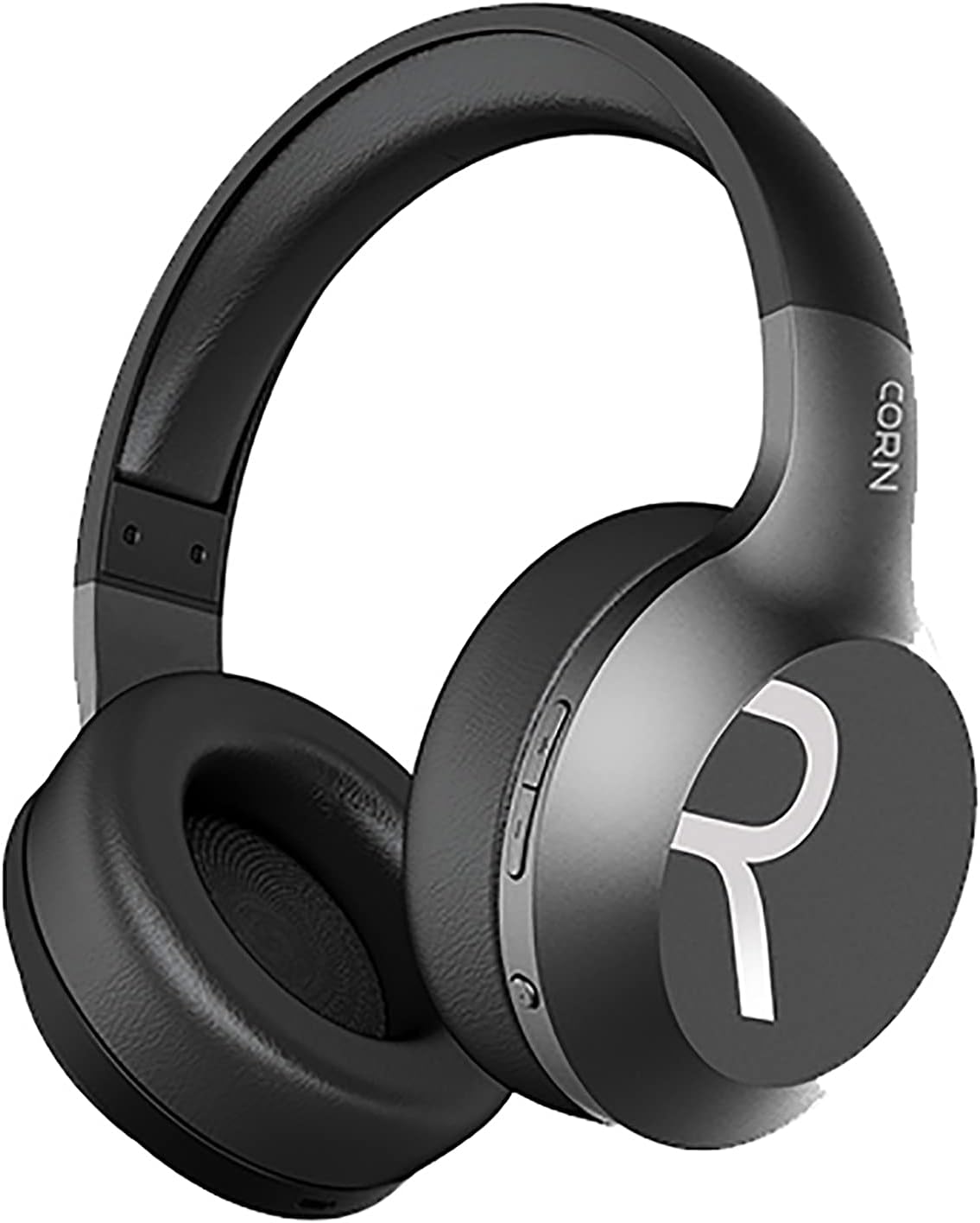
1 vaizdas: Apskritai view of the CORN HB001 Bluetooth Wireless Headphones. The image displays the black on-ear headphones with adjustable headband and earcups, featuring the 'CORN' brand logo on the side.
Valdiklių išdėstymas

2 vaizdas: Close-up of the control buttons located on the right earcup. These typically include volume up/down and a multi-function button for power, play/pause, and call management.
Familiarize yourself with the buttons and ports on your headphones. Typically, you will find a power/multi-function button, volume controls, a charging port (e.g., USB-C), and a 3.5mm audio jack.
Sąranka
1. Ausinių įkrovimas
Before first use, fully charge your headphones. Connect the charging cable (usually USB) to the charging port on the headphones and the other end to a USB power source (e.g., computer, wall adapter). The LED indicator will typically show red during charging and turn off or blue when fully charged.
- Įkrovimo laikas: Maždaug 2 valandos.
- Baterijos talpa: 300 mAh.
2. „Bluetooth“ poravimas
Norėdami belaidžiu būdu prijungti ausines prie įrenginio:
- Įsitikinkite, kad ausinės yra įkrautos ir išjungtos.
- Paspauskite ir palaikykite maitinimo / daugiafunkcį mygtuką maždaug 5–7 sekundes, kol LED indikatorius pakaitomis mirksės mėlynai ir raudonai, rodydamas susiejimo režimą.
- Savo įrenginyje (išmaniajame telefone, planšetiniame kompiuteryje, kompiuteryje) įjunkite „Bluetooth“ ir ieškokite naujų įrenginių.
- Select "CORN HB001" from the list of available devices.
- Once connected, the LED indicator will usually flash blue slowly or turn solid blue.
- Įjungus ausines, jos automatiškai bandys prisijungti prie paskutinio suporuoto įrenginio.
Naudojimo instrukcijos
Maitinimo įjungimas/išjungimas
- Maitinimas: Press and hold the Power/Multi-function button for about 3 seconds until the LED indicator lights up blue.
- Išjungti: Press and hold the Power/Multi-function button for about 3-5 seconds until the LED indicator turns red and then off.
Muzikos atkūrimas
- Leisti / pristabdyti: Vieną kartą paspauskite maitinimo / daugiafunkcinį mygtuką.
- Pagarsink: Paspauskite mygtuką „+“.
- Patildyti: Paspauskite mygtuką „-“.
- Kitas takelis: Paspauskite ir palaikykite nuspaudę mygtuką „+“.
- Ankstesnis takelis: Paspauskite ir palaikykite nuspaudę mygtuką „-“.
Skambučių valdymas
- Atsiliepti / Baigti skambutį: Vieną kartą paspauskite maitinimo / daugiafunkcinį mygtuką.
- Atmesti skambutį: Press and hold the Power/Multi-function button for about 2 seconds.
- Perrink paskutinį numerį: Dukart paspauskite maitinimo / daugiafunkcinį mygtuką.
Wired Mode (3.5mm Audio Jack)
You can use the headphones in wired mode even if the battery is depleted. Simply connect one end of a 3.5mm audio cable (not always included) to the headphone's 3.5mm jack and the other end to your audio source. In wired mode, Bluetooth functions are disabled, and controls on the headphones may not function.
Priežiūra
Tinkama priežiūra užtikrina jūsų ausinių ilgaamžiškumą.
- Valymas: Use a soft, dry cloth to wipe the headphones. Do not use abrasive cleaners or solvents. For ear cushions, gently wipe with a damp šluoste ir leiskite visiškai išdžiūti.
- Saugykla: Store the headphones in a cool, dry place away from direct sunlight and extreme temperatures. If your headphones are foldable, fold them carefully to prevent damage.
- Vandens ekspozicija: These headphones are not waterproof. Avoid exposure to water, moisture, or rain.
Trikčių šalinimas
Jei kyla problemų, išbandykite šiuos sprendimus:
| Problema | Sprendimas |
|---|---|
| Ausinės neįsijungia | Ensure the headphones are fully charged. Press and hold the Power button for a few seconds. |
| Nepavyksta susieti su įrenginiu | Ensure headphones are in pairing mode (flashing blue/red). Turn off and on Bluetooth on your device. Forget previous pairings and try again. Ensure headphones are within 10m range. |
| Nėra garso | Check volume levels on both headphones and your device. Ensure headphones are properly paired. Try wired connection if available. |
| Prasta garso kokybė | Move closer to your device to reduce interference. Ensure no physical obstructions between headphones and device. |
Specifikacijos
| Funkcija | Detalė |
|---|---|
| Modelio pavadinimas | HB001 |
| Prekės ženklo pavadinimas | KURŪZAI |
| Ryšio technologija | Belaidis, „Bluetooth“ |
| Belaidė versija | V5.0 |
| Veikimo atstumas | 10 metrų |
| Garsiakalbio tvarkyklės dydis | Φ40 mm |
| Garsiakalbio varža | 32Ω |
| Garsiakalbio galia | 15mW |
| Baterijos talpa | 300 mAh |
| Įkrovimo laikas | Maždaug 2 val |
| Darbo laikas | Maždaug 8 val |
| Ausinių formos faktorius | Ant ausies |
| Ausinių lizdas | 3.5mm Jack (for wired use) |
| Įtraukti komponentai | Ausų pagalvėlės |
| Amžiaus diapazono aprašymas | Suaugęs |
| Medžiaga | Plastikiniai |
| Spalva | Juoda |
Garantija ir palaikymas
For warranty information or technical support, please refer to the documentation included with your purchase or contact the manufacturer directly through their official websvetainėje arba klientų aptarnavimo kanaluose. Išsaugokite pirkimo įrodymą, jei prireiktų pateikti garantinį prašymą.