
Produktas baigtasview
The EWO'S XRT140 Universal Remote Control is designed as a direct replacement for various VIZIO Smart TV remotes. This product has been professionally inspected and tested to ensure it functions and appears like new. It offers seamless control over your VIZIO Smart TV, providing a reliable and user-friendly experience.

Vaizdas: Priekinė ir šoninė view of the EWO'S XRT140 Universal Remote Control, showcasindėl savo ergonomiško dizaino ir mygtukų išdėstymo.
Sąrankos vadovas
The EWO'S XRT140 remote control is designed for immediate use with compatible VIZIO Smart TVs. No pairing or programming is required.
Akumuliatoriaus montavimas
- Nuotolinio valdymo pulto gale raskite baterijų skyrių.
- Atidarykite akumuliatoriaus skyriaus dangtelį.
- Insert two (2) 1.5V AAA batteries, ensuring the positive (+) and negative (-) terminals align correctly with the indicators inside the compartment.
- Saugiai uždarykite akumuliatoriaus skyriaus dangtelį.
Once batteries are installed, the remote is ready to operate your VIZIO Smart TV.
Nuotolinio valdymo pulto valdymas
This section details the functions of the buttons on your EWO'S XRT140 Universal Remote Control.
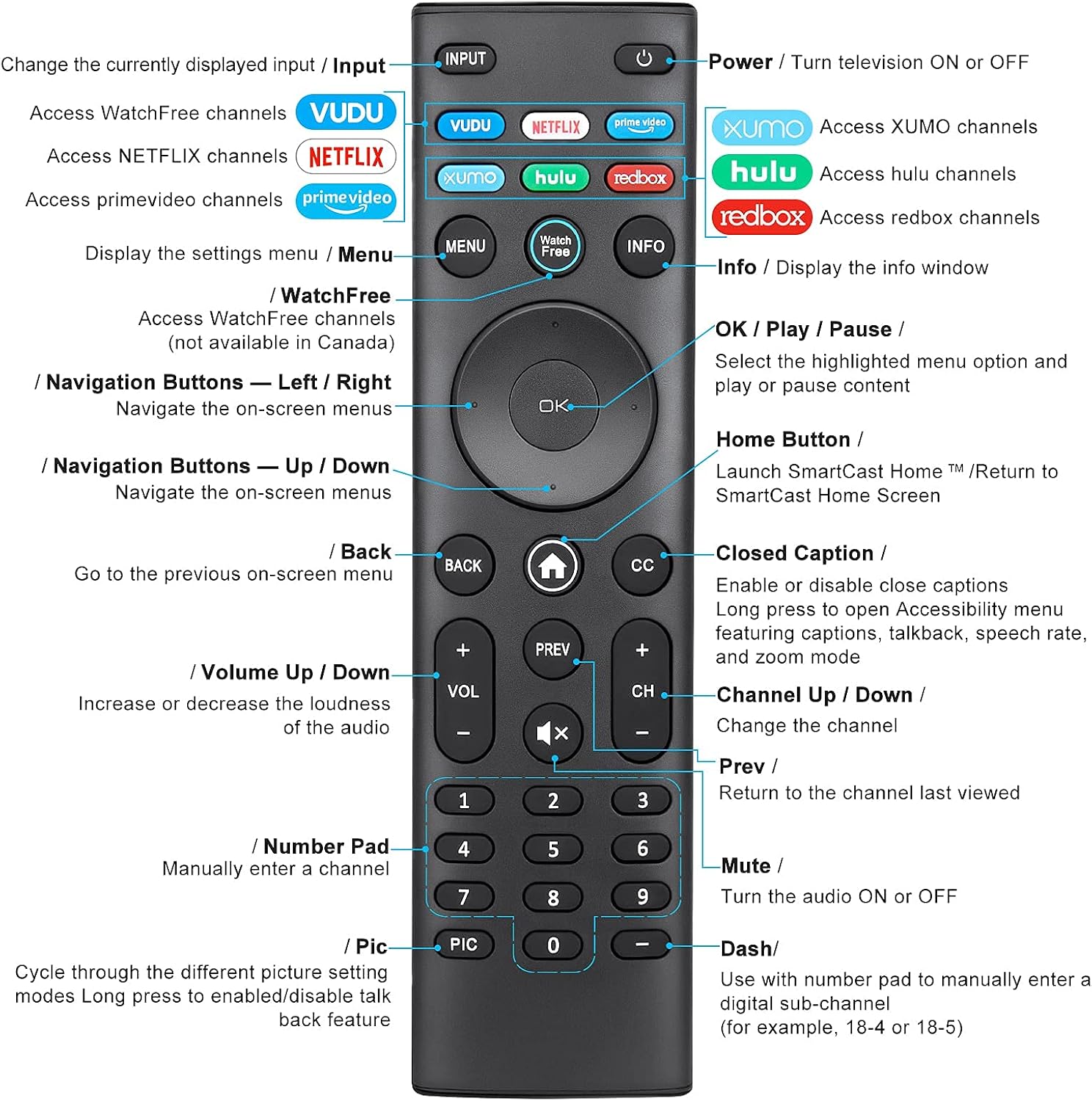
Image: Detailed diagram of the EWO'S XRT140 remote control, labeling each button with its corresponding function.
Mygtukų funkcijos:
- INPUT: Change the currently displayed input source.
- GALIA (⏻): Turn the television ON or OFF.
- VOODOO: Access VUDU channels.
- NETFLIX: Access Netflix channels.
- prime video: Access Prime Video channels.
- XUMO: Access XUMO channels.
- hulu: Access Hulu channels.
- redbox: Access Redbox channels.
- MENIU: Display the settings menu.
- WatchFree: Access WatchFree channels (Note: May not be available in all regions, e.g., Canada).
- INFORMACIJA: Display the info window.
- OK / Play / Pause: Select the highlighted menu option and play or pause content.
- Naršymo mygtukai (aukštyn / žemyn / kairėn / dešinėn): Naršykite ekrano meniu.
- Home Button (⌂): Launch SmartCast Home or return to the SmartCast Home Screen.
- GRĮŽTI: Go to the previous on-screen menu.
- Uždarieji subtitrai (CC): Enable or disable closed captions. Long press to open Accessibility menu featuring captions, talkback, speech rate, and zoom mode.
- VOL +/- (Volume Up/Down): Padidinkite arba sumažinkite garso garsumą.
- PREV: Return to the channel last viewred.
- CH +/- (Channel Up/Down): Pakeiskite kanalą.
- NUTILDYTI (🔇): Turn the audio ON or OFF.
- Skaičių klaviatūra (0–9): Manually enter a channel number.
- PIC: Cycle through different picture setting modes. Long press to enable/disable talk back feature.
- BRŪKŠNIS (-): Use with the number pad to manually enter a digital sub-channel (e.g., 18-4 or 18-5).
Pagrindinės savybės
- Momentinis atsakymas: This remote control boasts a quick transmission and response time of 0.2 seconds, ensuring minimal delay between your command and the TV's action.
- Patvarūs mygtukai: The buttons are rigorously tested to support over 150,000 clicks, providing long-lasting reliability.
- Išplėstas diapazonas: The remote transmits a signal effectively over long distances, up to 12 meters (40 feet), allowing for flexible viewpozicijų.
- Aukščiausios kokybės dizainas: Upgraded with a high-end glossy finish, the remote is made from durable ABS material, making it safe for use by children.
- Specialūs spartieji mygtukai: Features 7 convenient shortcut buttons for popular streaming services like VUDU, Netflix, Prime Video, XUMO, Hulu, and Redbox, plus a WatchFree button for quick access.
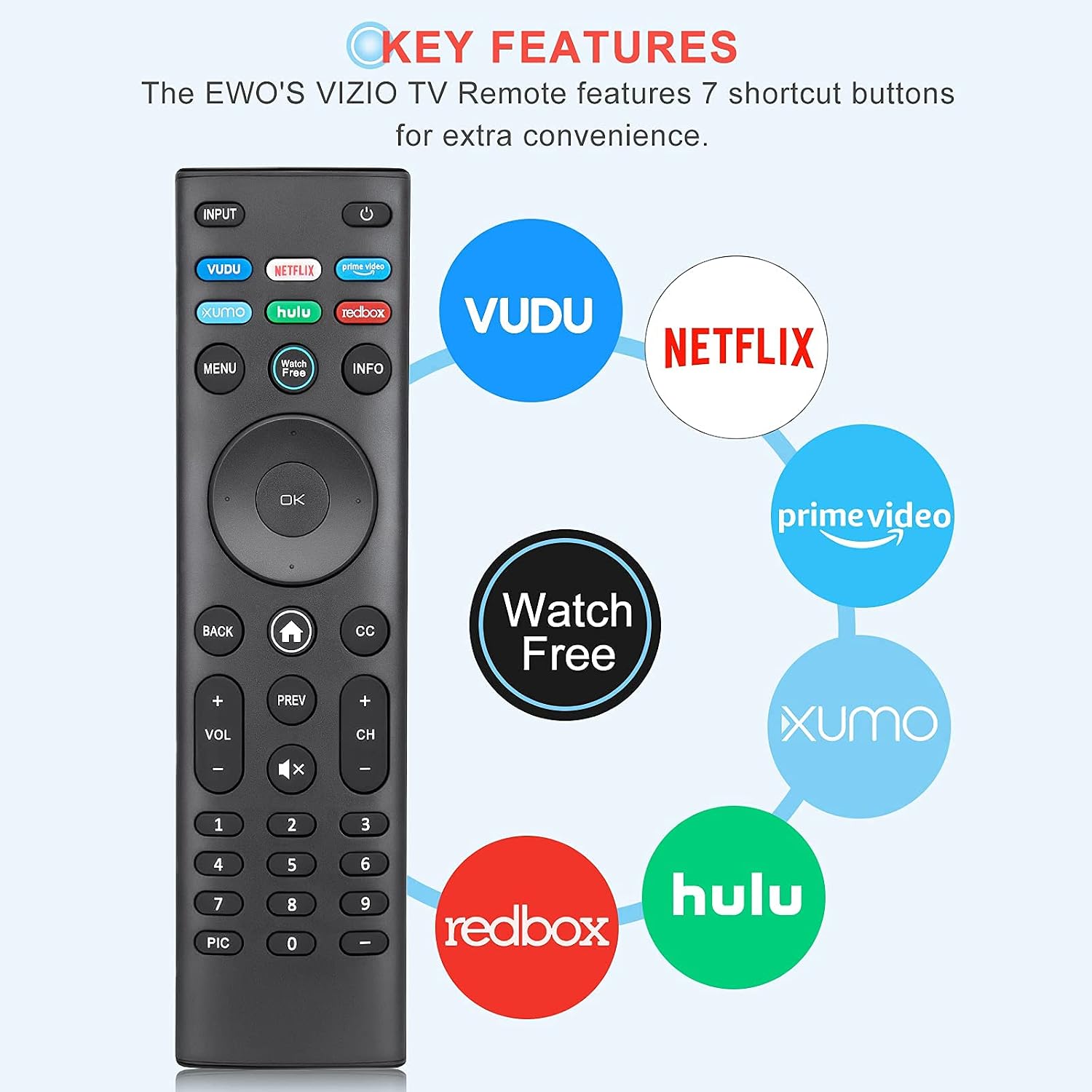
Image: The EWO'S XRT140 remote control with its 7 shortcut buttons for streaming services highlighted, emphasizing convenience.

Image: A hand holding the EWO'S XRT140 remote, with text indicating its fast response time and high click durability.

Image: An illustration demonstrating the EWO'S XRT140 remote's ability to transmit signals over 40 feet, highlighting its long-distance capability.
Suderinamumas
The EWO'S XRT140 Universal Remote Control is designed for broad compatibility with VIZIO Smart TVs and various VIZIO remote models.
Compatible VIZIO TV Series:
- All VIZIO LED LCD HD UHD HDR Smartcast 4K 3D Smart TVs
- Including D-Series, E-Series, M-Series, P-Series, PX-Series, V-Series, and OLED-Series.

Image: The EWO'S XRT140 remote alongside various VIZIO SmartCast TV models, illustrating its broad compatibility.
Compatible VIZIO Remote Models:
The XRT140 is a universal remote control compatible with, but not limited to, the following VIZIO remote models:
- XRT112
- XRT122
- XRT302
- XRT135
- XRT510
- XRT500
- XRT100
- XRT136
- VR1
- VR2
- VR10
- VR15

Image: The EWO'S XRT140 remote displayed next to several other VIZIO remote models, indicating its universal compatibility.
Priežiūra
Tinkama priežiūra ir remontas prailgins jūsų nuotolinio valdymo pulto tarnavimo laiką.
Valymas:
- Nuotolinio valdymo pultą nuvalykite minkšta, sausa šluoste.
- Įsisenėjusiam purvui šiek tiek pamirkykiteampNuvalykite šluostę vandeniu arba švelniu, neabrazyviniu valikliu. Nepurkškite valiklio tiesiai ant nuotolinio valdymo pulto.
- Venkite naudoti stiprias chemines medžiagas, tirpiklius ar abrazyvines valymo kempines, nes jos gali pažeisti nuotolinio valdymo pulto paviršių arba vidinius komponentus.
Akumuliatoriaus priežiūra:
- Pakeiskite baterijas, kai nuotolinio valdymo pulto veikimas suprastėja arba jis nustoja reaguoti.
- Visada keiskite abi baterijas vienu metu naujomis to paties tipo (AAA) baterijomis.
- If the remote will not be used for an extended period (e.g., several weeks or months), remove the batteries to prevent leakage and potential damage to the remote.
Trikčių šalinimas
Jei kyla problemų dėl nuotolinio valdymo pulto, žr. toliau pateiktus įprastus trikčių šalinimo veiksmus:
| Problema | Galima priežastis | Sprendimas |
|---|---|---|
| Nuotolinis nereaguoja | Išsikrovusios arba neteisingai įdėtos baterijos | Pakeiskite baterijas naujomis 1.5 V AAA baterijomis, užtikrindami teisingą poliškumą. |
| Nuotolinis veikia su pertraukomis | Low battery power; Obstruction between remote and TV; Remote sensor on TV is blocked. | Replace batteries. Ensure a clear line of sight between the remote and the TV's IR sensor. Remove any objects blocking the TV's sensor. |
| Neveikia konkretūs mygtukai | Dirt or debris under the button; Button malfunction. | Clean the remote surface around the button. If the issue persists, the button may be faulty. |
| Remote range is reduced | Low battery power; Interference from other electronic devices. | Replace batteries. Move other electronic devices away from the TV or remote. |
Gaminio specifikacijos
| Specifikacija | Detalė |
|---|---|
| Prekės ženklas | EWO |
| Modelis | XRT140 |
| Suderinami įrenginiai | Television (VIZIO Smart TVs) |
| Didžiausias diapazonas | 40 pėdų (apie 12 metrus) |
| Baterijos tipas | 2 x AAA (neįtraukta) |
| Prekės svoris | 2.39 uncijos |
| Pakuotės matmenys | 8.19 x 3.66 x 0.83 colio |
| ASIN | B098YWCB68 |
| UPC | 656942198109 |
| Pasiekiama pirmoji data | 8 m. liepos 2021 d |
Garantija ir palaikymas
As an Amazon Renewed product, the EWO'S XRT140 Universal Remote Control is backed by the Amazon Renewed Guarantee. This ensures that the product has been professionally inspected and tested to work and look like new.
If you are not satisfied with your purchase, renewed products are eligible for replacement or refund under the Amazon Renewed Guarantee. Please refer to the Amazon Renewed program terms and conditions for specific details regarding returns, replacements, and refunds.
For further assistance or inquiries, please contact Amazon customer support or refer to the Amazon Renewed Store for more information.
Amazon Renewed Store Link: Apsilankykite atnaujintoje „Amazon“ parduotuvėje