
Įvadas
Thank you for choosing the Remax RB-T32 Wireless Bluetooth Earphone. This manual provides detailed instructions on how to set up, operate, and maintain your new earphone. Please read this manual carefully before use to ensure optimal performance and longevity of your device.
Pakuotės turinys
Patikrinkite pakuotę, ar joje yra šie daiktai:
- Remax RB-T32 Wireless Bluetooth Earphone
- Įkrovimo kabelis
- Ausų pagalvėlės (įvairių dydžių)
- Vartotojo vadovas
Produktas baigtasview
Familiarize yourself with the components of your Remax RB-T32 earphone.
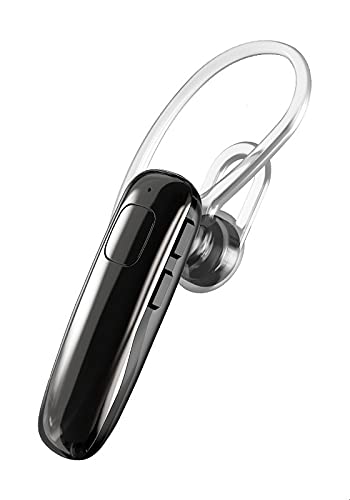
Image: The Remax RB-T32 Wireless Bluetooth Earphone, showcasing its compact design and in-ear form factor. This image provides a general view produkto.
The earphone features a compact in-ear design with integrated touch controls for easy operation. It includes a charging port, an LED indicator, and a built-in microphone for calls.
Sąranka
1. Ausinių įkrovimas
- Connect the charging cable to the earphone's charging port.
- Kitą laido galą prijunkite prie USB maitinimo šaltinio (pvz., kompiuterio, sieninio adapterio).
- The LED indicator will show the charging status. A full charge typically takes approximately 1-2 hours.
- Once fully charged, the LED indicator will change or turn off. Disconnect the earphone from the charger.
2. Suporavimas su „Bluetooth“ įrenginiu
- Ensure the earphone is charged and turned off.
- Press and hold the multi-function button (or touch area) on the earphone until the LED indicator flashes red and blue alternately, indicating pairing mode.
- Savo įrenginyje (išmaniajame telefone, planšetiniame kompiuteryje ir kt.) įjunkite „Bluetooth“ ir ieškokite galimų įrenginių.
- Select "RB-T32" from the list of found devices.
- Once successfully paired, the LED indicator will flash blue slowly or turn off, and you will hear a confirmation tone.
- The earphone will automatically connect to the last paired device when turned on, if Bluetooth is enabled on the device.
Naudojimo instrukcijos
Maitinimo įjungimas/išjungimas
- Maitinimas: Press and hold the touch area for approximately 3 seconds until the LED indicator flashes blue and you hear a power-on prompt.
- Išjungti: Press and hold the touch area for approximately 5 seconds until the LED indicator flashes red and you hear a power-off prompt.
Muzikos atkūrimas
- Leisti / pristabdyti: Vieną kartą palieskite jutiklinę sritį.
- Kitas takelis: Dukart bakstelėkite jutiklinę sritį dešinėje ausinėje.
- Ankstesnis takelis: Dukart bakstelėkite jutiklinę sritį kairėje ausinėje.
Skambučių valdymas
- Atsiliepti / Baigti skambutį: Tap the touch area once during an incoming call or an active call.
- Atmesti skambutį: Press and hold the touch area for 2 seconds during an incoming call.
Garsumo valdymas
- Padidinti garsumą: Triple-tap the touch area on the right earphone.
- Sumažinti garsumą: Triple-tap the touch area on the left earphone.
Balso asistentas
- Suaktyvinti „Voice Assistant“: Press and hold the touch area for 2 seconds (when not on a call) to activate your device's voice assistant (e.g., Siri, Google Assistant).
Priežiūra
- Valymas: Use a soft, dry cloth to clean the earphone. Do not use harsh chemicals or abrasive materials.
- Saugykla: Ausines laikykite vėsioje, sausoje vietoje, toliau nuo tiesioginių saulės spindulių ir ekstremalių temperatūrų.
- Akumuliatoriaus priežiūra: To preserve battery life, charge the earphone regularly, even if not in use for extended periods. Avoid fully discharging the battery frequently.
- Atsparumas vandeniui: This earphone is not waterproof. Avoid exposure to water or excessive moisture.
Trikčių šalinimas
| Problema | Sprendimas |
|---|---|
| Ausinės neįsijungia. | Ensure the earphone is fully charged. |
| Nepavyksta susieti su įrenginiu. |
|
| Nėra garso arba garsas per mažas. |
|
| Pertraukiamas ryšys. |
|
Specifikacijos
| Funkcija | Detalė |
|---|---|
| Prekės ženklas | Remax |
| Modelio pavadinimas | RB-T32 |
| Ryšio technologija | Belaidis ryšys („Bluetooth“) |
| Ausinių formos faktorius | Ausyje |
| Valdymo tipas | Garsumo valdymas (lietimui jautrus) |
| Suderinami įrenginiai | Multi-device compatible |
| Įtraukti komponentai | Ausų pagalvėlės |
| Amžiaus diapazono aprašymas | Suaugęs |
| Spalva | Juoda |
Garantija ir palaikymas
The Remax RB-T32 Wireless Bluetooth Earphone comes with a standard manufacturer's warranty. Please refer to the warranty card included in your package for specific terms and conditions, including the warranty period and coverage details.
For technical support, troubleshooting assistance, or warranty claims, please contact your local Remax distributor or the retailer where you purchased the product. Keep your proof of purchase for warranty validation.