
1. Įvadas
The Temtop M100 Air Station is a sophisticated indoor air quality monitor designed to provide comprehensive data on your environment. This device integrates multiple sensors to detect various air pollutants and environmental factors, offering real-time insights into the air you breathe. This manual will guide you through the setup, operation, and maintenance of your M100 Air Station to ensure optimal performance and accurate readings.

Image 1.1: The Temtop M100 Air Station displaying various environmental parameters.
2. Produkto ypatybės
The Temtop M100 Air Station combines an air quality monitor, weather station, and indoor thermometer into a single device, offering an 8-in-1 monitoring solution. Key features include:
- Pažangi jutiklių technologija: Equipped with an industrial-grade PM2.5 laser sensor, SenseAir NDIR carbon dioxide sensor, and Sensirion temperature & humidity sensor for high accuracy.
- 8 viename stebėjimas: Provides accurate readings for CO2, PM2.5, PM10, AQI (Air Quality Index), temperature, humidity, weather forecast, and displays date & time.
- Patogi vartotojo sąsaja: Features a large 7.8-inch touch screen with three adjustable brightness levels.
- Spalvoti indikatoriai: Utilizes 6 colorful AQI index levels and 3 colorful CO2 concentration levels to visually represent air quality status from Good to Hazardous/Poor.
- „Wi-Fi“ ryšys: Supports 2.4GHz and 5GHz Wi-Fi for connection to the Temtop APP, enabling real-time monitoring, data download, and history tracking.
- Temperatūros vienetų perjungimas: Easily switch between Celsius and Fahrenheit directly from the device settings.

2.1 vaizdas: Baigtaview of the 8-in-1 professional sensors integrated into the M100 Air Station.
3. Pakuotės turinys
Atidarę pakuotę, patikrinkite, ar yra visi šie daiktai:
- Temtop M100 Air Station (8-in-1 Multifunction Device)
- USB įkrovimo kabelis (USB-A į USB-C)
- Vartotojo vadovas (šis dokumentas)
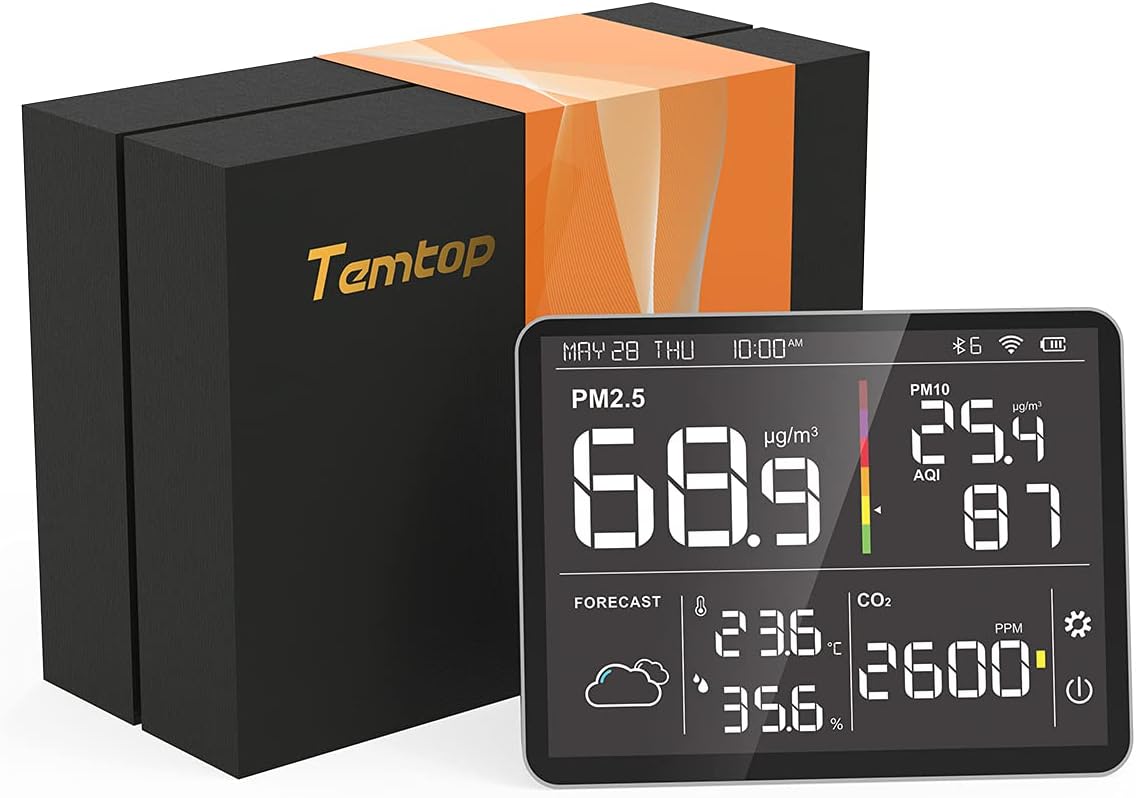
Image 3.1: Temtop M100 Air Station and its packaging.
4. Darbo pradžia: sąranka
4.1 Pradinis įkrovimas
Before first use, connect the M100 Air Station to a power source using the provided USB charging cable. A standard 5V/1A DC power adapter (not included) is recommended. Ensure the device is fully charged for optimal performance, especially if planning to use it without continuous power.
4.2 Initial CO2 Calibration
For accurate CO2 readings, it is recommended to perform an initial calibration. Place the M100 Air Station outdoors in a well-ventilated area for approximately 7 hours. This allows the CO2 sensor to establish a baseline with ambient outdoor CO2 levels, which are typically around 400 ppm.
4.3 Connecting to Wi-Fi and Mobile Application
- Download the Temtop App: Ieškokite 'Temtop' in your device's app store (available on Apple App Store and Google Play Store).
- Registruotis / Prisijungti: Open the app and follow the prompts to create an account or log in.
- Pridėti įrenginį: Within the app, select the option to add a new device. The app will guide you through connecting the M100 Air Station via Bluetooth initially, then configuring its Wi-Fi connection (supports 2.4GHz and 5GHz networks).
- Tinklo suderinamumas: While the device supports both 2.4GHz and 5GHz Wi-Fi, some 5GHz bands may have compatibility issues. If you encounter connection problems, try connecting to a 2.4GHz network.

Image 4.1: The Temtop mobile application interface for monitoring devices.
4.4 Ekrano nustatymai
- Sureguliuokite ryškumą: Single-click the ON/OFF button on the device to cycle through the three available brightness models for the screen.
- Switch Temperature Units: Long-press the setting button on the device to toggle the temperature display between Celsius (°C) and Fahrenheit (°F).
5. Operating Your Air Station
5.1 Ekrano supratimas
The M100 Air Station's large LCD screen provides real-time readings for all monitored parameters:
- PM2.5 ir PM10: Displays particulate matter concentrations in µg/m³.
- AQI: Air Quality Index, a numerical value indicating overall air quality.
- CO2: Carbon Dioxide concentration in PPM (parts per million).
- Temperatūra ir drėgmė: Current ambient temperature and relative humidity.
- Orų prognozė: Provides a basic weather forecast.
- Data ir laikas: Dabartinė data ir laikas.
The display uses color-coded indicators for AQI and CO2 to quickly convey air quality status:
- AQI: 6 color levels ranging from Good to Hazardous.
- CO2: 3 color levels indicating Good, Moderate, or Poor concentration.
5.2 Mobiliosios programėlės naudojimas
The Temtop mobile application enhances the functionality of your M100 Air Station:
- Stebėjimas realiuoju laiku: View all sensor readings remotely.
- History Data: Prieiga ir review historical air quality data.
- Duomenų eksportavimas: Download monitoring history via the app or USB cable for further analysis.
- Nustatymai: Adjust device settings, such as logging frequency.

Image 5.1: M100 Air Station in use, demonstrating connectivity with a mobile device.
6. Oro kokybės rodmenų supratimas
The M100 Air Station measures several key air quality parameters:
- PM2.5 (kietosios dalelės 2.5): Refers to fine inhalable particles with diameters generally 2.5 micrometers and smaller. These particles can penetrate deep into the respiratory tract.
- PM10 (kietosios dalelės 10): Refers to inhalable particles with diameters generally 10 micrometers and smaller.
- CO2 (anglies dioksidas): A gas naturally present in the atmosphere. Elevated indoor CO2 levels can indicate poor ventilation and may lead to drowsiness or reduced cognitive function.
- AQI (oro kokybės indeksas): A standardized index used to report daily air quality. It indicates how clean or polluted the air is, and what associated health effects might be a concern.

Image 6.1: Explanation of the impact of fine particulate matter (PM2.5) on human health.
7. Priežiūra
To ensure the longevity and accuracy of your Temtop M100 Air Station, follow these maintenance guidelines:
- Valymas: Gently wipe the device's screen and body with a soft, dry cloth. Avoid using abrasive cleaners, solvents, or spraying liquids directly onto the device.
- Jutiklio priežiūra: Do not attempt to clean the internal sensors. Exposure to dust and debris should be minimized.
- Saugykla: Kai ilgesnį laiką nenaudojate prietaiso, laikykite jį vėsioje, sausoje vietoje, apsaugotoje nuo tiesioginių saulės spindulių ir ekstremalių temperatūrų.
8. Problemų sprendimas
If you encounter issues with your M100 Air Station, refer to the following common problems and solutions:
- Trumpas baterijos veikimo laikas: The M100 Air Station is designed for continuous monitoring and is best used when connected to a power source. If operating on battery, expect a limited duration (e.g., 1-3 hours). For prolonged use, keep the device plugged in.
- „Wi-Fi“ ryšio problemos: If the Wi-Fi icon blinks or the device frequently disconnects, ensure your Wi-Fi network is stable. Try restarting your router and the M100. If using a dual-band router, attempt to connect to the 2.4GHz band as it often provides a more stable connection for smart home devices.
- App Displaying Incorrect Temperature Units: If the app's main screen shows Celsius while the device or detailed app view is set to Fahrenheit, this may be a known app display bug. Refer to the detailed device view within the app for accurate unit display. Ensure your app is updated to the latest version.
- Device Not Powering On with USB-C to USB-C Cable: The M100 Air Station may require a USB-A to USB-C cable for charging, such as the one provided. If using a USB-C to USB-C cable, ensure it is compatible and provides sufficient power. It is recommended to use the included charging cable.
- Inaccurate CO2 Readings: Ensure the initial CO2 calibration was performed outdoors in fresh air. If readings seem consistently off, repeat the outdoor calibration process.
9. Specifikacijos
Detailed technical specifications for the Temtop M100 Air Station:
| Parametras | Vertė |
|---|---|
| Modelis | M100 |
| Bendras matmuo | 6.9 x 2.6 x 1.2 colio |
| Duomenų eksportavimas | WiFi |
| Maitinimo adapteris | 5V/1A DC |
| Darbinės temperatūros diapazonas | 0 ~ 50 ° C (32 ~ 122 ° F) |
| Veikimo drėgmės diapazonas | 0–90 % santykinis drėgnis |
| Atmosferos slėgis | 1 atm |
| PM2.5 Measurement Range | 0–999 µg/m³ |
| PM2.5 Resolution | 0.1 µg/m³ |
| PM2.5 tikslumas | ±5µg/m³ (0~50µg/m³), ±10µg/m³ (50~100µg/m³), ±10% (>100µg/m³) |
| PM10 Measurement Range | 0–999 µg/m³ |
| PM10 Resolution | 0.1 µg/m³ |
| CO2 matavimo diapazonas | 0–5000 PPM |
| CO2 skiriamoji geba | 1 PPM |
| CO2 tikslumas | ±50ppm + 5% |
| Temperatūros tikslumas | ±1 °C |
| Ryšio technologija | Wi-Fi |
| Baterijos tipas | 1 ličio jonų baterija (pridedama) |
| Ekrano tipas | LCD |
| Prekės svoris | 1.81 svaro |
| UPC | 781454250493 |
10. Garantija ir palaikymas
Temtop provides a 12 mėnesių garantija for the M100 Air Station, covering manufacturing defects and malfunctions under normal use. For any inquiries, technical assistance, or warranty claims, please contact Temtop customer support.
Klientų aptarnavimas: Temtop offers 24/7 customer support access via email and phone. Refer to the contact information provided on the Temtop official website or your product packaging for specific details.