
Cecotec Conga 9090 Ai
Cecotec Conga 9090 IA Robot Vacuum Cleaner
Vartotojo vadovas
Įvadas
Thank you for choosing the Cecotec Conga 9090 IA Robot Vacuum Cleaner. This advanced 4-in-1 robot is designed to vacuum, sweep, mop, and scrub simultaneously, providing comprehensive floor cleaning. Equipped with Artificial Intelligence and laser technology, it offers maximum cleaning precision by recognizing household objects and adapting its cleaning path. This manual provides essential information for the safe and efficient operation and maintenance of your robot vacuum cleaner.
Saugos instrukcijos
Prieš naudodami prietaisą, atidžiai perskaitykite šias saugos instrukcijas ir išsaugokite jas ateičiai. Nesilaikant šių instrukcijų, gali kilti elektros smūgis, gaisras arba sunkūs sužalojimai.
- Užtikrinkite galios tūrįtage atitinka ttage, nurodyta prietaiso vardinėje etiketėje.
- Nemerkite prietaiso, maitinimo laido ar kištuko į vandenį ar bet kokį kitą skystį.
- Laikykite prietaisą atokiau nuo šilumos šaltinių, tiesioginių saulės spindulių, drėgmės ir aštrių briaunų.
- Do not use the appliance on wet surfaces or in areas with standing water.
- Prižiūrėkite vaikus, kad jie nežaistų su prietaisu.
- Prieš valydami ar atlikdami techninę priežiūrą, visada atjunkite prietaisą nuo elektros lizdo.
- Nenaudokite prietaiso, jei pažeistas maitinimo laidas arba kištukas.
- Prieš naudodami pašalinkite iš valymo zonos visus palaidus laidus, smulkius daiktus ar trapius daiktus, kad išvengtumėte jų susipainiojimo ar pažeidimo.
Pakuotės turinys
Išpakuodami patikrinkite, ar yra visi komponentai ir ar jie geros būklės.
- Cecotec Conga 9090 IA Robot Vacuum Cleaner
- Special Silicone Brush for pets
- Chalisco šepetys
- Vibration Wash Basin (Water Tank)
- Solid Tank (Dust Bin)
- Nuotolinio valdymo pultas
- 2 Šluostės
- 2 šoniniai šepečiai
- 1 High-Efficiency Filter
- Self-Cleaning Brush
- Įkrovimo stotis
- Maitinimo adapteris

Image: The Conga 9090 IA robot vacuum cleaner along with its comprehensive set of accessories, including various brushes, remote control, and a mobile phone showing the companion app.
Produktas baigtasview
The Conga 9090 IA features advanced components for intelligent and efficient cleaning.
- AI and Laser Technology: The robot uses a front camera and a three-dimensional sensor to recognize common household objects and adapt its cleaning path accordingly. It also identifies floors and rooms, automatically mapping them.
- Jalisco teptukas: A specialized brush designed for effective cleaning on various floor types.
- Twerking Scrub Tank: Provides three intelligent scrubbing levels for thorough mopping.
- Room Assist: Intelligent room management for customized cleaning.

Image: The robot vacuum intelligently detects and navigates around obstacles like shoes, thanks to its advanced AI and laser technology.

Image: The robot vacuum positioned on a floor, ready to clean various small debris, demonstrating its powerful suction.

Image: The robot vacuum near its charging base, illustrating its object detection capabilities for items such as socks and power cables.
Sąranka
- Įkrovimo stoties vieta: Place the charging station against a wall in an open area, ensuring there are no obstacles within 1 meter to the sides and 2 meters in front. Connect the power adapter to the charging station and a power outlet.
- Pradinis mokestis: Place the robot on the charging station. Ensure the charging contacts on the robot align with those on the station. The robot will begin charging automatically. For first use, fully charge the robot (approximately 3-4 hours).
- Šoninių šepečių montavimas: Snap the left (L) and right (R) side brushes into their corresponding slots on the bottom of the robot until they click into place.
- Pagrindinio šepečio montavimas: If not already installed, insert the Jalisco brush into its compartment on the underside of the robot.
- Download the Conga App: Ieškokite "Conga" in your smartphone's app store (iOS or Android) and download the official application.
- Prisijunkite prie „Wi-Fi“: Follow the in-app instructions to connect your robot to your home Wi-Fi network. This will enable smart features, mapping, and remote control.
Naudojimo instrukcijos
Your Conga 9090 IA offers various cleaning modes and smart functionalities.
Valymo režimai
- Automatinis režimas: The robot automatically plans the optimal cleaning path for your entire home.
- Krašto režimas: Valo palei sienas ir baldų kraštus.
- Spot režimas: Koncentruoja valymą į konkrečią nešvarią vietą.
- Šveitimo režimas: Utilizes the vibration wash basin for deep mopping. You can select from three intelligent scrubbing levels via the app.
- Draudžiamos zonos: Use the app to define no-go zones or virtual walls to prevent the robot from entering specific areas.

Image: The robot vacuum demonstrating its ability to respect virtual boundaries, preventing it from entering designated areas like a play zone.
Išmaniosios funkcijos
- Programos valdymas: Use the Conga app to start/stop cleaning, select modes, schedule cleaning, view maps, and manage rooms.
- Valdymas balsu: The robot is compatible with Amazon Echo and Google Home. You can control it using voice commands.

Image: The robot vacuum can be controlled via voice commands through smart home devices like Amazon Echo.
Priežiūra
Reguliarus techninis aptarnavimas užtikrina optimalų roboto dulkių siurblio veikimą ir pailgina jo tarnavimo laiką.
Valymo grafikas
- Po kiekvieno naudojimo: Empty the dust bin and clean the main brush.
- Kas savaitę: Clean the side brushes, filters, and sensors.
- Kas mėnesį: Clean the charging contacts and wheels. Replace filters and brushes as needed.
Detailed Cleaning Instructions
- Dulkių surinktuvas ir filtrai: Open the robot's cover, remove the dust bin, and empty its contents. Tap the filter gently to remove dust. Do not wash the HEPA filter with water.
- Vandens bakas ir šluostė: Remove the water tank and empty any remaining water. Detach and wash the mop pad with water. Allow it to air dry completely before reattaching.
- Pagrindinis šepetys (Jalisco šepetys): Nuimkite pagrindinio šepečio dangtelį ir iškelkite šepetį. Naudokite pateiktą valymo įrankį plaukams ir šiukšlėms pašalinti.
- Šoniniai šepečiai: Pull the side brushes upwards to remove them. Clean any tangled hair or debris. If damaged, replace them.
- Jutikliai ir įkrovimo kontaktai: Use a clean, dry cloth to wipe the anti-drop sensors (on the bottom) and the charging contacts (on the robot and charging station).
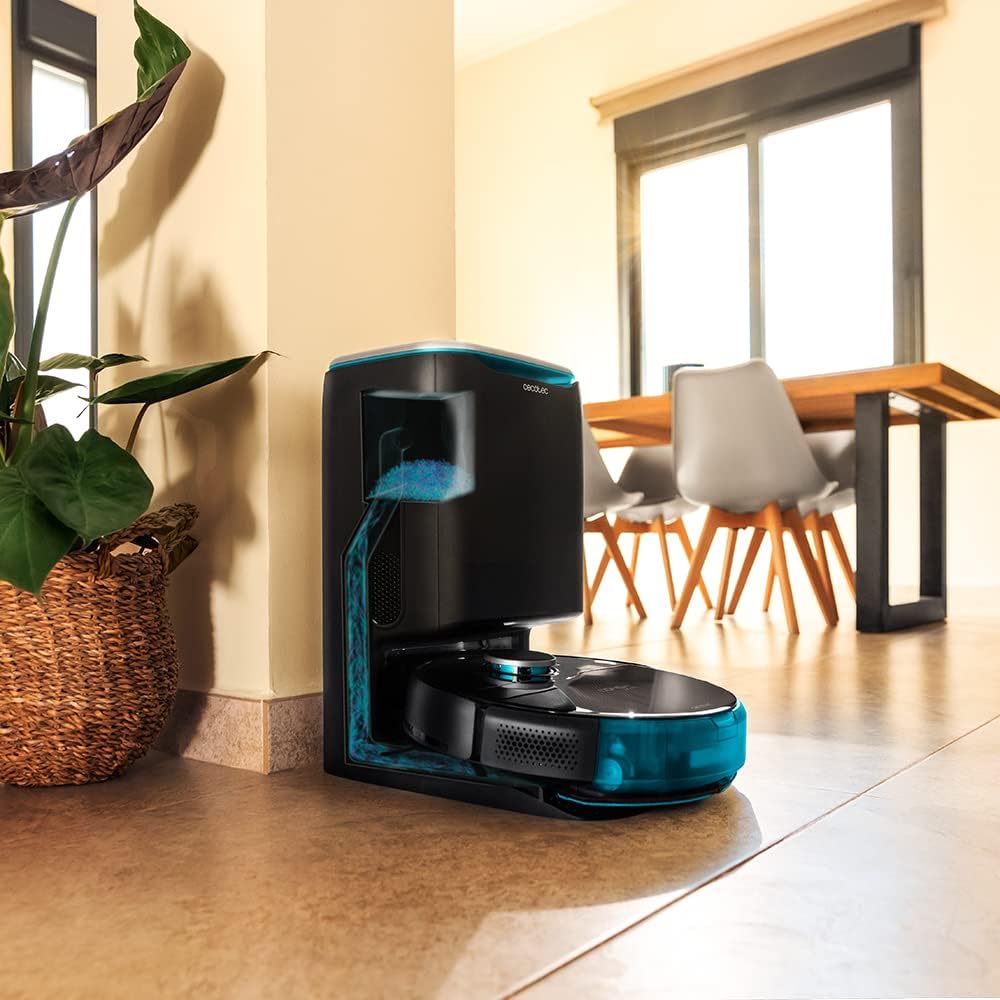
Image: The robot vacuum is compatible with the CongaHome 10.000 self-emptying station for convenient dust disposal.
Trikčių šalinimas
Jei kyla problemų dėl roboto dulkių siurblio, dažniausiai pasitaikančias problemas ir sprendimus rasite toliau pateiktoje lentelėje.
| Problema | Galima priežastis | Sprendimas |
|---|---|---|
| Robotas neįsijungia ir neįkraunamas. | Žema akumuliatoriaus įkrova; nešvarūs įkrovimo kontaktai; neprijungtas maitinimo adapteris. | Place robot on charging station; clean charging contacts; ensure power adapter is securely connected. |
| Prastas valymo našumas. | Dulkių surinktuvas pilnas; šepečiai susivėlę; filtras užsikimšęs. | Empty dust bin; clean main and side brushes; clean or replace filter. |
| Robotas dažnai užstringa. | Per daug kliūčių; nešvarūs jutikliai. | Clear the cleaning area of loose cables and small objects; clean all sensors. |
| Programėlės ryšio problemos. | Neteisingas „Wi-Fi“ slaptažodis; silpnas „Wi-Fi“ signalas; robotas neįjungtas susiejimo režimu. | Verify Wi-Fi password; ensure robot is within Wi-Fi range; reset robot and re-attempt pairing as per app instructions. |
| Robotas skleidžia neįprastą triukšmą. | Brush or wheel obstructed; foreign object inside. | Check and clean main brush, side brushes, and wheels for obstructions. |
Specifikacijos
| Funkcija | Detalė |
|---|---|
| Prekės ženklas | Cecotec |
| Modelio pavadinimas | Conga 9090 AI |
| Modelio numeris | 05416 |
| Spalva | Juoda |
| Gaminio matmenys | 17.5 x 40 x 54.2 cm |
| Prekės svoris | 4.1 kilogramo |
| Talpa (dulkių konteineris) | 2.5 litrai |
| Triukšmo lygis | 64 dB |
| Automatinis išjungimas | Nr |
| Suderinami įrenginiai | „Amazon Echo“, „Google Home“. |
| Ypatinga funkcija | Programuojamas |
Garantija ir palaikymas
For warranty information, technical support, or service requests, please refer to the warranty card included with your product or visit the official Cecotec websvetainėje. Išsaugokite pirkimo kvitą kaip pirkimo įrodymą garantiniams reikalavimams.
Taip pat galite apsilankyti „Cecotec“ parduotuvė „Amazon“ platformoje daugiau informacijos apie produktą ir pagalbos išteklių.
Ask a question about this manual
Ask about setup, troubleshooting, compatibility, parts, safety, or missing instructions. Manuals+ will review the question and use this page’s manual context to help answer it.