
Įvadas
This manual provides detailed instructions for the installation, operation, and maintenance of your NC SWM 9702 Car Radio 1 Din MP5 Player. Please read this manual thoroughly before using the product to ensure proper functionality and safety. Keep this manual for future reference.
Produkto savybės
- 7-Inch HD Retractable Screen: Provides a clear and intuitive display for navigation, video playback, and system controls.
- Android operacinė sistema: Offers a familiar interface and access to various applications.
- Bluetooth 4.0 ryšys: Supports hands-free calling and audio streaming for safe driving.
- Veidrodinio ryšio funkcija: Seamlessly projects your smartphone screen (iOS/Android) onto the player's display via USB or WiFi.
- GPS navigacija: Built-in GPS with support for offline maps (Europe) and real-time traffic updates.
- Galinis View Kameros įvestis: Enhances parking safety with automatic display when reversing (camera optional/included with this model).
- FM radijas: High-quality radio tuner with a frequency range of 87.5~108MHz.
- USB & AUX Input: Multiple connectivity options for media playback from USB drives and external audio devices.
- Vairo valdymo palaikymas: Allows integration with your vehicle's steering wheel controls for convenient operation.
- Lossless Audio Support: Compatible with APE/FLAC and other popular audio formats.
- 4-Core CPU: Ensures smooth performance and faster operation.
Kas yra dėžutėje
Patikrinkite, ar pakuotėje yra visi toliau išvardyti komponentai:
- 1 x Android Head Unit (SWM 9702)
- 1x GPS antena
- 2 x išardymo raktai
- 2 x Power Cords (Wiring Harnesses)
- 1x galinis View Camera (4LED)
- 1x USB laidas

Figure 1: All components included in the NC SWM 9702 package.
Sąranka ir diegimas
Šiam gaminiui rekomenduojamas profesionalus montavimas. Prieš pradėdami montuoti, įsitikinkite, kad transporto priemonės maitinimas yra atjungtas.
Kontrolinis sąrašas prieš montavimą
- Ensure your vehicle's dashboard has a 1-DIN slot.
- Gather necessary tools (screwdrivers, wire strippers, electrical tape, multimeter).
- Identify your vehicle's wiring harness for power, speakers, and accessories.
Laidų jungtys
Refer to the provided wiring diagram (usually on the unit or in a separate sheet) for precise connections. Below are general guidelines:
- Geltonas laidas (B+): Prijunkite prie nuolatinės 12 V įtampos.
- Raudonas laidas (ACC): Prijunkite prie 12 V maitinimo šaltinio (uždegimo).
- Juodas laidas (GND): Prijunkite prie automobilio važiuoklės įžeminimo.
- Mėlynas laidas (ANT): Prijunkite prie maitinimo antenos arba amp„Lifier“ nuotolinis įjungimas.
- Garsiakalbių laidai: Prijunkite prie atitinkamų automobilio garsiakalbių laidų (pvz., balta/balta-juoda priekiniam kairiajam garsiakalbiui, pilka/pilka-juoda priekiniam dešiniajam garsiakalbiui, žalia/žalia-juoda galiniam kairiajam garsiakalbiui, violetinė/violetinė-juoda galiniam dešiniajam garsiakalbiui).
- Reverse Input Wire: Connect to the vehicle's reverse light signal for automatic camera display.
- GPS antena: Prijunkite GPS anteną prie specialaus prievado įrenginio gale ir pritvirtinkite ją vietoje, kur nėra šviesos. view dangaus (pvz., prietaisų skydelis, priekinis statramstis).
- Galinis View Kamera: Connect the camera's video output to the "CAM IN" or "REVERSE VIDEO" input on the unit. Power the camera from the reverse light circuit.
Įrenginio montavimas
- Carefully slide the head unit into the 1-DIN mounting sleeve until it clicks into place.
- Pritvirtinkite įrenginį naudodami pateiktus tvirtinimo laikiklius arba varžtus.
- Surinkite prietaisų skydelio apdailos plokštes.
Naudojimo instrukcijos
Pagrindinė operacija
- Maitinimo įjungimas/išjungimas: Norėdami įjungti arba išjungti įrenginį, paspauskite maitinimo mygtuką (dažniausiai tai yra VOL rankenėlė).
- Garsumo valdymas: Rotate the VOL knob or use the on-screen controls.
- Ekrano atitraukimas: The screen automatically retracts when the unit is turned off or can be manually retracted/extended via a dedicated button.
- Pagrindinis ekranas: Tap the Home icon to return to the main menu.
Bluetooth Hands-free and Audio
- Go to the Bluetooth menu on the head unit.
- Įjunkite „Bluetooth“ savo mobiliajame telefone ir ieškokite galimų įrenginių.
- Select "SWM 9702" (or similar name) from the list and pair.
- Once connected, you can make/receive calls and stream audio directly through the car speakers.
Veidrodinio susiejimo funkcija
This feature allows you to display your smartphone's screen on the head unit.
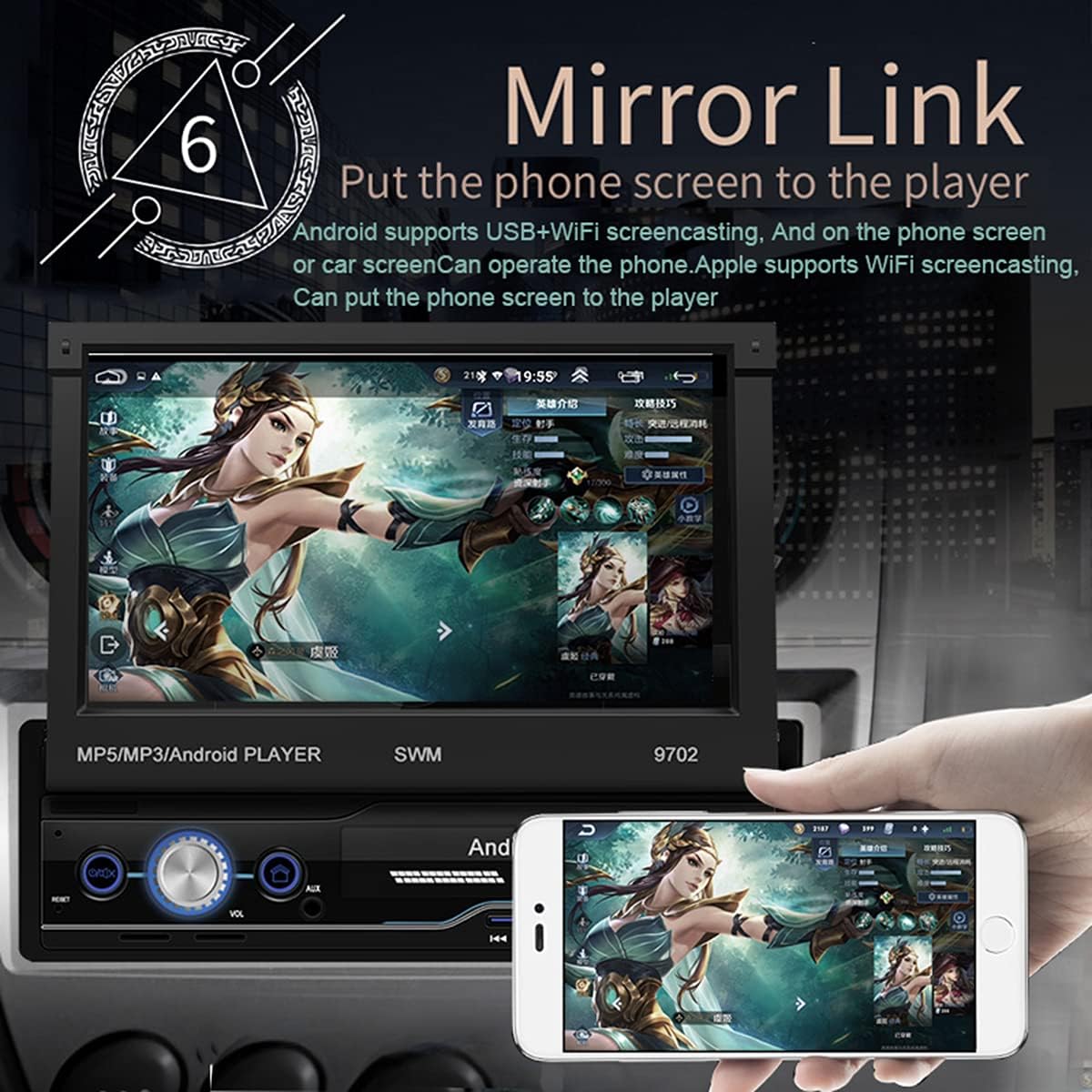
Figure 2: Mirror Link in action, showing a smartphone screen duplicated on the car radio display.
- „Android“: Connect your phone via USB or WiFi. Follow the on-screen prompts to enable USB debugging or WiFi mirroring. You can control the phone from the car screen.
- For iOS (Apple): Connect via WiFi. The phone screen will be mirrored to the player. Control is typically from the phone itself.
GPS navigacija
The unit comes with pre-installed offline maps for Europe and supports online navigation.

Figure 3: GPS Navigation interface showing map data and route details.
- Tap the "Navigation" or "GPS" icon on the home screen.
- Select your preferred navigation application (e.g., Google Maps, Waze, or the pre-installed offline map).
- Enter your destination and follow the voice and visual prompts.
Galinis View Kameros funkcija
When properly installed, the unit automatically displays the rear view kai transporto priemonė įjungia atbulinės eigos pavarą.
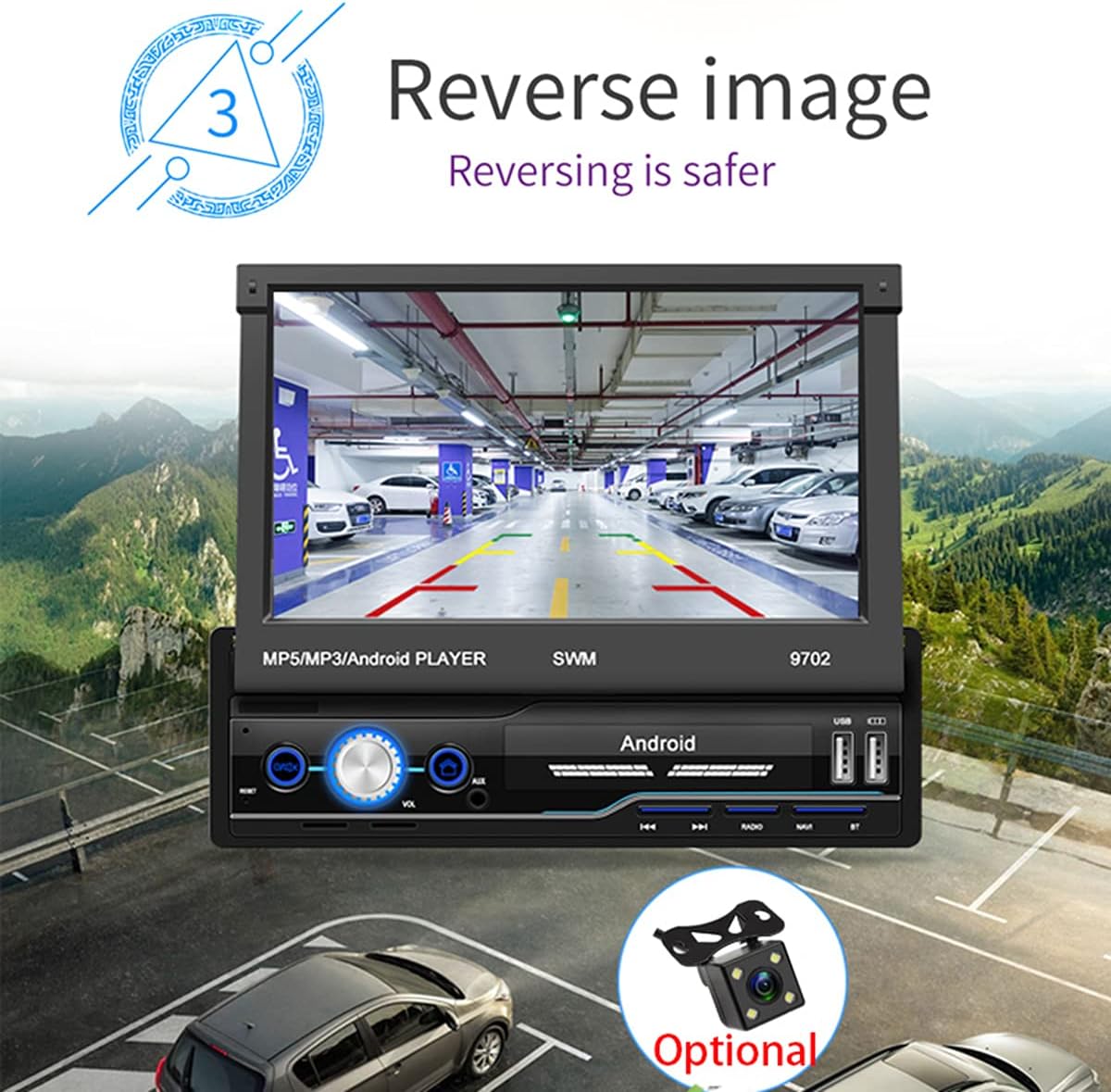
4 pav.: galinis view camera display for safer reversing.
- Užtikrinkite galinę dalį view camera is correctly wired to the unit and the vehicle's reverse light circuit.
- Perjungiant atbulinės eigos pavarą, ekranas automatiškai persijungs į kamerą view.
FM radijas
- Pradiniame ekrane palieskite piktogramą „Radijas“.
- Naudokite nuskaitymo funkciją, kad automatiškai ieškotumėte ir išsaugotumėte galimas stotis.
- Manually tune by frequency or select from saved presets.
USB ir AUX atkūrimas
- USB: Insert a USB flash drive into the USB port. The unit will automatically detect and allow you to browse and play audio/video/picture files.
- AUX: Connect an external audio device (e.g., MP3 player) to the AUX input using a 3.5mm audio cable. Select "AUX" as the source.
Vairo valdymo mokymasis
If your vehicle has steering wheel controls, you can configure them to operate the head unit.
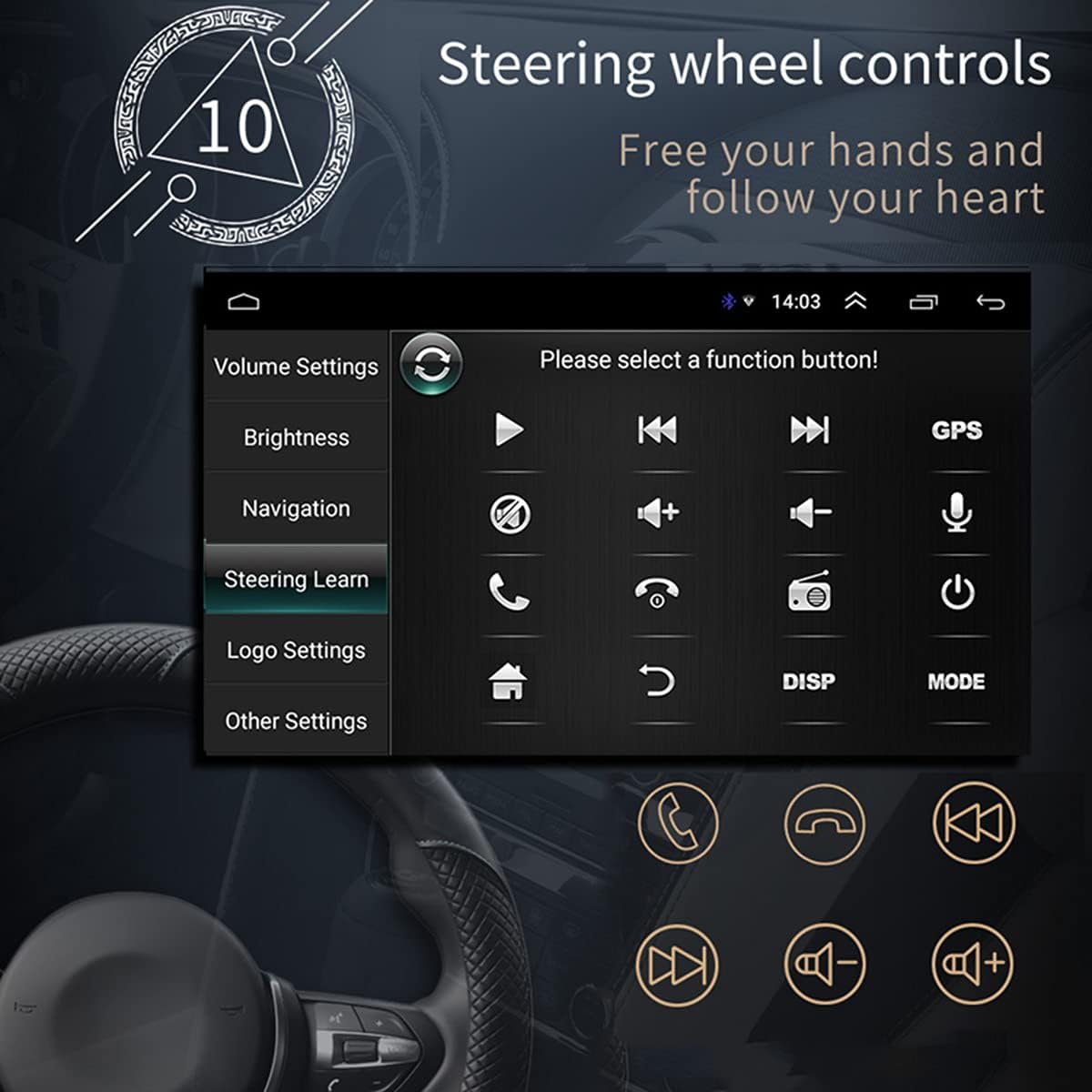
5 pav.: Vairo valdymo mokymosi sąsaja.
- Go to "Settings" > "Steering Wheel Learning" or "SWC".
- Follow the on-screen instructions to assign functions to your steering wheel buttons. This typically involves pressing a button on the screen, then pressing the corresponding button on your steering wheel.
WiFi ryšys
Connect the unit to a WiFi hotspot for online features and app downloads.

Figure 6: WiFi connection enables access to online applications.
- Eikite į „Nustatymai“ > „Tinklas ir internetas“ > „Wi-Fi“.
- Įjunkite „Wi-Fi“ ir iš sąrašo pasirinkite norimą tinklą.
- Jei būsite paraginti, įveskite slaptažodį ir prisijunkite.
APE/FLAC Lossless Audio Playback
The unit supports high-quality audio formats for superior sound experience.

Figure 7: Music player interface demonstrating APE/FLAC support.
- Užtikrinkite savo garsą files are in supported formats (MP3, WMA, WAV, APE, FLAC).
- Play them from a USB drive or other connected media.
Priežiūra
- Ekrano valymas: Ekraną švelniai nuvalykite minkštu, nepūkuotu audiniu. Nenaudokite abrazyvinių valiklių ar tirpiklių.
- Bendras valymas: Keep the unit free from dust and debris. Use a soft brush or compressed air for vents and buttons.
- Programinės įrangos atnaujinimai: Periodiškai tikrinkite gamintojo website or the unit's settings for available software updates to ensure optimal performance and new features.
Trikčių šalinimas
Jei kyla problemų, prieš kreipdamiesi į palaikymo tarnybą, peržiūrėkite toliau pateiktas dažniausiai pasitaikančias problemas ir sprendimus.
| Problema | Galima priežastis | Sprendimas |
|---|---|---|
| Įrenginys neįsijungia. | Incorrect wiring (B+ or ACC), blown fuse, vehicle battery issue. | Check power connections (Yellow and Red wires), inspect fuses, ensure vehicle battery is charged. |
| Nėra garso iš garsiakalbių. | Speaker wires incorrectly connected, volume too low, mute enabled, incorrect audio source. | Verify speaker wiring, increase volume, check mute setting, select correct audio source (FM, USB, AUX, BT). |
| GPS signalas silpnas arba nerastas. | GPS antenna improperly installed or obstructed, unit not receiving satellite signals. | Ensure GPS antenna is mounted in a clear location (e.g., dashboard), check antenna connection. |
| Veidrodinė nuoroda neveikia. | Incorrect USB cable, USB debugging not enabled (Android), incompatible phone. | Use original or high-quality USB cable, enable USB debugging in phone developer options, check compatibility list. |
| Galinis view kamera nerodo. | Camera not powered, video input wire disconnected, reverse trigger wire not connected. | Check camera power supply, verify video cable connection, ensure reverse trigger wire is connected to reverse light. |
Specifikacijos
| Funkcija | Detalė |
|---|---|
| Modelis | SWM 9702 |
| ttage | 12 V |
| Sistema | Android |
| Konfigūracija | 1 GB RAM + 16 GB atminties |
| Ekrano dydis | 7 Inches (HD Retractable) |
| Ekrano raiška | 1024*600 |
| Skydelio dydis | 188*58mm |
| Skydo apšvietimas | Mėlyna |
| Maitinimo išvestis | 60W |
| Darbinė temperatūra | -10-60 laipsnių Celsijaus |
| Bluetooth versija | 4.0 |
| Galia Ampkeltuvas Chip | TDA7388 |
| Radijo dažnis | FM 87.5 ~ 108MHz |
| GPS navigacija | Support (Built-in offline map: Europe) |
| Wireless WIFI | Palaikymas |
| Mobilusis internetas | Support (Apple/Android) |
| USB sąsaja | 2 rear tail cable plus front |
| RCA Terminal Introduction | 2 audio outputs, 2 audio inputs, 2 video inputs, 1 reversing input, 1 video output |
| Front AUX Audio Input | Taip |
| DVR funkcija | Palaikymas |
| Car Logo Replacement | Palaikymas |
| Supported Picture Format | JPG |
| Gamyklinio nustatymo slaptažodis | 1111 |
Garantija ir palaikymas
For warranty information, technical support, or service inquiries, please refer to the purchase documentation or contact the retailer/manufacturer directly. Keep your proof of purchase for warranty claims.
Manufacturer: N\\C
Pirmą kartą prieinama: 2021 m. liepos 29 d.