
1. Įvadas
This manual provides instructions for the setup, operation, and maintenance of your Crosley C6B-DB Belt-Drive Bluetooth Turntable. The C6B-DB is a fully manual two-speed turntable designed to deliver an authentic analog listening experience. It features a durable MDF plinth, a heavy steel platter, and a low-vibration synchronous motor. The adjustable tonearm with a pre-installed moving magnet cartridge allows for precise tracking. Connectivity options include RCA outputs for wired speakers and built-in Bluetooth for wireless streaming to external speakers. Please read this manual thoroughly before using your turntable.
2. Saugos informacija
Please observe the following safety precautions to prevent damage to the unit and ensure safe operation:
- Saugokite įrenginį nuo lietaus ar drėgmės.
- Nelaikykite įrenginio tiesioginiuose saulės spinduliuose, šilumos šaltiniuose ar ekstremaliose temperatūrose.
- Užtikrinkite tinkamą vėdinimą aplink įrenginį.
- Naudokite tik su įrenginiu pateiktą maitinimo adapterį.
- Nebandykite ardyti ar modifikuoti įrenginio. Visus techninės priežiūros darbus patikėkite kvalifikuotiems darbuotojams.
- Saugokite įrenginį nuo stiprių magnetinių laukų.
- Handle the stylus with care to avoid damage and injury.
3. Kas yra dėžutėje
Patikrinkite, ar pakuotėje yra visi toliau išvardyti daiktai:
- Crosley C6B-DB Turntable Unit
- Maitinimo šaltinio adapteris
- Vartotojo vadovas
- Apsauga nuo dulkių
- Lėkštė
- Pavarokite diržą
- Veltinis Mat
- Atsvara
- Svoris nuo pačiūžų
4. Produktas baigtasview
Familiarize yourself with the components of your Crosley C6B-DB turntable.

1 paveikslas: Crosley C6B-DB Turntable with its clear dust cover in place. This image shows the overall design of the turntable, including the plinth, platter, tonearm, and the protective dust cover.
4.1 Viršus View Komponentai
- Apsauga nuo dulkių: Apsaugo patefoną nuo dulkių, kai jis nenaudojamas.
- Lėkštė: The surface on which records are placed. Made of heavy steel for stability.
- Veltinio kilimėlis: Provides a soft surface for records and helps reduce static.
- Velenė: Holds the record in place on the platter.
- Tonearmas: Holds the cartridge and stylus, guiding it across the record grooves.
- Kasetė: Converts groove vibrations into electrical signals. The C6B-DB comes with a pre-installed moving magnet cartridge.
- Plunksna (adata): The tip of the cartridge that reads the record grooves.
- Atsvara: Adjusts the tracking force of the tonearm.
- Apsauginis ratukas nuo slydimo: Compensates for the inward force on the tonearm, ensuring even tracking.
- Sulenkimo svirtis: Švelniai pakelia ir nuleidžia tonarmą.
- Greičio parinkiklis: Switch between 33 1/3 RPM and 45 RPM.
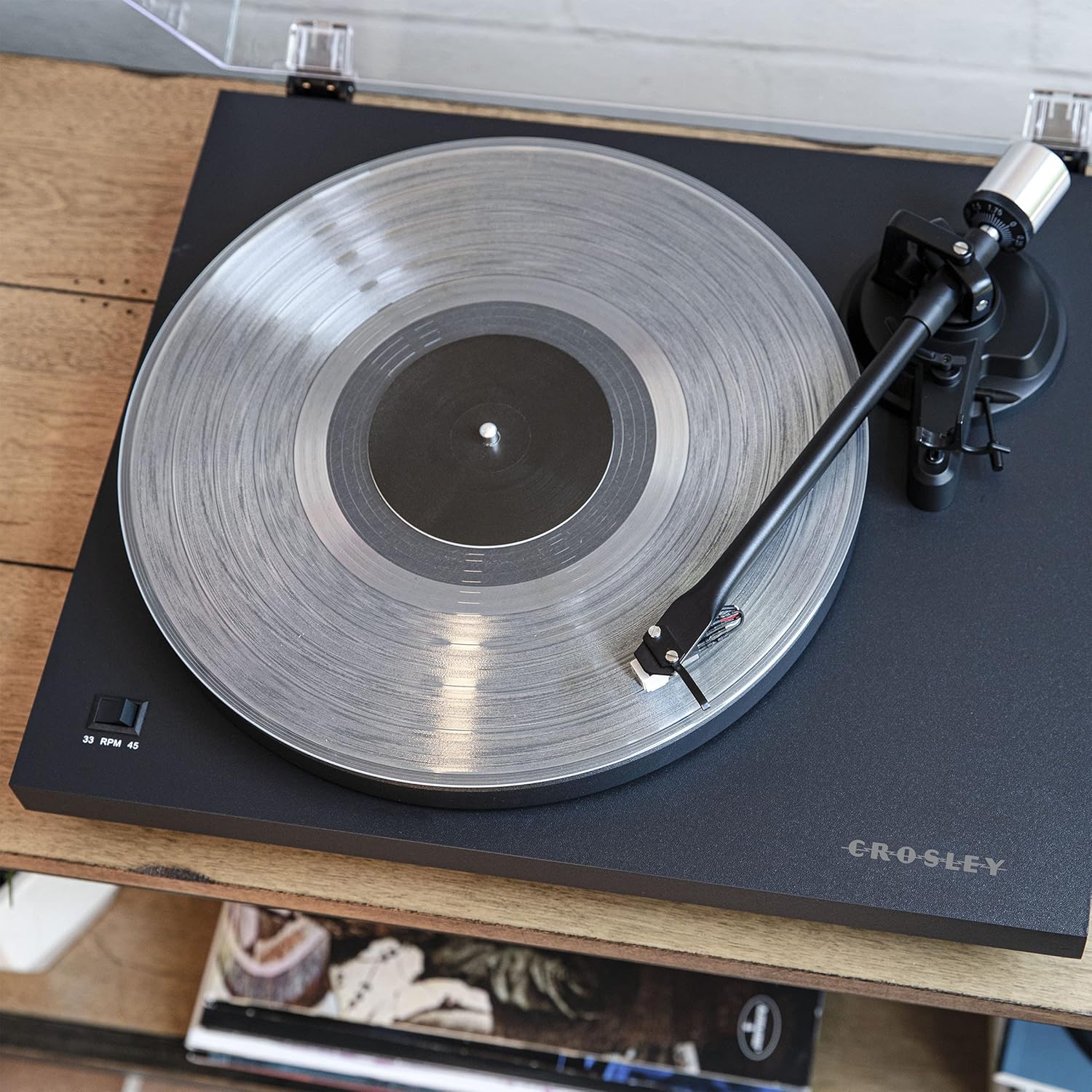
2 paveikslas: Iš viršaus į apačią view of the turntable, highlighting the platter, felt mat, spindle, and the tonearm assembly. The speed selector switch is visible on the left side of the plinth.

3 paveikslas: A detailed close-up of the pre-installed moving magnet cartridge and stylus on the tonearm. This component is crucial for converting the physical grooves of a record into an audio signal.
4.2 Galinio skydelio jungtys
- Antžeminis terminalas: For connecting a ground wire from an amplifier/receiver to reduce hum.
- RCA išvestis (K/D): Jungiasi prie an ampkeltuvai arba maitinami garsiakalbiai.
- Fono / linijos jungiklis: Selects between the built-in preamplifier (Line) or an external phono preamplifier (Phono).
- DC IN 12V: Maitinimo įvestis pridedamam adapteriui.
- Bluetooth indikatorius: LED light indicating Bluetooth pairing status.
- Maitinimo jungiklis: Turns the turntable on or off.

4 paveikslas: The rear panel of the turntable, showing the ground terminal, RCA L/R outputs, Phono/Line switch, DC 12V power input, Bluetooth indicator, and the main power switch.
5. Sąranka
Follow these steps to set up your turntable for first use.
5.1 Išpakavimas ir įdėjimas
- Atsargiai išimkite visus komponentus iš pakuotės.
- Place the turntable on a stable, level surface away from direct sunlight, heat, and vibrations.
- Ensure there is enough space around the turntable for proper ventilation and operation.
5.2 Plokštelės ir diržo montavimas
- Uždėkite lėkštę ant patefono veleno.
- Locate the drive belt. Gently stretch the belt around the inner rim of the platter and then around the motor pulley. Ensure the belt is not twisted.
- Padėkite veltinio kilimėlį ant lėkštės viršaus.
5.3 Tonarmo balanso ir sekimo jėgos reguliavimas
Proper tonearm adjustment is crucial for optimal sound quality and to prevent damage to your records and stylus.
- Nuimkite rašiklio apsaugą.
- Place the counterweight onto the rear of the tonearm. Rotate it clockwise until it is approximately halfway on.
- With the cueing lever in the down position, carefully balance the tonearm by rotating the counterweight until the tonearm floats horizontally. Do not let the stylus touch the platter or record.
- Once balanced, hold the counterweight steady and rotate the numbered ring on the front of the counterweight until "0" aligns with the line on the tonearm.
- Rotate the entire counterweight (both parts) counter-clockwise to the recommended tracking force. For the pre-installed cartridge, a tracking force of 2.0 grams is typically recommended. Refer to your cartridge manufacturer's specifications for precise values.
5.4 Anti-skate Adjustment
The anti-skate mechanism prevents the tonearm from being pulled inward excessively.
- Attach the small loop of the anti-skate weight's thread to the anti-skate post on the tonearm.
- Pass the thread through the wire support.
- Set the anti-skate dial to the same value as your tracking force (e.g., 2.0 for 2.0 grams tracking force).
5.5 Garso jungtis
Connect your turntable to an audio system.
- Using Built-in Preamplifier (Line Out): Connect the RCA cables from the turntable's RCA outputs to a Line-level input (AUX, CD, Tuner) on your amplifier or powered speakers. Set the Phono/Line switch on the turntable's rear panel to "Line".
- Using External Preamplifier (Phono Out): Jei jūsų amplifier has a dedicated Phono input, connect the RCA cables from the turntable's RCA outputs to the Phono input on your amplifier. Set the Phono/Line switch on the turntable's rear panel to "Phono". Connect the ground wire from the turntable to the ground terminal on your ampgyvesnis.
5.6 Maitinimo jungtis
Connect the power adapter to the DC IN 12V port on the turntable and then plug it into a wall outlet.
6. Operacija
Instructions for playing records and using Bluetooth connectivity.
6.1 Įrašo atkūrimas
- Ensure the turntable is powered on using the switch on the rear panel.
- Select the correct speed (33 1/3 or 45 RPM) using the speed selector switch on the plinth.
- Place a record on the felt mat.
- Pakelkite tonarmą naudodami tonarmo svirtį.
- Rankiniu būdu nustatykite tonarmą virš norimo plokštelės pradinio griovelio.
- Gently lower the tonearm using the cueing lever. The stylus will begin playing the record.
- Norėdami sustabdyti atkūrimą, pakelkite tonarmą naudodami svirtį ir grąžinkite jį į tonarmo laikiklį.
6.2 Bluetooth Out Function
The C6B-DB can stream audio wirelessly to external Bluetooth speakers.
- Įsitikinkite, kad jūsų išorinis „Bluetooth“ garsiakalbis veikia susiejimo režimu.
- Turn on the turntable. The Bluetooth indicator light on the rear panel will flash, indicating it is searching for a device.
- Prisijungus, „Bluetooth“ indikatoriaus lemputė ims šviesti mėlynai.
- You can now play records, and the audio will stream to your paired Bluetooth speaker.
- To disconnect, turn off the Bluetooth speaker or the turntable.
„1“ vaizdo įrašas: This video demonstrates the features and operation of the Crosley C6B Turntable, including playing records, speed selection, and Bluetooth connectivity. It highlights the adjustable tonearm, pre-mounted cartridge, steel platter, and belt-driven motor.
7. Priežiūra
Regular maintenance helps prolong the life of your turntable and records.
7.1 Patefono valymas
- Wipe the dust cover and plinth with a soft, dry cloth. Do not use abrasive cleaners or solvents.
- For the stylus, use a soft brush designed for stylus cleaning, brushing gently from back to front.
7.2 Rašiklio keitimas
The stylus is a consumable part and should be replaced after approximately 300-500 hours of playback, or if you notice a degradation in sound quality. The C6B-DB is compatible with NP5 replacement needles.
- Gently pull the old stylus assembly downwards and forwards to remove it from the cartridge.
- Align the new stylus assembly with the cartridge body and push it upwards until it clicks into place.
8. Problemų sprendimas
Jei kyla problemų dėl patefono, žr. toliau pateiktas dažniausiai pasitaikančias problemas ir sprendimus.
| Problema | Galima priežastis | Sprendimas |
|---|---|---|
| Nėra galios | Maitinimo adapteris neprijungtas; maitinimo lizdas neaktyvus. | Ensure power adapter is securely connected to the turntable and a working outlet. Check the power switch on the rear panel. |
| Nėra garso ar mažas garsumas | Incorrect Phono/Line switch setting; RCA cables not connected; Amplifier/speakers off or volume low; Stylus damaged. | Set Phono/Line switch correctly (Line for line input, Phono for phono input). Check RCA cable connections. Ensure amplifier/speakers are on and volume is up. Inspect stylus for damage and replace if necessary. |
| Garsas iškraipytas arba trūkčioja | Tracking force incorrect; Anti-skate incorrect; Stylus dirty or damaged; Record dirty or damaged; Turntable not level. | Re-adjust tracking force and anti-skate. Clean stylus. Clean record. Ensure turntable is on a level surface. Replace stylus if damaged. |
| Record speed incorrect | Incorrect speed selected; Drive belt dislodged or worn. | Select the correct speed (33 1/3 or 45 RPM). Check if the drive belt is properly seated around the platter and motor pulley. Replace belt if worn. |
| „Bluetooth“ nesusieja | External speaker not in pairing mode; Too far from speaker. | Ensure external Bluetooth speaker is in pairing mode. Move turntable closer to the speaker. |
9. Specifikacijos
| Funkcija | Detalė |
|---|---|
| Modelio numeris | C6B-DB |
| Gaminio matmenys | 16.38 x 14.25 x 5.25 colio |
| Prekės svoris | 12.13 svaro |
| Greičiai | 33 1/3, 45 aps./min |
| Variklio tipas | AC Motor, Belt-Drive |
| Kasetės tipas | Moving Magnet (NP5 replacement needle compatible) |
| Ryšys | RCA Output (Phono/Line switchable), Bluetooth Out |
| Medžiaga | Inžinerinė mediena, plastikas |
| Maitinimo šaltinis | Laidinis elektrinis (nuolatinė 12 V srovė) |
10. Garantija ir palaikymas
Crosley products are manufactured to high-quality standards. For detailed warranty information, please refer to the warranty card included with your product or visit the official Crosley website. If you encounter any issues or require technical assistance, please contact Crosley customer support.
Crosley Support: www.crosleyradio.com/support