
1. Įvadas
The VTech RM5752 Wi-Fi 1080p HD Video Monitor provides a secure and reliable way to monitor your baby. This system includes a 5-inch color screen parent unit and a 1080p HD camera unit, offering both local and remote viewing capabilities. Utilizing your home's wireless network, the monitor streams live video and audio, allowing you to stay connected whether you are at home or away via the MyVTech Baby 1080p app.
Pagrindinės funkcijos:
- 5-inch full color HD parent unit with 1080p HD camera.
- Automatic night vision for clear viewesant silpnam apšvietimui.
- 2x local digital zoom and 10x remote digital zoom for detailed viewing.
- Nuotolinis viewing access and control via the free VTech app.
- Motion alerts and temperature sensor with alerts on both parent unit and app.
- 9 soothing sounds and lullabies to assist with sleep.
- Local and remote two-way talk functionality.
2. Pakuotės turinys
Ensure all items are present in your package. If any items are missing or damaged, contact your retailer.
- Tėvų įrenginys (su įkraunama baterija)
- Kameros blokas
- Tėvų įrenginio maitinimo adapteris
- Camera Unit Power Adapter
- Wall Mount Bracket (for camera)
- Greitos pradžios vadovas

Image: The VTech RM5752 Wi-Fi 1080p HD Video Monitor package contents, including the parent unit, camera unit, and power adapters.
3. Darbo pradžia
3.1 Įjungimas
- Prijunkite mažąjį tėvų įrenginio maitinimo adapterio kištuką prie tėvų įrenginio maitinimo lizdo.
- Connect the large plug of the parent unit power adapter to a wall outlet.
- Paspauskite ir palaikykite GALIA button on the parent unit until the screen turns on.
- Connect the small plug of the camera unit power adapter to the camera unit's power jack.
- Connect the large plug of the camera unit power adapter to a wall outlet. The camera unit will power on automatically.
3.2 Kameros išdėstymas
Place the camera unit on a flat surface, such as a dresser or shelf, or mount it on a wall. Ensure the camera is positioned to provide a clear view of the desired area. The camera features an adjustable angle for optimal positioning.

Image: The camera unit of the VTech RM5752, illustrating its adjustable angle for flexible placement.
4. Monitoriaus valdymas
4.1 Parent Unit Functions
The 5-inch color LCD screen on the parent unit displays the live video feed from the camera. Use the control buttons to navigate menus and adjust settings.

Image: The VTech RM5752 parent unit, showcasing its 5-inch color LCD screen with a live video feed.
- Garsumo valdymas: Klausymo garsumą reguliuokite naudodami TŪRIS - ir VOL+ mygtukai.
- Skaitmeninis priartinimas: Paspauskite MODYTI button to activate 2x local digital zoom.
- Dvipusis pokalbis: Paspauskite ir palaikykite KALBĖKITE button to speak through the camera unit. Release to listen.
- Lopšinės: Access and play 9 pre-set lullabies and 4 natural sounds through the menu.
- Naktinis matymas: The camera automatically activates infrared night vision in low light conditions.
- Temperatūros jutiklis: The parent unit displays the room temperature detected by the camera. Alerts can be set for temperature fluctuations.

Image: A composite image highlighting the VTech RM5752's features: temperature sensor, automatic infrared night vision, two-way talk, and soothing sounds/lullabies.
4.2 Mobile App Integration (MyVTech Baby 1080p App)
For remote access and additional features, download the free MyVTech Baby 1080p app on your smartphone or tablet. This app allows you to:
- View live video and audio from anywhere with an internet connection.
- Control the camera's digital zoom (10x remote digital zoom).
- Receive motion alerts directly on your device.
- Engage in two-way talk with the camera unit.
- Monitor room temperature and receive alerts.
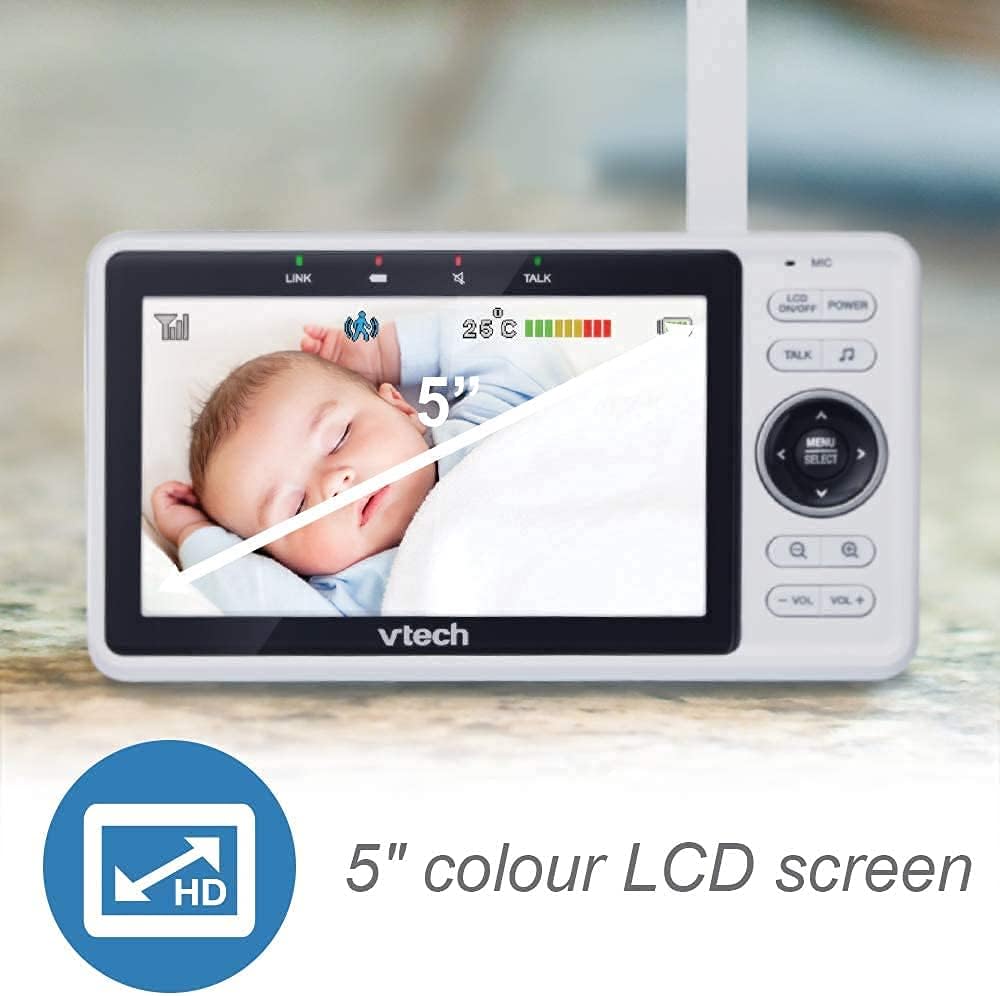
Image: A smartphone screen showing an instant motion alert notification from the VTech baby monitor app.
5. Priežiūra ir priežiūra
5.1 Monitoriaus valymas
To keep your VTech RM5752 monitor clean, wipe the surfaces of the parent unit and camera unit with a soft, damp cloth. Do not use cleaning sprays or liquid cleaners. Ensure the units are unplugged before cleaning.
5.2 Baterijos priežiūra (tėvų įrenginys)
The parent unit contains a rechargeable battery. To maximize battery life:
- Prieš naudodami pirmą kartą, visiškai įkraukite akumuliatorių.
- Saugokite, kad akumuliatorius nepatektų į ekstremalias temperatūras.
- If the unit will not be used for an extended period, remove the battery.
6. Problemų sprendimas
If you experience issues with your VTech RM5752 monitor, refer to the following common problems and solutions:
| Problema | Sprendimas |
|---|---|
| No link to camera / Disconnects frequently | Ensure both parent and camera units are within range of your Wi-Fi router. Check for obstructions. Restart both units and your Wi-Fi router. Verify your Wi-Fi network is stable. |
| No picture on parent unit | Check if the camera unit is powered on. Ensure the parent unit is charged and powered on. Re-pair the camera if necessary (refer to the full user manual for pairing instructions). |
| Nėra garso arba silpnas garsas | Increase the volume on the parent unit. Ensure the camera's microphone is not obstructed. |
| App not connecting or working | Ensure your smartphone/tablet has a stable internet connection. Verify the MyVTech Baby 1080p app is updated to the latest version. Restart the app and your device. Check your home Wi-Fi network settings. |
| Poor picture quality / Blurry image | Clean the camera lens. Ensure adequate lighting (night vision will activate in low light). Check for strong Wi-Fi signal strength. |
7. Techninės specifikacijos
Below are the technical specifications for the VTech RM5752 Wi-Fi 1080p HD Video Monitor:
- Modelio pavadinimas: RM5752
- Vaizdo įrašo raiška: 1080p
- Ryšio technologija: Bevielis, Wi-Fi
- Maitinimo šaltinis: Elektra su laidu (5 voltai)
- Suderinami įrenginiai: Išmanusis telefonas, planšetinis kompiuteris
- Montavimo tipas: Sieninis laikiklis
- Ypatingos savybės: Judesio jutiklis, naktinis matymas
- Spalva: Baltas
- Gaminio matmenys: 3 x 10 x 9 colio
- Prekės svoris: 1.7 svaro
- Tarptautinis apsaugos įvertinimas: IP54
- Fokusavimo tipas: Automatinis fokusavimas
- Priartinimo tipas: Skaitmeninis priartinimas
- Įspėjimo tipas: Tik judėjimas
- Vaizdo įrašymo formatas: MPEG-4
8. Garantija ir palaikymas
For detailed warranty information and technical support, please refer to the warranty card included with your product or visit the official VTech websvetainėje. website provides comprehensive support resources, including FAQs, product registration, and contact information for customer service.