
1. Įvadas
Thank you for choosing the Greadio MD-T26 Portable AM/FM/SW Radio. This manual provides detailed instructions for the proper setup, operation, and maintenance of your radio. Please read this manual thoroughly before use to ensure optimal performance and longevity of your device.
The Greadio MD-T26 is a versatile portable radio featuring AM, FM, and Shortwave (SW) bands, an LCD display for clear frequency and time viewing, and dual power options for both indoor and outdoor use. It is designed for ease of use with large, accessible controls and a built-in speaker for clear audio.

1 pav.: priekis view of the Greadio MD-T26 Portable AM/FM/SW Radio.
2. Produkto ypatybės
- Daugiajuostis priėmimas: Receives AM, FM, and Shortwave (SW) frequencies.
- LCD ekranas: Clear digital display for frequency and time settings.
- Dvi maitinimo parinktys: Operates via AC power or 4 x D cell batteries (not included).
- Aukštos kokybės garsiakalbis: Integrated 2W speaker for clear sound output.
- Tono valdymas: Adjustable tone settings (Low/High) for personalized audio.
- Ausinių lizdas: 3.5mm stereo earphone jack for private listening.
- Nešiojamas dizainas: Equipped with a sturdy handle for easy transport.
3. Sąranka
3.1 Radijo maitinimas
The Greadio MD-T26 radio offers two methods for power supply:
- Kintamosios srovės maitinimas: For indoor use, connect the included AC power cable to the radio's AC input jack and then plug it into a standard wall outlet.
- Akumuliatoriaus maitinimas: For portable use, insert four (4) D cell batteries (not included) into the battery compartment located on the back of the radio. Ensure correct polarity (+/-) as indicated inside the compartment.
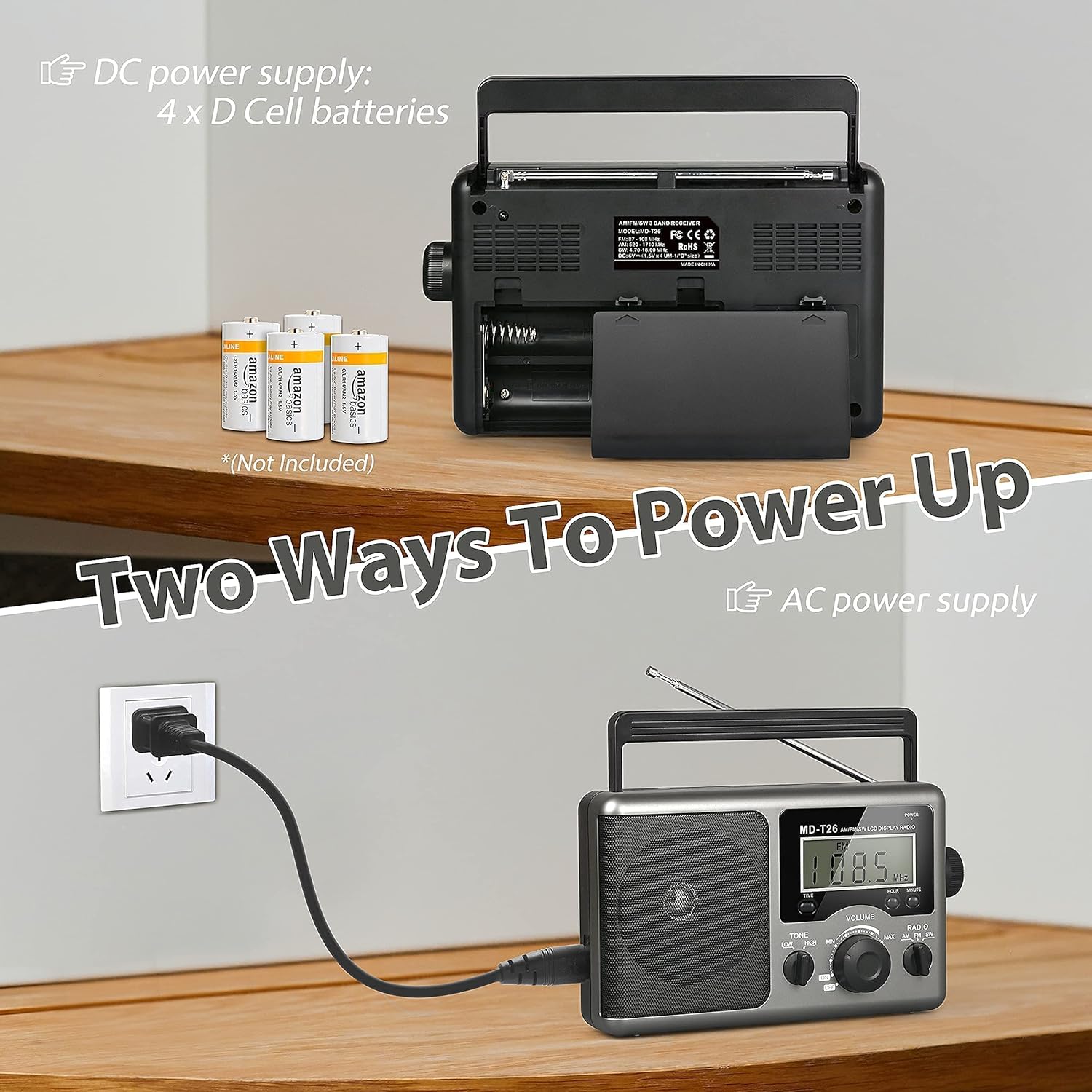
Figure 2: Illustration of AC power connection and battery compartment for D cell batteries.
3.2 Antenos reguliavimas
For optimal reception, adjust the antenna as follows:
- FM/SW priėmimas: Extend the telescopic antenna fully and adjust its angle for the clearest signal.
- Rytinis priėmimas: The radio uses a built-in ferrite rod antenna for AM. Rotate the entire radio unit to find the strongest signal.
4. Naudojimo instrukcijos
4.1 Valdymas baigtasview

3 pav. Išsamus view of the radio's control panel.
- Įjungimo mygtukas: Located on the top right, press to turn the radio ON/OFF.
- DERINIMO rankenėlė: Located on the right side, rotate to select radio stations.
- GARSUMO rankenėlė: Located on the front panel, rotate to adjust the sound level.
- RADIO Band Selector: Switch between AM, FM, and SW bands.
- TONE Switch: Select between LOW and HIGH tone settings.
- TIME/HOUR/MINUTE Buttons: Used for setting the time on the LCD display.
4.2 Turning On and Selecting a Band
- Paspauskite GALIA button to turn on the radio. The LCD display will illuminate.
- Naudokite RADIJAS band selector switch to choose your desired band: AM, FM, or SW.
4.3 Stoties nustatymas
Once a band is selected, slowly rotate the TUNINGAS knob on the right side of the radio. Observe the frequency displayed on the LCD screen. Stop rotating when you hear your desired station clearly.
4.4 Garsumo ir tono reguliavimas
- Apimtis: Pasukite TOMAS knob on the front panel clockwise to increase volume and counter-clockwise to decrease it.
- Tonas: Naudokite TONAS switch to select between 'LOW' for a warmer sound or 'HIGH' for a brighter sound, according to your preference.
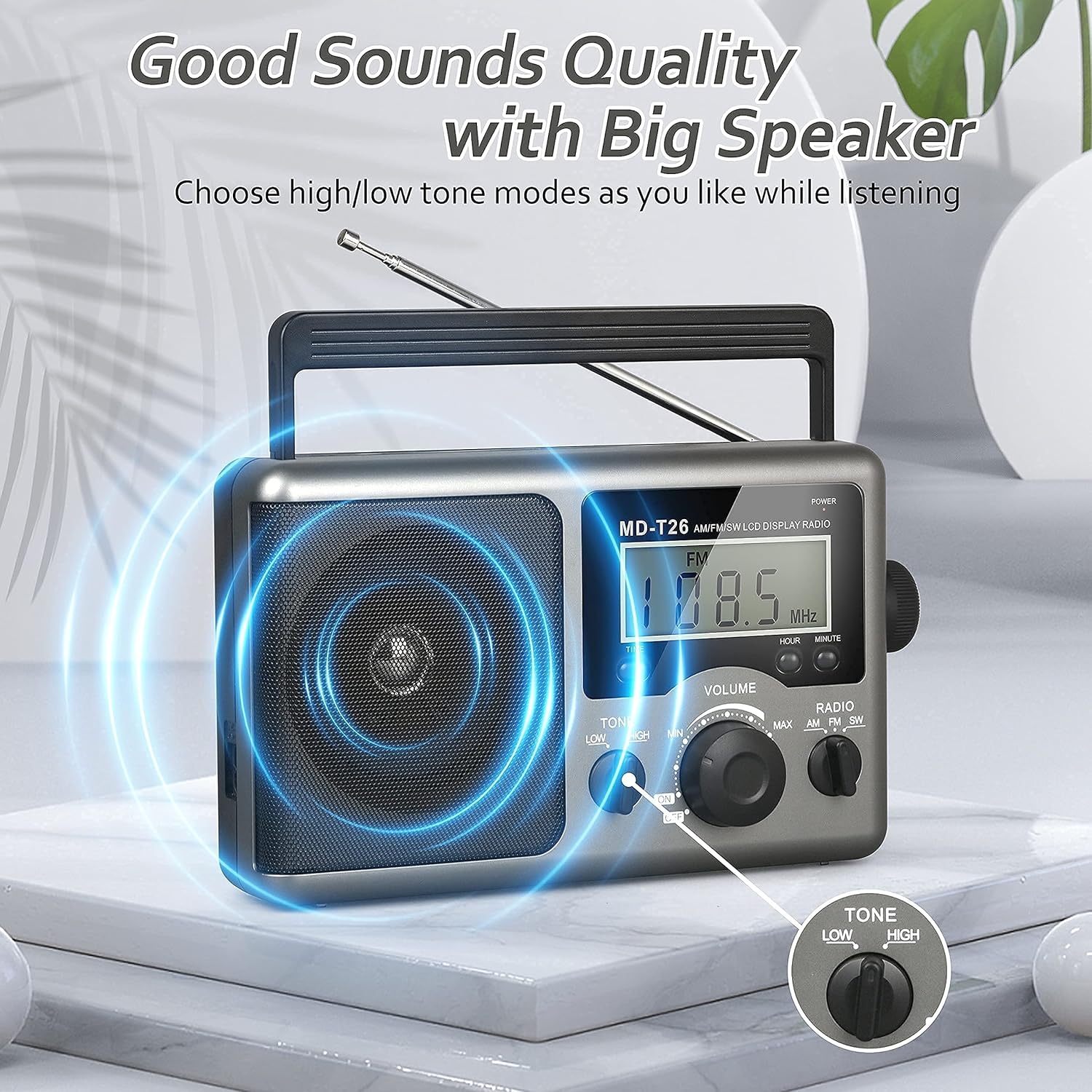
Figure 4: Speaker and Tone control detail.
4.5 Laiko nustatymas
The LCD display can also show the current time. To set the time:
- Paspauskite LAIKAS button once to enter time setting mode.
- Naudokite VALANDA mygtuką, norėdami reguliuoti valandas.
- Naudokite MINUTĖ mygtuką, kad nustatytumėte minutes.
- The time system is 24-hour format.
4.6 Using the Earphone Jack
For private listening, plug any standard 3.5mm stereo earphones (not included) into the AUSINIŲ TARPINIS located on the side of the radio. The internal speaker will automatically mute when earphones are connected.
5. Priežiūra
- Valymas: Radijo imtuvo išorę nuvalykite minkštu, sausu skudurėliu. Nenaudokite abrazyvinių valiklių ar tirpiklių.
- Akumuliatoriaus priežiūra: If the radio will not be used for an extended period, remove the D cell batteries to prevent leakage and damage.
- Saugykla: Radijo imtuvą laikykite vėsioje, sausoje vietoje, toliau nuo tiesioginių saulės spindulių ir ekstremalių temperatūrų.
- Atsparumas vandeniui: Šis radijas yra nėra atsparus vandeniui. Avoid exposure to rain, moisture, or splashing water.
6. Problemų sprendimas
| Problema | Galima priežastis | Sprendimas |
|---|---|---|
| Nėra galios | AC cable not connected, batteries depleted or incorrectly inserted. | Check AC cable connection. Replace batteries or ensure correct polarity. |
| Prastas signalas / statinis triukšmas | Antenna not extended/adjusted, weak signal area, interference. | Extend and adjust telescopic antenna (FM/SW). Rotate radio for AM. Move to an area with better signal. Avoid sources of electronic interference. |
| Nėra garso iš garsiakalbio | Volume too low, earphones connected. | Increase volume. Disconnect earphones if not intended for private listening. |
| LCD ekranas neveikia | Maitinimo problema, vidinis gedimas. | Patikrinkite maitinimo šaltinį. Jei problema išlieka, kreipkitės į klientų aptarnavimo tarnybą. |
7. Specifikacijos
| Funkcija | Detalė |
|---|---|
| Prekės ženklas | Greadio |
| Modelio numeris | MD-T26 |
| Ryšio technologija | Pagalbinis (ausinėms) |
| Derintuvo technologija | AM, FM, SW |
| Maitinimo šaltinis | AC Power, 4 x D Cell Batteries |
| Suderinami įrenginiai | Ausinės |
| Ekrano tipas | LCD |
| Techninės įrangos sąsaja | 3.5mm garso lizdas |
| Atsparumo vandeniui lygis | Neatsparus vandeniui |
8. Garantija ir palaikymas
8.1 Informacija apie garantiją
Greadio provides a 12 mėnesių garantija for this product, covering manufacturing defects from the date of purchase. Additionally, a 30 dienų pinigų grąžinimo garantija yra siūlomas.
Ši garantija netaikoma žalai, atsiradusiai dėl netinkamo naudojimo, nelaimingo atsitikimo, neleistinos modifikacijos ar įprasto nusidėvėjimo.
8.2 Pagalba klientams
For any questions, technical assistance, or warranty claims, please contact Greadio customer service. We offer Klientų aptarnavimas visą parą padėti jums.
Prašome žiūrėti ant produkto pakuotės arba mažmenininko websvetainę, kurioje rasite naujausią kontaktinę informaciją.