
UNITOPSCI A2878
UNITOPSCI A2878 Double Din Car Stereo User Manual
Modelis: A2878
1. Įvadas
This manual provides instructions for the installation, operation, and maintenance of your UNITOPSCI A2878 Double Din Car Stereo. This unit features a 7-inch touchscreen, Apple CarPlay, Android Auto, Bluetooth connectivity, FM radio, support for a backup camera, mirror link functionality, and dual USB ports.
Prieš naudodami gaminį, atidžiai perskaitykite šį vadovą, kad užtikrintumėte tinkamą veikimą ir išvengtumėte pažeidimų.
2. Pakuotės turinys
Patikrinkite, ar pakuotėje yra visi toliau išvardyti daiktai:
- Pagrindinis galvos blokas
- Atsarginė kamera
- Išorinis mikrofonas
- Dual USB Adapter
- Maitinimo kabelis
- Vartotojo vadovas
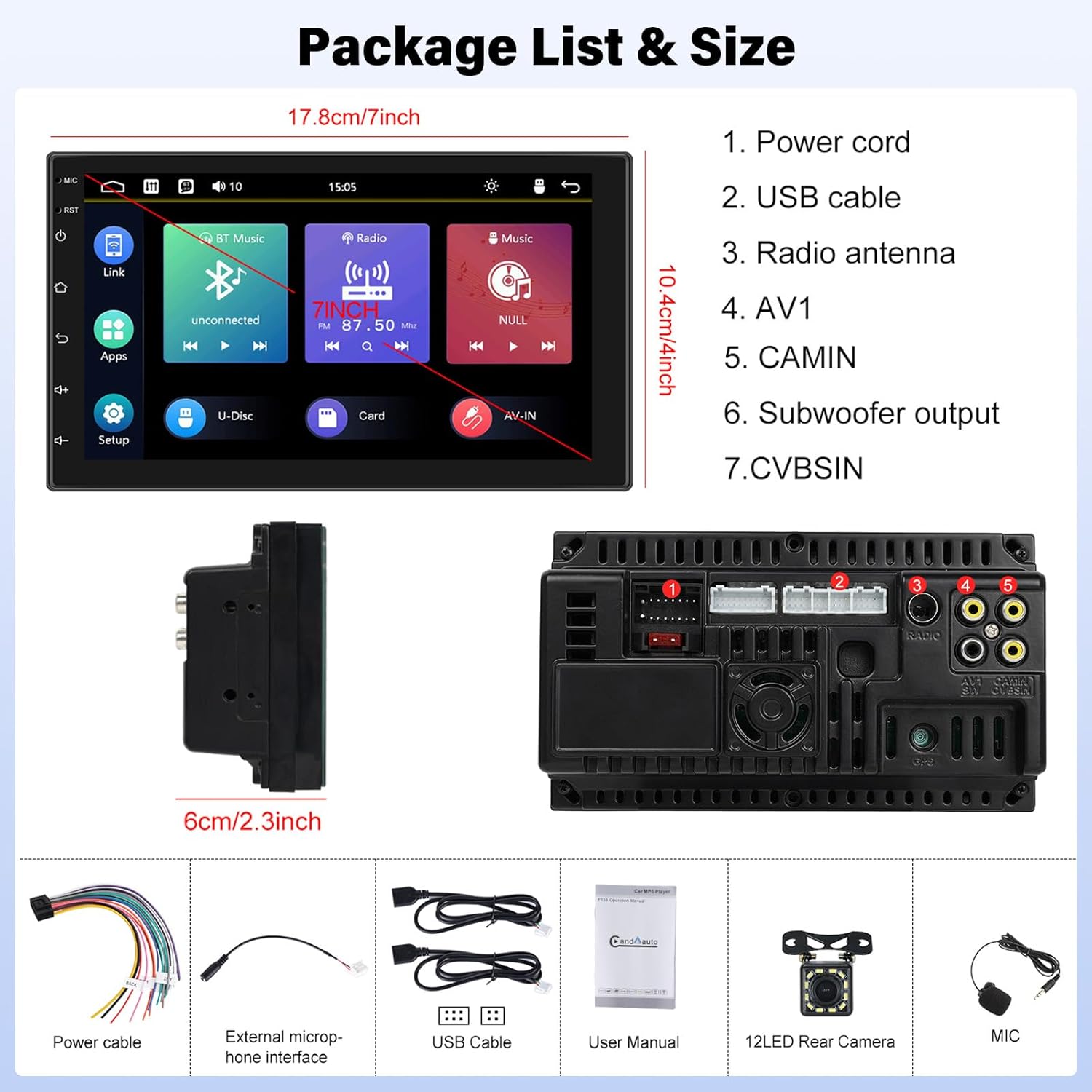
Image: Contents of the UNITOPSCI A2878 package, showing the main unit, wiring, and accessories.
3. Produktas baigtasview
The UNITOPSCI A2878 is a double din car stereo featuring a 7-inch high-definition touchscreen. The front panel includes essential controls and the display for various functions. The rear panel provides all necessary connection ports for power, speakers, USB devices, and external accessories like the backup camera.

Vaizdas: priekis view of the UNITOPSCI A2878 car stereo with its 7-inch touchscreen interface.

Image: Rear panel connections of the UNITOPSCI A2878 head unit, indicating ports for power, USB, radio antenna, AV, camera, subwoofer, and CVBS.
4. Sąranka ir diegimas
Proper installation is crucial for the performance and safety of your car stereo. It is recommended that installation be performed by a qualified professional.
4.1 Laidų jungtys
Konkrečius sujungimus žr. prie įrenginio pridėtoje laidų schemoje. Svarbiausios jungtys:
- Maitinimo laidas: Prijunkite prie transporto priemonės maitinimo šaltinio (nuolatinė 12 V įtampa, 12 V priedų įtampa ir įžeminimas).
- USB kabeliai: Connect the provided USB cables for CarPlay/Android Auto and media playback.
- Radijo antena: Prijunkite savo automobilio FM/AM anteną.
- CAMIN (kameros įvestis): Prijunkite galinio vaizdo kameros vaizdo signalą.
- Žemųjų dažnių garsiakalbio išvestis: Skirta išoriniam žemųjų dažnių garsiakalbiui prijungti.
- Išorinis mikrofonas: Prijunkite išorinį mikrofoną, kad pagerintumėte skambučių kokybę.
4.2 Galinio vaizdo kameros įrengimas
Install the backup camera at the rear of your vehicle. Connect its video output to the CAMIN port on the head unit and its power to the vehicle's reverse light circuit so it activates automatically when reversing.
5. Naudojimo instrukcijos
5.1 „CarPlay“ ir „Android Auto“
Connect your smartphone to the stereo via a USB cable to activate Apple CarPlay or Android Auto. This allows access to your phone's navigation, music, calls, and other compatible apps directly on the stereo's screen, controlled by voice or touch.

Image: Wired connection setup for CarPlay and Android Auto.

Image: CarPlay and Android Auto interfaces displayed on the stereo screen.
5.2 Veidrodinis ryšys
The mirror link function allows you to project your smartphone's screen (both iOS and Android) onto the stereo display via a USB cable. This enables viewing videos, navigation maps, and images from your phone on the larger screen.

Image: Mirror Link functionality with a smartphone connected to the stereo.
5.3 Bluetooth Hands-free & FM Radio
Bluetooth: Pair your smartphone with the stereo via Bluetooth for hands-free calling and wireless audio streaming. The built-in microphone facilitates clear communication. You can access your phone book and dial directly from the stereo.
FM radijas: The unit includes an FM tuner with 18 preset stations. Tune into your favorite radio programs, music, and traffic updates.

Image: FM Radio interface and Bluetooth hands-free call screen.
5.4 Galinio vaizdo kameros įvestis
When the vehicle is shifted into reverse, the stereo automatically displays the clear image from the connected backup camera, assisting with safe parking maneuvers.
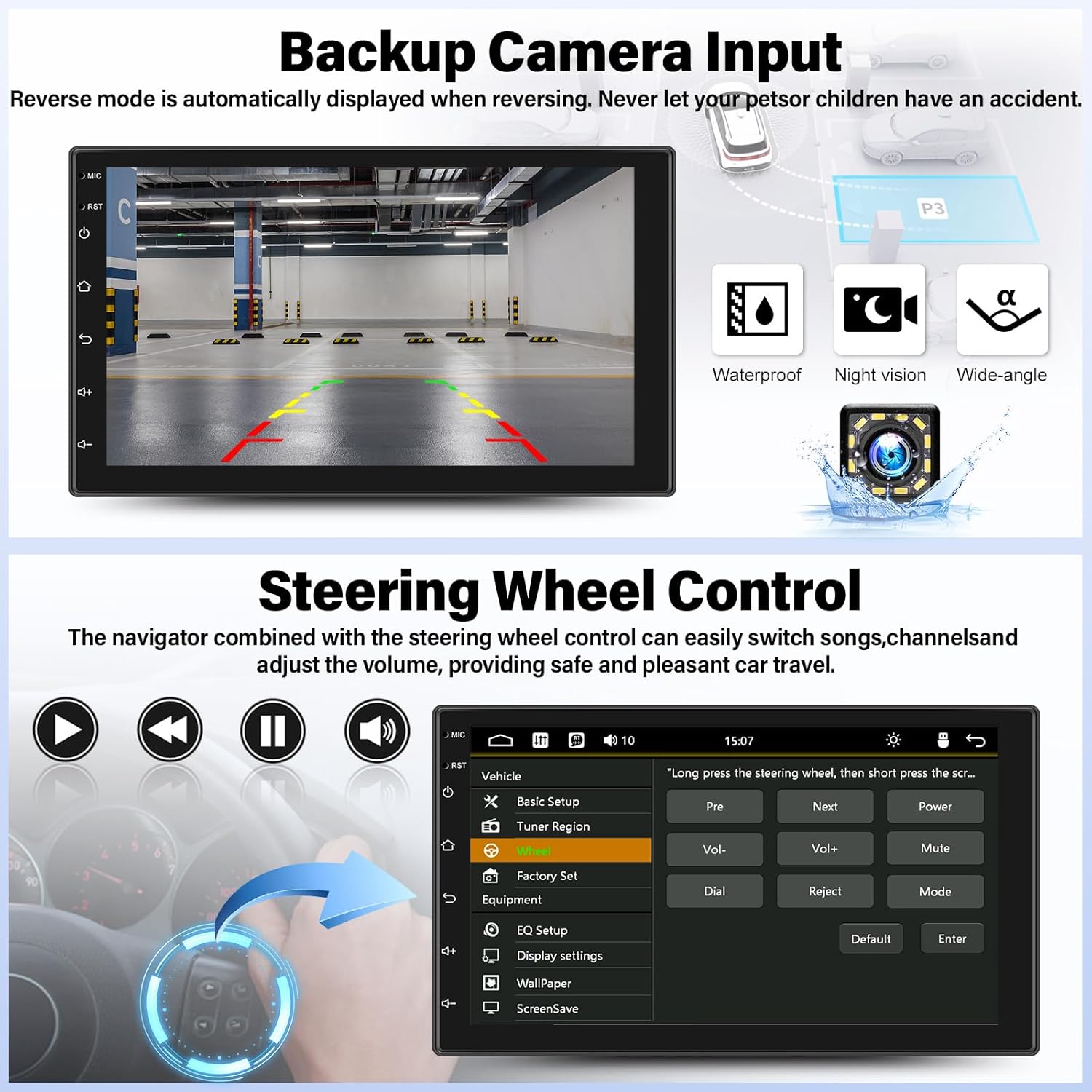
Image: Backup camera display on the stereo screen.
5.5 Vairo valdymas (SWC)
The unit supports steering wheel control, allowing you to manage functions such as volume adjustment, track skipping, and mode switching directly from your vehicle's steering wheel buttons (if compatible and wired correctly). This enhances convenience and safety while driving.
5.6 USB atkūrimas ir įkrovimas
The two USB adapter ports allow for media playback from a USB drive (audio/video files) and charging of compatible devices.

Image: USB media playback and charging capabilities.
5.7 Garso ekvalaizeris (EQ)
Adjust the audio output using the built-in equalizer. You can select from various preset audio styles (e.g., Classic, Pop, Rock, Jazz) or customize settings to match your preferences and vehicle acoustics. The unit also supports subwoofer output for enhanced bass.

Image: Audio Equalizer interface for sound customization.
6. Priežiūra
Norėdami užtikrinti automobilio garso sistemos ilgaamžiškumą ir optimalų veikimą, laikykitės šių priežiūros nurodymų:
- Valymas: Jutiklinį ekraną ir įrenginio išorę valykite minkšta, sausa šluoste. Venkite abrazyvinių valiklių ar tirpiklių.
- Temperatūra: Venkite įrenginio ilgalaikio laikymo tiesioginiuose saulės spinduliuose, itin aukštose temperatūrose ar didelėje drėgmėje.
- Jungtys: Periodiškai patikrinkite visus laidų sujungimus, kad įsitikintumėte, jog jie tvirtai pritvirtinti.
7. Problemų sprendimas
If you encounter issues with your UNITOPSCI A2878 car stereo, refer to the following common problems and solutions:
- Nėra galios: Check the power cable connections (constant 12V, accessory 12V, ground). Ensure the vehicle's fuse for the stereo is not blown.
- Nėra garso: Verify speaker connections. Check volume levels and audio settings (EQ). Ensure the mute function is not activated.
- „CarPlay“ / „Android Auto“ neprisijungia: Ensure your phone is connected via a compatible USB cable. Try a different USB port or cable. Check phone settings for CarPlay/Android Auto permissions.
- „Bluetooth“ poravimo problemos: Ensure Bluetooth is enabled on both the stereo and your phone. Delete previous pairings and try pairing again.
- Galinio vaizdo kamera nerodoma: Check the camera's power and video signal connections. Ensure the camera is properly installed and wired to the reverse light trigger.
- Jutiklinis ekranas nereaguoja: Try resetting the unit using the reset button (if available, typically a small pinhole).
Jei problemos išlieka, kreipkitės pagalbos į klientų aptarnavimo tarnybą.
8. Specifikacijos
| Funkcija | Specifikacija |
|---|---|
| Modelio numeris | A2878 |
| Ekrano dydis | 7 colių |
| Ekrano raiška | 1024x600 |
| Gaminio matmenys | 7.01 x 1.77 x 4.02 colio |
| Prekės svoris | 2.4 svaro (1.09 kilogramo) |
| Ryšio technologija | „Bluetooth“, USB, RCA |
| Valdiklio tipas | Android, iOS (via CarPlay/Android Auto) |
| Garso išvesties režimas | Stereo |
| Erdvinio garso kanalo konfigūracija | 2.0 |
| Vaizdo kodavimo palaikymas | H.264, H.263 |
9. Garantija ir palaikymas
UNITOPSCI provides comprehensive customer support for its products:
- Pakeitimas: Available within 24 months of purchase.
- Techninė pagalba: Lifetime after-sales consultation and technical support.
- Grąžinimai: 60 dienų grąžinimo politika.
For any inquiries or support, please contact UNITOPSCI customer service at: UNITOPSCI@126.com
Ask a question about this manual
Ask about setup, troubleshooting, compatibility, parts, safety, or missing instructions. Manuals+ will review the question and use this page’s manual context to help answer it.