
1. Įvadas
Welcome to the Kinstone KST103SD-L 10.3-inch Android Tablet user manual. This guide provides essential information for setting up, operating, and maintaining your new tablet. The Kinstone KST103SD-L is designed for versatile use, featuring a vibrant 10.3-inch IPS display, a powerful Octa-core processor, and extensive connectivity options including cellular and Wi-Fi.
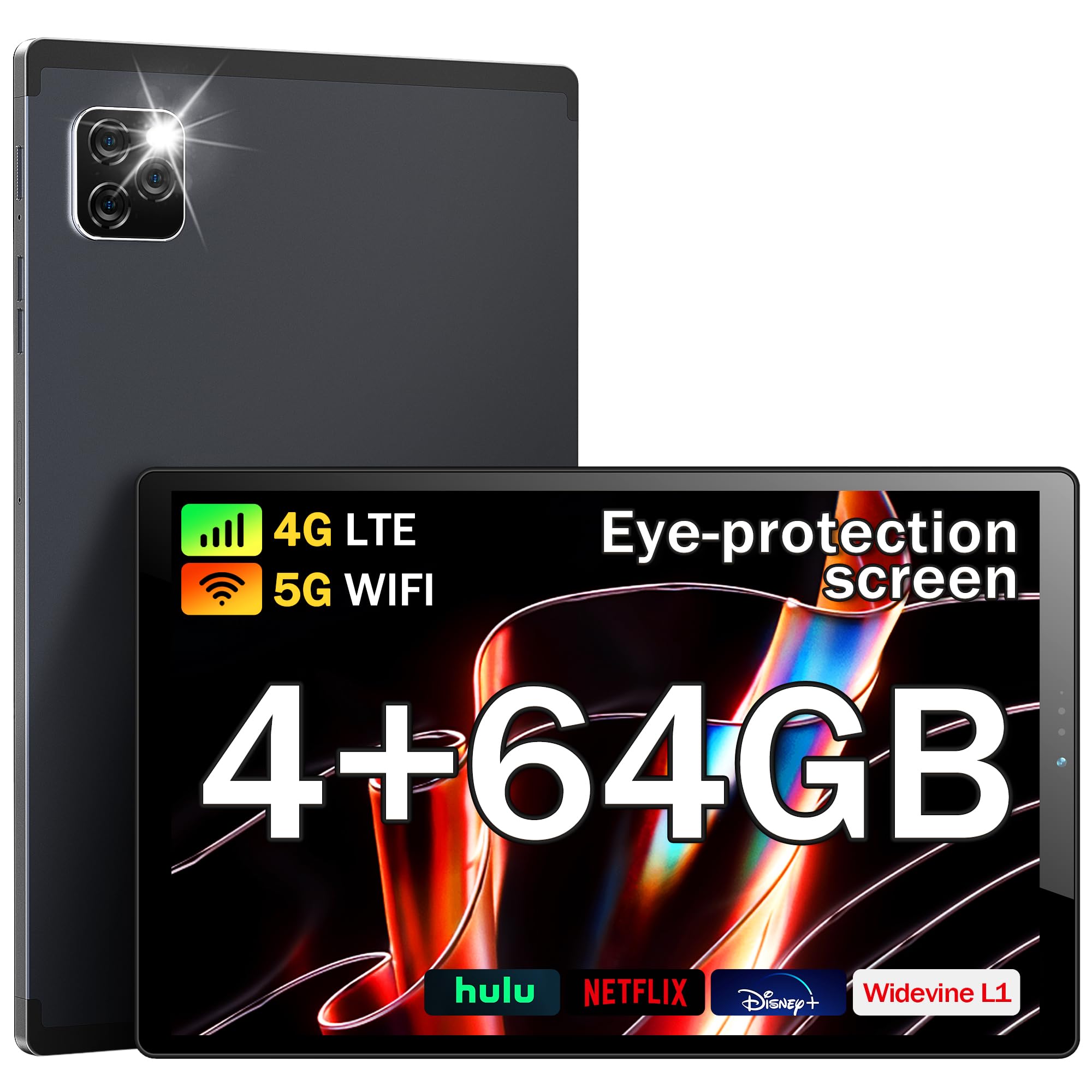
1 pav.: priekis view of the Kinstone KST103SD-L Android Tablet.
2. Kas yra dėžutėje
Upon opening your Kinstone KST103SD-L tablet package, you should find the following items:
- Kinstone KST103SD-L 10.3-inch Android Tablet
- USB-C įkrovimo laidas
- Maitinimo adapteris
- Rašiklis
- Vartotojo vadovas (šis dokumentas)
The tablet is securely packaged with protective sleeves and foam inserts to ensure safe delivery. The power adapter and charging cable are located in a separate compartment within the box.
Video 1: Unboxing the Kinstone Android Tablet, showing package contents and initial setup.
3. Produktas baigtasview
Familiarize yourself with the physical components of your Kinstone KST103SD-L tablet:

Figure 2: Technical diagram illustrating ports and buttons.
- Priekinė kamera: 5 MP kamera vaizdo skambučiams ir asmenukėms.
- Galinė kamera: 13MP camera with LED flash for high-quality photos and videos.
- Garsumo mygtukai: Reguliuokite garso garsumą.
- Maitinimo mygtukas: Press and hold to power on/off or restart. Short press to sleep/wake.
- SIM/TF kortelės lizdas: Insert a SIM card for cellular connectivity and a TF (MicroSD) card for expandable storage.
- C tipo USB prievadas: Įkrovimui ir duomenų perdavimui.
- Ausinių lizdas: 3.5mm port for audio output.
- Garsiakalbiai: Integruoti garsiakalbiai garso išvesčiai.
- Atkūrimo mygtukas: A small pinhole button located between the Power and Volume+ buttons for system reset (use a thin pin).

3 pav.: Nugara view of the Kinstone KST103SD-L Android Tablet, showing the camera module.
4. Sąranka
4.1 Pradinis įkrovimas
Your tablet may arrive with a partial charge. For optimal performance, fully charge the device before first use. Connect the provided USB-C cable to the tablet's USB-C port and the power adapter, then plug the adapter into a wall outlet. The charging indicator will show the charging status.
4.2 Maitinimo įjungimas/išjungimas
To power on the tablet, press and hold the Power Button until the Kinstone logo appears. To power off, press and hold the Power Button, then select 'Power off' from the options. A short press of the Power Button will put the tablet to sleep or wake it up.
4.3 ekrano apsauga
The tablet comes with a protective film on the screen. For the best visual experience, gently peel off this film before use.

Figure 4: Gently remove the protective screen film.
5. Operating System (Android 11)
The Kinstone KST103SD-L runs on the Android 11 operating system, offering enhanced performance and user experience. It provides full access to Google services, including the Google Play Store for downloading applications.

Figure 5: Android 11 home screen with various applications.
5.1 Pagrindinė navigacija
- Pagrindinis ekranas: Braukite kairėn arba dešinėn, kad pasiektumėte skirtingus pagrindinius ekranus.
- Programėlių stalčius: Braukite aukštyn iš ekrano apačios į view visos įdiegtos programos.
- Pranešimai ir greitieji nustatymai: Braukite žemyn nuo ekrano viršaus, kad pasiektumėte pranešimus ir greitųjų nustatymų perjungiklius.
- Daugiafunkcinis darbas: Palieskite kvadratinę piktogramą (arba braukite aukštyn ir palaikykite iš apačios), kad view neseniai naudotos programos.
- „Google“ padėjėjas: Access Google Assistant by saying "Hey Google" or by tapping the Assistant icon.
6. Pagrindinės savybės
The Kinstone KST103SD-L tablet is equipped with a range of features designed to enhance your digital experience:
2 vaizdo įrašas: Viršview of Kinstone KIS Pad S10 features including display, processor, and camera.
6.1 Ekranas
Experience vivid visuals on the 10.3-inch IPS Eye Protection Display with a Full HD resolution of 1920 x 1200 pixels. This display offers a wider and clearer view, designed to reduce eye strain during extended use.

Figure 6: Comparison of display quality, highlighting the 1920x1200 FHD IPS display.
6.2 procesorius
Powered by a 1.8GHz Octa-core Unisoc T610 processor, the tablet delivers fast and efficient performance for gaming, streaming, and multitasking.

Figure 7: Illustration of the high-performance Octa-core processor.
6.3 Atmintis ir saugykla
The tablet comes with 4GB of RAM and 64GB of built-in storage. Storage can be expanded up to 1TB using a MicroSD card (not included).
6.4 Baterija
Equipped with a 7500mAh mega battery, the tablet offers up to 10 hours of streaming content on a single charge, ensuring long-lasting use for various activities.

Figure 8: Visual representation of the 7500mAh battery and its usage times.
6.5 fotoaparatai
Capture moments with the 13MP rear camera (with LED flash) and take clear video calls and selfies with the 5MP front camera.

Figure 9: Details on camera specifications and connectivity options.
6.6 Ryšys
Stay connected with 4G LTE cellular support, dual-band Wi-Fi (2.4G/5G), Bluetooth 5.0, and GPS for accurate positioning, even without Wi-Fi.
6.7 Ypatingos savybės
- Akių apsauga: The screen effectively reduces blue light inhalation.
- Tėvų kontrolė: User function limits content and time for children.
- Metalinis korpusas: Features a high-quality metal shell for durability and a premium feel.
- Stylus & Case: Includes a stylus for precise input and a sleek case for protection and portability.

Figure 10: Features including wireless projection, Bluetooth, eye protection, and parental control.
7. Naudojimo scenarijai
The Kinstone KST103SD-L tablet is versatile for various applications:
7.1 Žaidimai
Enjoy a smooth gaming experience thanks to the Octa-core processor and ample RAM. The large display provides an immersive view for your favorite games.
Video 3: Demonstrating gaming performance on the Kinstone Android Tablet.
7.2 Streaming & Entertainment
Watch movies, TV shows, and videos in Full HD quality. The tablet's long-lasting battery ensures uninterrupted entertainment.
Video 4: Demonstrating video streaming on the Kinstone Android Tablet.
7.3 Productivity & Navigation
Utilize the tablet for work or study by connecting a Bluetooth keyboard (sold separately) and using the included stylus. The built-in GPS functionality allows for reliable navigation, even without Wi-Fi.

Figure 11: Kinstone tablet used with an external keyboard for productivity.
8. Priežiūra
- Valymas: Ekraną ir korpusą valykite minkštu, nepūkuotu audiniu. Venkite stiprių cheminių medžiagų.
- Akumuliatoriaus priežiūra: Norėdami pailginti akumuliatoriaus veikimo laiką, venkite ekstremalių temperatūrų ir neleiskite akumuliatoriui dažnai visiškai išsikrauti.
- Programinės įrangos atnaujinimai: Reguliariai tikrinkite, ar yra sistemos naujinimų, ir įdiekite juos, kad užtikrintumėte optimalų našumą ir saugumą.
- Saugyklos valdymas: Periodiškai valykite nereikalingus files and apps to maintain sufficient storage space and tablet speed.
9. Problemų sprendimas
9.1 Planšetinis kompiuteris neįsijungia
Ensure the tablet is sufficiently charged. Connect it to the charger and wait a few minutes before attempting to power it on again. If the issue persists, try performing a hard reset by pressing and holding the power button for 10-15 seconds.
9.2 Lėtas veikimas
If your tablet is running slow, try the following:
- Uždarykite nereikalingas fonines programas.
- Išvalykite dažnai naudojamų programų talpyklos duomenis.
- Atlaisvinkite vietos saugykloje ištrindami senus failus files or uninstalling unused apps.
- Iš naujo paleiskite planšetinį kompiuterį.
9.3 Ryšio problemos („Wi-Fi“ / mobilusis ryšys)
If you experience issues with Wi-Fi or cellular connectivity:
- Išjunkite ir įjunkite „Wi-Fi“ arba mobiliojo ryšio duomenis.
- Paleiskite maršrutizatorių iš naujo (jei naudojate „Wi-Fi“).
- Ensure your SIM card is correctly inserted and activated (for cellular).
- Check network settings for any restrictions.
9.4 Reset Button Location
The reset button is a small pinhole located between the Power and Volume+ buttons. Do not confuse it with the microphone hole, which is near the USB-C connector. Using a thin pin, gently press the reset button to perform a system reset if necessary.
10. Specifikacijos
| Funkcija | Specifikacija |
|---|---|
| Modelio pavadinimas | KST103SD-L |
| Operacinė sistema | Android 11 |
| Ekrano dydis | 10.3 colių |
| Ekrano raiška | 1920 x 1200 pikselių (Full HD IPS) |
| Procesorius | „Unisoc T610“ aštuonių branduolių (1.8 GHz) |
| RAM | 4 GB |
| Vidinė saugykla | 64 GB |
| Išplečiama saugykla | Iki 1 TB (MicroSD) |
| Baterijos talpa | 7500 mAh (ličio polimeras) |
| Baterijos veikimo laikas (vidutinis) | 10 valandų |
| Galinė kamera | 13 MP |
| Priekinė kamera | 5 MP |
| Ryšys | 4G LTE, Wi-Fi (802.11ac), Bluetooth 5.0, GPS |
| Uostai | USB Type-C, 3.5 mm Headphone Jack |
| Dimensions (L x W x Thickness) | 24.2 ilgio x 15.2 pločio x 0.9 centimetrų |
| Prekės svoris | 0.46 kilogramo |
| Pridedami priedai | Sleek Case, Stylus |
11. Garantija ir palaikymas
The Kinstone KST103SD-L tablet comes with a 3-Year Limited Warranty. For any questions or support needs, please contact Kinstone customer service. They aim to reply within 6 hours.
Gamintojo kontaktinė informacija:
Xinjianxing Technology Industrial Park Fengxin Road 5th Floor, Building A2 Shenzhen Guangdong
TEL: 13823168064 XNUMX XNUMX
Kinstone is committed to providing professional and timely after-sales service, ensuring customer satisfaction.


