
1. Įvadas
This manual provides essential information for setting up, operating, maintaining, and troubleshooting your Alienware X17 R1 Gaming Laptop. Please read this manual thoroughly to ensure optimal performance and longevity of your device.

Figure 1: Alienware X17 R1 Gaming Laptop
2. Pakuotės turinys
Ensure all items are present in your Alienware X17 R1 package:
- Alienware X17 R1 Notebook
- Maitinimo adapteris
- Maitinimo laidas
- Vartotojo vadovas (šis dokumentas)
3. Produktas baigtasview
3.1 Design and Dimensions
The Alienware X17 R1 features a sleek, thin design in Lunar Light (white) with Dark Side of the Moon (black) accents for the keyboard and deck. Its dimensions are approximately 11.79 x 15.72 x 0.82 inches (LxWxH) and it weighs around 7.05 pounds.

Figure 2: Alienware X17 R1 Side Profile
3.2 Prievadai ir jungtys
The Alienware X17 R1 is equipped with a comprehensive set of ports, primarily located at the rear for efficient cable management and thermal performance.
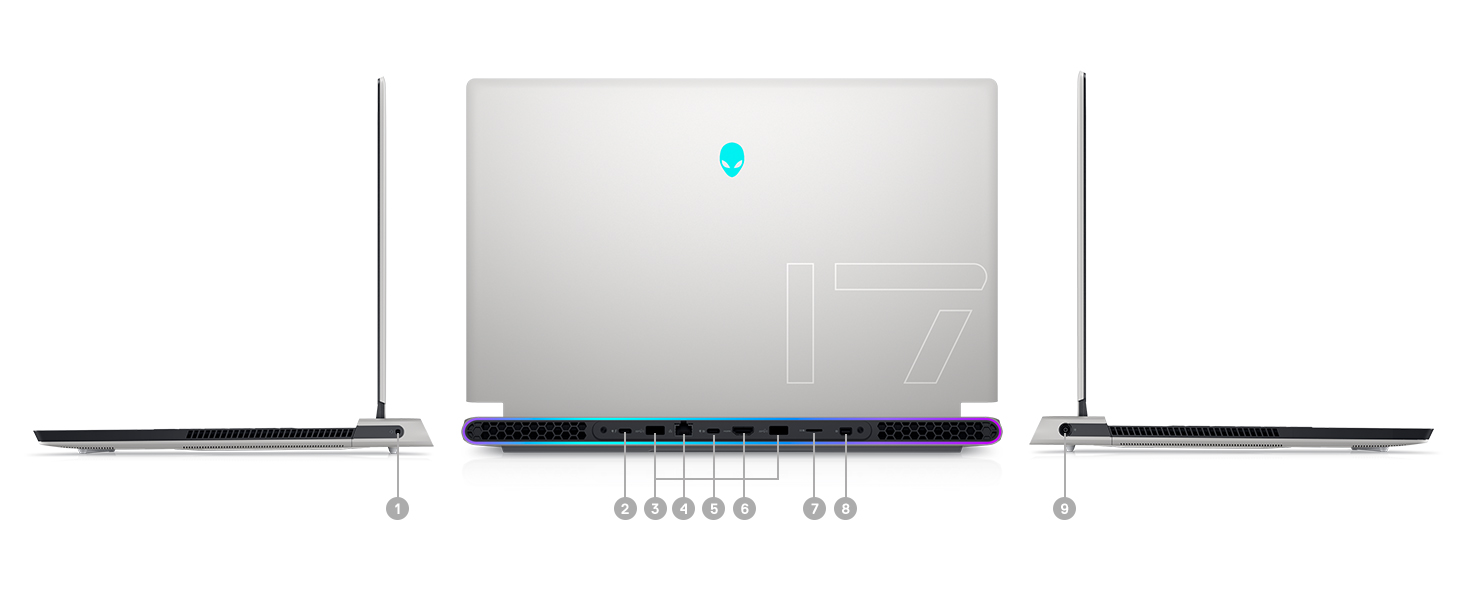
Figure 3: Rear Ports and Connectors
- Power/DC-in Port
- Mini Display Port 1.4
- HDMI 2.1 (for up to 4K/120Hz output)
- Type-C USB 3.2 Gen 2 Port with Power Delivery (5V/3A)
- Killer E3100 RJ-45 2.5G Ethernet
- Micro SD kortelių skaitytuvas
- USB 3.2 Gen 1 Type-A with Powershare
- Type-C Thunderbolt™ 4/USB 3.2 Gen 2 Port with Power Delivery (5V/3A)
- Pasaulinis ausinių lizdas
3.3 Klaviatūra ir jutiklinė planšetė
The laptop features an AlienFX keyboard with per-key RGB lighting and an AlienFX Lighting design supporting 16.8 million colors. The touchpad is glass, offering solid tracking and responsive gestures.

Figure 4: AlienFX Keyboard and Touchpad
3.4 Ekranas
The 17.3-inch Full HD (1920 x 1080) display boasts a 360Hz refresh rate and 1ms response time, enhanced with ComfortView Plus, NVIDIA G-SYNC, and Advanced Optimus for a smooth visual experience.

5 pav.: 360 Hz ekranas
3.5 Aušinimo sistema
The Alienware X17 R1 incorporates advanced thermal management with its Cryo-Tech™ Technologies. This includes an exclusive Quad Fan design and Element 31, an encapsulated gallium-silicone thermal interface material, to ensure efficient heat dissipation during intensive use.

Figure 6: Cryo-Tech Cooling System
Video 1: Official Alienware X17 R1 Product Overview, highlighting key features including the cooling system.
4. Sąranka
4.1 Pradinis įjungimas
- Unpack your Alienware X17 R1 laptop and all accessories.
- Prijunkite maitinimo adapterį prie nešiojamojo kompiuterio maitinimo prievado, o tada – prie maitinimo lizdo.
- Open the laptop lid and press the power button (Alienware head logo) to turn on the device.
- Vykdykite ekrane pateikiamus nurodymus, kad užbaigtumėte „Windows 11“ sąrankos procesą.
4.2 Išorinių įrenginių prijungimas
Utilize the various ports on the rear and sides of the laptop to connect external monitors, keyboards, mice, and other accessories. For optimal display performance, use the HDMI 2.1 or Mini Display Port 1.4 for external monitors.

Figure 7: Connecting External Peripherals
5. Nešiojamojo kompiuterio valdymas
5.1 Energijos valdymas
The Alienware X17 R1 offers tailored power states to optimize performance or battery life. These can be managed through the Alienware Command Center software:
- Tylus režimas: Reduces fan noise and power consumption.
- Subalansuotas režimas: Offers a balance between performance and acoustics.
- Viso greičio režimas: Maximizes fan speed for peak performance.
- Akumuliatoriaus tausojimo režimas: Optimizes settings for extended battery life.
- Našumo režimas: Prioritizes performance for demanding tasks.
5.2 Windows Hello
The laptop supports Windows Hello for secure and convenient login using facial recognition via the integrated webkumštelis.
5.3 Alienware Command Center
This software allows you to customize various aspects of your laptop, including RGB lighting, power profiles, and overclocking settings. It is recommended to keep the software updated for the best experience.

Figure 8: Alienware Command Center
6. Priežiūra
6.1 Valymas
- Ekranui ir išoriniams paviršiams valyti naudokite minkštą, nepūkuotą šluostę.
- Įsisenėjusioms dėmėms lengvai nuvalykiteampNuvalykite šluostę vandeniu arba ekranui saugiu valikliu.
- Regularly clean the air vents to prevent dust buildup, which can affect cooling performance.
6.2 Programinės įrangos naujiniai
Keep your operating system, drivers, and Alienware Command Center software updated to ensure optimal performance, security, and compatibility. Use the Alienware Update utility or visit the Dell support websvetainę, kurioje rasite naujausius atnaujinimus.
6.3 Atnaujinami komponentai
The Alienware X17 R1 offers upgradable slots for memory and storage:
- 2 x RAM Slots (DDR4)
- 1 x M.2 PCIe Gen 4 SSD Slot
- 1 x M.2 PCIe Gen 3 SSD Slot
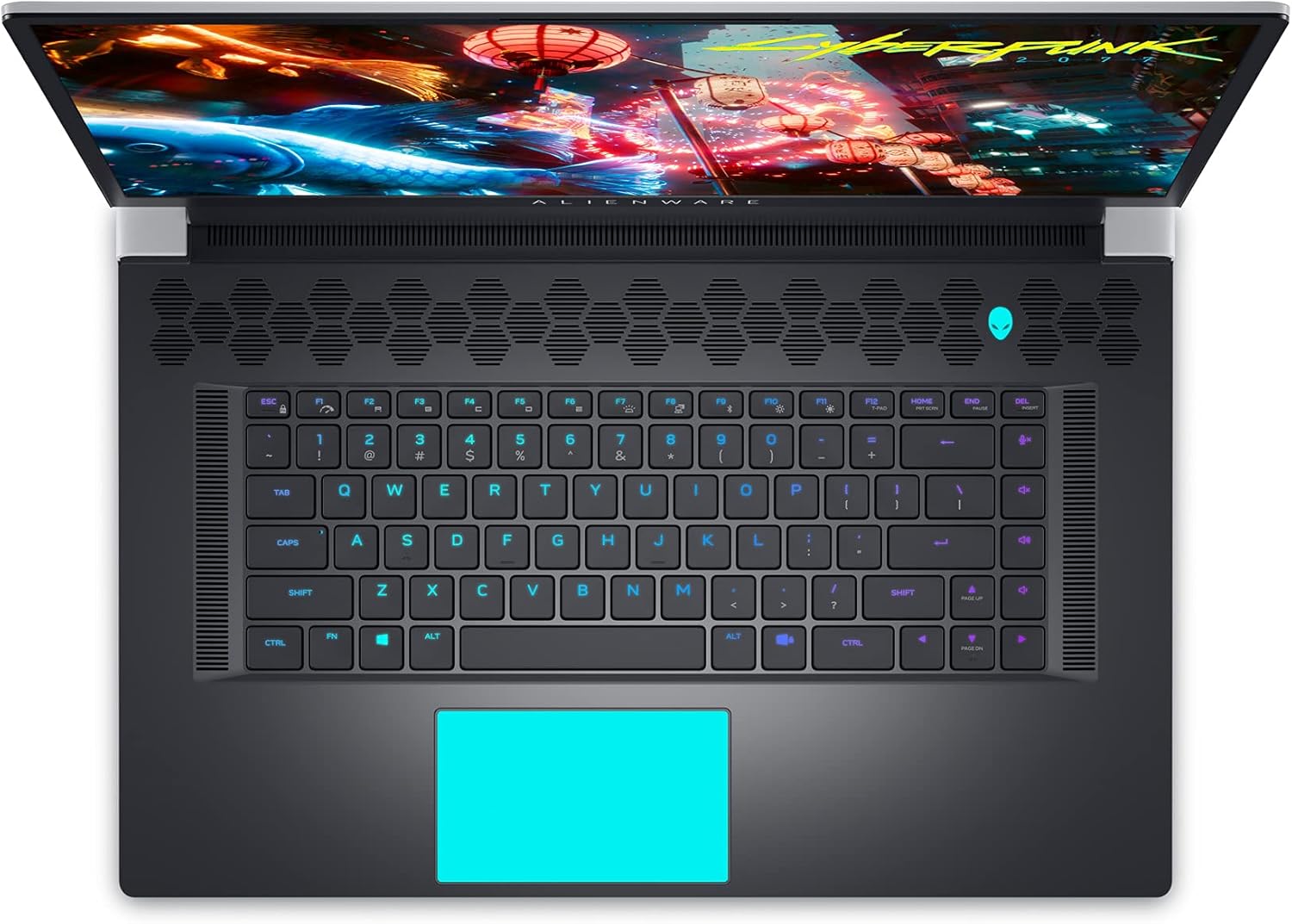
Figure 9: Internal Components and Upgradable Slots
7. Problemų sprendimas
If you encounter issues with your Alienware X17 R1, try the following basic troubleshooting steps:
- Nėra galios: Ensure the power adapter is securely connected to both the laptop and the power outlet. Try a different outlet.
- Rodymo problemos: If the screen is blank, try connecting an external monitor to verify if the issue is with the laptop's display or the graphics card. Update graphics drivers.
- Našumo delsa: Check your power management settings in Alienware Command Center. Ensure all drivers are up to date. Monitor temperatures to prevent thermal throttling.
- Ryšio problemos: For Wi-Fi or Ethernet issues, restart your router and the laptop. Check network adapter drivers.
- Programinės įrangos trūkumai: Restart the application or the laptop. Ensure your operating system and applications are updated.
Dėl sudėtingesnių trikčių šalinimo ar nuolatinių problemų kreipkitės į „Dell“ palaikymo tarnybą. websvetainėje arba susisiekite su klientų aptarnavimo tarnyba.
8. Specifikacijos
| Funkcija | Specifikacija |
|---|---|
| Modelio pavadinimas | Alienware x17 R1 |
| Procesorius | 11th Generation Intel Core i7-11800H (8 Cores, up to 4.6 GHz) |
| RAM | 32 GB DDR4 3200 MHz atmintis |
| Sandėliavimas | 1 TB M.2 PCIe NVMe Solid State Drive |
| Vaizdo plokštė | NVIDIA GeForce RTX 3080 16GB GDDR6 |
| Ekranas | 17.3-inch FHD (1920 x 1080) 360Hz 1ms with ComfortView Plus, NVIDIA G-SYNC and Advanced Optimus |
| Operacinė sistema | Windows 11 Home |
| Belaidis ryšys | Killer AX 1675 + Bluetooth 5.2 |
| Uostai | 3x USB 3.0, 2x Type-C (Thunderbolt 4/USB 3.2 Gen 2), HDMI 2.1, Mini DisplayPort 1.4, Ethernet, Micro SD, Headset Jack |
| Prekės svoris | 7.05 svaro |
| Gaminio matmenys | 11.79 x 15.72 x 0.82 colio |
| Spalva | Lunar Light (White) |
9. Garantija ir palaikymas
Your Alienware X17 R1 laptop is covered by Dell's standard warranty. For detailed warranty information, technical support, or service requests, please visit the official Dell support websvetainėje arba susisiekite su jų klientų aptarnavimo tarnyba. Kad galėtumėte greičiau gauti pagalbą, laikykite po ranka pirkimo kvitą ir gaminio serijos numerį.
„Dell“ palaikymas Websvetainė: www.dell.com/support