
1. Įvadas
Thank you for choosing the Andoer W200RGB LED Video Light. This manual provides detailed instructions for the proper setup, operation, and maintenance of your device. Please read this manual thoroughly before use to ensure optimal performance and longevity of the product. Keep this manual for future reference.
2. Produktas baigtasview
2.1 Pakuotės turinys
Atidarę pakuotę, patikrinkite, ar yra visi toliau išvardyti daiktai ir ar jie yra geros būklės:
- Andoer W200RGB LED Video Light
- C tipo USB įkrovimo laidas
- Mini trikojis
- Riešo dirželis
- User Manual (English and Chinese)

Image: Contents of the Andoer W200RGB LED Video Light package, showing the light, USB cable, mini tripod, and wrist strap.
2.2 Pagrindinės savybės
- Kompaktiškas ir nešiojamas dizainas: Rod-shaped design, 20cm in length, lightweight for easy transport.
- Aukštos Ryškumas: Equipped with 184 high-quality LED beads (69 white, 69 yellow, 46 RGB) with 7W output and CRI 95+.
- RGB Colored Light Mode: 360° adjustable HUE and 0%-100% adjustable brightness for diverse colorful lighting effects.
- CCT Cold & Warm Light Mode: Wide adjustable color temperature range from 2500K to 9000K.
- 20 Special Lighting Effects: Includes ambulance, fireworks, TV, candle, party, strobe, RGB strobe, red flash, green flash, blue flash, slow HSI, fast HSI, and more.
- Integruota įkraunama baterija: Integrated 3.7V 3000mAh lithium battery for extended working time, rechargeable via Type-C port.
- Magnetinė nugara: Built-in magnets at both ends allow for easy attachment to magnetic surfaces.
2.3 Valdikliai ir ekranas
The Andoer W200RGB features intuitive controls and an LCD screen for easy operation.

Image: The control panel of the Andoer W200RGB LED Video Light, showing the power button, mode button, adjustment buttons, and LCD screen.
- Maitinimo mygtukas: Press and hold to turn the light on or off. Short press to switch between modes.
- Režimo mygtukas (M): Short press to cycle through CCT, HSI (RGB), and Scene modes.
- Aukštyn/žemyn mygtukai (▲/▼): Adjust parameters such as brightness, color temperature, HUE, or saturation depending on the selected mode.
- LCD ekranas: Displays current settings including mode, brightness, color temperature, HUE, and battery level.
- C tipo įkrovimo prievadas: Located at one end for charging the internal battery.
3. Sąranka
3.1 Akumuliatoriaus įkrovimas
The Andoer W200RGB LED Video Light comes with a built-in rechargeable lithium battery. Before first use, it is recommended to fully charge the device.
- Connect the supplied USB Type-C cable to the charging port on the light.
- Kitą USB kabelio galą prijunkite prie standartinio USB maitinimo adapterio (nepridedamas) arba kompiuterio USB prievado.
- The LCD screen will indicate the charging status. A full charge typically takes a few hours.

Image: The Andoer W200RGB LED Video Light highlighting its internal 3.7V 3000mAh battery and Type-C charging capability.
3.2 Mini trikojo pritvirtinimas
The included mini tripod can be attached to the 1/4-inch screw hole at the bottom of the light for stable placement.
- Locate the 1/4-inch screw hole on the bottom of the LED light.
- Screw the mini tripod securely into the screw hole.
- Adjust the tripod legs for desired height and stability.
4. Naudojimo instrukcijos
4.1 Maitinimo įjungimas/išjungimas
- To turn on the light, press and hold the Power button (labeled with a circle and vertical line) for a few seconds.
- To turn off the light, press and hold the Power button again for a few seconds.
4.2 Perjungimo režimai
After powering on, short press the Mode button (M) to cycle through the available lighting modes:
- CCT Mode (Color Correlated Temperature): For adjusting white light from warm to cool.
- HSI režimas (atspalvis, sodrumas, intensyvumas): For adjusting RGB colored light.
- Scenos režimas: Skirta specialiems apšvietimo efektams pasirinkti.
4.3 CCT Mode Operation
In CCT mode, you can adjust the color temperature and brightness.
- Use the Up/Down buttons (▲/▼) to adjust the brightness from 0% to 100%.
- Short press the Power button to switch to color temperature adjustment. Use the Up/Down buttons (▲/▼) to adjust the color temperature from 2500K (warm) to 9000K (cool).

Image: Visual representation of brightness adjustments (0%, 50%, 100%) and color temperature settings (6000K, 5000K, 2800K) in CCT mode.
4.4 HSI Mode (RGB) Operation
In HSI mode, you can adjust the HUE (color), saturation, and brightness.
- Use the Up/Down buttons (▲/▼) to adjust the HUE (360° color spectrum).
- Short press the Power button to switch to saturation adjustment. Use the Up/Down buttons (▲/▼) to adjust saturation.
- Short press the Power button again to switch to brightness adjustment. Use the Up/Down buttons (▲/▼) to adjust brightness from 0% to 100%.
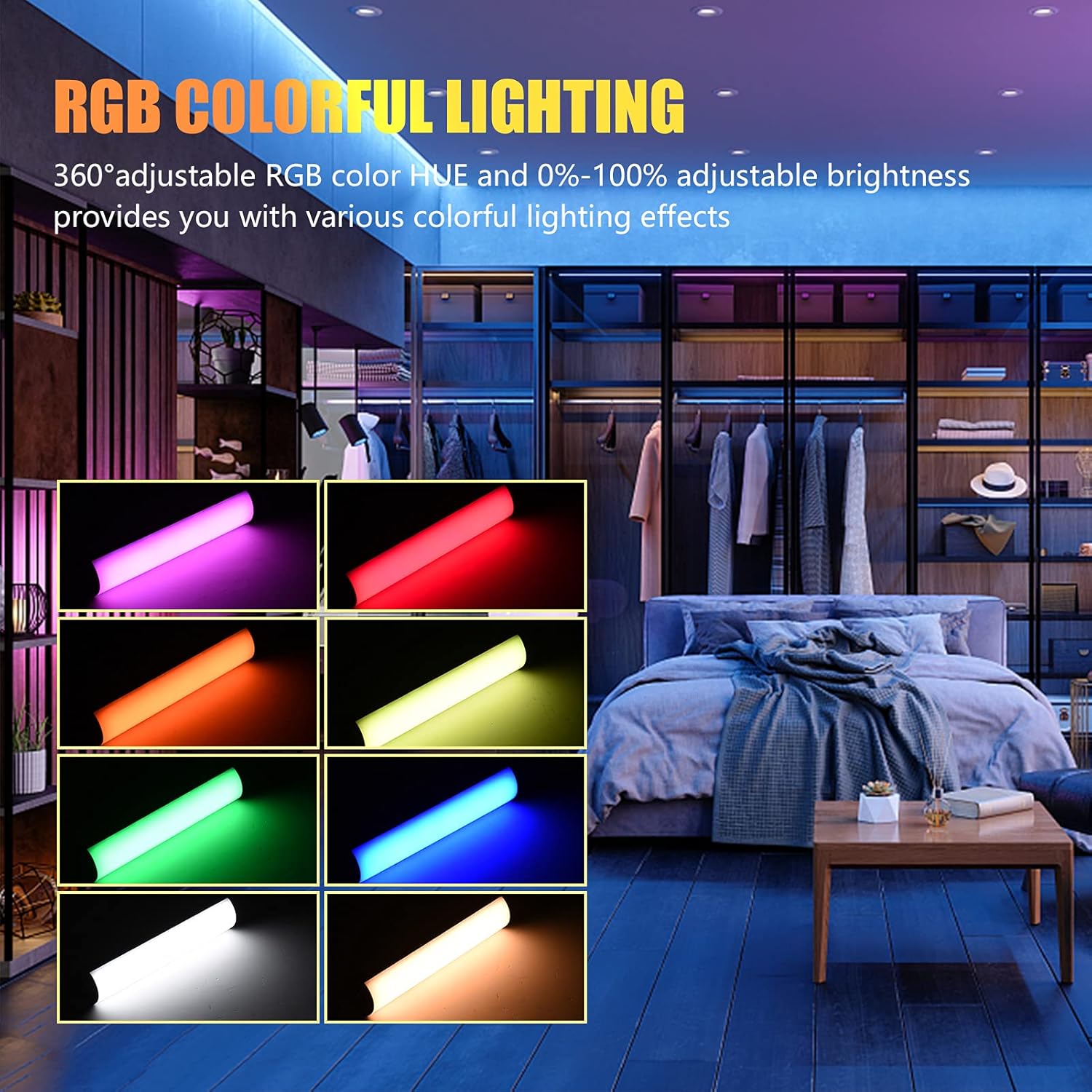
Image: The Andoer W200RGB LED Video Light demonstrating its RGB colorful lighting capabilities, showing different hues and brightness levels.

Image: Several Andoer W200RGB LED Video Lights illuminated in various solid RGB colors, showcasing the rod-shaped design.
4.5 Scene Mode Operation (Special Effects)
In Scene mode, you can select from 20 pre-programmed special lighting effects.
- Use the Up/Down buttons (▲/▼) to cycle through the 20 special effects.
- Some effects may have adjustable parameters (e.g., speed or intensity), which can be adjusted by short pressing the Power button and then using the Up/Down buttons.

Image: A visual guide to the 20 dynamic scene light effects, such as police car, ambulance, fireworks, TV, candle, party, strobe, and various color flashes.
4.6 Using the Magnetic Back
The Andoer W200RGB LED Video Light features built-in magnets at both ends, allowing it to be easily attached to metallic surfaces for flexible lighting setups.
- Simply place either end of the light onto a suitable magnetic surface.
- Ensure the surface is stable and can support the weight of the light.

Image: The Andoer W200RGB LED Video Light highlighting its magnetic ends, demonstrating how it can be attached to metal surfaces.
4.7 Praktinis pritaikymas

Image: A comparison of scenes before and after using the Andoer W200RGB LED Video Light, illustrating its effectiveness in enhancing illumination for various activities.
5. Priežiūra
5.1 Valymas
- Prieš valydami įsitikinkite, kad prietaisas yra išjungtas ir atjungtas nuo bet kokio maitinimo šaltinio.
- Šviestuvo paviršiui nuvalyti naudokite minkštą, sausą šluostę.
- Įsisenėjusiam purvui šiek tiek pamirkykiteampNuvalykite šluostę vandeniu. Venkite naudoti stiprias chemines medžiagas, tirpiklius ar abrazyvinius valiklius.
- Do not allow water or liquids to enter the device.
5.2 Saugykla
- Šviestuvą laikykite vėsioje, sausoje vietoje, apsaugotoje nuo tiesioginių saulės spindulių ir ekstremalių temperatūrų.
- Jei ilgesnį laiką laikysite akumuliatorių, kas tris mėnesius įkraukite jį maždaug iki 50 %, kad palaikytumėte jo būklę.
5.3 Akumuliatoriaus priežiūra
- Venkite dažnai visiškai iškrauti akumuliatorių.
- Nelaikykite akumuliatoriaus aukštoje temperatūroje ir nepradurkite.
- If the battery shows signs of swelling or leakage, discontinue use immediately and dispose of it properly according to local regulations.
6. Problemų sprendimas
If you encounter any issues with your Andoer W200RGB LED Video Light, please refer to the following common problems and solutions:
- Šviesa neįsijungia:
- Ensure the battery is charged. Connect the light to a power source using the USB Type-C cable.
- Paspauskite ir kelias sekundes palaikykite nuspaudę maitinimo mygtuką, kad įsitikintumėte, jog tai nėra tik trumpas paspaudimas.
- Light flickers or output is unstable:
- Check the battery level; low battery can cause unstable performance. Recharge if necessary.
- Įsitikinkite, kad šviestuvas nėra veikiamas ekstremalių temperatūrų.
- Cannot change modes or adjust parameters:
- Ensure you are pressing the correct buttons (Mode button for mode changes, Power button to cycle through adjustable parameters within a mode, Up/Down buttons for value adjustment).
- Iš naujo paleiskite įrenginį išjungdami ir vėl įjungdami.
- Baterija nekraunama:
- Verify the USB Type-C cable is securely connected to both the light and the power source.
- Išbandykite kitą USB laidą arba maitinimo adapterį, kad atmestumėte sugedusių priedų problemą.
- Įsitikinkite, kad maitinimo šaltinis veikia.
Jei problema išlieka ir išbandžius šiuos sprendimus, kreipkitės į klientų aptarnavimo tarnybą.
7. Specifikacijos
| Funkcija | Specifikacija |
|---|---|
| Prekės ženklas | Andoer |
| Modelis | W200RGB |
| LED karoliukai | 69pcs White + 69pcs Yellow + 46pcs RGB |
| Spalvos temperatūra | 2500–9000 tūkst |
| CRI (spalvų perteikimo indeksas) | 95+ |
| Maksimali išėjimo galia | 7W |
| Šviesos srautas | 800Lux / 0.3m |
| Spindulio kampas | 120° |
| Baterijos tipas | Integruota 3.7 V 3000 mAh ličio baterija |
| Įkrovimo prievadas | C tipo USB |
| Prekės dydis | 20 x 4 x 3.5 cm (7.9 x 1.6 x 1.4 colio) |
| Prekės svoris | 11.3 uncijos (apie 320 g) |
| Tripod (folded length) | 7.5cm (use height 4.5cm) |
| Modelio numeris (ASIN) | QEX6686347803069PL (B09F8RLMSY) |
8. Saugos informacija
Įspėjimas:
Jei pastebėsite, kad gaminys pažeistas, deformuotas ar veikia neįprastai, nedelsdami nutraukite jo naudojimą ir susisiekite su mumis.
Always handle the device with care. Do not disassemble or modify the product. Keep out of reach of children.
9. Garantija ir palaikymas
Andoer products are designed for reliability and performance. This product is covered by a standard manufacturer's warranty against defects in materials and workmanship. For specific warranty terms and conditions, please refer to the documentation provided at the time of purchase or contact your retailer.
For technical support, troubleshooting assistance, or warranty claims, please contact Andoer customer service through the retailer's platform or the official Andoer websvetainę. Kreipdamiesi į palaikymo tarnybą, turėkite paruoštą savo produkto modelį ir pirkimo informaciją.
Aplankykite Andoer Store on Amazon daugiau informacijos ir produktų.