
1. Įvadas
This manual provides detailed instructions for the setup, operation, maintenance, and troubleshooting of your uRage Exodus 700 Semi-Mechanical Gaming Keyboard. Please read this manual thoroughly before using the product to ensure optimal performance and longevity.
2. Pakuotės turinys
Patikrinkite, ar pakuotėje yra visi reikalingi daiktai:
- uRage Exodus 700 Semi-Mechanical Gaming Keyboard
- Vartotojo vadovas (šis dokumentas)
- Garantijos kortelė
3. Sąranka
3.1 Klaviatūros prijungimas
The uRage Exodus 700 keyboard connects via a wired USB-A connection. Follow these steps to connect your keyboard:
- Kompiuteryje raskite laisvą USB-A prievadą.
- Prijunkite klaviatūros laido USB-A jungtį prie kompiuterio USB-A prievado.
- The operating system (Windows 11/10/8/7) will automatically detect and install the necessary drivers.
3.2 Programinės įrangos diegimas (neprivaloma)
For advanced customization, including macro programming and lighting effects, dedicated gaming software is available. Refer to the official uRage website for the latest software download and installation instructions.

Image 1: uRage Exodus 700 Semi-Mechanical Gaming Keyboard connected and ready for use.
4. Klaviatūros valdymas
4.1 Pagrindinės savybės
- Semi-Mechanical Keys: Provides a tactile typing experience with fast response times (1 ms) and a key travel of 2.5 mm.
- Anti-ghosting: Ensures that multiple key presses are registered simultaneously, crucial for gaming. Up to 24 keys can be registered at once.
- RGB apšvietimas: Customizable backlighting with various effects and colors.
- WIN Lock-Function: Disables the Windows key to prevent accidental interruptions during gameplay.
- Integruotas riešo atrama: Designed for enhanced comfort during extended use.
4.2 RGB apšvietimo valdymas
The keyboard features integrated RGB lighting. Specific key combinations (often involving the 'Fn' key) or the dedicated gaming software can be used to:
- Turn the lighting on or off.
- Cycle through different lighting modes and effects.
- Sureguliuokite ryškumo lygius.
Refer to the keyboard's function key legends for specific lighting control shortcuts.

Image 2: Keyboard in use, demonstrating RGB lighting.
4.3 Macro and Multimedia Functions
The keyboard includes 4 dedicated macro buttons (G1-G4) and additional multimedia functions. These can be programmed and controlled:
- Makro programavimas: Use the dedicated gaming software to record and assign complex key sequences to the macro buttons.
- Multimedijos valdikliai: Access functions like volume control, play/pause, and track skipping via function key combinations.
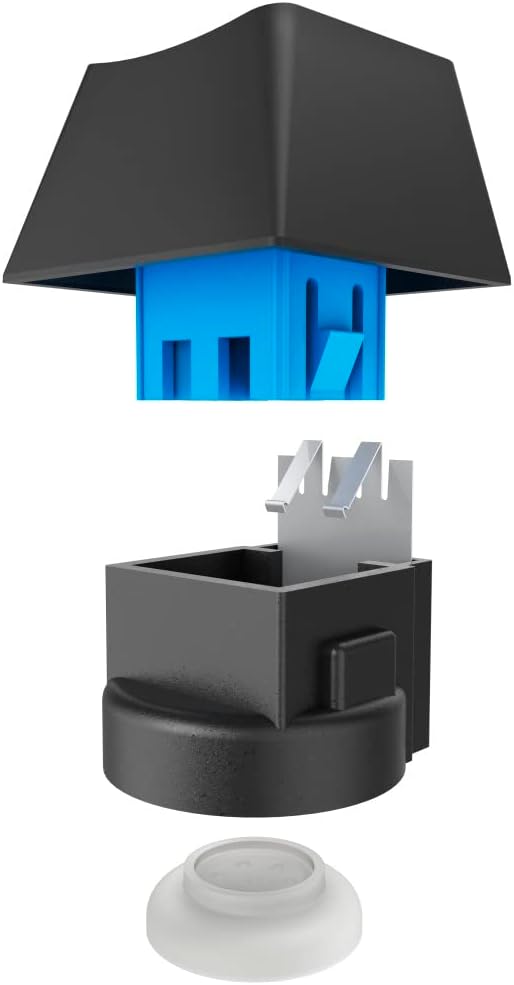
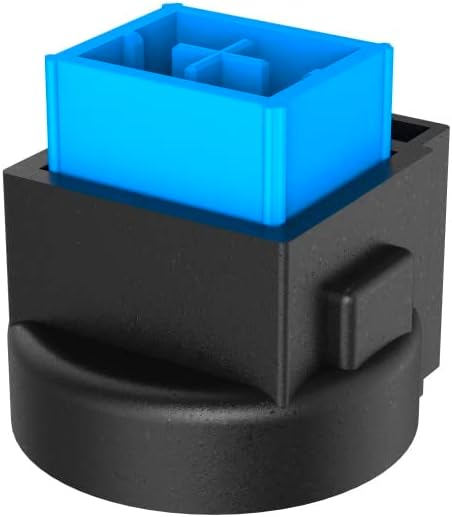
Image 3: Exploded and assembled views of the semi-mechanical key structure.
5. Priežiūra
Tinkama klaviatūros priežiūra užtikrina jos ilgaamžiškumą ir našumą.
5.1 Valymas
- Prieš valydami atjunkite klaviatūrą nuo kompiuterio.
- Klaviatūros paviršiui nuvalyti naudokite minkštą, sausą šluostę.
- Dulkėms ir šiukšlėms tarp klavišų pašalinti naudokite suslėgtą orą.
- Venkite naudoti stiprias chemines medžiagas, abrazyvinius valiklius ar per didelę drėgmę.
5.2 Saugykla
Kai nenaudojate klaviatūros, laikykite ją švarioje, sausoje vietoje, toliau nuo tiesioginių saulės spindulių ir ekstremalių temperatūrų.
6. Problemų sprendimas
If you encounter issues with your uRage Exodus 700 keyboard, refer to the following common solutions:
- Klaviatūra nereaguoja:
- Įsitikinkite, kad USB laidas yra tvirtai prijungtas tiek prie klaviatūros, tiek prie kompiuterio.
- Pabandykite prijungti klaviatūrą prie kito USB prievado.
- Iš naujo paleiskite kompiuterį.
- Raktai neregistruojami:
- Patikrinkite, ar po klavišų dangteliais nėra jokių fizinių kliūčių.
- Ensure the keyboard drivers are correctly installed (check Device Manager on Windows).
- RGB apšvietimas neveikia:
- Verify that the lighting is not turned off via keyboard shortcuts.
- Check the gaming software settings if installed.
- Macro functions not working:
- Ensure the gaming software is running and macros are correctly configured.
- Update the gaming software to the latest version.
If problems persist, contact uRage customer support for further assistance.
7. Specifikacijos
| Funkcija | Specifikacija |
|---|---|
| Modelio pavadinimas | Exodus 700 |
| Modelio numeris | ham_n8_U8186011 |
| Klaviatūros išdėstymas | QWERTY (anglų k.) |
| Pagrindinė technologija | Semi-Mechanical |
| Raktų skaičius | 114 |
| Rollover Buttons | Iki 24 |
| Reagavimo laikas | 1 ms |
| Rakto tarnavimo laikas | 10 Million Attacks |
| Work Travel | 2.5 mm |
| Ryšys | Laidinis USB-A |
| Apšvietimas | RGB spalvos |
| Suderinama OS | Windows 11/10/8/7 |
| Number of Macro Buttons | 4 |
| Spalva | Juoda |
| Medžiaga | Plastikiniai |
| Kabelio ilgis | 180 cm |
| Matmenys (P x A x G) | 47 cm x 3.5 cm x 19 cm |
| Svoris | 885 g |
8. Garantija ir palaikymas
8.1 Gamintojo garantija
The uRage Exodus 700 Semi-Mechanical Gaming Keyboard comes with a 5 metų gamintojo garantijaPrašome išsaugoti pirkimo įrodymą garantiniams reikalavimams. Garantija taikoma medžiagų ir gamybos defektams, atsiradusiems įprasto naudojimo sąlygomis.
8.2 Pagalba klientams
For technical support, warranty claims, or further inquiries, please visit the official uRage website or contact their customer service department. Contact information can typically be found on the warranty card included in your package or on the brand's official websvetainę.