
1. Įvadas
This manual provides detailed instructions for the TECLAST P33 10.1-inch Android Tablet. Please read this manual thoroughly before using your device to ensure proper operation and to maximize its lifespan.
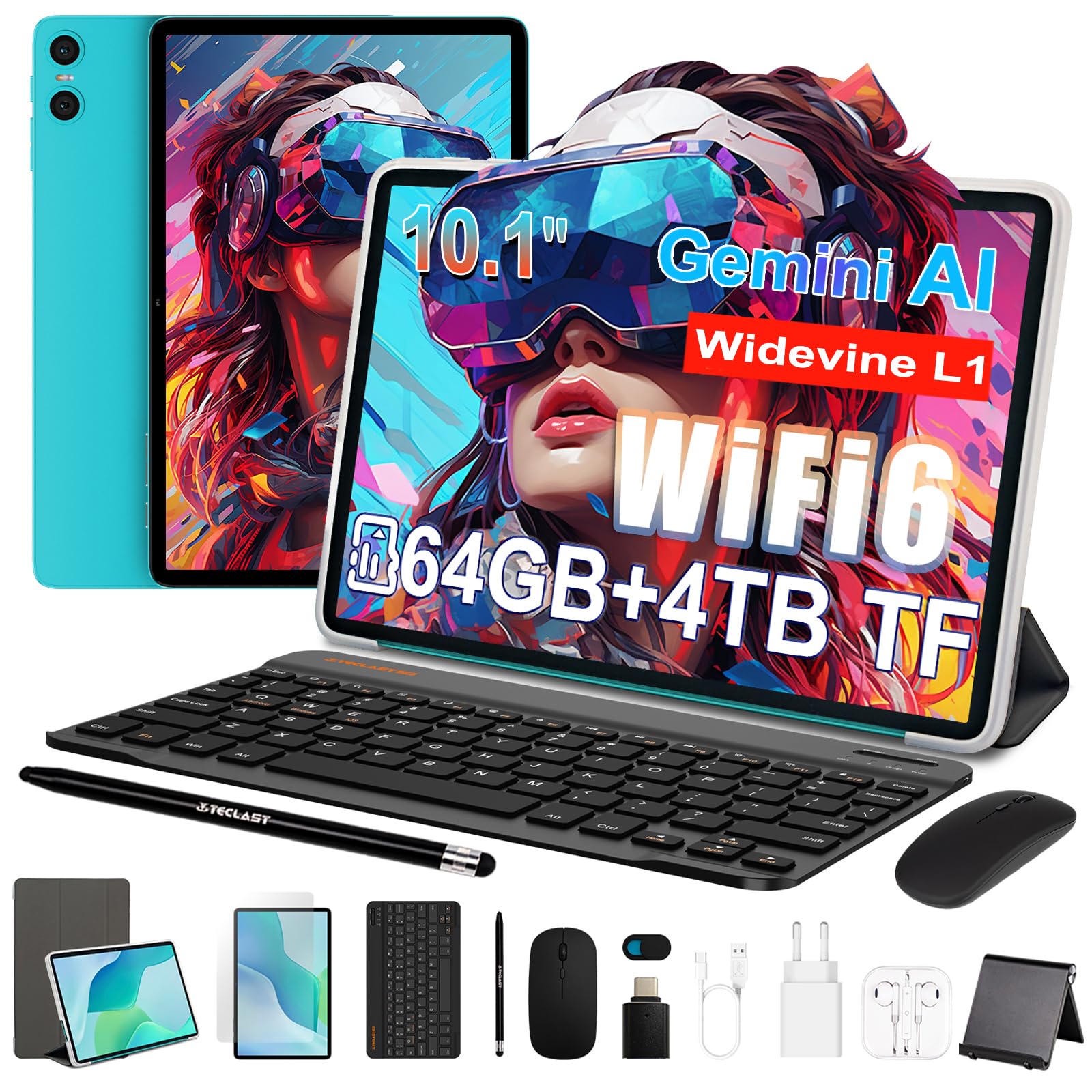
Figure 1: TECLAST P33 10.1-inch Android Tablet
Pakuotės turinys
The TECLAST P33 tablet comes with a comprehensive accessory bundle to enhance your user experience. Please verify that all items listed below are included in your package:
- TECLAST P33 Tablet
- Planšetinio kompiuterio dėklas
- Apsauginė plėvelė
- Pelė
- Camera Protection Caps
- Bluetooth klaviatūra
- 3.5 mm laidinės ausinės
- Stylus Pen
- Tabletės stovas
- OTG adapteris
- C tipo kabelis
- Įkroviklis
- Vartotojo vadovas

Figure 2: TECLAST P33 Package Contents
2. Sąranka
2.1 Pradinis įkrovimas
Before first use, it is recommended to charge the tablet for at least 30 minutes. Use the provided Type-C cable and charger.
- Prijunkite C tipo laidą prie planšetinio kompiuterio įkrovimo prievado.
- Connect the other end of the cable to the charger.
- Įjunkite įkroviklį į maitinimo lizdą.
- Įkrovimo indikatorius užsidegs.

Figure 3: Charging the TECLAST P33 Tablet
2.2 Įjungimas / išjungimas
- Norėdami įjungti: Press and hold the Power button until the TECLAST logo appears on the screen.
- Norėdami išjungti: Press and hold the Power button until a power-off menu appears. Select "Power off" and confirm.
- Norėdami paleisti iš naujo: From the power-off menu, select "Restart" and confirm.
2.3 „MicroSD“ kortelės įdėjimas
The TECLAST P33 supports MicroSD card expansion up to 4TB.
- Planšetinio kompiuterio šone raskite „MicroSD“ kortelės lizdą.
- Use the provided ejector pin to open the card tray.
- Place the MicroSD card into the tray with the gold contacts facing down.
- Švelniai stumkite dėklą atgal į angą, kol jis spragtelėdamas užsifiksuos savo vietoje.
2.4 Priedų prijungimas
The TECLAST P33 comes with several accessories that can be connected via Bluetooth or physical ports.
- „Bluetooth“ klaviatūra / pelė:
- Turn on the Bluetooth keyboard or mouse.
- On the tablet, go to Settings > Connected devices > Bluetooth.
- Įjunkite „Bluetooth“ ir ieškokite galimų įrenginių.
- Select the keyboard or mouse from the list and follow on-screen pairing instructions.
- 3.5mm Wired Earphones: Plug the earphones into the 3.5mm audio jack on the tablet.
- OTG Adapter: The OTG adapter allows you to connect USB devices (like flash drives) to your tablet. Plug the OTG adapter into the Type-C port, then connect your USB device to the adapter.
3. Naudojimo instrukcijos
3.1 Ekranas ir vartotojo sąsaja
The TECLAST P33 features a 10.1-inch IPS display with a resolution of 1280x800 pixels. It utilizes T-color 3.0 technology for enhanced color and image detail. The tablet runs on Android 15, offering an intuitive user interface.

Figure 4: TECLAST P33 Display Features
3.2 Našumas ir saugykla
Powered by an Allwinner A333 Octa-Core processor (up to 2GHz) and an ARM Mali-G57 GPU, the P33 delivers smooth performance for multitasking, video playback, and light gaming. It includes 9GB RAM (3GB LPDDR4 + 6GB expandable memory) and 64GB of internal storage, expandable up to 4TB via MicroSD card.

Figure 5: Processor and GPU Details

Figure 6: Storage Expansion Capabilities
3.3 Ryšys
The tablet supports dual-band Wi-Fi 6 (2.4G+5G) for faster connection speeds and lower latency. Bluetooth 5.4 is included for connecting wireless peripherals and supports AAC and LDAC codecs for high-fidelity audio.

7 pav.: Belaidis ryšys
3.4 Kamera ir garsas
The P33 is equipped with a 5MP front camera and a 5MP rear camera, suitable for video calls and capturing everyday moments. It features dual PureSound stereo speakers and an intelligent amplification chip for immersive audio. A 3.5mm audio jack is also available for headphones.

8 pav.: Garso funkcijos
3.5 Baterijos veikimo laikas
The 6000mAh battery provides approximately 10-12 hours of online video playback at standard brightness, ensuring extended usage for reading and browsing.
4. Priežiūra
4.1 Planšetinio kompiuterio valymas
- Planšetinio kompiuterio ekraną ir korpusą valykite minkštu, nepūkuotu audiniu.
- Įsisenėjusioms dėmėms šiek tiek pamirkykiteampNuvalykite šluostę vandeniu arba ekrano valikliu, skirtu specialiai elektronikai.
- Venkite naudoti stiprias chemines medžiagas, abrazyvines medžiagas ar per didelę drėgmę, nes jos gali pažeisti įrenginį.
4.2 Programinės įrangos naujiniai
Reguliariai tikrinkite, ar yra programinės įrangos atnaujinimų, ir juos įdiekite, kad užtikrintumėte optimalų našumą, saugumą ir prieigą prie naujų funkcijų.
- Eikite į Nustatymai > Sistema > Sistemos naujinimas.
- Vykdykite ekrane pateikiamus nurodymus, kad patikrintumėte, ar yra atnaujinimų, ir įdiegtumėte juos.
4.3 Akumuliatoriaus priežiūra
- Venkite dažnai visiškai iškrauti akumuliatorių.
- Nelaikykite planšetinio kompiuterio ekstremaliose temperatūrose (karštyje ar šaltyje).
- Naudokite tik originalų įkroviklį arba sertifikuotą suderinamą įkroviklį.
5. Problemų sprendimas
If you encounter issues with your TECLAST P33 tablet, refer to the following common solutions.
| Problema | Sprendimas |
|---|---|
| Planšetinis kompiuteris neįsijungia | Įsitikinkite, kad akumuliatorius įkrautas. Prijunkite įkroviklį ir bandykite dar kartą. Jei įrenginys nereaguoja, paspauskite ir 10–15 sekundžių palaikykite nuspaudę maitinimo mygtuką, kad priverstumėte įrenginį paleisti iš naujo. |
| Lėtas veikimas | Close unnecessary background applications. Clear cache regularly. Consider performing a factory reset if the issue persists (back up data first). |
| Wi-Fi ryšio problemos | Iš naujo paleiskite planšetinį kompiuterį ir „Wi-Fi“ maršrutizatorių. Pamirškite tinklą ir prijunkite iš naujo. Įsitikinkite, kad esate „Wi-Fi“ signalo diapazone. |
| „Bluetooth“ įrenginys nesuporuojamas | Ensure the Bluetooth device is in pairing mode. Turn Bluetooth off and on again on the tablet. Check if the device is already paired with another device. |
| Ekranas nereaguoja | Paleiskite planšetinį kompiuterį iš naujo. Jei problema išlieka, įsitikinkite, kad ekranas švarus ir be šiukšlių. |
For further assistance, please contact TECLAST customer support.
6. Specifikacijos
| Funkcija | Detalė |
|---|---|
| Modelio pavadinimas | TECLAST P33 |
| Ekrano dydis | 10.1 colių |
| Ekrano raiška | 1280x800 Pixels (IPS LCD) |
| Procesorius | Allwinner A333 Octa-Core (up to 2 GHz) |
| Grafikos koprocesorius | Malis-G57 |
| RAM | 9 GB (3GB LPDDR4 + 6GB expandable) |
| Vidinė saugykla | 64 GB |
| Išplečiama saugykla | Iki 4 TB per „MicroSD“ |
| Operacinė sistema | Android 15 |
| Baterijos talpa | 6000 mAh (ličio polimeras) |
| Baterijos veikimo laikas (vidutinis) | 10 valandų |
| Galinė kamera | 5 MP |
| Priekinė kamera | 5 MP |
| Wi-Fi | 802.11a/b/g/n/ac (Wi-Fi 6, Dual-band 2.4G/5G) |
| Bluetooth | Bluetooth 5.4 |
| Korinio ryšio technologija | 5G (SIM card support not explicitly detailed) |
| Uostai | 1x USB-C, 1x 3.5mm Audio Jack, MicroSD Slot |
| Matmenys (IxPxT) | Apytiksl. 24 x 16 x 0.8 cm |
| Svoris | 535 gramų |
| Ypatingos savybės | Gemini AI, Stereo Speakers, USB OTG Support, Stylus Support |
7. Garantija ir palaikymas
7.1 Gaminio garantija
The TECLAST P33 tablet is covered by a limited three-year warranty from the date of purchase. This warranty covers manufacturing defects and ensures product quality. Please retain your proof of purchase for warranty claims.
For the first use, it is recommended to charge the tablet for more than 30 minutes before powering it on.
7.2 Pagalba klientams
If you encounter any issues or have questions regarding your TECLAST P33 tablet that are not covered in this manual, please contact TECLAST customer support. Our team is available to assist you and will respond to inquiries within 24 hours.
You can typically find contact information on the official TECLAST websvetainėje arba per pardavėją, iš kurio įsigijote produktą.