
1. Įvadas
Thank you for choosing the Gateman GRAB100-FH Digital Door Lock. This manual provides essential information for the proper installation, operation, and maintenance of your new digital door lock. The GRAB100-FH features advanced fingerprint recognition, IPX4 class waterproofing, and fire-resistant properties, ensuring both convenience and enhanced security for your home or office.
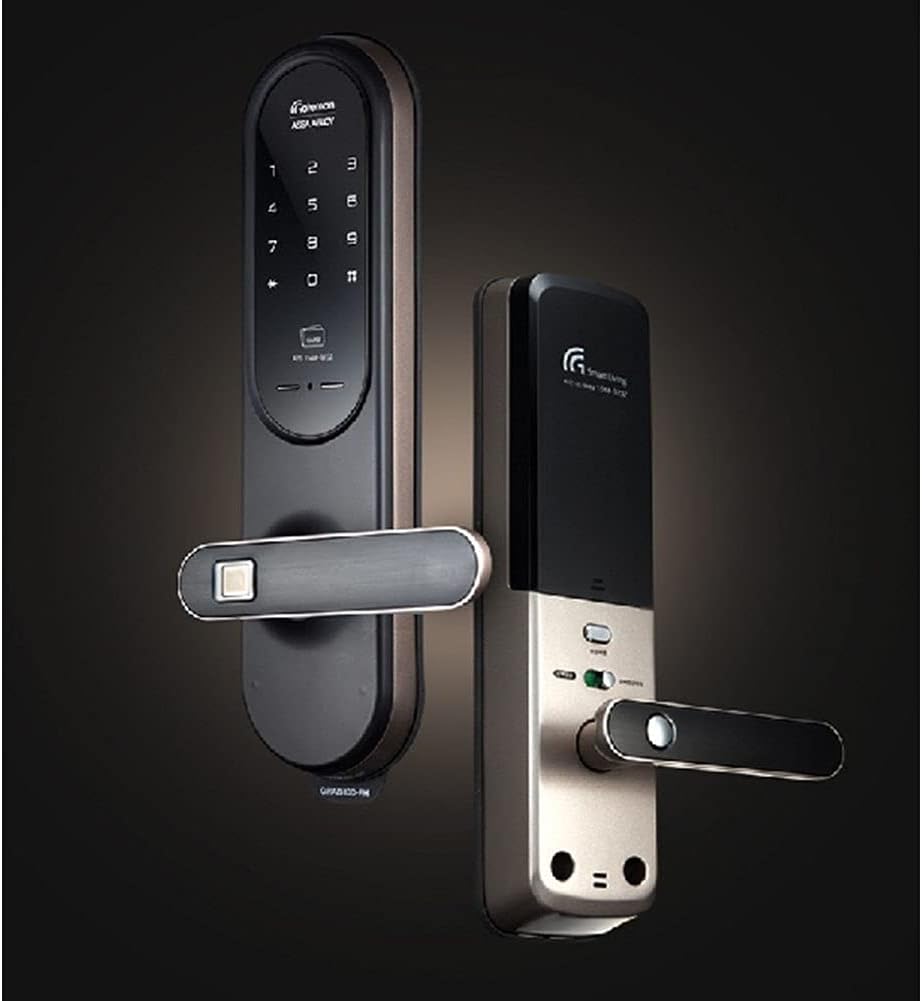
Image 1.1: The Gateman GRAB100-FH Digital Door Lock installed on a door, showcasing savo elegantišku dizainu.
2. Sąranka ir diegimas
Proper installation is crucial for the optimal performance and security of your Gateman GRAB100-FH Digital Door Lock. It is highly recommended to have the lock installed by a qualified professional. This section provides general guidelines.
2.1 Pakuotės turinys
Before installation, verify that all components are present in the package. Refer to the product packaging for a detailed list of included items.
2.2 Akumuliatoriaus įdėjimas
- The lock requires four (4) 1.5V AA alkaline batteries.
- Locate the battery compartment on the interior unit of the door lock.
- Open the battery cover and insert the batteries, ensuring correct polarity (+/-).
- Saugiai uždarykite akumuliatoriaus dangtelį.

Image 2.1: The interior and exterior units of the Gateman GRAB100-FH Digital Door Lock, showing the components.
3. Naudojimo instrukcijos
The Gateman GRAB100-FH offers multiple convenient and secure ways to operate your door lock.
3.1 QuickPass Fingerprint Recognition
This feature allows for rapid and natural door unlocking. Simply place your registered finger on the fingerprint sensor, and the lock will authenticate and open the door.

3.1 paveikslėlis: Stambus planas view of the QuickPass fingerprint recognition sensor, designed for quick access.
3.2 Smart Etiquette Function
Activate the Smart Etiquette Function for silent operation of the door lock. This is useful in situations where minimizing sound is desired, such as late at night or early morning.
3.3 External Forced Lock Function
When activated from the outside, this function enhances security by triggering an intrusion alarm if the door is opened from the inside. This provides an additional layer of protection when you are away.
3.4 Internal Forced Lock Function
When set from the inside, this function disables all external authentication methods, including passwords, card keys, and fingerprints. This ensures privacy and prevents unauthorized entry from the outside.

3.2 pav.: Išsamus view of the digital keypad and fingerprint sensor on the Gateman GRAB100-FH.
4. Priežiūra
Regular maintenance ensures the longevity and reliable operation of your digital door lock.
4.1 Valymas
- Nuvalykite spynos paviršių minkštu, sausu skudurėliu.
- Venkite naudoti abrazyvinius valiklius, tirpiklius ar stiprias chemines medžiagas, nes jos gali pažeisti apdailą ir vidinius komponentus.
- Keep the fingerprint sensor clean and free of dirt or moisture for optimal recognition.
4.2 Akumuliatoriaus keitimas
- Replace all four (4) AA alkaline batteries when the low battery indicator appears or when the lock's response becomes slow.
- Always replace all batteries at once with new ones of the same type. Do not mix old and new batteries.
5. Problemų sprendimas
If you encounter issues with your Gateman GRAB100-FH, refer to the following common problems and solutions.
5.1 Užraktas nereaguoja
- Patikrinkite baterijas: Įsitikinkite, kad baterijos tinkamai įdėtos ir yra pakankamai įkrautos. Jei reikia, pakeiskite.
- Maitinimo ciklas: Remove batteries, wait 30 seconds, then reinsert them.
5.2 Piršto atspaudas neatpažintas
- Švarus jutiklis: Ensure the fingerprint sensor is clean and dry.
- Tinkamas išdėstymas: Įsitikinkite, kad pirštas uždengia visą jutiklio paviršių.
- Iš naujo užregistruoti piršto atspaudą: If issues persist, try deleting and re-registering your fingerprint.
5.3 Alarm Sounds Unexpectedly
- Check Forced Lock Function: Verify if the External Forced Lock Function is active.
- Durų išlyginimas: Ensure the door is properly closed and aligned, as misalignment can sometimes trigger alarms.
6. Specifikacijos
Detailed technical specifications for the Gateman GRAB100-FH Digital Door Lock.
| Modelio numeris | GRAB100-FH |
| Įvertintas ttage | DC 6V |
| Darbinė temperatūra | -15°C iki 55°C |
| Jutiklio darbo temperatūra | 55°C |
| Exterior Unit Dimensions (L x W x H) | 76 x 31 x 312 mm (2.99 x 1.22 x 12.28 colio) |
| Interior Unit Dimensions (L x W x H) | 76 x 36 x 312 mm |
| Baterijos | 4 x 1.5 V AA šarminės baterijos |
| Užrakto tipas | Elektroninė |
| Ypatingos savybės | Fingerprint Recognition, Fire Resistant, IPX4 Waterproofing |
| Kontrolės metodas | Palieskite |
| UPC | 191997047007 |

Image 6.1: Visual representation of the fire-resistant properties of the Gateman GRAB100-FH, designed to withstand high temperatures.
7. Garantija ir palaikymas
For warranty information and customer support, please refer to the documentation provided at the time of purchase or contact your retailer. Gateman is committed to providing reliable products and assistance.
- Garantija: Specific warranty terms and conditions may vary by region and retailer. Please retain your proof of purchase.
- Techninė pagalba: For technical assistance, troubleshooting beyond this manual, or service inquiries, please contact the authorized Gateman service center or your product supplier.