
1. Produktas baigtasview
The Anderic OEM NSRCFNA21 Smart Remote is an original equipment manufacturer (OEM) replacement remote control specifically designed for various Insignia TV models. This remote provides seamless functionality and user-friendly operation, ensuring reliable control over your television.
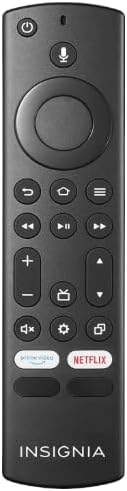
1.1 vaizdas: The Anderic OEM NSRCFNA21 Smart Remote. This image displays the front view of the black remote control, featuring various buttons for power, voice control, navigation, volume, channel, and dedicated streaming service buttons.
Pagrindinės funkcijos:
- Original Quality: An authentic OEM product, ensuring performance and reliability comparable to the remote originally supplied with your TV.
- Patogus vartotojui dizainas: Intuitive buttons and controls for easy navigation, volume adjustment, channel changes, and access to various TV functions.
- Patikimas našumas: Provides a stable and responsive connection for accurate command execution.
2. Sąrankos ir susiejimo instrukcijos
To ensure proper functionality, the remote control must be paired with your Insignia TV. Follow these steps carefully:
- Iš naujo nustatyti televizorių: Unplug your Insignia TV from its power source. Wait for approximately 30 seconds.
- Televizoriaus įjungimas: Plug the TV back into the power source and turn it on. Allow the TV to fully boot up.
- Pradėti poravimą: Once the TV has completely booted up and is displaying content, press and hold the Pradžia button on the Anderic NSRCFNA21 remote control for up to 30 seconds.
- Remote Update (if prompted): Your TV may display a message indicating that the remote needs an update. If prompted, allow the TV to proceed with the update. This process may take 1 to 3 minutes to complete.
- Patvirtinimas: After the update (if any) and pairing process, test the remote's functions (e.g., volume, channel, navigation) to confirm successful pairing.
If the remote does not pair after following these steps, repeat the process or refer to the troubleshooting section.
3. Nuotolinio valdymo pulto valdymas
The Anderic NSRCFNA21 remote control features an intuitive layout for easy operation of your Insignia TV. Below are the general functions of the primary buttons:
- Maitinimo mygtukas: Įjungia arba išjungia televizorių.
- Valdymo balsu mygtukas: Activates voice commands for searching content or controlling the TV.
- Navigation Pad (Directional Buttons and Select): Naudojamas naršyti meniu ir pasirinkti elementus.
- Namų mygtukas: Grąžina į pagrindinį televizoriaus ekraną.
- Atgal mygtukas: Grįžta į ankstesnį ekraną arba meniu.
- Menu/Options Button: Accesses additional menu options or settings.
- Garsumo didinimas / sumažinimas: Adjusts the TV's audio volume.
- Kanalas aukštyn/žemyn: Keičia televizijos kanalus.
- Nutildymo mygtukas: Išjungia arba įjungia televizoriaus garsą.
- Nustatymų mygtukas: Atidaro televizoriaus nustatymų meniu.
- Įvesties / šaltinio mygtukas: Changes the TV's input source (e.g., HDMI 1, HDMI 2).
- Dedicated Streaming Service Buttons: Provides quick access to popular streaming applications (e.g., Amazon Prime Video, Netflix).
4. Suderinamumas
The Anderic OEM NSRCFNA21 Smart Remote is compatible with the following Insignia TV models:
- NS24DF310NA21
- NS39DF310NA21
- NS50DF710NA21
- NS55DF710NA21
This remote also replaces the following models:
- NSRCFNA19 Rev B Fire
- NSRCFNA19revB
- NSRCFNA21 Fire
- NSRCFNA21 Rev E
- NSRCFNA21-Rev-E
Ensure your TV model is listed above for optimal performance.
5. Priežiūra
Proper maintenance can extend the life and functionality of your remote control.
- Baterijos keitimas: The remote requires two AAA batteries. Replace batteries when the remote's responsiveness decreases or it stops functioning. Ensure correct polarity when inserting new batteries.
- Valymas: Nuotolinio valdymo pulto paviršių valykite minkšta, sausa šluoste. Venkite naudoti skystus valiklius ar abrazyvines medžiagas, nes jos gali pažeisti nuotolinio valdymo pultą.
- Saugykla: Nuotolinio valdymo pultą laikykite sausoje vietoje, atokiau nuo ekstremalių temperatūrų ir tiesioginių saulės spindulių.
6. Problemų sprendimas
If you encounter issues with your Anderic NSRCFNA21 Smart Remote, try the following troubleshooting steps:
- Nuotolinio valdymo pultas nereaguoja:
- Check the batteries. Replace them with fresh AAA batteries, ensuring correct polarity.
- Įsitikinkite, kad tarp nuotolinio valdymo pulto ir televizoriaus jutiklio nėra jokių kliūčių.
- Pabandykite dar kartą susieti, kaip aprašyta 2 skyriuje.
- Pertraukiamas funkcionalumas:
- Tai gali rodyti, kad baterijos išsikrovė. Pakeiskite baterijas.
- Ensure you are within the effective range of the TV's sensor.
- Pairing Fails:
- Confirm your TV model is listed in the compatibility section (Section 4).
- Ensure the TV is fully booted up before attempting to hold the Home button.
- Try unplugging the TV for a longer period (e.g., 1-2 minutes) before plugging it back in and re-attempting pairing.
Jei po šių veiksmų problemos išlieka, kreipkitės į klientų aptarnavimo tarnybą.
7. Specifikacijos
| Prekės ženklas | Anderikas |
| Modelio numeris | NSRCFNA21 Rev B |
| Suderinami įrenginiai | Insignia Televisions |
| Maitinimo šaltinis | 2 AAA baterijos (reikalingos) |
| Prekės svoris | 1.76 uncijos |
| Pakuotės matmenys | 6.3 x 2.95 x 0.67 colio |
| Spalva | Juoda |
| Gamintojas | Dan's Electronics Etc., Inc. |
8. Garantija ir palaikymas
For warranty information or technical support, please contact the manufacturer, Anderic (Dan's Electronics Etc., Inc.). Refer to the product packaging or the official Anderic websvetainėje rasite konkrečius kontaktinius duomenis ir garantijos sąlygas.
Galite aplankyti Anderic Store on Amazon Norėdami gauti daugiau informacijos.