
1. Produktas baigtasview
The Oversteel Kyanite is a gaming PC case designed to house ATX, Micro ATX, and Mini ITX motherboards. It features a mesh front panel for optimized airflow, a tempered glass side panel to showcase internal components, and four pre-installed 120mm A-RGB fans for effective cooling and customizable lighting. This case is engineered for quality and performance, providing a robust foundation for your gaming PC build.

1.1 paveikslas: Priekinė pusė view of the Oversteel Kyanite Gaming PC Case, highlighting its mesh front and tempered glass side panel.

1.2 vaizdas: priekis view of the Oversteel Kyanite PC case, showcasing the mesh design for airflow.
2. Sąranka ir diegimas
Before beginning installation, ensure you have all necessary components and tools. Work on a clean, static-free surface.
2.1. Bylos atidarymas
Carefully remove the tempered glass side panel by unscrewing the thumb screws located at the rear of the case. Place the panel on a soft, flat surface to prevent scratches.
2.2 Pagrindinės plokštės montavimas
The Kyanite case supports ATX, Micro ATX, and Mini ITX motherboards. Install the necessary standoffs for your motherboard form factor. Carefully align your motherboard with the standoffs and I/O shield, then secure it with screws. Ensure all screws are tightened appropriately, but do not overtighten.
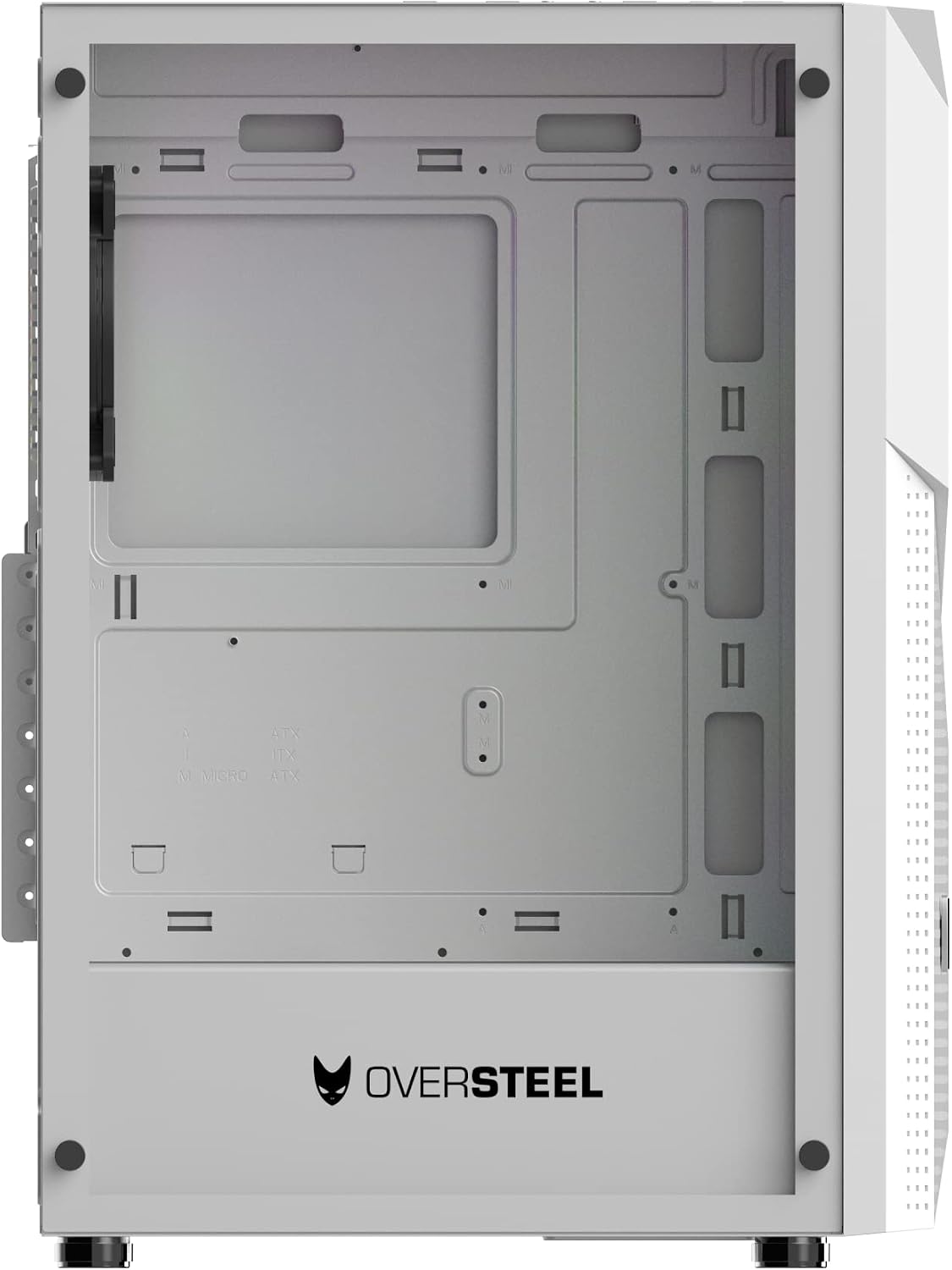
2.1 pav.: Vidinis view of the PC case, illustrating the motherboard mounting area with ATX, Micro ATX, and ITX markings.
2.3 Maitinimo bloko (PSU) montavimas
The case features a bottom-mount PSU design. Slide your ATX power supply into the designated compartment at the bottom rear of the case and secure it with screws from the exterior. Ensure the PSU fan faces downwards for optimal cooling if the case has a bottom vent.
2.4 Atminties disko diegimas
The Kyanite case provides 4 internal bays compatible with 2.5" and 3.5" storage drives. Mount your SSDs or HDDs into the drive cages or designated mounting points and secure them with the appropriate screws.
2.5 Vaizdo plokštės (VGA) ir išplėtimo plokštės įdiegimas
Remove the necessary expansion slot covers at the rear of the case. Insert your graphics card (VGA) or other expansion cards into the PCIe slots on your motherboard and secure them with screws. The case supports VGA cards up to 295mm in length.
2.6 CPU aušintuvo montavimas
Install your CPU cooler according to its specific instructions. The case accommodates CPU coolers up to 160mm in height.
2.7 Kabelių valdymas
Utilize the cable routing cutouts and tie-down points behind the motherboard tray to manage cables. This improves airflow and aesthetics. Connect all power cables from the PSU to your components and all data cables to your storage drives and motherboard.

2.2 pav.: Galinė pusė view of the PC case, indicating space for cable management and expansion slots.
3. Operacija
3.1 Priekinio skydelio jungtys
The top panel of the Kyanite case provides convenient access to essential ports and controls:
- Maitinimo mygtukas: Paspauskite, kad įjungtumėte arba išjungtumėte sistemą.
- Atkūrimo mygtukas: Can also function as an A-RGB lighting control button.
- USB 3.0 prievadas: One port for high-speed data transfer.
- USB 2.0 prievadai: Du prievadai periferiniams įrenginiams prijungti.
- Garso lizdai: Ausinių ir mikrofono lizdai.

3.1 pav.: Viršus view of the PC case, detailing the front panel I/O ports and control buttons.
3.2 A-RGB Fan Control
The four pre-installed 120mm A-RGB fans are connected to a controller. You can cycle through various lighting modes and colors by pressing the dedicated A-RGB control button, which is often integrated with the reset button on the top panel. Refer to your motherboard's manual for potential software control options if it supports addressable RGB synchronization.
4. Priežiūra
Reguliarus kompiuterio komponentų aptarnavimas užtikrina optimalų našumą ir ilgaamžiškumą.
4.1 Dulkių filtro valymas
The Kyanite case is equipped with magnetic dust filters on the top and bottom. Periodically remove these filters and clean them with compressed air or a soft brush to prevent dust buildup and maintain optimal airflow.
4.2 Case Exterior Cleaning
Nuvalykite korpuso išorinius paviršius minkšta,amp cloth. Avoid abrasive cleaners or solvents that could damage the finish. For the tempered glass panel, use a glass cleaner and a microfiber cloth.
4.3 Fan Cleaning
Over time, dust can accumulate on fan blades. Use compressed air to gently clean the fan blades of the pre-installed A-RGB fans to ensure efficient cooling.
5. Problemų sprendimas
Šiame skyriuje aptariamos dažniausiai pasitaikančios problemos, su kuriomis galite susidurti diegimo ar naudojimo metu.
5.1 Sistema neįsijungia
- Įsitikinkite, kad maitinimo šaltinis tinkamai prijungtas prie sieninio lizdo ir įjungtas.
- Verify all power cables from the PSU are securely connected to the motherboard, CPU, and graphics card.
- Patikrinkite, ar priekinio skydelio maitinimo jungiklio kabelis tinkamai prijungtas prie pagrindinės plokštės priekinio skydelio jungties.
5.2 A-RGB Fans or Lighting Not Working
- Confirm that the A-RGB controller is receiving power, typically via a SATA power connector from the PSU.
- Ensure all fan A-RGB cables are securely connected to the controller.
- Try pressing the A-RGB control button (often the reset button) on the top panel to cycle through modes.
- If connected to a motherboard A-RGB header, verify the connection and check motherboard software settings.
5.3 Component Fitment Issues
- Pagrindinė plokštė: Ensure correct standoffs are used for your motherboard form factor (ATX, Micro ATX, Mini ITX).
- Vaizdo plokštė: Verify your graphics card length does not exceed 295mm.
- CPU aušintuvas: Įsitikinkite, kad procesoriaus aušintuvo aukštis neviršija 160 mm.
- Varžtai: Always use the correct type and size of screws for each component to avoid damage or improper fit.
6. Specifikacijos
| Modelio pavadinimas | KIANITAS |
| Modelio numeris | NAT-OV-CS-KYANITE-W |
| Matmenys (I x P x A) | 51.59 x 24.51 x 40.59 cm (20.31 x 9.65 x 15.98 colio) |
| Svoris | 5.55 kg (12.24 svaro) |
| Medžiaga | Grūdintas stiklas |
| Pagrindinės plokštės suderinamumas | ATX, mikro ATX, mini ITX |
| Atvejo tipas | Mid Tower |
| Rekomenduojamas naudojimas | Žaidimų kompiuteris |
| Spalva | Baltas |
| Aušinimo būdas | Oras |
| Ventiliatoriaus dydis | 120 milimetrų |
| Ventiliatorių skaičius | 4 (A-RGB) |
| Maitinimo bloko tvirtinimas | Apatinis kalnas |
| USB 2.0 prievadai | 2 |
| USB 3.0 prievadai | 1 |
| Diskų skyriai (vidiniai) | 4 (compatible with 2.5" and 3.5" drives) |
| Maksimalus VGA kortelės ilgis | 295 mm |
| Maksimalus procesoriaus aušintuvo aukštis | 160 mm |
| Produkto savybės | Unique mesh design with 3D effect and A-RGB fans |
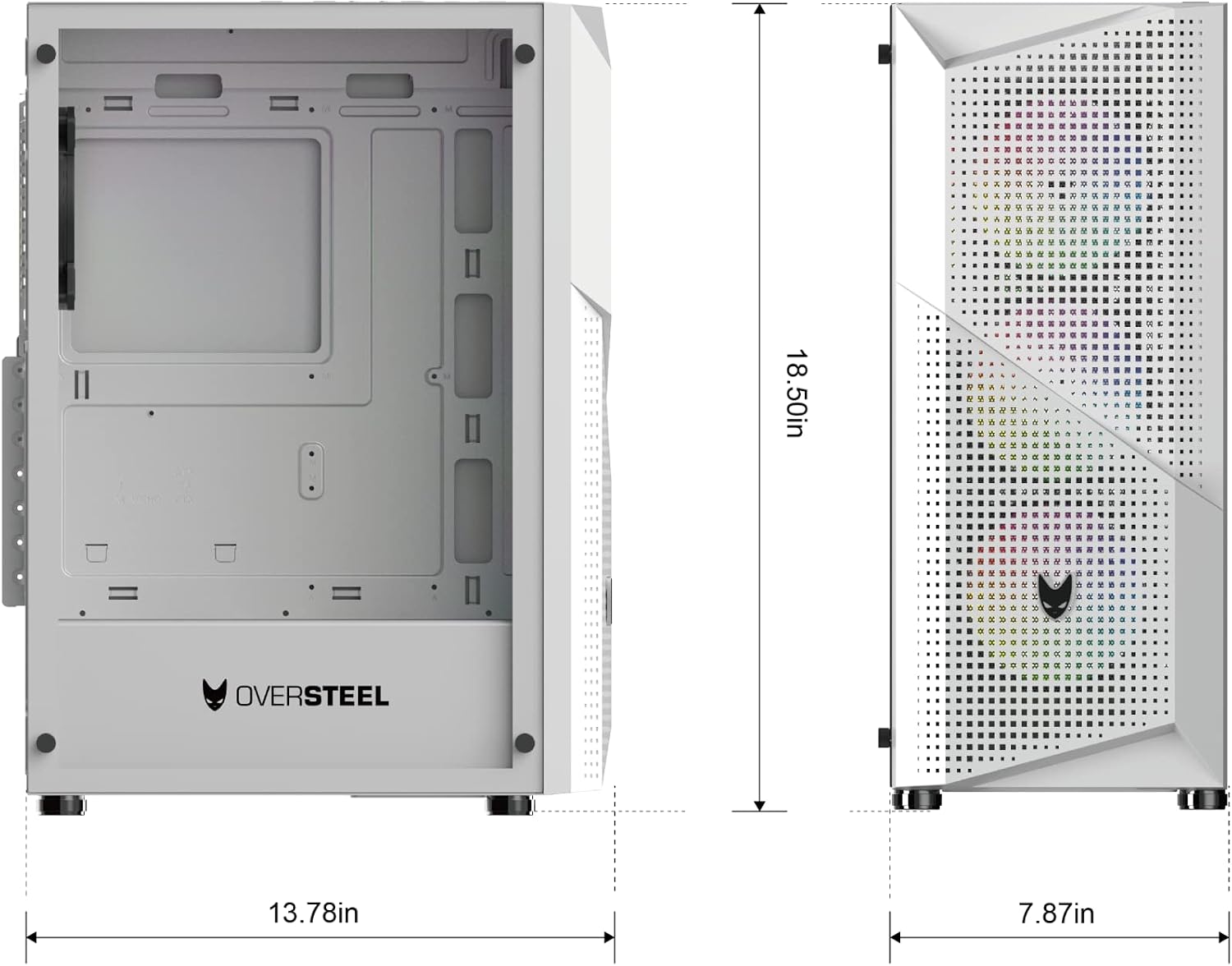
Image 6.1: Dimensional diagram of the Oversteel Kyanite PC case, showing key measurements.
7. Informacija apie garantiją
For detailed warranty terms and conditions, please refer to the official Oversteel websvetainėje arba susisiekite su pardavėju. Išsaugokite pirkimo įrodymą, jei prireiktų pateikti garantinį prašymą.
8. Techninė pagalba
Should you require technical assistance or have questions not covered in this manual, please visit the official Oversteel website for support resources, FAQs, and contact information for customer service.