
1. Įvadas
The Phomemo P12 PRO is a compact, portable Bluetooth thermal label maker designed for various labeling needs in home, office, and school environments. This device utilizes thermal printing technology, eliminating the need for ink or toner. It connects wirelessly to your smartphone or tablet via Bluetooth, allowing you to design and print labels using the dedicated 'Print Master' application.
The P12 PRO supports a variety of label materials, including standard plastic labels, satin ribbons, and iron-on labels, offering versatility for organizing, crafting, and personalizing items. Its built-in rechargeable battery ensures portability and convenience.

Figure 1: Phomemo P12 PRO Label Maker with a roll of label tape and a smartphone displaying the 'Print Master' app.
2. Sąranka
2.1. Kas yra dėžutėje
- Phomemo P12 PRO Label Maker
- Label Tape Roll (pre-installed or included separately)
- C tipo USB įkrovimo laidas
- Vartotojo vadovas (šis dokumentas)
2.2. Įrenginio įkrovimas
Before initial use, fully charge the P12 PRO. Connect the provided USB Type-C cable to the charging port on the device and to a standard USB power adapter (not included) or a computer's USB port. The charging indicator light will provide feedback on the charging status.
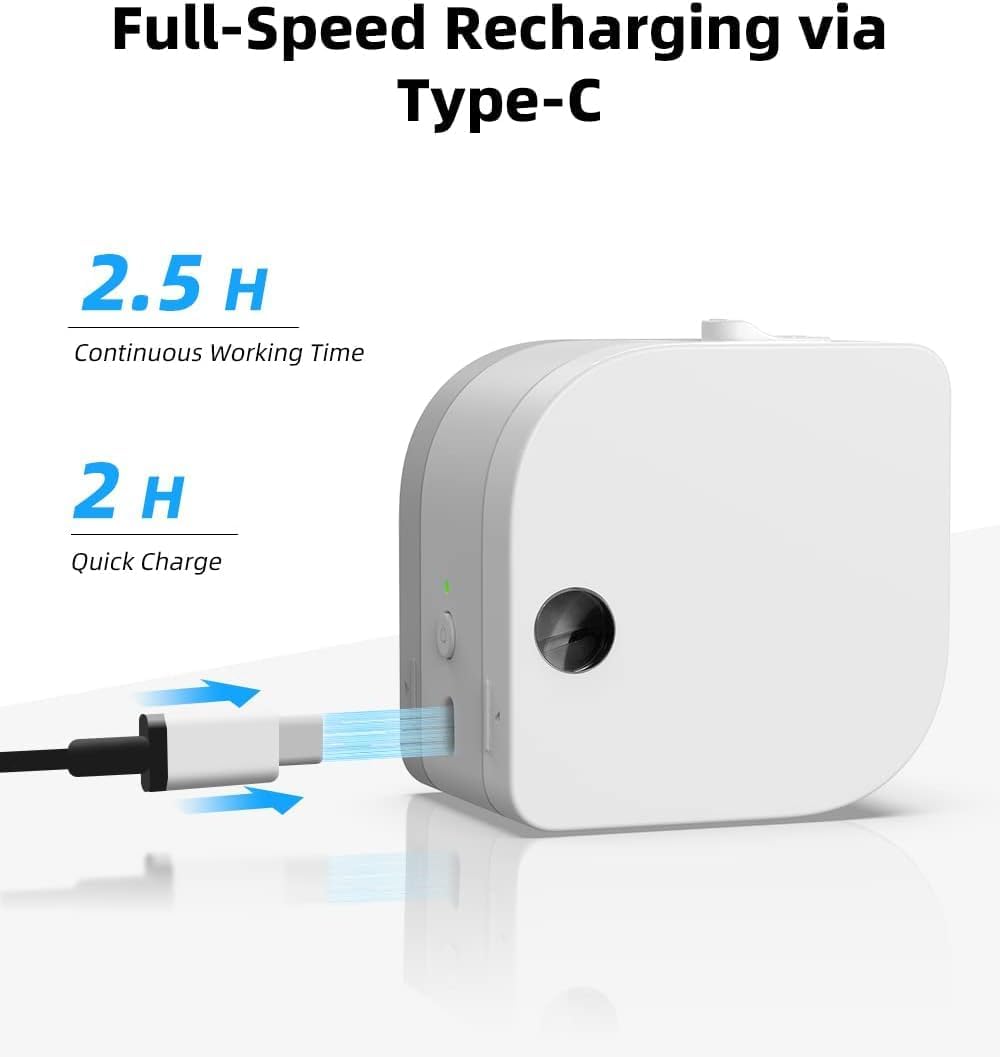
Figure 2: The P12 PRO charging via its Type-C port. A full charge takes approximately 2 hours and provides up to 2.5 hours of continuous working time.
2.3. Programėlės diegimas ir „Bluetooth“ susiejimas
The Phomemo P12 PRO operates via the 'Print Master' application. Follow these steps to install the app and pair your device:
- Atsisiųskite programą: Ieškokite 'Print Master' in the Apple App Store (for iOS devices) or Google Play Store (for Android devices) and install it.
- Maitinimas: Press and hold the power button on the P12 PRO until the indicator light turns on.
- Įjungti Bluetooth: Įsitikinkite, kad jūsų išmaniajame telefone arba planšetiniame kompiuteryje įjungtas „Bluetooth“ ryšys.
- Atidarykite programėlę ir prisijunkite: Open the 'Print Master' app. The app will automatically search for available Phomemo devices. Select 'P12 PRO' from the list to establish a connection. The device indicator light will change to confirm a successful connection.

Figure 3: The 'Print Master' app interface, demonstrating Bluetooth connectivity and options for customizing labels with borders and icons.
3. Naudojimo instrukcijos
3.1. Etikečių juostos įdėjimas
- Atidaryti viršelį: Gently push the cover release button (if present) or lift the top cover of the device.
- Įdėkite juostą: Place the label tape roll into the compartment with the label end extending out through the printer's output slot. Ensure the tape is aligned correctly.
- Uždaryti viršelį: Tvirtai uždarykite dangtelį, kol jis spragtelėdamas užsifiksuos vietoje.
3.2. Etikečių kūrimas ir spausdinimas
The 'Print Master' app provides extensive customization options for your labels:
- Teksto įvestis: Enter your desired text. The app supports multiple lines of text.
- Fonts and Styles: Choose from over 154 fonts and adjust text size, bolding, italics, and alignment.
- Borders and Icons: Select from 78 frames and thousands of icons, graphics, and symbols to enhance your labels.
- Ypatingos savybės: Create barcodes, QR codes, and utilize various templates for specific applications (e.g., date labels, price tags).

4 pav. Pvzamples of labels with clear text and icons, suitable for school items and organization.

Figure 5: The P12 PRO's versatility in creating labels for kitchen organization, including date and content labels.
3.3. Supported Label Types
The P12 PRO is compatible with 12mm wide label tapes and supports various materials:
- Plastikinės etiketės: Water-resistant, abrasion-resistant, oil-resistant, and strong adhesive for general use.
- Satin Ribbon Labels: Ideal for gift wrapping, crafts, and decorative purposes.
- Iron-on Labels: For labeling clothing and fabric items.
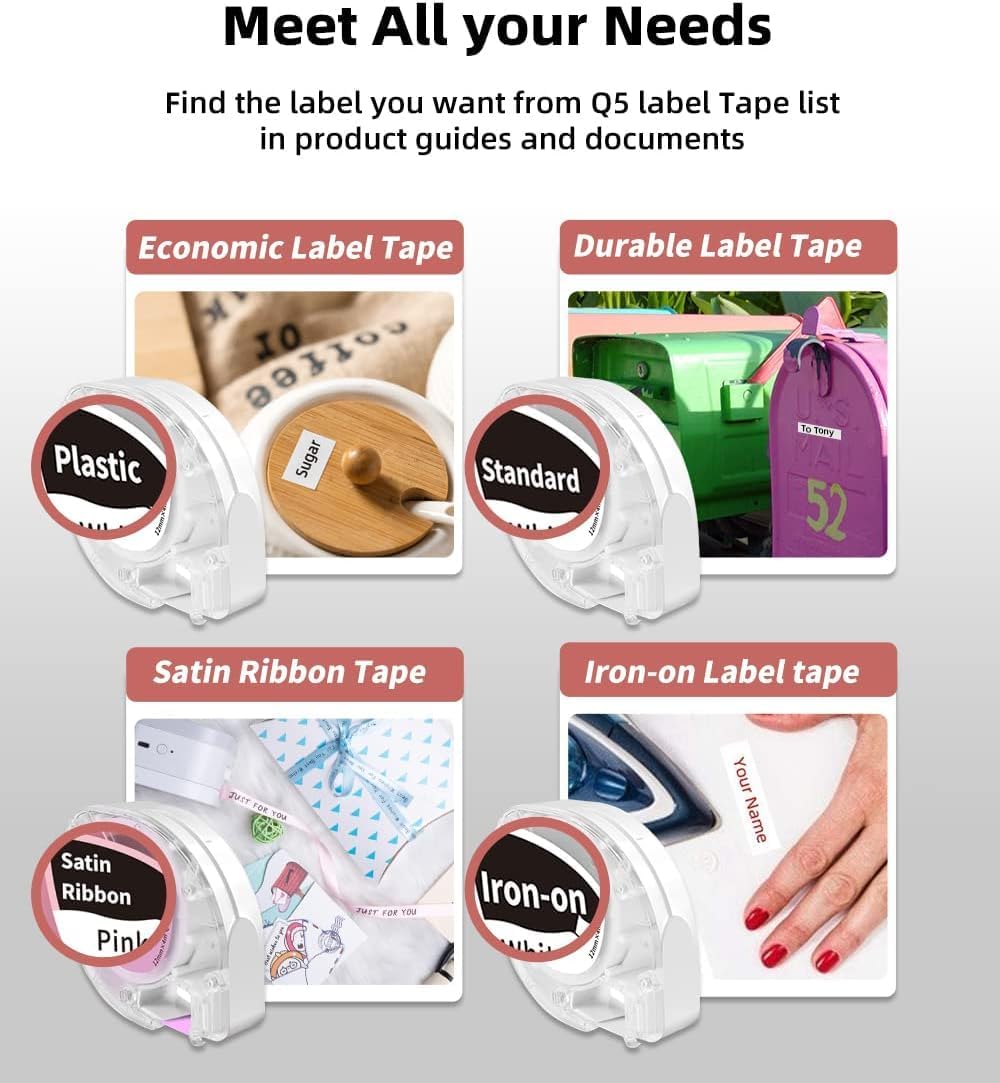
Figure 6: A selection of label tape types compatible with the Phomemo P12 PRO, including plastic, standard, satin ribbon, and iron-on options.

Figure 7: Demonstrating the application of an iron-on label for clothing, a feature supported by the P12 PRO.
3.4. Etikečių pjaustymas
After printing, use the built-in serrated tear-off knife to cleanly cut the label from the tape roll. This ensures a smooth and quick cut.
4. Priežiūra
4.1. Spausdinimo galvutės valymas
Norėdami išlaikyti optimalią spausdinimo kokybę, periodiškai valykite spausdinimo galvutę. Naudokite minkštą, nepūkuotą šluostę, lengvai nuvalytąampened with isopropyl alcohol. Gently wipe the print head surface. Ensure the device is powered off before cleaning.
4.2. Akumuliatoriaus priežiūra
The P12 PRO features a built-in lithium-ion battery. To prolong battery life:
- Venkite dažnai visiškai iškrauti akumuliatorių.
- Laikykite prietaisą vėsioje, sausoje vietoje, kai jo ilgesnį laiką nenaudojate.
- If the device will not be used for a long time, charge it to about 50% every few months.
5. Problemų sprendimas
5.1. Įrenginys neįsijungia
- Įsitikinkite, kad įrenginys yra visiškai įkrautas. Prijunkite jį prie maitinimo šaltinio naudodami C tipo laidą.
- Paspauskite ir keletą sekundžių palaikykite maitinimo mygtuką.
5.2. Cannot Connect via Bluetooth
- Verify that the P12 PRO is powered on and within range of your mobile device.
- Įsitikinkite, kad jūsų mobiliajame įrenginyje įjungtas „Bluetooth“.
- Restart the 'Print Master' app and try connecting again.
- If issues persist, try restarting both the P12 PRO and your mobile device.
5.3. Prasta spausdinimo kokybė
- Check if the label tape is correctly installed and not jammed.
- Išvalykite spausdinimo galvutę, kaip aprašyta skyriuje „Priežiūra“.
- Įsitikinkite, kad naudojate originalias „Phomemo“ etikečių juostas.
- Patikrinkite akumuliatoriaus lygį; žemas akumuliatoriaus įkrovos lygis gali turėti įtakos spausdinimo kokybei.
5.4. Label Jamming
- Nedelsdami išjunkite įrenginį.
- Open the cover and carefully remove any jammed label tape.
- Reinstall the label tape, ensuring it is properly aligned.
6. Specifikacijos
| Funkcija | Detalė |
|---|---|
| Modelio pavadinimas | Phomemo P12 Pro |
| Spausdinimo technologija | Šiluminis |
| Rezoliucija | 203 dpi |
| Ryšys | Bluetooth 4.0 or above, USB Type-C |
| Suderinamos sistemos | Android, iOS |
| Maksimalus etiketės plotis | 12 mm |
| Baterijos talpa | 1000 mAh ličio jonų (įkraunamas) |
| Įkrovimo laikas | apytiksliai 2 valandas |
| Nepertraukiamas darbo laikas | apytiksliai 2.5 valandas |
| Automatinis išjungimas | Po 15 minučių neveikimo |
| Matmenys | 4.8 x 4.5 x 2.67 colio |
| Prekės svoris | 7.8 uncijos |
7. Garantija ir palaikymas
7.1. Informacija apie garantiją
The Phomemo P12 PRO Label Maker Machine comes with a 2 metų garantija nuo įsigijimo datos. Ši garantija taikoma gamybos defektams ir gedimams įprasto naudojimo metu. Išsaugokite pirkimo įrodymą, jei galėtumėte pateikti pretenzijas dėl garantijos.
7.2. Pagalba klientams
For technical assistance, troubleshooting not covered in this manual, or warranty inquiries, please contact Phomemo customer support through their official website or the contact information provided with your product packaging. Please have your model number (P12 Pro) and purchase details ready when contacting support.