
BLAUX 30888
BLX Earbuds - Wireless Bluetooth 5.1 Earbuds User Manual
Model: 30888 | Brand: BLAUX
1. Įvadas
Thank you for choosing BLX Earbuds. These True Wireless Stereo (TWS) earbuds are designed to provide a seamless and high-quality audio experience with the convenience of Bluetooth 5.1 technology. This manual will guide you through the setup, operation, and maintenance of your new earbuds to ensure optimal performance and longevity.
2. Kas yra dėžutėje
Patikrinkite pakuotės turinį, kad įsitikintumėte, jog yra visi reikalingi daiktai:
- BLX Wireless Earbuds (Left and Right)
- Belaidžio įkrovimo dėklas
- Mikro USB įkrovimo laidas
- Silikoniniai ausų antgaliai (maži, vidutiniai, dideli)
- Vartotojo vadovas
3. Produktas baigtasview
The BLX Earbuds offer a compact and ergonomic design for comfortable, all-day wear. The included charging case provides extended battery life and convenient storage.
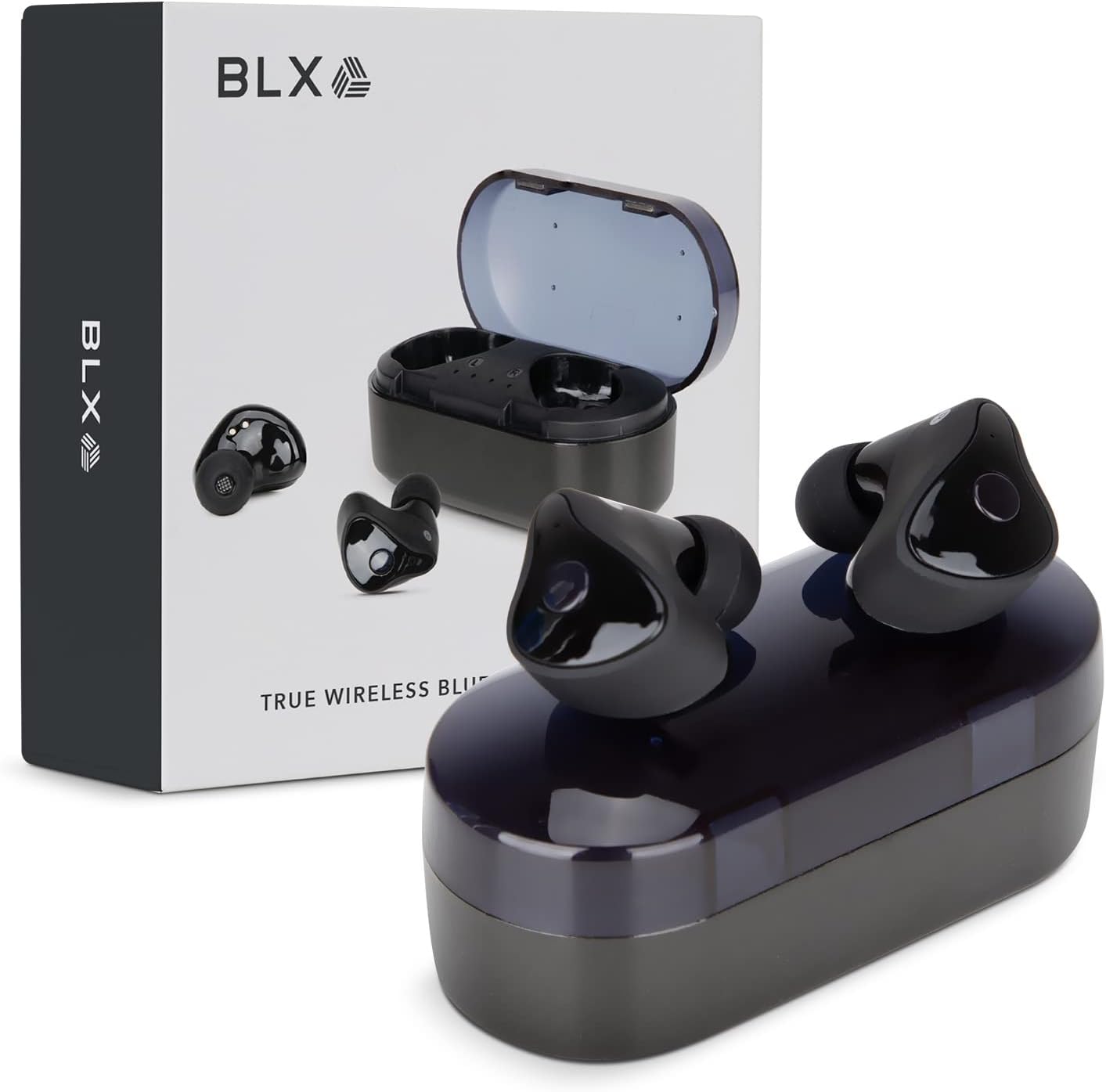
Image: BLX Earbuds, charging case, and product packaging.
3.1 Pagrindinės savybės
- Tikrasis belaidis stereofoninis ryšys (TWS): Enjoy a completely wireless audio experience with independent earbuds.
- Bluetooth 5.1 technologija: Provides a stable and efficient wireless connection with a range of up to 10 meters.
- Greitas susiejimas: Earbuds automatically connect to your device once removed from the charging case.
- Intuityvūs jutikliniai valdikliai: Valdykite muzikos atkūrimą, skambučius ir balso asistentus paprastais bakstelėjimais.
- IPX4 atsparumas vandeniui: Designed to withstand sweat and splashes, making them suitable for workouts and outdoor activities.
- Integruotas mikrofonas: Enables hands-free calling and voice assistant interaction.

Image: BLX Earbuds demonstrating true wireless freedom with Bluetooth 5.1, fast pairing, and a 10-meter range.

Vaizdas: Išsamus view of a BLX Earbud highlighting its smart touch control capabilities for various functions.

Image: A person running while wearing BLX Earbuds, emphasizing their IPX4 water resistance for sweat and splashes, and the portability of the compact charging case.

Image: A woman wearing a BLX Earbud, with an illustration of the three included silicone ear tip sizes (11mm, 12mm, 13mm) to help users find their perfect fit.

Image: A woman enjoying music with BLX Earbuds, illustrating the battery performance: 4.5 hours of listening time, up to 18 hours with the charging case, and a 1-hour full charge time for the case.

Image: A close-up of a BLX Earbud, emphasizing its clear immersive audio quality with a frequency response range of 20Hz to 20KHz.

Image: BLX Earbuds depicted with icons for Google Assistant and Siri, along with a built-in microphone icon, indicating hands-free voice assistant capabilities.
4. Sąranka
4.1 Ausinių ir dėklo įkrovimas
Before first use, fully charge the BLX Earbuds and their charging case.
- Įdėkite ausines į įkrovimo dėklą. Įsitikinkite, kad jos tinkamai įstatytos į atitinkamus lizdus (K – kairė, R – dešinė).
- Connect the Micro USB charging cable to the charging port on the case and the other end to a USB power source (e.g., computer, wall adapter).
- The indicator lights on the charging case will illuminate to show charging status. A full charge for the case takes approximately 1 hour.
- Kai ausinės bus visiškai įkrautos, atjunkite įkrovimo laidą. Ausinės įsikraus automatiškai, kai bus įdėtos į dėklą su maitinimo šaltiniu.
4.2 Susiejimas su jūsų įrenginiu
BLX Earbuds feature auto-pairing technology for quick and easy connection.
- Ensure the charging case is charged and your device's Bluetooth is enabled.
- Atidarykite įkrovimo dėklą. Ausinės automatiškai įsijungs ir pradės veikti susiejimo režimu.
- On your device (smartphone, tablet, laptop), go to the Bluetooth settings and search for available devices.
- Select "BLX Earbuds" from the list of found devices.
- Once connected, your device will confirm the pairing, and the earbuds will be ready for use.
- Vėlesniais naudojimo atvejais ausinės automatiškai prisijungs prie paskutinio suporuoto įrenginio, kai bus išimtos iš dėklo.
4.3 Finding the Perfect Fit
A proper fit is crucial for sound quality and comfort. Experiment with the included silicone ear tips (Small, Medium, Large) to find the size that best seals your ear canal.
- Švelniai įkiškite ausinę į ausies kanalą.
- Twist slightly to secure it in place. The earbud should feel snug and comfortable without causing pressure.
- Jei garso kokybė prasta arba ausinės atrodo laisvos, pabandykite kito dydžio ausinių antgalius.
5. Operating Your BLX Earbuds
The BLX Earbuds utilize touch controls for easy management of audio and calls.
5.1 Maitinimo įjungimas/išjungimas
- Maitinimas: Atidarykite įkrovimo dėklą ir ausinės automatiškai įsijungs.
- Išjungti: Įdėkite ausines atgal į įkrovimo dėklą ir uždarykite dangtelį. Jos automatiškai išsijungs ir pradės krautis.
5.2 Muzikos atkūrimas
| Veiksmas | Kontrolė |
|---|---|
| Leisti / pristabdyti | Vienu bakstelėjimu bet kurią ausinę |
| Kitas takelis | Dukart bakstelėkite dešinįjį ausinės antgalį |
| Ankstesnis takelis | Dukart bakstelėkite kairįjį ausinės antgalį |
5.3 Skambučių valdymas
| Veiksmas | Kontrolė |
|---|---|
| Atsiliepti / Baigti skambutį | Vienu bakstelėjimu bet kurią ausinę |
| Atmesti skambutį | Paspauskite ir 2 sekundes palaikykite bet kurią ausinę |
5.4 Balso padėjėjas
| Veiksmas | Kontrolė |
|---|---|
| Įjunkite balso asistentą („Siri“, „Google Assistant“ ir kt.) | Tris kartus bakstelėkite bet kurią ausinę |
5.5 Garsumo valdymas
Volume control is managed directly through your connected device (phone, tablet, laptop).
6. Priežiūra
Proper care and maintenance will extend the life of your BLX Earbuds.
6.1 Valymas
- Ausinėms ir įkrovimo dėklui valyti naudokite minkštą, sausą, nepūkuotą šluostę.
- Ausų antgalius nuimkite nuo ausinių ir, jei reikia, nuvalykite švelniu muilo tirpalu, tada kruopščiai nuskalaukite ir visiškai nusausinkite prieš vėl uždėdami.
- Nenaudokite abrazyvinių valiklių, alkoholio ar cheminių tirpiklių.
- Įsitikinkite, kad abiejų ausinių ir dėklo įkrovimo kontaktai yra švarūs ir be šiukšlių.
6.2 Saugykla
Kai nenaudojate, visada laikykite ausines įkrovimo dėkle, kad apsaugotumėte jas nuo dulkių, pažeidimų ir kad jos būtų įkrautos.
6.3 Atsparumas vandeniui (IPX4)
Your BLX Earbuds are rated IPX4, meaning they are resistant to splashing water from any direction. This makes them suitable for:
- Sweaty workouts
- Light rain or splashes
Svarbi pastaba:
- IPX4 rating does NOT mean the earbuds are waterproof. Do not submerge them in water.
- Do not wear them while swimming, showering, or in heavy rain.
- If the earbuds get wet, wipe them dry immediately before placing them back in the charging case.
7. Problemų sprendimas
If you encounter issues with your BLX Earbuds, try the following solutions:
7.1 Ausinės nesusijungia arba neprisijungia
- Įsitikinkite, kad abi ausinės yra įkrautos.
- Įsitikinkite, kad jūsų įrenginyje įjungtas „Bluetooth“.
- Place the earbuds back in the case, close the lid, wait a few seconds, then open the lid again to re-enter pairing mode.
- Forget/delete "BLX Earbuds" from your device's Bluetooth list and try pairing again.
- Perkelkite ausines arčiau savo įrenginio (iki 10 metrų).
7.2 Nėra garso arba tylus garsas
- Patikrinkite prijungto įrenginio garsumo lygį.
- Įsitikinkite, kad ausinės tinkamai prijungtos prie jūsų įrenginio.
- Nuvalykite visas šiukšles nuo ausinių garsiakalbio tinklelio.
- Pabandykite leisti garsą iš kitos programos ar šaltinio.
7.3 Neveikia viena ausinė
- Įdėkite abi ausines atgal į įkrovimo dėklą, uždarykite dangtelį ir vėl jį atidarykite.
- Įsitikinkite, kad abi ausinės yra įkrautos.
- Pabandykite iš naujo nustatyti ausines (žr. gamintojo website or support for specific reset instructions if needed).
7.4 Įkrovimo dėklas nesikrauna
- Įsitikinkite, kad įkrovimo laidas yra tvirtai prijungtas tiek prie dėklo, tiek prie maitinimo šaltinio.
- Išbandykite kitą USB prievadą arba sieninį adapterį.
- Įsitikinkite, kad įkrovimo laidas nepažeistas.
8. Specifikacijos
| Funkcija | Detalė |
|---|---|
| Modelio pavadinimas | 30888 |
| Ryšio technologija | Belaidis ryšys („Bluetooth 5.1“) |
| belaidis diapazonas | Iki 10 metrų |
| Dažnio atsakas | 20 Hz–20 000 Hz |
| Baterijos veikimo laikas (ausinės) | Approx. 4.5 Hours (listening time) |
| Baterijos veikimo laikas (su įkrovimo dėklu) | Approx. 18 Hours total |
| Įkrovimo laikas (dėklas) | apytiksliai 1 valanda |
| Atsparumo vandeniui lygis | IPX4 (atsparus vandeniui) |
| Mikrofonas | Built-In, Bidirectional |
| Valdymo tipas | Palieskite valdymą |
| Suderinami įrenginiai | Cellphones, Tablets, Laptops (iOS, Android, PC) |
| Medžiaga | Plastikiniai |
| Prekės svoris | 44 gramų |
| Gaminio matmenys | 9.9 x 9.9 x 3.8 cm |
9. Garantija ir palaikymas
BLAUX products are manufactured to high standards and undergo rigorous testing. For information regarding warranty coverage, technical support, or service inquiries, please visit the official BLAUX websvetainėje arba susisiekite tiesiogiai su jų klientų aptarnavimo tarnyba.
Daugiau informacijos ir pagalbos galite rasti adresu BLAUX Store on Amazon.
Ask a question about this manual
Ask about setup, troubleshooting, compatibility, parts, safety, or missing instructions. Manuals+ will review the question and use this page’s manual context to help answer it.