
1. Įvadas
The AOPUTTRIVER AP-5800M is a high-precision air quality monitor designed to detect fine particulate matter, specifically PM2.5, PM1.0, and PM10. Utilizing a laser PM2.5 sensor and single-chip microcomputer technology, this device provides accurate readings displayed on a 2.8-inch TFT color LCD. It is suitable for monitoring air quality in various environments, including indoor spaces, outdoor areas, bedrooms, factories, construction sites, and during travel.
This manual provides essential information for the safe and effective use of your AP-5800M air quality monitor. Please read it thoroughly before operation.
2. Saugos informacija
- Nebandykite ardyti ar modifikuoti įrenginio. Neleistinos modifikacijos gali sukelti gedimą ar sužalojimą.
- Keep the device away from water and high humidity to prevent electrical shock or damage.
- Venkite įrenginio veikimo ekstremaliose temperatūrose, tiesioginiuose saulės spinduliuose ar ėsdinančiose medžiagose.
- Use only the provided USB cable for charging. Ensure the charging voltage yra suderinamas su įrenginiu.
- Laikyti vaikams nepasiekiamoje vietoje.
- Dispose of the device and its battery according to local environmental regulations.
3. Pakuotės turinys
Atidarę pakuotę, patikrinkite, ar yra visi toliau išvardyti daiktai ir ar jie yra geros būklės:
- 1 x AOPUTTRIVER AP-5800M Air Quality Monitor
- 1x USB įkrovimo laidas
- 1 x nešiojimo dėklas
- 1 x Vartotojo vadovas

This image displays the items included in the product package: the AP-5800M air quality monitor, a USB cable, a carrying case, and the user manual.
4. Produktas baigtasview
4.1 Įrenginio išdėstymas ir mygtukai
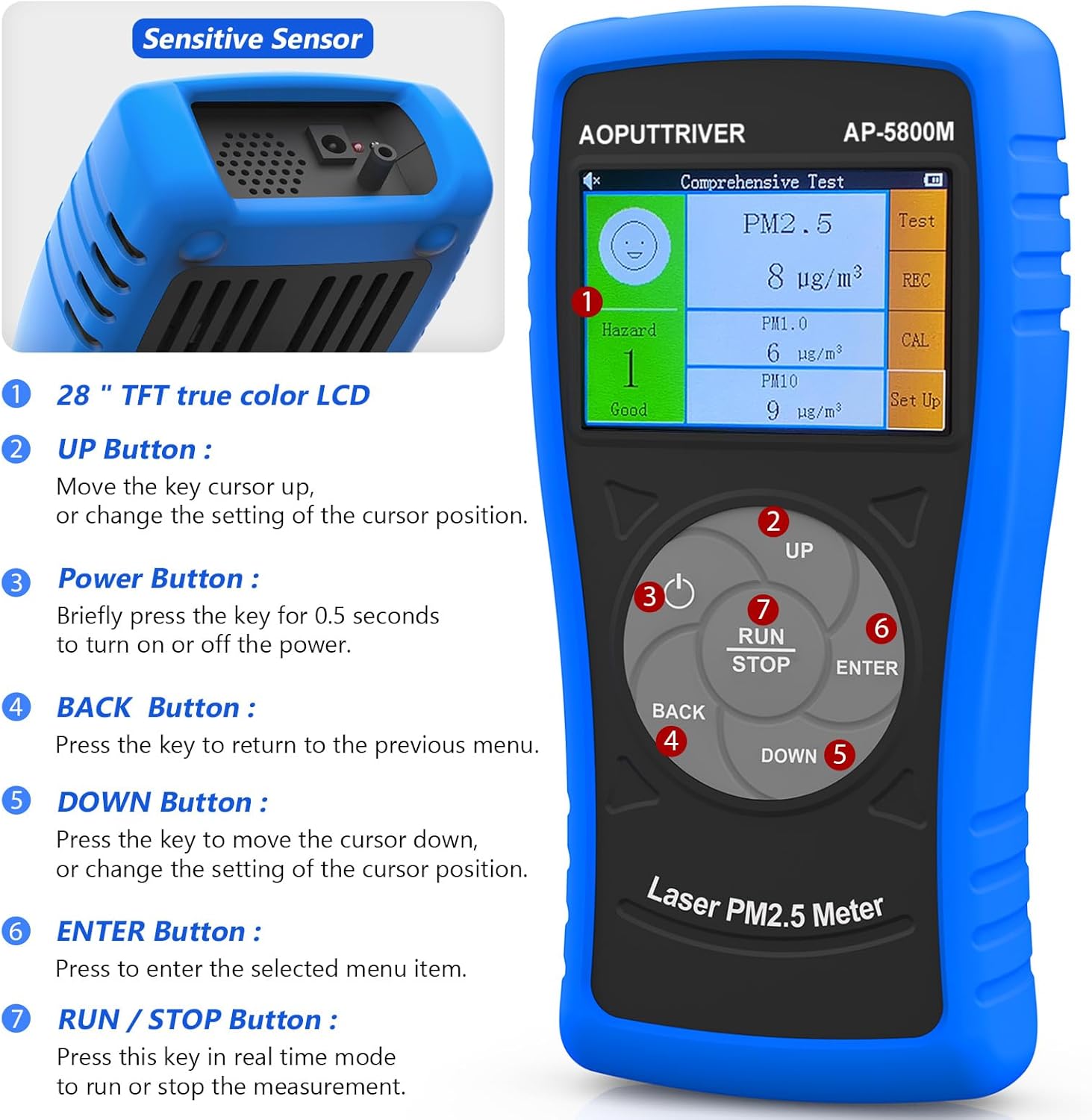
Šiame paveikslėlyje parodyta priekinė dalis view of the AOPUTTRIVER AP-5800M Air Quality Monitor, highlighting the 2.8-inch TFT true color LCD, the sensitive sensor area, and the functions of the UP, Power, BACK, DOWN, ENTER, and RUN/STOP buttons.
- Sensitive Sensor: Located at the top, responsible for detecting particulate matter.
- Aukštyn mygtukas: Moves the cursor up or changes the setting of the cursor position.
- Maitinimo mygtukas: Briefly press for 0.5 seconds to turn the device on or off.
- ATGAL mygtukas: Paspauskite norėdami grįžti į ankstesnį meniu.
- Žemyn mygtukas: Moves the cursor down or changes the setting of the cursor position.
- Įvesties mygtukas: Press to select the highlighted menu item.
- Mygtukas RUN/STOP: Press this key in real-time mode to start or stop the measurement.
4.2 Ekranas ir indikatoriai
The device features a 2.8-inch TFT true color LCD, providing clear visibility even in low-light conditions. The display shows real-time readings for PM2.5, PM1.0, and PM10, along with a hazard index and battery indicator.

Šis paveikslėlis pateikia stambų planą view of the AP-5800M's colorful LCD display, showing the comprehensive test results for PM2.5, PM1.0, and PM10, along with the hazard index.
4.3 Vidiniai komponentai

This diagram shows the internal components of the AP-5800M, emphasizing the high-precision laser PM2.5 sensor and the 3rd generation particle sensor responsible for detecting PM2.5 and PM10 in air samples.

Šis paveikslėlis pateikia stambų planą view of the air outlet and inlet on the device, illustrating how air samples are drawn in and expelled for particle detection.
5. Sąranka
5.1 Įrenginio įkrovimas
The AP-5800M is equipped with a rechargeable battery. Before first use, or when the battery indicator shows low power, charge the device using the provided USB cable.
- Connect the USB cable to the device's charging port and to a standard USB power source (e.g., computer, USB wall adapter).
- Įkrovimo metu užsidegs raudona indikatoriaus lemputė.
- The indicator light will turn green once the battery is fully charged.

This image depicts the charging process of the AP-5800M's 2000mAh rechargeable battery via a USB cable, with an indicator showing the battery level.
5.2 Pradinis įjungimas
After charging, press the Power Button briefly (for approximately 0.5 seconds) to turn on the device. The display will light up, and the device will begin its startup sequence.
6. Naudojimo instrukcijos
6.1 Maitinimo įjungimas/išjungimas
- Norėdami įjungti: Paspauskite Maitinimo mygtukas (labeled '3' in the diagram) for approximately 0.5 seconds.
- Norėdami išjungti: Paspauskite Maitinimo mygtukas for approximately 0.5 seconds. The device also features an automatic power-off mode to conserve battery.
6.2 Meniu naršymas
Use the following buttons for menu navigation:
- Aukštyn mygtukas: Move cursor up or increase values.
- Žemyn mygtukas: Move cursor down or decrease values.
- Įvesties mygtukas: Patvirtinkite pasirinkimą arba įeikite į submeniu.
- ATGAL mygtukas: Return to the previous menu or cancel an action.
6.3 Starting and Stopping Measurements
In real-time measurement mode, press the RUN/STOP mygtukas to initiate or pause the air quality measurement process.
6.4 Ekrano supratimas
The 2.8-inch TFT color LCD displays various parameters:
- PM2.5, PM1.0, PM10 Values: Real-time concentration in µg/m³.
- Hazard Index: A calculated risk value based on PM2.5, PM1.0, and PM10 levels. The formula used is: Hazard Value = PM2.5/6 + PM1.0/20 + PM10/20.
- Baterijos indikatorius: Rodo esamą baterijos lygį.

This image illustrates the AP-5800M monitor on its stand, alongside a color-coded chart explaining PM2.5 and PM10 health concern levels, ranging from Good to Hazardous.

Šiame paveikslėlyje parodytas padidintas view of the hazard index chart displayed on the AP-5800M, detailing the color-coded levels of air quality from Good to Hazardous for PM2.5 and PM10.
6.5 Setting Parameters and Alarms
The AP-5800M allows for various settings adjustments, including:
- Laiko nustatymas: Adjust the device's internal clock.
- Duomenų įrašymas: Enable or disable the recording of measurement data.
- Duomenų sulaikymas: Freeze the current display readings.
- Hazard Index Alarm: Set thresholds for an audible alarm to activate when air quality levels exceed predefined limits. The device features an audible alarm.

This image highlights the audible alarm function of the AP-5800M, showing an alarm icon on the display and indicating that the device can emit sound alerts for high particle levels.
6.6 Usage Environments
The AP-5800M is versatile and can be used in a variety of settings to monitor air quality:
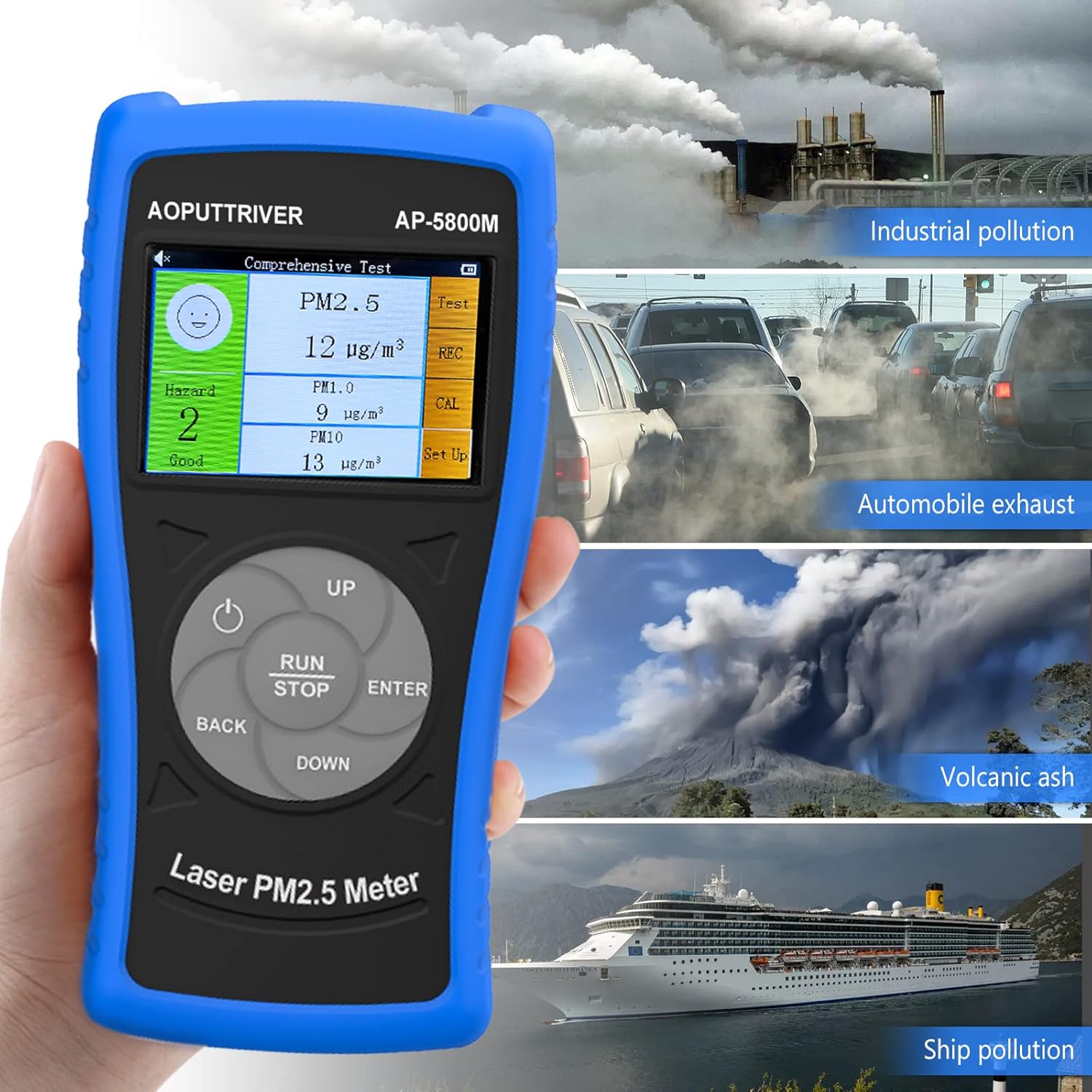
This image demonstrates the versatility of the AP-5800M, showing it in different scenarios such as industrial pollution, automobile exhaust, volcanic ash, and ship pollution, indicating its suitability for diverse testing environments.

This image combines a PM2.5/PM10 air quality level guide with illustrations of various suitable usage environments, including home, school, car, and office, demonstrating the monitor's versatility.
7. Priežiūra
7.1 Prietaiso valymas
- Nuvalykite įrenginio išorę minkštu, sausu skudurėliu.
- Nenaudokite abrazyvinių valiklių, tirpiklių ar stiprių cheminių medžiagų, nes jos gali pažeistiasing arba ekranas.
- Ensure the air inlet and outlet are free from dust and obstructions for accurate readings.
7.2 Akumuliatoriaus priežiūra
- Norėdami pailginti akumuliatoriaus veikimo laiką, venkite dažnai visiškai jį iškrauti.
- Jei įrenginį ilgesnį laiką laikysite, įkraukite jį maždaug iki 50 % ir vėl įkraukite kas kelis mėnesius.
7.3 Saugykla
Laikykite prietaisą nešiojimo dėkle vėsioje, sausoje vietoje, toliau nuo tiesioginių saulės spindulių ir ekstremalių temperatūrų.
8. Problemų sprendimas
If you encounter issues with your AP-5800M, refer to the following common problems and solutions:
| Problema | Galima priežastis | Sprendimas |
|---|---|---|
| Įrenginys neįsijungia. | Išsikrovusi baterija arba maitinimo problema. | Charge the device using the provided USB cable. Ensure the charging indicator lights up. If the issue persists, contact customer support. |
| Netikslūs arba nenuoseklūs rodmenys. | Blocked air inlet/outlet, sensor contamination, or environmental interference. | Ensure the air inlet/outlet is clear. Clean the device exterior. Move the device away from strong air currents, dust sources, or chemical fumes. |
| Ekranas tuščias arba užstrigęs. | Programinės įrangos gedimas arba senka baterija. | Try restarting the device by holding the Power Button. If unresponsive, charge the device. |
| Netikėtai suskamba žadintuvas. | High particulate levels detected or alarm threshold set too low. | Check the displayed PM values. If levels are high, ventilate the area. Adjust the alarm threshold in the settings if necessary. |
9. Specifikacijos
| Parametras | Vertė |
|---|---|
| Modelio numeris | UK-AP-5800M |
| PM2.5 aptikimo diapazonas | 0 ~ 999.9 µg/m³ |
| PM2.5 Resolution | 0.1 µg/m³ |
| PM10 aptikimo diapazonas | 0 ~ 999.9 µg/m³ |
| PM10 Resolution | 0.1 µg/m³ |
| Ekranas | 2.8 colių spalvotas TFT LCD |
| Maitinimo šaltinis | Rechargeable Battery (2000mAh), USB Powered |
| Signalizacija | Girdimas |
| Gaminio matmenys | 196 mm (7.71 col.) x 95 mm (3.74 col.) x 46 mm (1.81 col.) |
| Prekės svoris | 500 gramų |

Šis paveikslėlis pateikia išsamų view of the AP-5800M, showing its dimensions (196mm height, 95mm width, 46mm depth), the 90-degree support stand, the double protective shell, and the tripod hole for mounting.
10. Garantija ir palaikymas
AOPUTTRIVER offers a 2-year warranty for the AP-5800M Air Quality Monitor and provides lifetime customer service. If you encounter any issues with this product or require assistance, please do not hesitate to contact our customer support team. We are committed to ensuring your satisfaction.