
1. Įvadas
Ačiū, kad pirkoteasing the ETA ETA121090010 Galateo Microwave Oven. This manual provides essential information for the safe and efficient use of your appliance. Please read these instructions carefully before use and retain them for future reference.
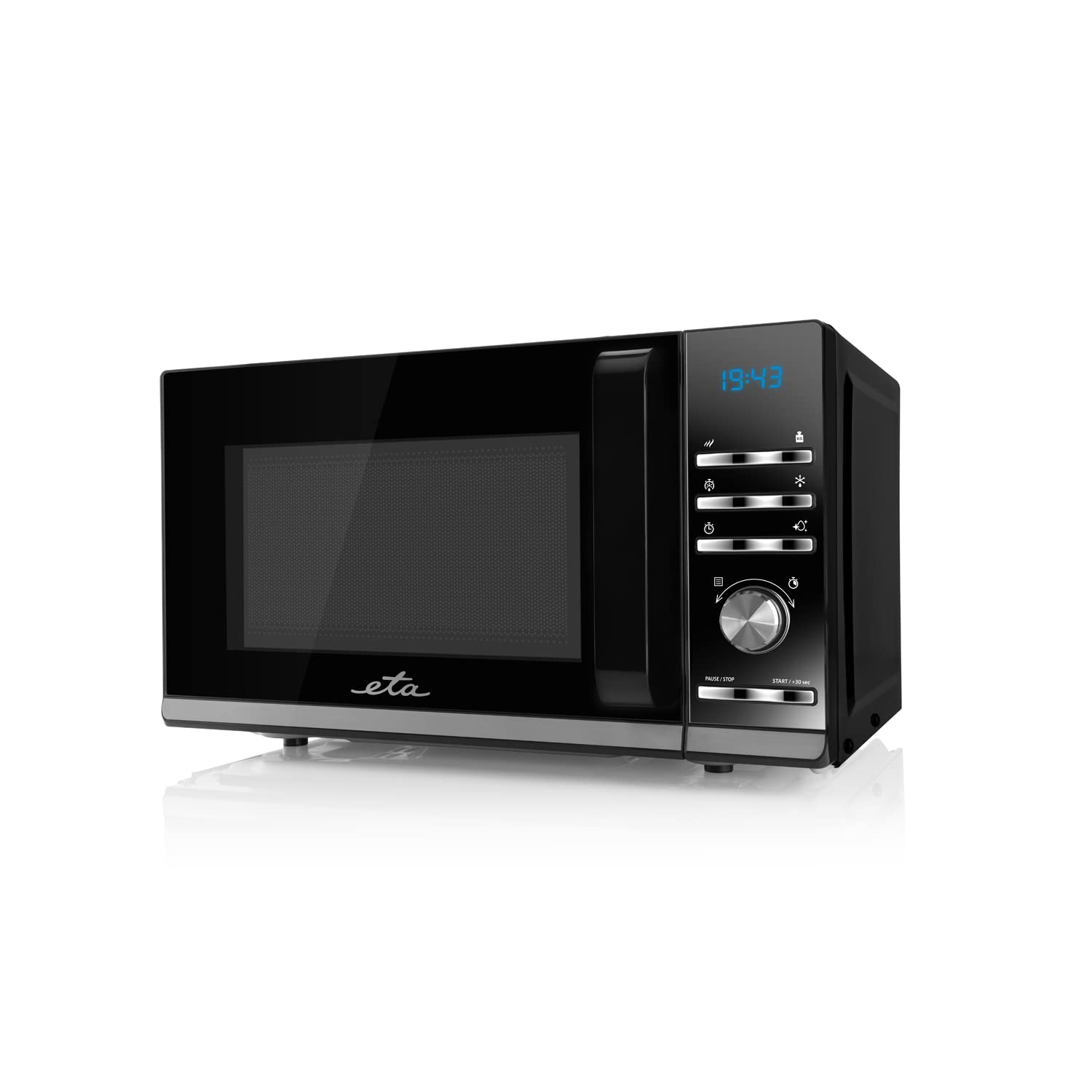
1.1 vaizdas: priekis view of the ETA ETA121090010 Galateo Microwave Oven. The appliance features a black finish with a glass door and a control panel on the right side.
2. Svarbios saugos instrukcijos
Naudodami elektros prietaisus, visada laikykitės pagrindinių saugos priemonių, kad sumažintumėte gaisro, elektros smūgio, sužalojimo ar per didelės mikrobangų energijos poveikio riziką.
- Prieš naudodami prietaisą perskaitykite visas instrukcijas.
- Nebandykite naudoti šios krosnelės atidarytomis durelėmis, nes tai gali sukelti žalingą mikrobangų energijos poveikį.
- Nestatykite jokių daiktų tarp orkaitės priekinės dalies ir durelių ir neleiskite ant sandarinamųjų paviršių kauptis nešvarumams ar valiklio likučiams.
- Nenaudokite orkaitės, jei ji pažeista. Ypač svarbu, kad orkaitės durelės tinkamai užsidarytų ir nebūtų pažeistos: (1) durelės (sulenktos), (2) vyriai ir skląsčiai (sulaužyti arba atsilaisvinę), (3) durelių sandarikliai ir sandarinimo paviršiai.
- Orkaitės neturėtų reguliuoti ar taisyti niekas, išskyrus tinkamai kvalifikuotą techninės priežiūros personalą.
- Įsitikinkite, kad prietaisas yra tinkamai įžemintas.
- Šiame prietaise nenaudokite korozinių cheminių medžiagų ar garų.
- Šis prietaisas skirtas naudoti tik buityje.
3. Sąranka ir diegimas
3.1 Išpakavimas
Carefully remove the microwave oven from its packaging. Retain the packaging materials for future transport or disposal. Check the appliance for any signs of damage. If any damage is found, do not operate the oven and contact your retailer.
3.2 Įdėjimas
Place the microwave oven on a flat, stable surface that can support its weight. Ensure there is adequate ventilation around the appliance. Maintain a minimum clearance of 10 cm (4 inches) at the rear and sides, and 30 cm (12 inches) above the oven for proper airflow.
3.3 Elektros prijungimas
Prijunkite maitinimo laidą prie įžeminto elektros lizdo. Įsitikinkite, kad įtampatagJūsų maitinimo šaltinio įtampa ir dažnis atitinka prietaiso etiketėje nurodytus parametrus.

Image 3.1: The microwave oven showing approximate dimensions: 46 cm width, 26 cm height, and 36 cm depth. These dimensions are crucial for proper placement and ventilation.
4. Naudojimo instrukcijos
The ETA Galateo microwave oven features an intuitive control panel with buttons and a rotary knob for easy operation.

4.1 pav.: Išsamus view of the control panel, featuring a digital display, function buttons, and a central rotary knob for time and power adjustments. Buttons include power level, defrost, timer, and start/pause controls.
4.1 Pagrindinis gaminimas mikrobangų krosnelėje
- Padėkite maistą ant mikrobangų krosnelei tinkamo indo ant sukamojo padėklo.
- Saugiai uždarykite orkaitės dureles.
- Press the "Microwave Power" button (indicated by wavy lines) to select the desired power level (5 levels available).
- Pasukite sukamąją rankenėlę, kad nustatytumėte kepimo laiką (iki 95 minučių).
- Press the "START / +30 sec" button to begin cooking.
4.2 Atitirpinimas
The oven offers 3 defrost settings for various food types.
- Įdėkite šaldytą maistą į orkaitę.
- Press the "Defrost" button (indicated by a snowflake icon) to cycle through the 3 available defrost settings.
- Use the rotary knob to adjust the weight or time as required by the selected defrost program.
- Press the "START / +30 sec" button to begin defrosting.
4.3 Quick Start / +30 Seconds
Pressing the "START / +30 sec" button once will start cooking at full power for 30 seconds. Each subsequent press will add 30 seconds to the cooking time.
4.4 Pause / Stop
Press the "PAUSE / STOP" button once to pause cooking. Press it twice to cancel the current program and return to standby mode.
4.5 Automatic Cleaning and Disinfection Function
This model includes an automatic cleaning and disinfection function. Refer to the specific instructions in the full manual for details on how to activate and use this feature effectively.
5. Priežiūra ir valymas
Reguliarus valymas ir tinkama priežiūra užtikrins jūsų mikrobangų krosnelės ilgaamžiškumą ir efektyvų veikimą.
- Vidaus valymas: Po kiekvieno naudojimo orkaitės vidų nuvalykite drėgnu skudurėliuamp cloth to remove food splatters. For stubborn stains, use a mild detergent or a microwave-safe cleaner. Never use abrasive cleaners or scouring pads.
- Išorinis valymas: Išorinius paviršius valykite minkšta, d šluosteamp audinys. Venkite naudoti stiprių cheminių medžiagų ar tirpiklių.
- Durys ir sandarikliai: Reguliariai valykite dureles, durelių sandariklius ir gretimas dalis naudodami reklaminį valiklį.amp cloth to remove any spills or residue. This helps maintain a proper seal.
- Patefonas: The glass turntable and roller ring can be removed for cleaning. Wash them in warm, soapy water or in a dishwasher. Ensure they are completely dry before placing them back in the oven.
- Kvapai: To remove odors, combine a cup of water with several lemon slices or a tablespoon of vinegar in a microwave-safe bowl. Heat on high for 5-7 minutes, then let it stand in the oven for a few minutes before wiping the interior.
- Išjungti: Prieš valydami, visada atjunkite mikrobangų krosnelę nuo elektros lizdo.
6. Problemų sprendimas
Jei kyla problemų dėl mikrobangų krosnelės, dažniausiai pasitaikančias problemas ir jų sprendimus rasite šioje lentelėje.
| Problema | Galima priežastis | Sprendimas |
|---|---|---|
| Orkaitė neįsijungia. | Neįjungtas maitinimo laidas. Netinkamai uždarytos durelės. Perdegė saugiklis arba suveikė grandinės pertraukiklis. | Ensure power cord is securely plugged in. Close the door firmly. Check household fuse/circuit breaker. |
| Maistas nešildomas. | Incorrect power level or cooking time set. Microwave-safe dish not used. | Adjust power level and cooking time. Use only microwave-safe cookware. |
| Kibirkščiavimas orkaitės viduje. | Metal or foil in the oven. Food residue on oven walls. | Remove any metal objects. Clean the oven interior thoroughly. |
| Patefonas nesisuka. | Turntable not correctly placed. Roller ring dirty or obstructed. | Ensure turntable and roller ring are correctly positioned and clean. |
Jei problema išlieka ir išbandžius šiuos sprendimus, kreipkitės į kvalifikuotus techninės priežiūros darbuotojus.
7. Techninės specifikacijos
| Funkcija | Detalė |
|---|---|
| Prekės ženklas | ETA |
| Modelio numeris | ETA121090010 |
| Produkto tipas | Mikrobangų krosnelė |
| Spalva | Juoda |
| Talpa | 20 litrai |
| Mikrobangų galia | 700 W |
| Galios lygiai | 5 |
| Atitirpinimo nustatymai | 3 |
| Maksimalus laikmatis | 95 minučių |
| Ypatingos savybės | Turntable, Automatic Cleaning and Disinfection Function |
| Įvesties įrenginys | Mygtukai, sukamoji rankenėlė |
| Produkto matmenys (P x A x G) | apytiksliai 46 cm x 26 cm x 36 cm |
| Svoris | 250 g Note: The weight of 250g appears to be an error in the source data. Actual microwave oven weight is typically much higher. |
| ASIN | B09M6X85WW |

7.1 vaizdas: Baigtaview of the microwave oven highlighting its key features: 700W microwave power, 5 power levels, 3 defrost settings, timer up to 95 minutes, automatic cleaning and disinfection function, and 20-liter volume.
8. Garantija ir palaikymas
Specific warranty information for the ETA ETA121090010 Galateo Microwave Oven is not provided within this manual. For details regarding warranty coverage, terms, and conditions, please refer to the warranty card included with your product or contact ETA customer support directly.
For technical support, service, or spare parts, please visit the official ETA website or contact their authorized service centers. Always provide your model number (ETA121090010) when seeking support.