
1. Įvadas
Ačiū, kad pirkoteasing the TURBOX Giantpeak Mechanical Feel RGB Gaming Keyboard. This manual provides essential information for setting up, operating, and maintaining your new keyboard. Please read this manual carefully before use to ensure optimal performance and longevity of your device.
2. Saugos informacija
- Keep the keyboard away from excessive heat, direct sunlight, and moisture.
- Although the keyboard is spill-resistant, avoid intentionally exposing it to large amounts of liquid. In case of spills, disconnect the keyboard immediately and allow it to dry completely before reconnecting.
- Do not attempt to disassemble or modify the keyboard. This will void the warranty and may cause damage.
- Naudokite tik su suderinamais įrenginiais ir maitinimo šaltiniais, kaip nurodyta.
- Laikyti vaikams nepasiekiamoje vietoje.
3. Pakuotės turinys
Patikrinkite pakuotę, ar joje yra šie daiktai:
- TURBOX Giantpeak Mechanical Feel RGB Gaming Keyboard
- Vartotojo vadovas (šis dokumentas)
4. Produktas baigtasview
The TURBOX Giantpeak keyboard is designed for gaming, featuring a mechanical feel, customizable RGB lighting, and macro capabilities. It also includes a convenient mobile device holder.
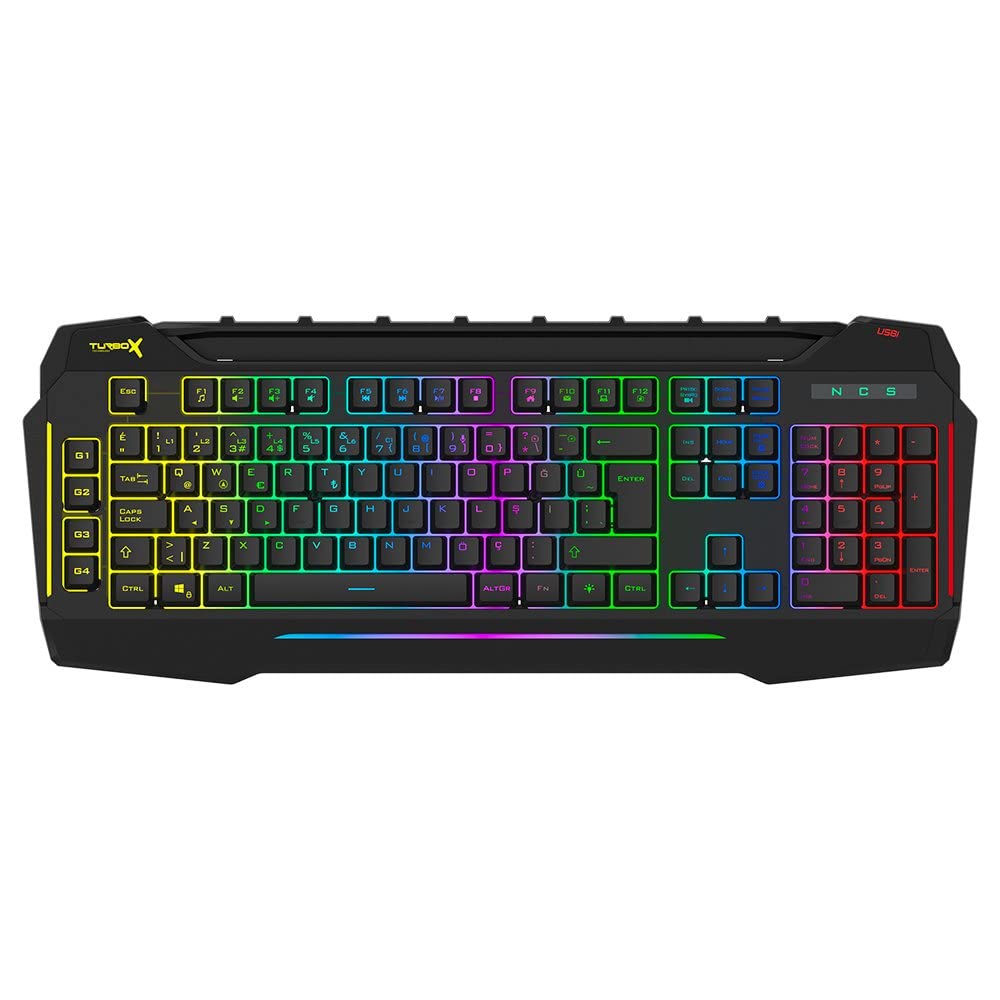
Figure 4.1: TURBOX Giantpeak keyboard with integrated mobile device stand.
This full-size keyboard offers a standard Q layout, providing a comfortable and responsive typing experience for both gaming and general use.

4.2 paveikslas: viršuje view of the TURBOX Giantpeak keyboard.
The keyboard features vibrant RGB backlighting that can be customized to various effects, including sound-sensitive modes. Its spill-resistant design provides added durability.

4.3 pav.: Kampinis view showing RGB lighting.
Dedicated macro keys (G1-G4) are located on the left side, allowing for quick execution of complex commands or sequences.

Figure 4.4: Close-up of programmable G-keys.
The keyboard also includes a full numeric keypad for data entry and additional functions.

Figure 4.5: Numeric keypad detail.
Connectivity is provided via a durable USB cable, ensuring a stable and responsive connection to your computer.

4.6 pav.: šonas view su USB kabeliu.
5. Sąranka
Follow these steps to set up your TURBOX Giantpeak keyboard:
- Išpakuokite klaviatūrą: Atsargiai išimkite klaviatūrą ir visas pakavimo medžiagas iš dėžutės.
- Prisijunkite prie kompiuterio: Plug the USB connector of the keyboard into an available USB port on your desktop or laptop computer.
- Tvarkyklės diegimas: Your operating system (Windows, macOS, etc.) should automatically detect and install the necessary drivers. This process may take a few moments.
- Patikrinkite funkcionalumą: Once drivers are installed, test the keyboard by typing in a text editor or browser to ensure all keys are functioning correctly. The RGB lighting should also illuminate.
6. Naudojimo instrukcijos
6.1 Pagrindinės klaviatūros funkcijos
The TURBOX Giantpeak keyboard operates like a standard Q-layout keyboard. All standard keys (alphanumeric, function keys, numeric keypad, navigation keys) function as expected.
6.2 RGB apšvietimo valdymas
The keyboard features customizable RGB backlighting with 7 different color options and sound-sensitive modes. Specific key combinations are used to cycle through lighting effects and adjust brightness:
- Keisti apšvietimo režimą: Naudokite Fn + Slinkties užraktas keys to cycle through various lighting effects.
- Sureguliuokite ryškumą: Naudokite Fn + Puslapis į viršų (padidėjimas) arba Fn + Puslapis žemyn (decrease) keys to adjust the brightness level of the backlighting.
- Sound-Sensitive Mode: The keyboard supports sound-sensitive lighting. Refer to specific software or key combinations (if available) for activation. (Note: Specific key combinations for sound-sensitive mode may vary or require software.)
6.3 Macro Programming (G1-G4 Keys)
The TURBOX Giantpeak keyboard includes 4 programmable macro keys (G1, G2, G3, G4) for executing custom commands or sequences. Follow these general steps for macro recording:
- Enter Macro Recording Mode: Paspauskite MR key (Macro Record, usually near the G-keys). The keyboard's indicator light may flash to indicate recording mode.
- Select Macro Key: Press one of the G-keys (G1, G2, G3, or G4) where you want to save the macro.
- Įrašų seka: Type the sequence of keys you wish to record. This can include multiple keystrokes, delays, and modifier keys.
- Exit Macro Recording Mode: Paspauskite MR key again to save the macro and exit recording mode. The indicator light should stop flashing.
- Vykdyti makrokomandą: To use the recorded macro, simply press the assigned G-key.
Note: For advanced macro settings or specific software-based macro management, please check the manufacturer's website for any available utility software.
6.4 Mobile Device Holder
The integrated slot at the top of the keyboard is designed to hold smartphones or small tablets, providing a convenient viewing angle while gaming or working.
7. Priežiūra
To ensure the longevity and performance of your keyboard, follow these maintenance guidelines:
- Valymas: Klaviatūros paviršiui nuvalyti naudokite minkštą, sausą šluostę. Jei nešvarumai sunkiai įveikiami, šiek tiek nuvalykite.ampNuvalykite šluostę vandeniu arba švelniu valymo tirpalu. Venkite stiprių cheminių medžiagų ar abrazyvinių medžiagų.
- Dulkių šalinimas: Norėdami pašalinti dulkes ir šiukšles iš tarpų tarp klavišų dangtelių, naudokite suslėgtą orą.
- Išsiliejimo valdymas: In case of liquid spills, immediately disconnect the keyboard from your computer. Turn it upside down to drain any liquid and allow it to air dry completely for at least 24-48 hours before reconnecting.
- Saugykla: Kai klaviatūra ilgesnį laiką nenaudojama, laikykite ją švarioje, sausoje vietoje.
8. Problemų sprendimas
If you encounter issues with your TURBOX Giantpeak keyboard, refer to the following common problems and solutions:
| Problema | Galimas sprendimas |
|---|---|
| Klaviatūra nereaguoja. |
|
| RGB apšvietimas neveikia arba užstringa. |
|
| Macro keys (G1-G4) are not working. |
|
| Klavišai yra lipnūs arba nereaguoja. |
|
9. Specifikacijos
| Funkcija | Detalė |
|---|---|
| Modelio pavadinimas | Giantpeak |
| Dalies numeris | ID9923266 |
| Prekės ženklas | TURBOX |
| Ryšio technologija | USB laidinis |
| Suderinami įrenginiai | Nešiojamasis kompiuteris, kompiuteris |
| Rakto tipas | Mechanical Feel (Membrane) |
| Ypatingos savybės | RGB Lighting, Macro Keys (4), Sound-Sensitive Lighting, Spill-Resistant, Mobile Device Holder |
| Raktų skaičius | 87 (Note: Visuals suggest a full-size layout, this number may refer to a specific key group or variant.) |
| Techninės įrangos sąsaja | USB |
| Pakuotės matmenys | 51.2 x 22.2 x 5.2 cm |
| Prekės svoris | 1 kilogramai |
10. Garantija ir palaikymas
For warranty information and technical support, please refer to the warranty card included with your product or visit the official TURBOX websvetainėje. Išsaugokite pirkimo įrodymą, jei prireiktų pateikti garantinį ieškinį.
If you require further assistance, please contact TURBOX customer support through their official channels.