
Įvadas
Thank you for choosing the Krisons Sound Blaster Tower Speaker. This manual provides essential information for the safe and efficient operation of your speaker system. Please read it thoroughly before use and retain it for future reference.
Produktas baigtasview
The Krisons Sound Blaster Tower Speaker is designed to deliver clear and balanced audio with an 8-inch woofer. It features multiple connectivity options including Bluetooth, USB, AUX, and FM radio, along with an LCD display for mode information. The speaker includes controls for volume, bass, and mode selection.

1 pav.: Priekinė ir šoninė dalys view of the Krisons Sound Blaster Tower Speaker, highlighting the display, USB port, mode button, play/pause, previous/next controls, bass, treble, volume knobs, 4-inch speakers, and 8-inch woofer.
Sąranka
1. Išpakavimas
Atsargiai išimkite visus komponentus iš pakuotės. Įsitikinkite, kad yra šie daiktai:
- 1 x Krisons Sound Blaster Tower Speaker
- 1x nuotolinio valdymo pultas
- 1 x Naudotojo vadovas (šis dokumentas)
- 1x garantinis talonas
2. Įdėjimas
Position the tower speaker on a flat, stable surface. For optimal sound performance, place the speaker in a location that allows for clear sound dispersion. The compact design allows for flexible placement in various room sizes.
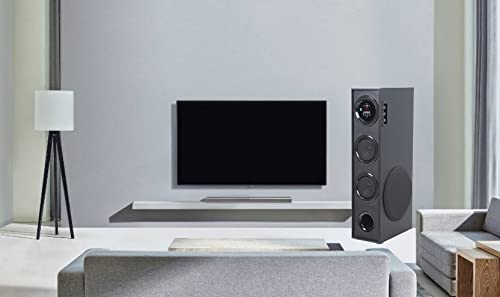
2 pav. Pvzample of speaker placement in a home environment.

Figure 3: Speaker dimensions for placement planning.
3. Maitinimo prijungimas
Connect the speaker's power cable to a standard AC power outlet. Ensure the power switch on the speaker is in the OFF position before connecting to power.
4. Garso jungtys
Garsiakalbis palaiko kelis garso įvesties metodus:
- Bluetooth: Belaidžiam ryšiui su išmaniaisiais telefonais, planšetiniais kompiuteriais ir kitais „Bluetooth“ įrenginiais.
- USB: Garso įrašams leisti files tiesiai iš USB atmintinės.
- AUX įvestis: For wired connection to devices using a 3.5mm audio cable.
- FM radijas: Integruotas FM imtuvas radijo transliacijoms.

4 pav.: Galimos prijungimo parinktys.

Figure 5: Connecting to an external device via AUX cable.
Naudojimo instrukcijos
1. Maitinimo įjungimas/išjungimas
Locate the power switch on the rear panel of the speaker. Flip the switch to the "ON" position to power on the speaker. The LCD display will illuminate. Flip to "OFF" to power down.
2. Kontrolės metodai
The speaker can be controlled using the physical buttons and knobs on the side panel or via the included remote control.
- Side Panel Controls: Includes buttons for mode change, play/pause, previous/next track, and knobs for volume and bass adjustment.
- Nuotolinio valdymo pultas: Provides full functionality for convenient operation from a distance.
3. Režimo pasirinkimas
Press the "MODE" button on the speaker's control panel or the remote control to cycle through available input modes: Bluetooth, USB, AUX, and FM Radio. The selected mode will be indicated on the LCD display.
4. Bluetooth veikimas
- Switch the speaker to Bluetooth mode. The LCD display will show "BT" or a similar indicator, and the speaker will enter pairing mode.
- Savo įrenginyje (išmaniajame telefone, planšetiniame kompiuteryje) įjunkite „Bluetooth“ ir ieškokite galimų įrenginių.
- Select "Krisons Sound Blaster" (or similar name) from the list of devices.
- Kai garsiakalbis bus suporuotas, jis patvirtins ryšį ir galėsite leisti garsą iš savo įrenginio.
5. USB atkūrimas
- Įdėkite USB atmintinę su MP3 garso įrašais fileį garsiakalbio USB prievadą.
- Switch the speaker to USB mode. The speaker will automatically detect and begin playing audio files iš USB atmintinės.
- Use the previous/next buttons to navigate tracks and the play/pause button to control playback.
6. AUX įvesties jungtis
- Connect one end of a 3.5mm audio cable to the AUX-in port on the speaker.
- Connect the other end of the 3.5mm audio cable to the audio output jack of your external device (e.g., TV, computer, MP3 player).
- Switch the speaker to AUX mode. Audio from your connected device will now play through the speaker.
7. FM radijas
- Perjunkite garsiakalbį į FM radijo režimą.
- Garsiakalbis automatiškai nuskaitys ir išsaugos galimas FM stotis.
- Use the previous/next buttons to cycle through the stored stations.
8. Garsumo ir tono reguliavimas
Use the "Volume" knob to adjust the overall sound level. Use the "Bass" knob to increase or decrease the low-frequency output. The speaker is designed to provide a balanced sound across treble, midrange, and bass frequencies.
Priežiūra
To ensure the longevity and optimal performance of your Krisons Sound Blaster Tower Speaker, follow these maintenance guidelines:
- Valymas: Use a soft, dry cloth to wipe the exterior surfaces of the speaker. Do not use abrasive cleaners, waxes, or solvents, as these can damage the finish.
- Dulkės: Regularly dust the speaker grilles and vents to prevent accumulation, which can affect sound quality and internal components.
- Skysčio ekspozicija: Keep the speaker away from water and other liquids. Do not place liquid-filled containers on or near the speaker.
- Saugykla: If storing the speaker for an extended period, disconnect it from power and store it in a cool, dry place, away from direct sunlight and extreme temperatures.
Trikčių šalinimas
Jei kyla problemų dėl garsiakalbio, žr. šias dažniausiai pasitaikančias problemas ir sprendimus:
| Problema | Galimas sprendimas |
|---|---|
| Nėra galios |
|
| Nėra garso |
|
| Bluetooth neprisijungia |
|
| Nuotolinio valdymo pultas neveikia |
|
| Sound during power on/off | A brief sound or pop during power on/off is normal for this type of audio equipment and does not indicate a malfunction. |
Specifikacijos
| Funkcija | Detalė |
|---|---|
| Prekės ženklas | Krisons |
| Modelio pavadinimas | „Sound Blaster“ |
| Didžiausia garsiakalbio išėjimo galia | 80 vatų |
| Ryšio technologija | Pagalbinis, „Bluetooth“, USB, belaidis |
| Garso išvesties režimas | Aplink |
| Montavimo tipas | Grindų stovėjimas |
| Korpuso medžiaga | Kristalas |
| Garsiakalbio tipas | Subwoofer/Bookshelf/Woofer/Tower |
| Spalva | Juoda |
| Kontrolės metodas | Touch, Remote Control |
| Woofer Driver Diameter | 8 colių |
| Tweeter Driver Diameter | 1 colių |
| Total USB 2.0 Ports | 1 |
| Garso kanalų skaičius | 2.1 |
| Elemento matmenys (D x P x A) | 39 gylio x 24 pločio x 57 aukščio centimetrų |
| Prekės svoris | 8900 gramų |
| Suderinami įrenginiai | Išmanusis telefonas, planšetinis kompiuteris |
| Maitinimo šaltinis | AC |
Informacija apie garantiją
This Krisons Sound Blaster Tower Speaker comes with a 6 mėnesių garantija on manufacturing defects. Please refer to the included Warranty Card for detailed terms and conditions. Retain your purchase receipt as proof of purchase for warranty claims.
Pagalba klientams
For any questions, assistance, or support regarding your Krisons Sound Blaster Tower Speaker, please contact Krisons Customer Care:

Figure 6: Krisons Customer Support contact details.
- El. paštas: service@krisons.com
- Telefonas: +91-8287124581 / +91-9910016757
- Darbo valandos: nuo 10 iki 6 val
- Gamintojas: Krisons Electronic Systems Limited, ZYTEL ENTERPRISES PVT