
1. Įvadas
The CAS DBI Weighing Indicator is designed for precise weight measurement in various applications, including open markets and retail environments. This indicator offers multiple functions such as counting, weight comparison, and percentage calculations, providing versatility for different weighing needs. This manual provides essential information for the proper setup, operation, and maintenance of your DBI Weighing Indicator.
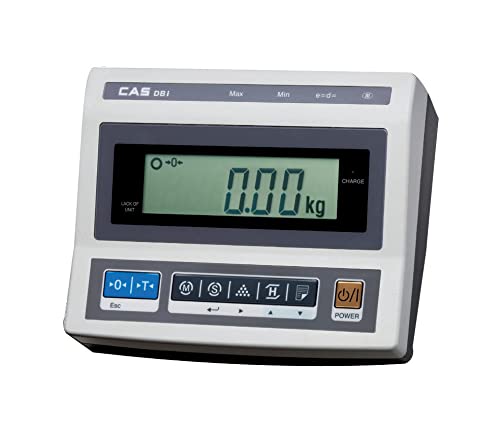
Image: CAS DBI Weighing Indicator in operation with a platform scale.
2. Kas yra dėžutėje
- 1 x CAS DBI Weighing Indicator
3. Sąranka
- Išpakavimas: Carefully remove the DBI Weighing Indicator from its packaging.
- Vieta: Place the indicator on a stable, level surface. Ensure it is free from vibrations and direct sunlight.
- Connecting to Platform Scale: Connect the indicator to a compatible weighing platform scale using the appropriate cable (not included, typically supplied with the platform scale). Ensure the connection is secure.
- Maitinimo jungtis: Connect the provided power adapter to the indicator's DC input port and then to a suitable power outlet. The internal rechargeable battery will begin charging.
- Pradinis įjungimas: Paspauskite GALIA button to turn on the indicator. Allow a few moments for the display to stabilize.

Image: DBI Weighing Indicator connected to a platform scale, ready for use.
4. Naudojimo instrukcijos
4.1 Pagrindinės operacijos
- Maitinimo įjungimas/išjungimas: Paspauskite GALIA mygtuką, kad įjungtumėte arba išjungtumėte įrenginį.
- Pagrindinis svėrimas:
- Ensure the indicator displays "0.00 kg" before placing any item on the connected platform. If not, press the NULIS mygtuką.
- Place the item to be weighed on the center of the platform.
- Nuskaitykite svorį, rodomą LCD ekrane.
- Taros funkcija:
- Ant platformos uždėkite tuščią indą.
- Paspauskite TARĖ button. The display will show "0.00 kg" and the tare indicator will illuminate.
- Add items to the container; only the net weight will be displayed.
- To clear tare, remove the container and press TARĖ vėl.
4.2 Advanced Modes
- Skaičiavimo režimas: This mode allows for counting a large number of identical items. Follow the on-screen prompts to set a sample quantity, then place the items to get a total count.
- Proctage režimas: Use this mode to display the weight of an item as a percentage iš anksto nustatyto atskaitos svorio.
- Accumulation Mode (Σ): This function enables the summing of multiple individual weighments. After each stable weighment, activate the accumulation function to add the weight to a running total.
- Weight Comparison (HI/LOW/OK): Set upper (HI) and lower (LOW) weight limits. The indicator will visually or audibly signal if the current weight is above, below, or within the acceptable range.
4.3 Papildomos funkcijos
- Foninio apšvietimo ekranas: The large LCD display features a backlight (20mm character height) for improved visibility in various lighting conditions.
- RS-232C sąsaja: Use the RS-232C port to connect the indicator to a compatible printer (e.g., DEP-50) or a computer for data transfer and ticket print-out.
- Įkraunama baterija: The indicator includes a rechargeable battery providing approximately 100 hours of operation. Charge the battery when the low battery indicator appears.
- Automatinis išjungimas: The auto power off function conserves battery life by automatically shutting down the unit after a period of inactivity.
5. Funkcijos Overview
The CAS DBI Weighing Indicator is equipped with several features to enhance its functionality and user experience:
- OIML Approval: Certified for 3,000 divisions, ensuring accuracy and reliability in commercial applications.
- Didelis LCD ekranas: A 20mm large LCD with backlight provides clear and easy-to-read weight indications.
- Universalios programos: Designed for use with various bench and platform scales, making it suitable for diverse weighing tasks.
- Advanced Weighing Modes: Includes Counting Mode for item quantity, Percentage Mode for comparative weighing, and Accumulation Mode for summing multiple weights.
- Weight Comparison: Features HI/LOW/OK comparison function for efficient check-weighing against predefined limits.
- Ticket Print-out (DEP-50 Compatible): Supports connection to a DEP-50 printer for generating physical records of weighments.
- RS-232C sąsaja: Enables serial communication with external devices like printers or computers.
- Ilgas baterijos veikimo laikas: Integrated rechargeable battery offers approximately 100 hours of continuous operation.
- Automatinis išjungimas: An energy-saving feature that automatically turns off the indicator after a period of inactivity.
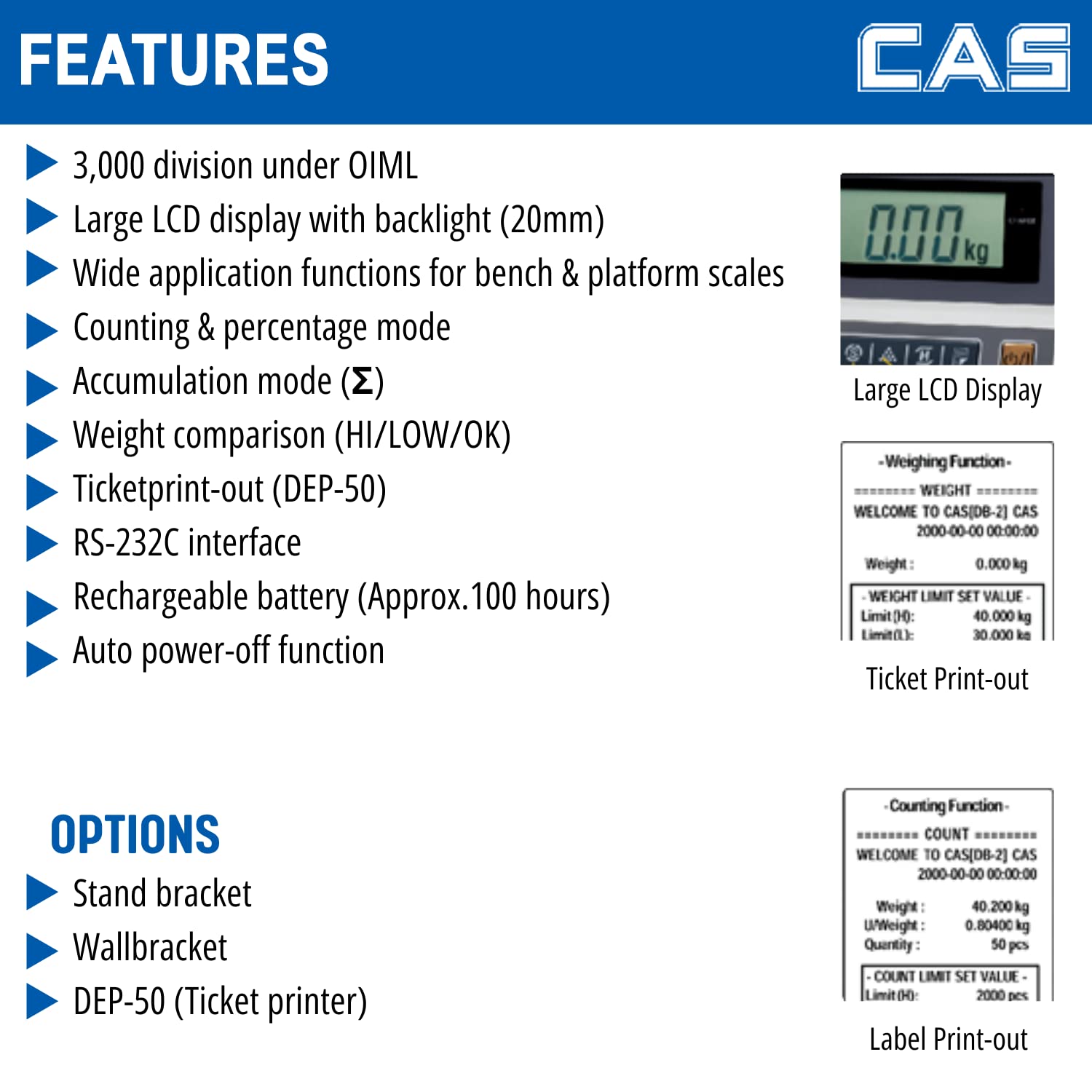
Image: Detailed features of the DBI Weighing Indicator.
6. Priežiūra
- Valymas: Wipe the indicator with a soft, damp šluoste. Nenaudokite abrazyvinių valiklių ar tirpiklių. Įsitikinkite, kad į įrenginį nepatenka skysčio.
- Akumuliatoriaus priežiūra: For optimal battery life, charge the battery regularly and avoid deep discharges. If storing the unit for an extended period, ensure the battery is partially charged.
- Saugykla: Store the indicator in a dry, dust-free environment away from extreme temperatures.
- Patikra: Periodically check cables and connections for any signs of wear or damage.
7. Problemų sprendimas
- No Display/Unit Does Not Turn On:
- Check power connection and ensure the adapter is securely plugged in.
- Patikrinkite, ar maitinimo lizdas veikia.
- Ensure the rechargeable battery is not completely depleted; charge the unit for several hours.
- Netikslūs rodmenys:
- Ensure the indicator and platform scale are on a stable, level surface.
- Check for any obstructions under the platform.
- Verify the platform scale is properly connected to the indicator.
- Perform a zero calibration if necessary (refer to advanced calibration procedures, usually requiring a service technician or specific key sequence).
- Display Shows "OVERLOAD" or "----":
- Remove any excessive weight from the platform.
- Ensure the platform scale's capacity is not exceeded.
- Mygtukai nereaguoja:
- Įsitikinkite, kad įrenginys įjungtas.
- Restart the indicator by turning it off and then on again.
- Jei problema išlieka, susisiekite su klientų aptarnavimo tarnyba.
8. Specifikacijos
| Specifikacija | Detalė |
|---|---|
| Prekės ženklas | CAS |
| Modelio numeris | DBI_Indicator |
| Spalva | Juoda |
| Ypatinga funkcija | Automatinis išsijungimas, ekranas su foniniu apšvietimu |
| Ekrano tipas | LCD |
| Formos faktorius | Mini |
| Medžiaga | Akrilnitrilo butadieno stirenas |
| Svėrimo svarstyklių tipas | Skaitiklio skalė |
| Prekės svoris | 1 kg 500 g |
| Gaminio matmenys (IxPxH) | 14.5 x 27.8 x 18.7 cm |
| Maitinimo šaltinis | DC |
| Įtraukti komponentai | 1 Weighing indicator |
| Baterijos veikimo laikas (apytiksliai) | 100 valandos |
| OIML Approval | 3,000 divizijų |

Image: Dimensions of the DBI Weighing Indicator.
9. Garantija ir palaikymas
Garantija: For warranty information, please refer to the documentation provided at the time of purchase or contact CAS customer service directly.
Klientų aptarnavimas: For technical assistance, service, or spare parts, please contact CAS Weighing India Pvt Ltd.
- Telefonas: +91-9212559707
- Adresas: Plot No. 788, Udyog Vihar, Phase -V, Gurugram, Haryana -122016 INDIA

Image: CAS DBI Indicator for retail weighing solutions, showing contact details.