
One For All URC 3661
One For All URC 3661 Universal Remote Control
Vartotojo vadovas
Produktas baigtasview
The One For All URC 3661 is a universal remote control designed to consolidate multiple remote controls into a single, easy-to-use device. It is compatible with a wide range of electronic devices, including televisions, set-top boxes, audio systems, DVD players, and Blu-ray players. This remote features backlit keys for improved visibility in low-light conditions and includes a learning function to copy commands from original remotes.

1 pav.: Kampinis view of the URC 3661 Universal Remote Control.
Sąranka
1. Akumuliatoriaus įdėjimas
The URC 3661 remote control requires two (2) AA batteries for operation. Follow these steps to install them:
- Nuotolinio valdymo pulto gale raskite baterijų skyrių.
- Nustumkite akumuliatoriaus dangtelį žemyn ir nuimkite jį.
- Įdėkite dvi AA baterijas, užtikrindami, kad teigiamas (+) ir neigiamas (-) poliai sutaptų su žymėjimais skyriaus viduje.
- Uždėkite akumuliatoriaus dangtelį, stumdami jį atgal į vietą, kol jis tvirtai užsifiksuos.
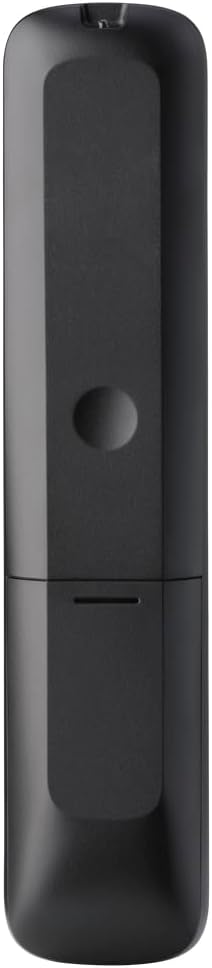
2 pav.: Nugara view of the remote, highlighting the battery compartment.
2. Nuotolinio valdymo pulto programavimas
The URC 3661 can be programmed using direct code entry, auto code search, or the learning function. It is recommended to try direct code entry first.
Tiesioginis kodo įvedimas:
- Įjunkite įrenginį, kurį norite valdyti (pvz., televizorių, DVD grotuvą).
- Paspauskite ir palaikykite NUSTATYMAS button until the LED light under the device key (e.g., TV, DVD) blinks twice and stays lit.
- Press the device key you want to program (e.g., TV). The LED will remain lit.
- Enter the 4-digit or 5-digit setup code for your brand and device. Refer to the code list provided with your remote or visit the One For All website for the most up-to-date codes.
- After entering the code, the LED will blink twice and turn off if the code is valid. If it blinks once and stays lit, the code is invalid; re-enter the code.
- Patikrinkite nuotolinio valdymo pultą paspausdami GALIA button. If the device turns off, try other functions like volume or channel. If it works, programming is complete. If not, try the next code for your brand or use the Auto Code Search.
Automatinė kodo paieška:
- Įjunkite įrenginį, kurį norite valdyti.
- Paspauskite ir palaikykite NUSTATYMAS button until the LED blinks twice and stays lit.
- Press the device key you want to program.
- Nukreipkite nuotolinio valdymo pultą į įrenginį ir paspauskite GALIA mygtuką pakartotinai (maždaug kas 3 sekundes), kol prietaisas išsijungs.
- Kai prietaisas išsijungia, nedelsdami paspauskite NUSTATYMAS button to save the code. The LED will blink twice and turn off.
- Test the remote. If it doesn't work correctly, repeat the process.
Mokymosi funkcija:
The learning function allows the URC 3661 to copy functions directly from your original remote control, which is useful for commands not available via direct code entry or auto search.
- Place the URC 3661 and your original remote on a flat surface, facing each other, about 1-2 inches apart.
- Paspauskite ir palaikykite NUSTATYMAS button until the LED blinks twice and stays lit.
- Press the button on the URC 3661 that you want to teach a function to (e.g., a specific input button). The LED will blink rapidly.
- Press and hold the corresponding button on your original remote control until the LED on the URC 3661 blinks twice, indicating successful learning.
- Pakartokite su visais norimais mygtukais.
- Norėdami išeiti iš mokymosi režimo, paspauskite NUSTATYMAS button. The LED will blink twice and turn off.
Nuotolinio valdymo pulto valdymas
The URC 3661 is designed for intuitive operation. Familiarize yourself with the button layout and their primary functions.

3 pav.: priekis view of the URC 3661 with button layout.
Pagrindinės funkcijos:
- Device Keys (TV, STB, AUDIO, BLURAY, DVD, STREAM): Select the device you wish to control. The LED under the selected device key will illuminate.
- GALIA: Įjungia arba išjungia pasirinktą įrenginį.
- VOL +/-: Reguliuoja garsumą.
- CH +/-: Keičia kanalus.
- Navigation Pad (UP, DOWN, LEFT, RIGHT, OK): Naudojamas meniu naršymui ir pasirinkimui.
- MENIU: Opens the device's main menu.
- VADOVAS: Displays the electronic program guide (if supported by the device).
- INFORMACIJA: Rodo informaciją apie dabartinę programą arba įvestį.
- NAMAI: Grąžina į įrenginio pradinį ekraną.
- UŽDARYTI: Exits menus or applications.
- Playback Controls (PLAY, PAUSE, STOP, REWIND, FAST FORWARD, SKIP): Valdykite medijos atkūrimą.
- Skaičių klavišai (0–9): For direct channel entry or numerical input.
- App Shortcut Keys (Netflix, Prime Video, YouTube): Tiesioginė prieiga prie populiarių transliacijos paslaugų.
- Foninis apšvietimas: The keys are backlit for easy use in dark environments. The backlight activates automatically when a button is pressed.
Priežiūra
Nuotolinio valdymo pulto valymas:
To maintain the remote's appearance and functionality, clean it regularly:
- Nuotolinio valdymo pulto paviršių nuvalykite minkšta, sausa šluoste.
- Įsisenėjusiam purvui šiek tiek pamirkykiteampNuvalykite šluostę vandeniu arba švelniu, neabrazyviniu valikliu. Venkite per didelės drėgmės.
- Nenaudokite stiprių cheminių medžiagų, tirpiklių ar abrazyvinių valymo priemonių, nes jos gali pažeisti nuotolinio valdymo pulto apdailą ar vidinius komponentus.
Baterijos keitimas:
Replace batteries when the remote's performance degrades or the LED indicator blinks unusually. Refer to the "Battery Installation" section under Setup for detailed instructions.
Trikčių šalinimas
If you encounter issues with your URC 3661 remote control, try the following troubleshooting steps:
| Problema | Galima priežastis | Sprendimas |
|---|---|---|
| Remote does not operate the device. | Pasirinktas neteisingas įrenginys. Baterijos išsikrovė arba įdėtos neteisingai. Neteisingai užprogramuotas kodas. | Ensure the correct device key (TV, DVD, etc.) is pressed. Patikrinkite baterijų orientaciją ir, jei reikia, pakeiskite. Re-program the remote using a different code or the Auto Code Search/Learning function. |
| Kai kurie mygtukai neveikia. | Incomplete programming. Device does not support the function. | Use the Learning function to copy specific commands from your original remote. Verify if the original remote has that function. |
| LED blinks once and stays lit during code entry. | Invalid code entered. | Ensure you are entering the correct 4 or 5-digit code. Try another code from the list or use Auto Code Search. |
| Remote LED does not light up. | Išsikrovusios baterijos. | Pakeiskite baterijas naujomis AA baterijomis. |
For further assistance, visit the official One For All support website or consult the comprehensive online manual.
Specifikacijos
| Funkcija | Detalė |
|---|---|
| Modelio numeris | 3661 m. URC |
| Prekės ženklas | Vienas už visus |
| Gaminio matmenys | 0.39 x 0.39 x 0.39 colio |
| Prekės svoris | 6.7 uncijos |
| Reikalingos baterijos | 2 AA baterijos |
| Maksimalus palaikomų įrenginių skaičius | Iki 6 įrenginių |
| Suderinami įrenginiai | Television, Set-top Box, Audio, Blu-ray, DVD, Streaming devices |
| Ypatinga funkcija | Universal, Learning Function, Backlit Keys |

Figure 4: Product packaging indicating compatibility with up to 6 devices.
Garantija ir palaikymas
Warranty information for the One For All URC 3661 Universal Remote Control is typically provided with your purchase documentation. Please refer to the warranty card or leaflet included in the product packaging for details regarding coverage, terms, and conditions.
For technical support, frequently asked questions, or to find the latest programming codes, please visit the official One For All website. Contact information for customer service may also be found on the manufacturer's websvetainėje arba savo produkto dokumentacijoje.
One For All Official Websvetainė: www.oneforall.com
Ask a question about this manual
Ask about setup, troubleshooting, compatibility, parts, safety, or missing instructions. Manuals+ will review the question and use this page’s manual context to help answer it.