
1. Įvadas
This manual provides detailed instructions for the installation, operation, and troubleshooting of your PEMP Ultra-Thin 12.3-inch Display Head Unit. Please read this manual thoroughly before installation and use to ensure proper functionality and safety.
2. Saugos informacija
- Išjungti: Ensure the vehicle's power is completely off before beginning any installation or wiring procedures.
- Profesionalus montavimas: If you are unsure about any part of the installation process, it is recommended to seek professional assistance.
- Kabelių valdymas: Secure all cables to prevent interference with vehicle operation or damage.
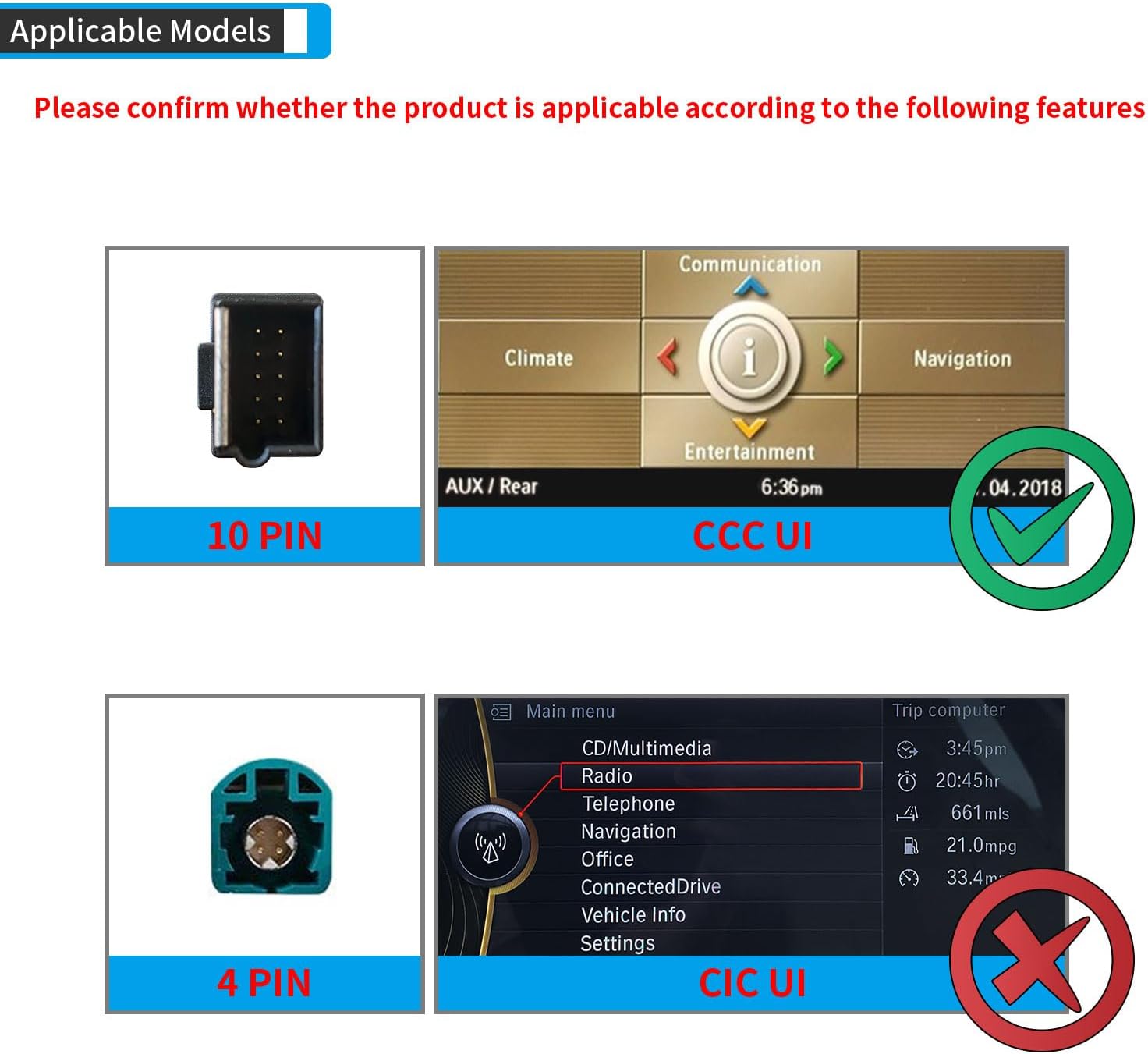
- Suderinamumas: This unit is specifically designed for BMW 2005-2010 E60 3 Series vehicles with the CCC Original 10 PIN LVDS system. Verify your vehicle's compatibility before installation.
3. Suderinamumas
This PEMP Ultra-Thin 12.3-inch Display Head Unit is compatible with:
- Transporto priemonių modeliai: BMW 5 serijos E60 (2005–2010)
- Original System: CCC Original 10 PIN LVDS system.
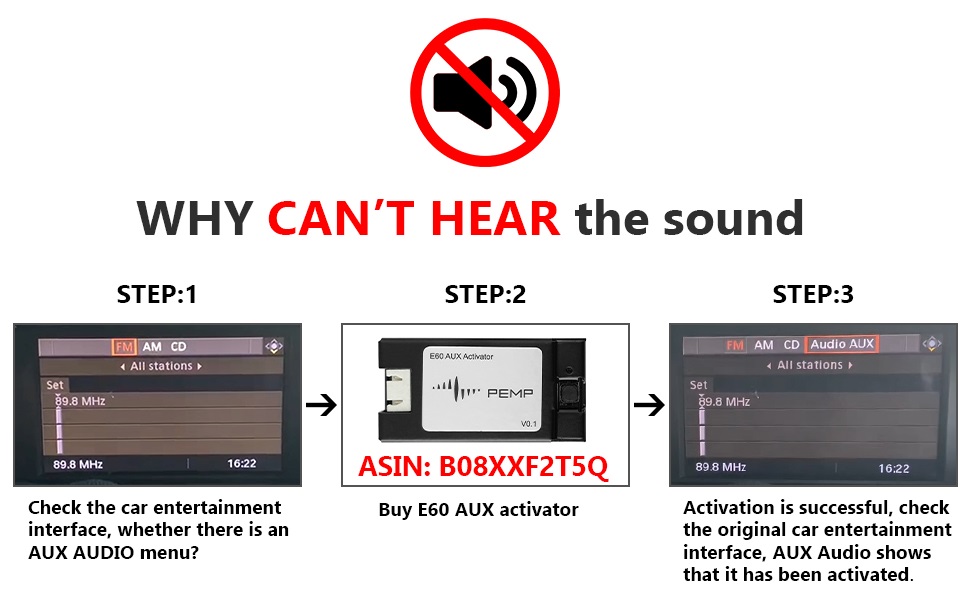
Svarbu: Please confirm your OEM display has the Aux Audio Menu. If not, an activator (ASIN: B08XXF2T5Q) may be required to activate Aux Audio first.
4. Produkto ypatybės
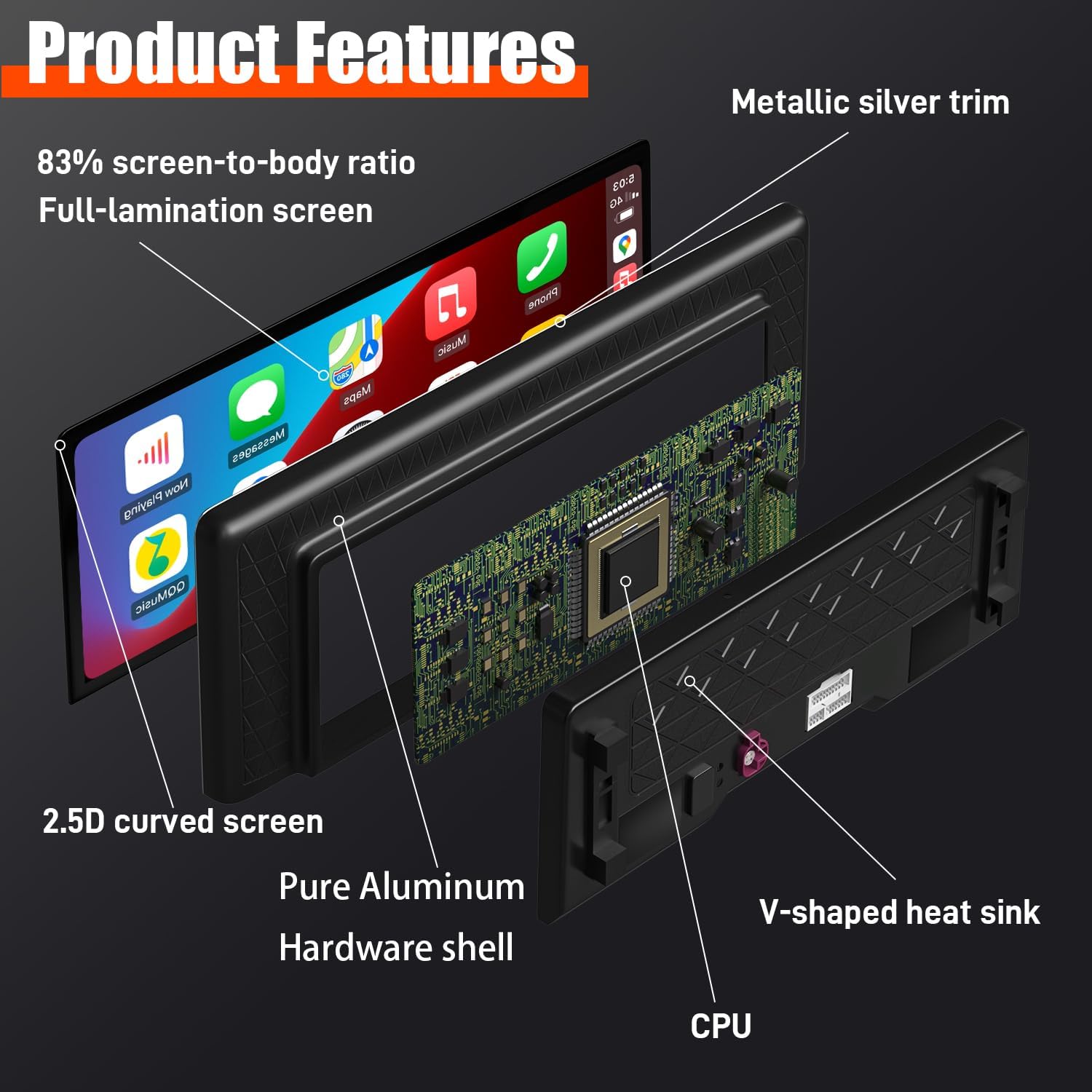
- Itin plonas dizainas: 12.3-inch large display with an 82.3% screen-to-body ratio, metal material shell, and Non-Airgap process for realistic picture quality.
- Ryšys: Supports Wired and Wireless CarPlay and Android Auto.
- Operacinė sistema: Linux System for quick boot-up and fast access to CarPlay/Android Auto interface.
- OEM integracija: Supports factory monitor information display. Long press the Menu button to switch between the factory OEM interface and the CarPlay interface.
- Valdikliai: Supports steering wheel button functions.
- Vaizdo kokybė: Multi-Point Capacitive Touch Screen, 12.3-inch HD IPS Display Screen with a resolution of 1920 x 720.
- Fotoaparato palaikymas: Supports the car's reversing camera and radar information display. Compatible with OEM cameras and aftermarket cameras (720P or less). Provides clear reversing picture.


5. Sąrankos ir diegimo vadovas
Pirmiausia sauga: Ensure your car is completely powered off before starting installation.
5.1. Bendras įrengimasview


5.2. Fiber Optic Cable Connection
If your OEM ISO harness includes a fiber optic cable, it must be adapted to the PEMP ISO harness for proper functionality.

5.3. Wired CarPlay and Android Auto Connection
For wired CarPlay and Android Auto, ensure your device is connected to USB IN 1.

6. Naudojimo instrukcijos
6.1. Switching Between OEM and New System
You can easily switch between your original BMW interface and the PEMP display's interface by long-pressing the Menu button on your iDrive controller.
6.2. Kameros nustatymai
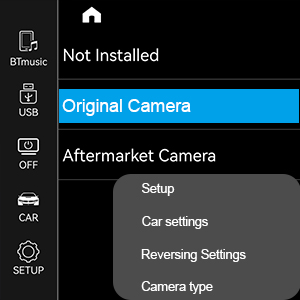
The unit supports both OEM and aftermarket front and rear view cameras. You can select the camera type in the settings menu.
- Eikite į Sąranka.
- Pasirinkite Automobilio nustatymai.
- Pasirinkite Atbulinės eigos nustatymai.
- Pasirinkite Kameros tipas (Original Camera or Aftermarket Camera).

7. Problemų sprendimas
7.1. Nėra garso problemų
If you experience no sound from the display, follow these steps:
- Check OEM Audio: Press the FM/AM button on your original radio to confirm if the OEM radio has sound.
- Bluetooth atjungimas: If the OEM radio has sound, go to Nustatymai > Sistema on the PEMP unit. Turn off "Use Car's BT Channel". Then, disconnect the original Bluetooth from your phone's settings.
- AUX Feature: After disconnecting Bluetooth, go to the car's settings and select "Auto Switch to AUX" feature off.
- Reguliuoti garsumą: Go back to the original car interface, select AUX Front. If there is still no sound, adjust the volume knob on your car's radio.
- AUX Harness: If there is still no sound, you may need to connect the AUX harness. This involves connecting the provided AUX cable from the PEMP unit to your car's AUX-IN port, usually found in the center console.
- ISO Harness Check: Ensure the ISO harness is securely plugged in. If it feels loose, unplug and re-plug it firmly.
- Power/LVDS Cables: Check that the power cable and LVDS cables on the back of the PEMP machine are not loose. Re-plug them if necessary.

7.2. Splash Screen / OEM Resolution Issues
If your screen displays a splash screen or distorted image, adjust the resolution:
- Eikite į Settings > Car Settings.
- Pasirinkite Original Car's Screen Resolution.
- Slide through the options to find your car's suitable resolution.
- Select the correct resolution and return to the original car interface. The display should now be normal.

8. Specifikacijos
| Funkcija | Specifikacija |
|---|---|
| Modelio numeris | PP-5823-11 |
| Ekrano dydis | 12.3 colių |
| Ekrano raiška | 1920x720 |
| Operacinė sistema | Linux |
| Ryšio technologija | Bluetooth |
| Ypatingos savybės | Bluetooth, Touchscreen, Built-in CarPlay and Android Auto |
| Garso išvesties režimas | AUX |
| Prekės svoris | 7.33 svaro |
| Gaminio matmenys | 12.99 x 5.12 x 1.06 colio |
9. Garantija ir palaikymas
For warranty information, technical support, or any inquiries regarding your PEMP product, please refer to the contact information provided with your purchase or visit the official PEMP websvetainėje. Išsaugokite pirkimo kvitą kaip pirkimo įrodymą garantiniams reikalavimams.
Taip pat galite apsilankyti PEMP Store on Amazon jei reikia papildomos informacijos apie produktą ir pagalbos išteklių.