
Perixx PERIBOARD-332
„Perixx PERIBOARD-332“ laidinės USB klaviatūros su foniniu apšvietimu naudotojo vadovas
Įvadas
This manual provides detailed instructions for the setup, operation, maintenance, and troubleshooting of your Perixx PERIBOARD-332 Wired Backlit USB Keyboard. Please read this manual thoroughly before using the product to ensure optimal performance and longevity.

Image: The Perixx PERIBOARD-332 Wired Backlit USB Keyboard, showcasindėl savo kompaktiško dizaino.
Pakuotės turinys
Patikrinkite, ar pakuotėje yra visi reikalingi daiktai:
- Perixx PERIBOARD-332 Wired Backlit USB Keyboard
- Integruotas USB laidas
- Vartotojo vadovas (šis dokumentas)

Image: The Perixx PERIBOARD-332 keyboard, its integrated USB cable, the user manual, and the product packaging.
Sąrankos instrukcijos
Prijunkite klaviatūrą: Locate an available USB port on your computer (PC, laptop, tablet, or smartphone with appropriate adapter). Insert the USB cable from the PERIBOARD-332 into the USB port.
Tvarkyklės diegimas: The keyboard is plug-and-play and typically does not require additional drivers for basic functionality on Windows, macOS, Linux, or Chrome OS. Your operating system should automatically detect and configure the device.
Vieta: Place the keyboard on a stable, flat surface. The compact design is ideal for small workspaces.

Image: A user typing on the Perixx PERIBOARD-332 keyboard, demonstrating its compact size and wired connection on a desk.
Naudojimo instrukcijos
Bendrasis naudojimas
The Perixx PERIBOARD-332 features a standard US English QWERTY layout with 84 keys. Its low-profile scissor keys provide a quiet and comfortable typing experience, similar to laptop keyboards. The compact design helps optimize desk space.

Image: A user typing on the Perixx PERIBOARD-332 keyboard, highlighting its compact size and ergonomic placement in a workspace.

Vaizdas: Stambus planas view of the sculpted, low-profile scissor keys of the Perixx PERIBOARD-332, highlighting their design.
Function Keys (Fn Hotkeys)
The keyboard includes integrated Fn hotkeys for quick access to multimedia and system functions. These functions are primarily designed for Windows operating systems. For other operating systems (macOS, Linux, Chrome OS), their functionality may vary or require specific system settings/configurations.
- Fn + F1: Fn užraktas
- Fn + F2: Backlight Brightness Adjustment (Cycle through levels)
- Fn + F3: Nutildyti
- Fn + F4: Sumažinti garsumą
- Fn + F5: Padidinti garsumą
- Fn + F6: Ankstesnis takelis
- Fn + F7: Leisti / pristabdyti
- Fn + F8: Kitas takelis
- Fn + F9: Pauzė
- Fn + F10: Slinkties užraktas
- Fn + F11: Įterpti
- Fn + F12: Spausdinimo ekranas

Image: Diagram illustrating the integrated Fn hotkeys on the Perixx PERIBOARD-332, showing the function of each F-key when pressed with the Fn key.
Foninio apšvietimo valdymas
The PERIBOARD-332 features white LED backlighting with adjustable brightness. To adjust the backlight brightness, press the Fn + F2 keys simultaneously. Repeatedly pressing this combination will cycle through different brightness levels (including off).
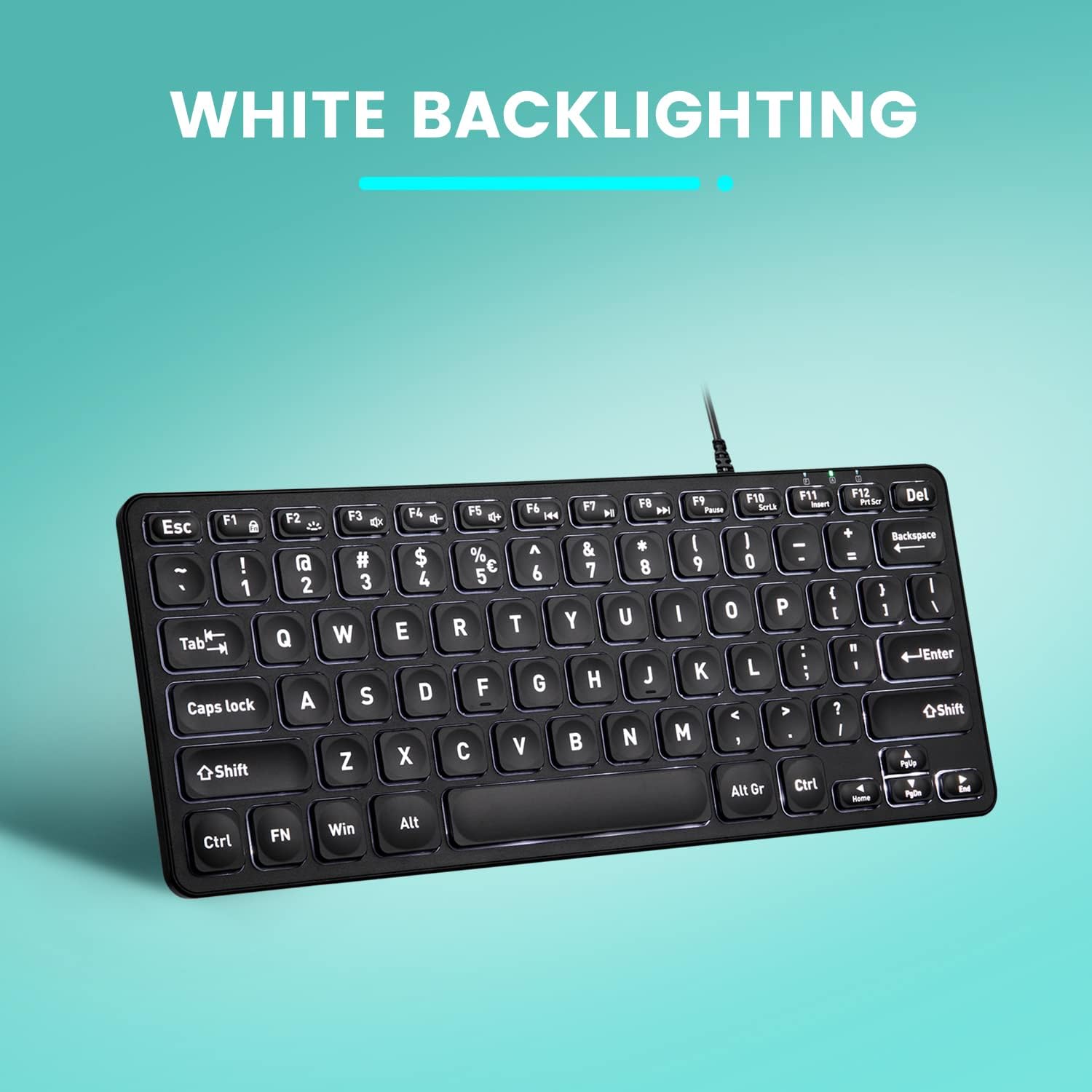
Vaizdas: Iš viršaus į apačią view of the Perixx PERIBOARD-332 keyboard with its white LED backlighting illuminated, showcasing the clear, large font on the keys.
Priežiūra
Norėdami užtikrinti klaviatūros ilgaamžiškumą ir tinkamą veikimą, laikykitės šių priežiūros nurodymų:
- Valymas: Šiek tiek naudokite minkštą, be pūkelių šluostę dampened with water or a mild cleaning solution to wipe the surface of the keyboard. Avoid excessive moisture. Do not spray cleaners directly onto the keyboard.
- Dulkių šalinimas: Norėdami pašalinti dulkes ir šiukšles iš tarpų tarp klavišų, naudokite suslėgtą orą.
- Venkite išsiliejimo: Keep liquids away from the keyboard to prevent damage. The keyboard is not water-resistant.
- Saugykla: Kai nenaudojate klaviatūros, laikykite ją švarioje, sausoje vietoje, toliau nuo ekstremalių temperatūrų.
Trikčių šalinimas
If you encounter issues with your Perixx PERIBOARD-332, refer to the following common solutions:
Klaviatūra nereaguoja
- Patikrinkite USB jungtį: Ensure the USB cable is securely plugged into both the keyboard and the computer's USB port. Try a different USB port.
- Iš naujo paleiskite kompiuterį: Kartais paprastas kompiuterio paleidimas iš naujo gali išspręsti ryšio problemas.
- Bandymas kitame įrenginyje: Connect the keyboard to another computer or device to determine if the issue is with the keyboard or the original computer.
Backlight Not Working or Adjusting
- Check Brightness Setting: Paspauskite Fn + F2 repeatedly to cycle through all brightness levels, including off. Ensure it's not set to the lowest or off setting.
- Maitinimo šaltinis: Ensure the keyboard is properly connected to a powered USB port.
Klavišai neveikia tinkamai
- Švarūs raktai: Check for any debris or obstructions under the affected keys. Use compressed air to clear them.
- Programinės įrangos konfliktai: If specific keys are not working, check for any software or driver conflicts on your computer.
Multimedia Keys Not Working on macOS/Linux/Chrome OS
- Operacinės sistemos suderinamumas: The multimedia shortcut keys are primarily designed for Windows. On other operating systems, their functionality may vary or require specific system settings/configurations.
Specifikacijos
| Funkcija | Detalė |
|---|---|
| Prekės ženklas | Perixx |
| Modelio numeris | PERBOARDAS-332 |
| Ryšio technologija | USB (laidinis) |
| Klaviatūros aprašymas | US English QWERTY |
| Ypatinga funkcija | Backlit (White LED) |
| Jungiklio tipas | Scissor Switches |
| Raktų skaičius | 84 |
| Gaminio matmenys (I x P x A) | 11.22 colio x 4.57 colio x 0.83 colio (28.5 cm x 11.6 cm x 2.1 cm) |
| Prekės svoris | 0.79 lbs (12.3 Ounces / 350 grams approx.) |
| Suderinami įrenginiai | PC, Laptop, Tablet, Smartphone (with compatible USB port/adapter) |
| Operacinės sistemos suderinamumas | Windows 7, 8, 10, 11; macOS; Linux; Chrome OS |
| Medžiaga | Plastikiniai |
Garantija ir palaikymas
Informacija apie garantiją
Your Perixx PERIBOARD-332 keyboard comes with a 12 mėnesių ribota garantija from the date of purchase. This warranty covers manufacturing defects and workmanship under normal use. It does not cover damage caused by misuse, accidents, unauthorized modifications, or external factors.
Išsaugokite pirkimo įrodymą, kad galėtumėte kreiptis dėl garantijos.
Pagalba klientams
For technical assistance, warranty claims, or any questions regarding your Perixx product, please visit the official Perixx website or contact their customer support team. Contact information can typically be found on the Perixx websvetainėje arba produkto pakuotėje.
Taip pat galite apsilankyti „Perixx“ parduotuvė „Amazon“ platformoje Norėdami gauti daugiau informacijos ir paramos išteklių.
Ask a question about this manual
Ask about setup, troubleshooting, compatibility, parts, safety, or missing instructions. Manuals+ will review the question and use this page’s manual context to help answer it.