
1. Įvadas
This manual provides essential information for the safe and efficient use of your LDNIO 65W 4-Port USB C Charger, Model A4808Q. Please read this manual thoroughly before using the product and retain it for future reference.
2. Saugos informacija
- Saugokite įkroviklį nuo skysčių, drėgmės ar ekstremalių temperatūrų.
- Venkite įkroviklio numetimo ar stiprių smūgių.
- Do not disassemble, modify, or attempt to repair the charger. This may void the warranty and pose safety risks.
- Use only compatible cables that support fast charging speeds for optimal performance and safety.
- Naudodami pasirūpinkite tinkama ventiliacija aplink įkroviklį.
- Atjunkite įkroviklį nuo maitinimo lizdo, kai jo nenaudojate arba perkūnijos metu.
3. Kas yra dėžutėje
- 1 x LDNIO 65W 4-Port USB C Charging Station (Model A4808Q)
- 1 x 5ft Extension Power Cable
4. Produktas baigtasview
The LDNIO 65W 4-Port USB C Charger is designed to provide efficient and fast charging for multiple devices simultaneously. It features an LED display to show real-time charging information and multiple safety protections.
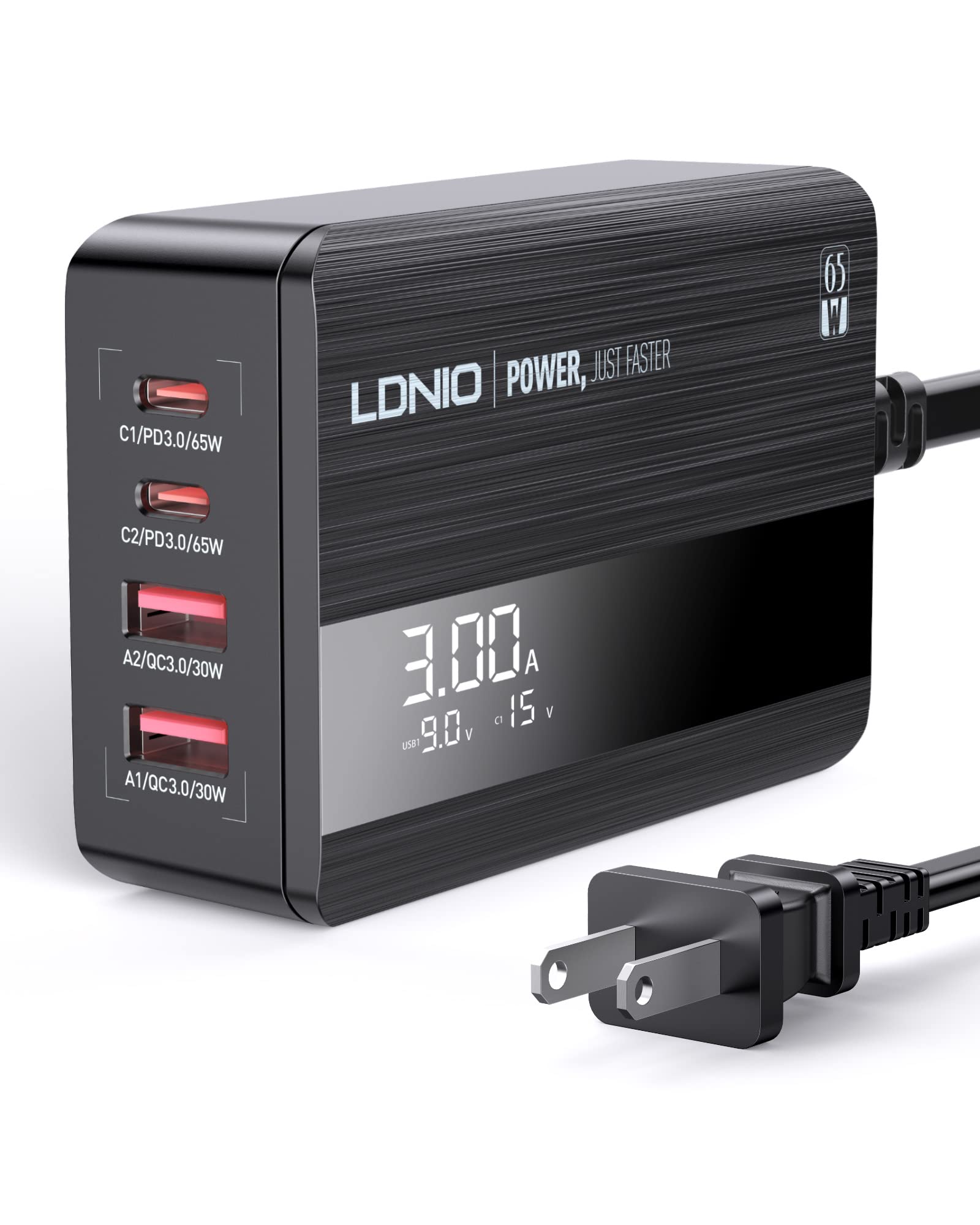
Image: The LDNIO 65W 4-Port USB C Charger connected to a laptop, tablet, and smartphone, demonstrating its multi-device charging capability.
4.1 Pagrindinės savybės
- 4-Port Charging: Two USB-C ports and two USB-A ports.
- 65W bendra galia: Delivers up to 65W of power for fast charging compatible devices.
- Skystųjų kristalų ekranas: Rodo tūrį realiuoju laikutage ir amperage for connected devices.
- Multiple Fast Charging Protocols: Supports Power Delivery 3.0 (PD3.0), Quick Charge 4+ (QC4.0), and PPS.
- Saugos apsaugos: Includes over-power, over-voltage, apsauga nuo perkrovos ir perkaitimo.

Paveikslėlis: detalus view of the charger's ports, showing the power delivery capabilities for each: C1/PD3.0/65W, C2/PD3.0/20W, A2/QC3.0/30W, A1/QC3.0/30W.

Image: A graphic highlighting the charger's safety features, including over-power, over-voltage, apsauga nuo perkrovos ir perkaitimo.
Video: An official product video demonstrating the LDNIO 65W 4-Port USB C Charging Station, showcasing jo dizainą ir funkcionalumą.
5. Sąranka
- Išpakuoti: Carefully remove the LDNIO 65W 4-Port USB C Charger and the 5ft extension power cable from its packaging.
- Prijunkite maitinimo kabelį: Insert the included 5ft extension power cable into the power input port on the back of the charging station.
- Prijunkite prie lizdo: Plug the other end of the power cable into a standard wall outlet (100-240V, 50-60Hz). The LED display on the charger will illuminate.
- Place Charger: Position the charger on a stable, flat surface, ensuring adequate ventilation. The anti-slip rubber feet on the bottom help prevent it from sliding.
6. Naudojimo instrukcijos
6.1 Įkrovimo įrenginiai
- Prijunkite įrenginius: Use appropriate USB charging cables (not included) to connect your devices to the available USB-C (C1, C2) or USB-A (A1, A2) ports on the charger.
- Monitoriaus LED ekranas: The LED display will show the real-time current (Amps) ir ttage (Volts) for the active charging ports. The display cycles through the information for each connected port.
- Kelių įrenginių įkrovimas: The charger can charge up to four devices simultaneously. When a new device is connected, the charger may briefly pause charging on other devices to intelligently redistribute power based on each device's protocol. This is normal behavior to protect your device's battery.

Image: The LDNIO 65W charger positioned on a desk, efficiently charging a laptop, tablet, and smartphone, illustrating its desktop use and cable management benefits.
6.2 LED ekrano supratimas
The LED display provides dynamic feedback on the charging status. It typically shows the current (A) and voltage (V) for each active port. When multiple ports are in use, the display will cycle through the information for each port, often indicated by a brief flicker on the corresponding port's display value.
Video: An official product video demonstrating the LDNIO 4-Port 65W USB C Charger, highlighting its features and the LED display in action.
7. Priežiūra
- Valymas: Prieš valydami atjunkite įkroviklį nuo maitinimo lizdo. Paviršiui nuvalyti naudokite minkštą, sausą šluostę. Nenaudokite skystų valiklių ar aerozolių.
- Saugykla: Kai nenaudojate, laikykite įkroviklį vėsioje, sausoje vietoje, toliau nuo tiesioginių saulės spindulių ir ekstremalių temperatūrų.
- Kabelio priežiūra: Avoid bending or crimping the power cable or charging cables excessively.
8. Problemų sprendimas
- Įrenginys neįkraunamas: Ensure the charger is properly plugged into a live power outlet and the power cable is securely connected to the charger. Verify that the charging cable is fully inserted into both the charger and your device.
- Lėtas įkrovimas: Check if your device supports fast charging and if the cable you are using is rated for fast charging speeds. Third-party cables may sometimes result in slower charging. The charging power is determined by your device's capabilities and the maximum power it can accept.
- LED display flickering: This is normal when multiple devices are connected. The charger is intelligently redistributing power, and the display cycles through the current and voltage information for each port.
- Įkroviklis įkaista: It is normal for the charger to become warm during operation, especially when charging multiple devices or high-power devices. If it becomes excessively hot, disconnect it immediately and contact support.
9. Specifikacijos
| Funkcija | Specifikacija |
|---|---|
| Modelio numeris | A4808Q |
| Iš viso USB prievadų | 4 (2 x USB-C, 2 x USB-A) |
| Iš viso vatųtage | 65W maks |
| USB-C išvestis (C1) | PD3.0 65W (5V/3A, 9V/3A, 12V/3A, 15V/3A, 20V/3.25A) |
| USB-C išvestis (C2) | PD3.0 20W (5V/3A, 9V/2.22A, 12V/1.67A) |
| USB-A išvestis (A1/A2) | QC3.0 30W (5V / 3A, 9V / 2A, 12V / 1.5A) |
| Įvesties tomastage | 100-240V ~ 50-60Hz, 1.5A Max |
| Medžiaga | Polikarbonatas |
| Svoris | 0.28 kilogramo |
| Įtraukti komponentai | 65W USB C Charging Station, 5ft Extension Power Cable |
10. Garantija ir palaikymas
LDNIO products are manufactured with high-quality standards. For warranty information or technical support, please refer to the warranty card included with your product or visit the official LDNIO websvetainėje. Išsaugokite pirkimo kvitą kaip pirkimo įrodymą garantiniams reikalavimams.