
Įvadas
This manual provides essential information for setting up, operating, maintaining, and troubleshooting your Xiaomi Redmi Note 11S smartphone. Please read this guide thoroughly to ensure optimal performance and longevity of your device.
ir baigtaview of the Redmi Note 11S, highlighting its 108MP pro-grade main camera, 90Hz FHD+ AMOLED DotDisplay, and 33W Pro fast charging capabilities.
Sąranka
1. Išpakavimas ir pirminė apžiūra
Carefully unpack your Redmi Note 11S. Ensure all items are present:
- „Xiaomi Redmi Note 11S“ išmanusis telefonas
- Greitas automobilio įkroviklis
- SIM dėklo išstūmiklis
- Sieninis įkroviklis
2. SIM kortelės montavimas
The Redmi Note 11S supports dual nano SIM cards. To install:
- Suraskite SIM kortelės dėklą įrenginio šone.
- Įkiškite SIM kortelės dėklo išstūmimo įrankį į mažą skylutę šalia dėklo ir švelniai paspauskite, kol dėklas iššoks.
- Įdėkite nano SIM kortelę (-es) į tam skirtus dėklo lizdus. Įsitikinkite, kad auksiniai kontaktai yra nukreipti žemyn.
- Atsargiai įstatykite dėklą atgal į telefoną.
3. Pradinis įkrovimas ir įjungimas
Before first use, it is recommended to fully charge your device. Connect the wall charger to the phone and a power outlet. The Redmi Note 11S supports 33W Pro fast charging for quick recharging of its 5000mAh battery.

Illustration of the 33W Pro fast charging feature for the 5000mAh battery, showing charging efficiency and estimated usage times for video, calling, and music.
To power on, press and hold the power button located on the side of the device until the Xiaomi logo appears.
Naudojimo instrukcijos
1. Pagrindinė navigacija
The Redmi Note 11S features a responsive touchscreen. Use gestures such as tap, swipe, pinch, and spread to navigate the MIUI 12 operating system. The power button controls screen on/off and device power, while the volume buttons adjust audio levels.
2. Ekrano funkcijos
Your device is equipped with a 6.43-inch FHD+ AMOLED DotDisplay with a 90Hz high refresh rate for smooth visuals. It also includes Sunlight Display for readability in bright conditions and Reading Mode 3.0 to reduce eye strain.

The 6.43-inch FHD+ AMOLED DotDisplay of the Redmi Note 11S, emphasizing its 90Hz high refresh rate for a responsive touchscreen experience.
3. Kamerų sistema
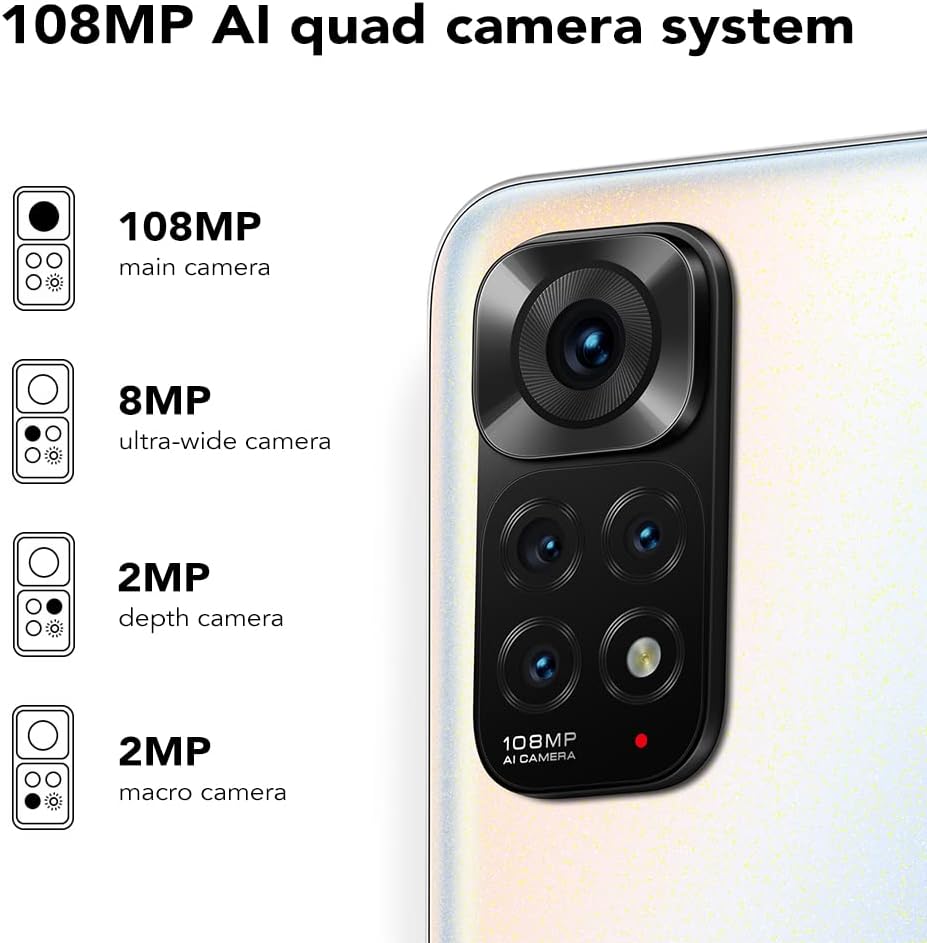
The Redmi Note 11S features a 108MP AI quad camera system on the rear and a 16MP selfie camera. The rear camera setup includes:
- 108 MP Pagrindinė kamera
- 8 MP Itin plataus kampo kamera
- 2 MP Makrokamera
- 2 MP Gylio kamera
Open the Camera application to access various modes such as Photo, Video, Portrait, Night Mode, and more.

Išsamus view of the 108MP AI quad camera system on the Redmi Note 11S, featuring a 108MP main camera, 8MP ultra-wide camera, 2MP depth camera, and 2MP macro camera.
4. Saugojimas ir našumas
The device comes with 128GB of internal storage, expandable up to 1TB via a microSD card (sold separately). It is powered by the MediaTek Helio G96 processor, ensuring smooth performance for daily tasks and gaming.
5. Ryšys
The Redmi Note 11S supports 4G cellular networks, Wi-Fi, and GPS for navigation and location services.
Priežiūra
1. Įrenginio valymas
Telefono ekraną ir korpusą valykite minkštu, nepūkuotu audiniu. Venkite naudoti stiprias chemines medžiagas ar abrazyvines medžiagas. Saugokite įrenginį nuo per didelės drėgmės.
2. Programinės įrangos atnaujinimai
Reguliariai tikrinkite, ar yra programinės įrangos atnaujinimų, ir juos įdiekite, kad jūsų įrenginyje būtų naujausios funkcijos, saugos pataisymai ir našumo patobulinimai. Eikite į Nustatymai > Apie telefoną > MIUI versija norėdami patikrinti, ar nėra atnaujinimų.
3. Akumuliatoriaus priežiūra
Norėdami pailginti baterijos veikimo laiką:
- Venkite ekstremalių temperatūrų.
- Neleiskite baterijai dažnai visiškai išsikrauti.
- Naudokite originalų įkroviklį, pateiktą kartu su įrenginiu.
4. Šilumos išsklaidymas
The Redmi Note 11S incorporates LiquidCool technology with multiple layers of graphite and copper foil for efficient heat dissipation. Ensure proper airflow around the device during heavy usage to prevent overheating.

Vidinis view illustrating the multi-dimensional heat dissipation system using LiquidCool technology, which incorporates multiple layers of graphite and copper foil for efficient cooling.
Trikčių šalinimas
Šiame skyriuje aptariamos dažniausiai pasitaikančios problemos, su kuriomis galite susidurti naudodami „Redmi Note 11S“.
Įrenginys neįsijungia
- Įsitikinkite, kad akumuliatorius įkrautas. Prijunkite įrenginį prie įkroviklio bent 30 minučių.
- Paspauskite ir palaikykite maitinimo mygtuką 10–15 sekundžių, kad atliktumėte priverstinį paleidimą iš naujo.
Apps Freezing or Crashing
- Uždarykite probleminę programėlę ir vėl ją atidarykite.
- Išvalykite programos talpyklą ir duomenis naudodami Nustatymai > Programos > Tvarkyti programas > [Programos pavadinimas] > Išvalyti duomenis.
- Ensure your apps and operating system are up to date.
Prasta baterija
- Adjust screen brightness and reduce screen timeout.
- Išjunkite nenaudojamas funkcijas, tokias kaip „Wi-Fi“, „Bluetooth“ ar GPS, kai jų nereikia.
- Identify and close power-consuming apps running in the background.
Tinklo ryšio problemos
- Iš naujo paleiskite įrenginį.
- Patikrinkite, ar jūsų SIM kortelė tinkamai įdėta.
- Atkurti tinklo nustatymus per Settings > Connection & sharing > Reset Wi-Fi, mobile networks and Bluetooth.
Specifikacijos
The following table outlines the key specifications for the Xiaomi Redmi Note 11S (Model: 2201117SY).
| Funkcija | Specifikacija |
|---|---|
| Modelio pavadinimas | NOTE 11s |
| Prekės modelio numeris | 2201117SY |
| Prekės ženklas | XIAOMI |
| Operacinė sistema | MIUI 12 |
| Ekrano dydis | 6.43 colių |
| Ekrano tipas | FHD+ AMOLED DotDisplay, 90Hz Refresh Rate |
| Galinė kamera | 108MP Main, 8MP Ultra-wide, 2MP Macro, 2MP Depth |
| Priekinė kamera | 16 MP |
| RAM | 6 GB |
| Atminties talpa | 128 GB (išplečiama iki 1 TB) |
| Baterijos talpa | 5000 milijonųampprieš valandą (mAh) |
| Įkrovimas | 33 W „Pro Fast“ įkrovimas (pilnas įkrovimas per 58 minučių) |
| Korinio ryšio technologija | 4G |
| Belaidis nešiklis | Atrakinta visiems vežėjams |
| Ryšio technologijos | „Wi-Fi“, mobilusis ryšys |
| Ypatingos savybės | Dual SIM, GPS, Smartphone |
| Gaminio matmenys | 2.9 x 0.32 x 6.29 colio |
| Prekės svoris | 6.3 uncijos (179 gramų) |
| Spalva | Pearl White |

The aesthetic flat-frame design of the Redmi Note 11S, highlighting its slim profile (8.09mm thickness) and light weight (179g) for a comfortable grip.
Informacija apie garantiją
Specific warranty terms and conditions for the Xiaomi Redmi Note 11S may vary by region and retailer. Please refer to the warranty card included with your product packaging or visit the official Xiaomi website for detailed warranty information applicable to your purchase. Retain your proof of purchase for warranty claims.
Palaikymas
For further assistance, technical support, or service inquiries regarding your Xiaomi Redmi Note 11S, please visit the official Xiaomi support website or contact their customer service. You can typically find contact information and FAQs on the manufacturer's official websvetainę.