
1. Įvadas
Ačiū, kad pirkoteasing the PUSOKEI Digital Alarm Clock Bluetooth Speaker. This device combines a digital alarm clock, Bluetooth 5.0 speaker, FM radio, and memory card player into a compact and portable unit. Please read this manual carefully to ensure proper use and optimal performance.
Pakuotės turinys:
- 1 x PUSOKEI Digital Alarm Clock Bluetooth Speaker
- 1 x Micro USB įkrovimo laidas
- 1 x Vartotojo vadovas
2. Saugos informacija
- Nelaikykite prietaiso ekstremaliose temperatūrose, tiesioginiuose saulės spinduliuose ar didelėje drėgmėje.
- Stenkitės, kad prietaisas nenumestų ar nepatirtų stipraus smūgio.
- Neardykite ir nebandykite taisyti įrenginio patys. Kreipkitės į kvalifikuotus techninės priežiūros darbuotojus.
- Saugokite prietaisą nuo vandens ir kitų skysčių.
- Įkrovimui naudokite tik pridedamą arba sertifikuotą „Micro USB“ laidą.
3. Produktas baigtasview
Familiarize yourself with the main components and controls of your PUSOKEI Digital Alarm Clock Bluetooth Speaker.

3.1 vaizdas: Priekyje view of the device, highlighting the speaker, LED display, and control buttons.
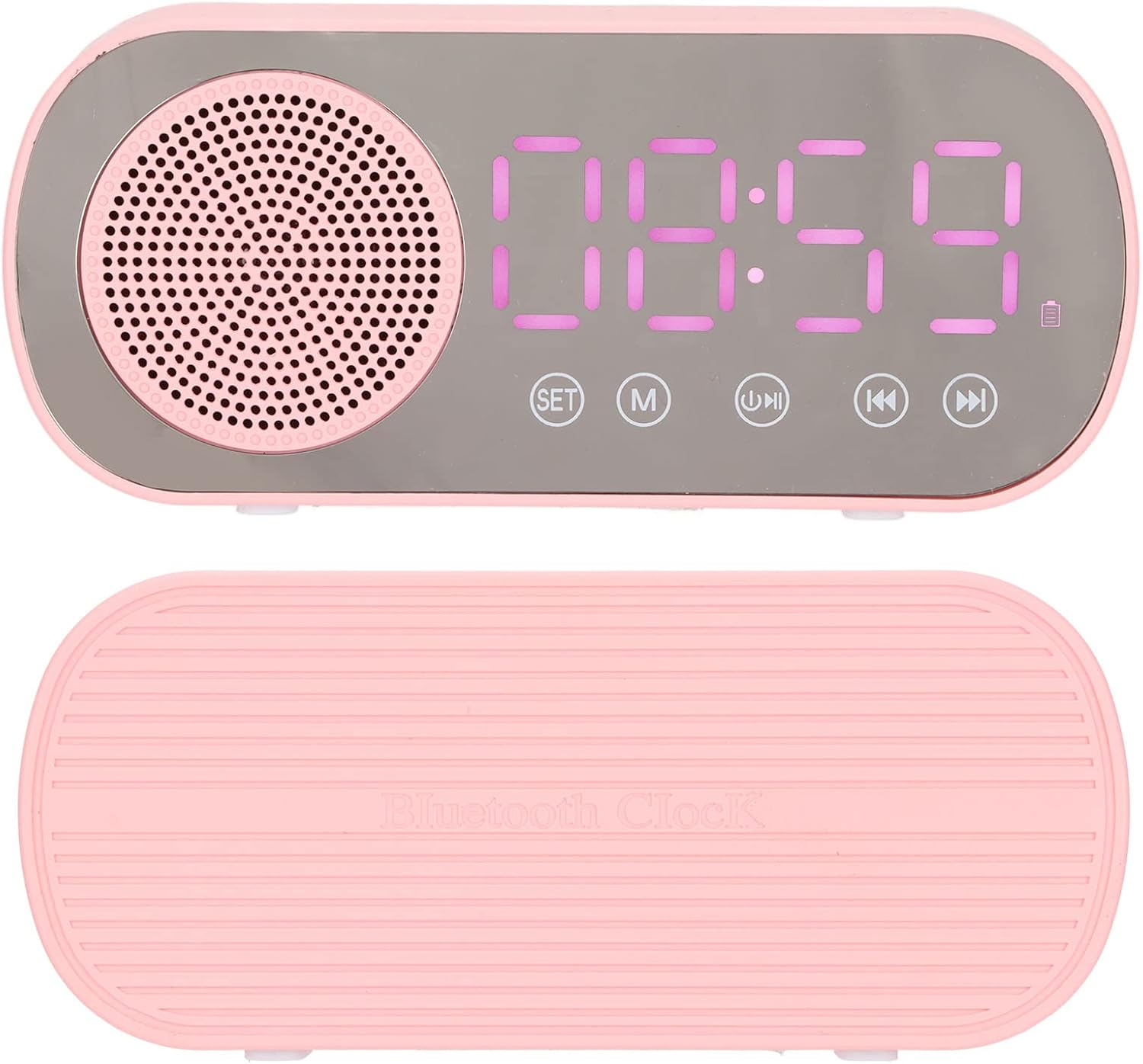
3.2 vaizdas: Viršuje ir apačioje views of the alarm clock, showing its compact design.

3.3 vaizdas: Galinis view of the device, illustrating the Micro USB charging port and the TF (memory card) slot.
Valdymo mygtukai:
- NUSTATYTI: Used to enter time/alarm setting mode and confirm selections.
- M (režimas): Switches between Bluetooth, FM Radio, and Memory Card playback modes.
- Leisti / pristabdyti: Plays or pauses audio. In FM mode, long press to auto-scan and save stations.
- Ankstesnis / Garsumo mažinimas: Trumpas paspaudimas, norint pereiti į ankstesnį takelį / stotį. Ilgas paspaudimas, norint sumažinti garsumą.
- Toliau/Garsumo didinimas: Trumpas paspaudimas, norint pereiti į kitą takelį / stotį. Ilgas paspaudimas, norint padidinti garsumą.
4. Sąranka
4.1 Įrenginio įkrovimas
Before first use, fully charge the alarm clock. Connect the supplied Micro USB cable to the charging port on the back of the device and the other end to a USB power adapter (5V=1A recommended) or a computer USB port. The charging indicator will illuminate and turn off once fully charged.
4.2 Laiko nustatymas
- Paspauskite ir palaikykite NUSTATYTI mygtuką, kol pradės mirksėti valandų skaitmenys.
- Naudokite Ankstesnis ir Kitas mygtukai valandoms reguliuoti.
- Paspauskite NUSTATYTI again to switch to minute adjustment. Use Ankstesnis ir Kitas sureguliuoti minutes.
- Paspauskite NUSTATYTI one more time to confirm the time setting.
5. Naudojimo instrukcijos
5.1 Setting Alarms (Dual Alarm Function)
The device supports two independent alarms.

5.1 vaizdas: The dual alarm function allows setting two different wake-up times.
- Paspauskite NUSTATYTI button once (short press) to enter Alarm 1 setting mode. The alarm icon and hour digits will flash.
- Naudokite Ankstesnis ir Kitas mygtukais nustatykite valandas. Paspauskite NUSTATYTI patvirtinti.
- Minutes reguliuokite naudodami Ankstesnis ir Kitas. Paspauskite NUSTATYTI patvirtinti.
- Pakartokite 1–3 veiksmus su 2 žadintuvu paspausdami NUSTATYTI twice (short presses) to enter Alarm 2 setting mode.
- To enable/disable an alarm, short press the NUSTATYTI button until the desired alarm icon flashes, then press the Leisti / pristabdyti button. The alarm icon will appear/disappear on the display.
5.2 „Bluetooth“ atkūrimas

5.2 vaizdas: Enjoy wireless music streaming from your phone via Bluetooth.
- Paspauskite M (režimas) button until 'BT' appears on the display, indicating Bluetooth mode. The device will enter pairing mode.
- On your smartphone or other Bluetooth-enabled device, search for 'PUSOKEI' in the Bluetooth settings.
- Select 'PUSOKEI' to pair. Once connected, you will hear a confirmation sound.
- You can now play music from your device. Use the Leisti / pristabdyti, Ankstesnis, ir Kitas mygtukai, skirti valdyti atkūrimą.
5.3 FM radijo veikimas

5.3 vaizdas: The built-in FM radio allows access to local broadcasts.
- Paspauskite M (režimas) mygtuką, kol ekrane pasirodys „FM“.
- Norėdami automatiškai nuskaityti ir išsaugoti galimas stotis, paspauskite ir palaikykite Leisti / pristabdyti button. The device will scan and store stations automatically.
- Kai nuskaitymas bus baigtas, naudokite Ankstesnis ir Kitas mygtukais galite naršyti po išsaugotas FM stotis.
5.4 Memory Card Playback
The device supports memory cards (TF cards) up to 32GB (not included).
- Insert a memory card with MP3 audio files into the TF card slot on the back of the device.
- Paspauskite M (režimas) button until the device automatically switches to memory card playback mode.
- Naudokite Leisti / pristabdyti, Ankstesnis, ir Kitas mygtukai, skirti valdyti atkūrimą.
6. Priežiūra
- Valymas: Prietaisą valykite minkštu, sausu skudurėliu. Nenaudokite abrazyvinių valiklių ar tirpiklių.
- Akumuliatoriaus priežiūra: Norėdami pailginti akumuliatoriaus veikimo laiką, venkite dažnai visiškai jį iškrauti. Reguliariai įkraukite įrenginį, net jei jis ilgą laiką nenaudojamas.
- Saugykla: Nenaudojamą prietaisą laikykite vėsioje, sausoje vietoje.
7. Problemų sprendimas
| Problema | Galima priežastis | Sprendimas |
|---|---|---|
| Įrenginys neįsijungia. | Senka baterija. | Charge the device using the Micro USB cable. |
| Iš garsiakalbio nėra garso. | Volume too low; device not connected properly (Bluetooth); incorrect mode. | Increase volume. Re-pair Bluetooth device. Ensure correct mode (BT, FM, TF). |
| „Bluetooth“ susiejimas nepavyksta. | Įrenginys ne poravimo režime; per toli nuo šaltinio; trukdžiai. | Ensure device is in BT mode and flashing. Move closer to the source device. Turn off other Bluetooth devices. |
| Prastas FM radijo priėmimas. | Silpnas signalas; aplinkos trukdžiai. | Try repositioning the device. Perform auto-scan again. |
| Signalizacija neskamba. | Alarm not enabled; volume too low. | Ensure the alarm icon is visible on the display. Increase the device volume. |
| Trumpas baterijos veikimo laikas. | Frequent use at high volume; aging battery. | Reduce volume. Ensure full charge before use. Battery life naturally decreases over time. |
8. Specifikacijos
| Funkcija | Detalė |
|---|---|
| Produkto tipas | Digital Alarm Clock Bluetooth Speaker |
| Modelio numeris | PUSOKEIoi23d8mgzx1614 |
| Medžiaga | ABS (Acrilonitrilo Butadieno Estireno) |
| Gaminio matmenys (I x P x A) | Apytiksliai 116 x 51 x 33 mm (4.6 x 2 x 1.3 colio) |
| Bluetooth versija | 5.0 |
| Baterijos tipas | Built-in Lithium Battery, 3.7V |
| Baterijos talpa | 1600 mAh |
| Maitinimo įvestis | 5V=1A |
| Garsiakalbio išėjimo galia | 2W |
| Dažnio atsakas | 80Hz-20KHz |
| Garso signalo ir triukšmo santykis | >85dB |
| FM radijo dažnis | 87.5 MHz–108 MHz |
| Atminties kortelių palaikymas | TF Card, up to 32GB (not included) |
| Ekrano tipas | Digital LED with Mirror Screen |
| Ypatingos savybės | Dual Alarms, FM Radio, Bluetooth Speaker, Memory Card Playback |