
1. Įvadas
Thank you for choosing the TOTAL TMT460013 Digital Multimeter. This device is designed for safe and accurate measurement of various electrical parameters, including AC/DC voltage, DC current, resistance, and continuity. It is an essential tool for electricians, technicians, and hobbyists for electrical testing and troubleshooting. Please read this manual thoroughly before use to ensure proper operation and safety.
2. Saugos informacija
Always adhere to basic safety precautions when using this multimeter to reduce the risk of fire, electric shock, or personal injury. Failure to follow these instructions can result in severe injury or damage to the device.
- Negalima exceed the maximum input values specified for each measurement range.
- Negalima use the multimeter if it appears damaged or if the test leads are compromised.
- Visada ensure the test leads are correctly connected to the appropriate input jacks for the desired measurement.
- Niekada attempt to measure voltage on a circuit with the function switch set to current, resistance, or continuity mode.
- Būkite atsargūs dirbant su ttagaukštesnėje nei 30 V kintamosios srovės RMS, 42 V maksimalios įtampos arba 60 V nuolatinės srovės įtampoje, nes kyla elektros smūgio pavojus.
- Pašalinti the test leads from the circuit before changing the function switch position.
- Pakeiskite the battery immediately when the low battery indicator appears to ensure accurate readings.
- Laikykitės to local and national safety codes.
3. Produktas baigtasview
The TOTAL TMT460013 Digital Multimeter is a compact and robust device designed for various electrical measurements. Its intuitive interface and clear display make it easy to use for both professionals and DIY enthusiasts.
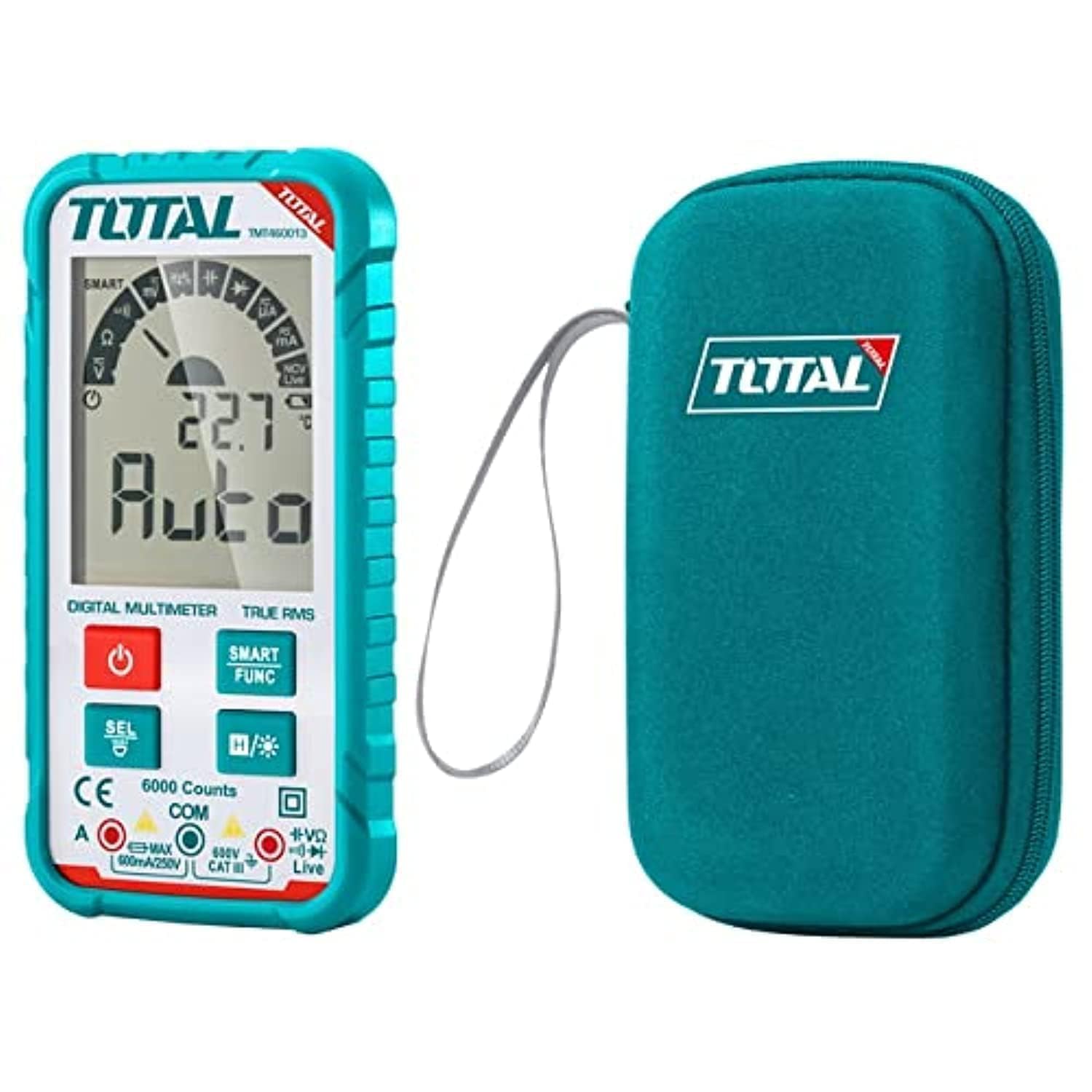
1 pav.: priekis view of the TOTAL TMT460013 Digital Multimeter, showing the LCD display, function buttons, and input terminals.
Valdikliai ir ekranas
- LCD ekranas: Rodo matavimo rodmenis, vienetus ir funkcijų indikatorius.
- Maitinimo mygtukas (raudonas): Press to turn the multimeter ON or OFF.
- SMART FUNC Button (Green): Cycles through different measurement functions within a mode (e.g., AC/DC voltage, varža/tęstinumas).
- HOLD Button (Blue): Įšaldo dabartinį rodmenį ekrane. Paspauskite dar kartą, kad atleistumėte.
- Įvesties lizdai: Terminals for connecting test leads (COM, VΩmA).
4. Sąranka
4.1 Akumuliatoriaus įdėjimas
The multimeter is powered by internal batteries. Ensure batteries are correctly installed before first use or when replacing them.
- Turn off the multimeter by pressing the Power button.
- Įrenginio gale suraskite baterijų skyriaus dangtelį.
- Atsuktuvu atlaisvinkite dangtelį tvirtinantį (-čius) varžtą (-us).
- Nuimkite dangtelį ir įdėkite baterijas, laikydamiesi teisingo poliškumo (+ ir -).
- Replace the battery compartment cover and tighten the screw(s).
4.2 Bandymo laidų prijungimas
Tinkamas bandymo laidų prijungimas yra labai svarbus norint atlikti tikslius ir saugius matavimus.
- Įkiškite juodą bandymo laidą į COM (Bendra) įvesties lizdas.
- Įkiškite raudoną bandymo laidą į VΩmA input jack for voltage, resistance, or current measurements.
- Ensure connections are firm before proceeding with any measurements.
5. Naudojimo instrukcijos
5.1 Įjungimas / išjungimas
Press the red Power button once to turn the multimeter ON. Press and hold the Power button for a few seconds to turn it OFF.
5.2 Selecting Measurement Functions
The TMT460013 features an auto-ranging function, simplifying measurement selection. The device will automatically detect the type of measurement (AC/DC voltage, resistance, continuity) when the leads are connected. Use the SMART FUNC button to cycle between specific functions if needed (e.g., between AC and DC voltage, or resistance and continuity).
5.3 Matavimai
- ttagMatavimas (kintamoji/nuolatinė):
Connect the test leads in parallel to the circuit or component you wish to measure. The multimeter will automatically detect AC or DC voltage. - Atsparumo matavimas:
Prieš matuodami varžą, įsitikinkite, kad grandinėje nėra įtampos. Prijunkite bandymo laidus prie komponento. - Tęstinumo testas:
Ensure the circuit is de-energized. Connect the test leads across the component or wire. A low resistance (typically less than 50Ω) will indicate continuity, often accompanied by an audible beep. - Nuolatinės srovės matavimas:
ĮSPĖJIMAS: To measure current, the multimeter must be connected in series with the circuit. Ensure the circuit is de-energized before connecting the multimeter. Break the circuit, then connect the red lead to the higher potential side and the black lead to the lower potential side.
5.4 Duomenų sulaikymo funkcija
Paspauskite mėlyną LAIKYTI button to freeze the current reading on the display. This is useful for recording measurements in difficult-to-read locations. Press the button again to release the hold and resume live readings.
6. Priežiūra
6.1 Valymas
Nuvalykite dėklą su skelbimuamp šluoste ir švelniu plovikliu. Nenaudokite abrazyvinių medžiagų ar tirpiklių. Prieš naudodami įsitikinkite, kad prietaisas yra visiškai sausas.
6.2 Akumuliatoriaus keitimas
Kai ekrane pasirodo išsikrovusio baterijų indikatorius, pakeiskite baterijas, kaip aprašyta 4.1 skyriuje. Visada naudokite nurodyto tipo baterijas.
6.3 Saugykla
If the multimeter is not used for an extended period, remove the batteries to prevent leakage and damage. Store the device in a cool, dry place away from direct sunlight and extreme temperatures.
7. Problemų sprendimas
Dažniausiai pasitaikančias problemas ir jų sprendimus žr. toliau pateiktoje lentelėje.
| Problema | Galima priežastis | Sprendimas |
|---|---|---|
| Nėra ekrano arba ekranas yra pritemdytas | Žemas arba išsikrovusios baterijos; neteisingas baterijų įdėjimas | Pakeiskite baterijas; patikrinkite baterijų poliškumą |
| Neteisingi rodmenys | Incorrect function selected; Poor test lead connection; Damaged test leads | Ensure correct function; Check lead connections; Replace damaged leads |
| Nėra tęstinumo pyptelėjimo | Circuit not continuous; Multimeter not in continuity mode | Check circuit for breaks; Select continuity function using SMART FUNC button |
| Multimeter does not respond | Internal fault; Completely drained battery | Replace batteries; Contact customer support if issue persists |
8. Specifikacijos
Key technical specifications for the TOTAL TMT460013 Digital Multimeter.
| Funkcija | Detalė |
|---|---|
| Gamintojas | Iš viso |
| Modelio numeris | TMT460013 |
| Matavimo tipas | Multimetras |
| Maitinimo šaltinis | Maitinamas baterijomis |
| Prekės svoris | 209 g (0.21 kilogramo) |
| Gaminio matmenys | 10 x 20 x 37 cm |
| Spalva | Turkis |
| Saugos standartai | UL 61010-1, IEC 61010-2-030 |
| ASIN | B09QZWHFNR |
| GTIN | 06941639846475 |
9. Garantija ir palaikymas
For warranty information and technical support, please refer to the documentation provided with your purchase or visit the official TOTAL Tools websvetainėje. Išsaugokite pirkimo kvitą kaip pirkimo įrodymą bet kokiems garantiniams prašymams.