
Bioby POA8202219
„Bioby“ elektrinių kūdikių sūpynių naudotojo vadovas
Model: POA8202219
Brand: Bioby
Įvadas
The Bioby Electric Baby Swing is designed to provide a safe, comfortable, and engaging environment for infants. Featuring multiple swing speeds, built-in music, Bluetooth connectivity, and a remote control, this portable baby swing aims to offer hands-free parenting convenience while ensuring your baby's well-being. It includes a 5-point harness for security and a removable mosquito net for protection.
Svarbi saugos informacija
Please read all instructions before assembly and use of the baby swing. Keep this manual for future reference. Failure to follow these warnings and instructions could result in serious injury or death.
- ĮSPĖJIMAS: Niekada nepalikite vaiko be priežiūros.
- ĮSPĖJIMAS: Nenaudokite šio gaminio, kai jūsų vaikas gali savarankiškai sėdėti arba sveria daugiau nei 9 kg (20 svarų).
- ĮSPĖJIMAS: Šis gaminys nėra skirtas ilgalaikiam miegui.
- ĮSPĖJIMAS: Visada naudokite apsaugos sistemą. Įsitikinkite, kad diržai tinkamai sureguliuoti ir pritvirtinti.
- ĮSPĖJIMAS: Nejudinkite ir nekelkite gaminio, kai viduje yra vaikas.
- ĮSPĖJIMAS: Smulkias dalis laikykite vaikams nepasiekiamoje vietoje.
- Ensure the swing is placed on a flat, stable surface.
- Nenaudokite šalia laiptų ar laiptų.
- Regularly inspect the product for loose parts, damaged components, or torn materials. Discontinue use if any damage is found.
Pakuotės turinys
Prieš surinkdami patikrinkite, ar yra visi komponentai:
- Main Swing Unit (Base and Seat Frame)
- Seat Cover & Pillow
- Baldakimas su tinkleliu nuo uodų
- Hanging Toys (Star and Moon)
- Nuotolinio valdymo pultas
- Maitinimo adapteris (USB laidas ir sieninis adapteris)
- Vartotojo vadovas (šis dokumentas)
Sąranka ir surinkimas
Follow these steps to assemble your Bioby Electric Baby Swing:
- Assemble the Base Bracket:
Insert the two curved base pieces into the central motor unit until they click securely into place. Ensure they are fully seated and stable.
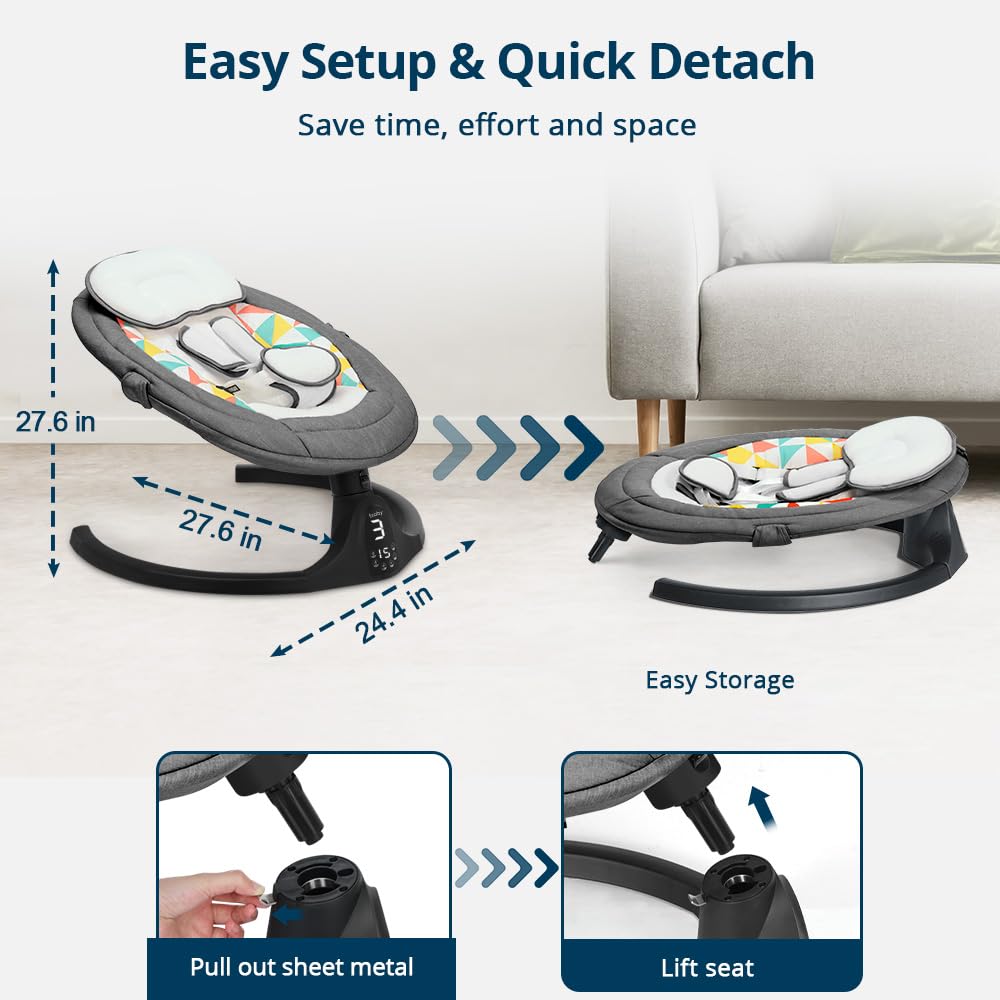
Image: Step-by-step visual guide for assembling the base bracket.
- Sėdynės rėmo pritvirtinimas:
Align the seat frame with the top of the assembled base. Push down firmly until it locks into position. You should hear a click indicating it's secure.
- Install Seat Cover & Pillow:
Slide the fabric seat cover over the seat frame, ensuring it fits snugly. Secure the cover using the zippers and Velcro straps located on the underside and back of the seat. Attach the head pillow to the top ring of the seat with its Velcro.

Image: Detailed steps for attaching the seat cover and head pillow.
- Attach the Canopy with Toys:
Fasten the canopy clasps to the designated points on the seat frame pipe. The canopy includes a removable mosquito net. To attach the mosquito net, tie the small Velcro strap around the swivel part of the swing, ensuring it covers the opening completely. You can also hang the two included toys (star and moon) from the canopy bar.

Image: The fully assembled swing, demonstrating the canopy and hanging toys.
- Prijunkite maitinimą:
Plug the power adapter into the swing's power port and then into a standard electrical outlet. The swing can also be powered by a power bank for portable use.
Naudojimo instrukcijos
The Bioby Electric Baby Swing can be operated via the touch screen panel on the base or the included remote control.
Valdymo skydelio funkcijos:
- Maitinimo mygtukas: Įjungia / išjungia sūpynes.
- Swing Speed Buttons: Adjusts between 5 gentle swing speeds.
- Laikmačio mygtukai: Sets the swing timer for 8, 15, or 30 minutes.
- Music/Sound Buttons: Selects from 8 preset melodies or natural sounds.
- Bluetooth mygtukas: Activates Bluetooth for playing custom music from your device.
- Garsumo valdymas: Reguliuoja garso garsumą.
Nuotolinio valdymo pulto funkcijos:
The remote control duplicates most functions of the touch panel for convenient operation from a distance.

Image: Layout and functions of the remote control.
- Maitinimas (raudonas mygtukas): Įjungia / išjungia sūpynes.
- Music (Blue Button): Perjungia muzikos atkūrimą.
- Timer (Green Button): Cycles through timer settings (8, 15, 30 minutes).
- Garsumo didinimas / sumažinimas: Reguliuoja muzikos garsumą.
- Kita/ankstesnė daina: Skips between preset melodies.
- Swing Speed (1-5 Buttons): Directly selects swing speed.
- AUTO (Yellow Button): Activates automatic swing mode.
- STOP (Orange Button): Stops the swing motion.
Bluetooth ryšys:
To connect your device via Bluetooth, press the Bluetooth button on the control panel or remote. Ieškokite "Bioby Swing" on your device's Bluetooth settings and pair. Once connected, you can play your baby's favorite lullabies or sounds directly through the swing's speaker.
Priežiūra
Proper maintenance ensures the longevity and safety of your Bioby Electric Baby Swing.
- Audinio valymas: The seat cushion is removable and machine-washable. Use a gentle cycle with cold water and mild detergent. Air dry or tumble dry on low heat. Do not bleach.
- Rėmo valymas: Wipe down the plastic and metal parts of the frame with a damp šluoste ir švelniu muilu. Nemerkite pagrindinio įrenginio į vandenį.
- Saugykla: When not in use, the swing can be easily detached and folded for compact storage. Store in a cool, dry place away from direct sunlight.

Image: Demonstrating the ease of removing the seat cover for cleaning.
Trikčių šalinimas
If you encounter issues with your Bioby Electric Baby Swing, refer to the following common problems and solutions:
| Problema | Galima priežastis | Sprendimas |
|---|---|---|
| Sūpynės neįsijungia. | Not plugged in; power adapter issue. | Ensure power adapter is securely plugged into the swing and a working outlet. Try a different outlet. |
| Sūpynės judesiai silpni arba nepastovūs. | Low power; weight exceeds limit; obstruction. | Ensure the swing is properly powered. Verify child's weight is within the 20 lbs limit. Check for any obstructions around the swing mechanism. |
| „Bluetooth“ neprisijungia. | Device too far; swing not in pairing mode. | Ensure your device is within range. Press the Bluetooth button on the swing or remote to activate pairing mode. Restart both devices. |
| Nuotolinio valdymo pultas neveikia. | Battery depleted; obstruction. | Replace the CR2032 battery in the remote control. Ensure no objects are blocking the signal between the remote and the swing. |
Specifikacijos
- Gaminio matmenys: 27.6 "D x 24.4" P x 27.6" A
- Prekės modelio numeris: POA8202219
- Rekomendacija dėl didžiausios masės: 20 svaro
- Medžiagos tipas: Aluminum (frame), Polycotton (fabric)
- Maitinimo šaltinis: Battery Powered (CR2032 for remote, included) / AC Adapter (5V/1A output)
- Prekės svoris: 7.27 svaro
- Savybės: 5 Swing Speeds, 3 Timer Options (8/15/30 mins), 8 Preset Music/Sounds, Bluetooth, Touch Screen/Remote Control, 5-Point Harness, Removable Mosquito Net, Portable.
Garantija ir palaikymas
Bioby products are manufactured with high-quality materials and craftsmanship. For warranty information, technical support, or to purchase replacement parts, please contact Bioby customer service. Refer to the official Bioby website or the original product packaging for the most current contact details.
Papildomos pagalbos ir išteklių galite rasti apsilankę adresu Bioby Store on Amazon.
A digital version of the user guide is available at: Vartotojo vadovas (PDF)
Ask a question about this manual
Ask about setup, troubleshooting, compatibility, parts, safety, or missing instructions. Manuals+ will review the question and use this page’s manual context to help answer it.