
1. Įvadas
This manual provides detailed instructions for the installation, operation, and maintenance of the Walfront HF020-7X1T1M Stepper Motor Motion Controller Module. This module is designed for precise control of stepper motors in various industrial automation applications.
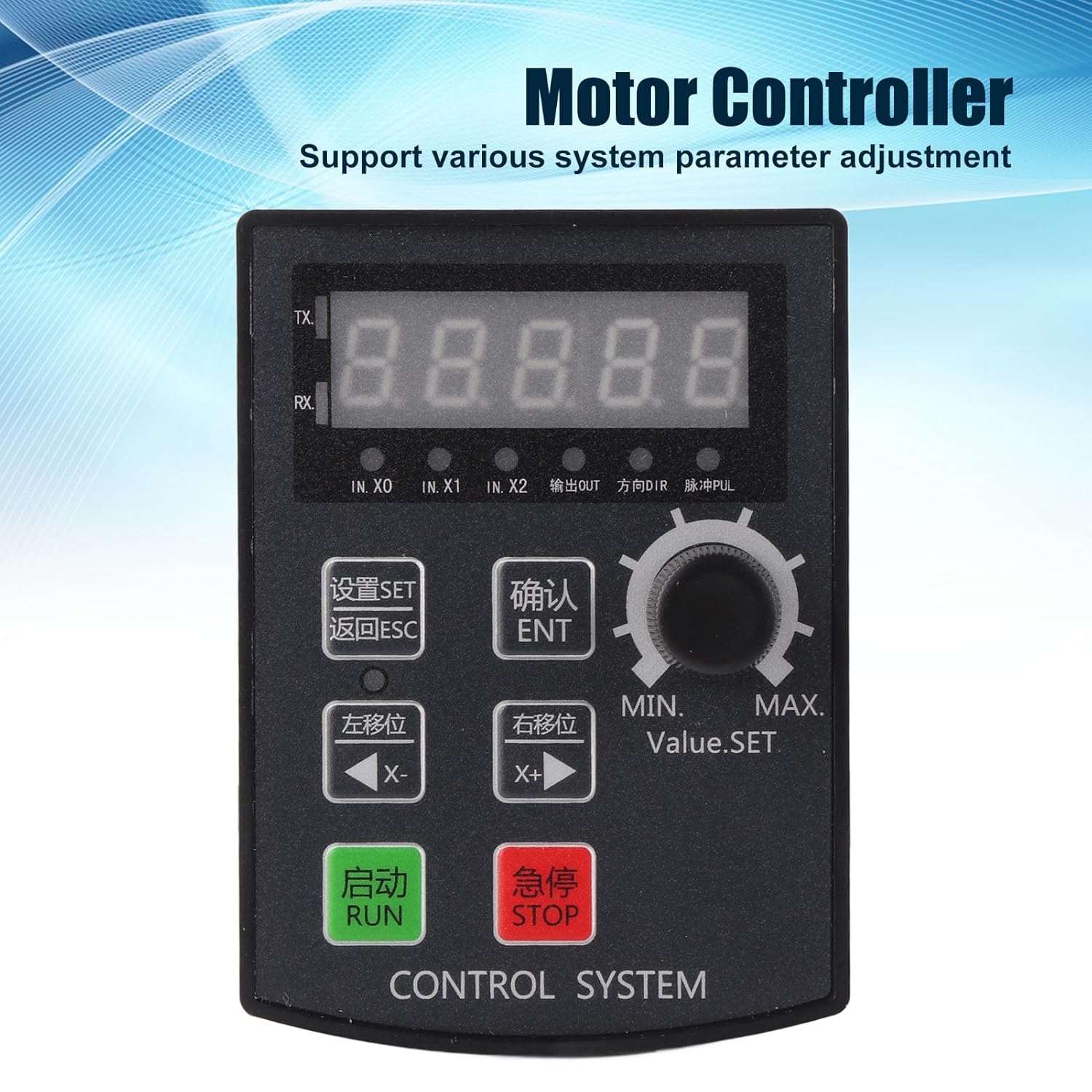
1 pav.: priekis view of the Walfront HF020-7X1T1M Stepper Motor Motion Controller Module, showing the 5-digit display and control buttons.
2. Pagrindinės savybės
- Parametrų valdymas: Supports precise positioning, angle, and revolution control, along with various system parameter adjustments.
- Debugging Convenience: Allows for manual motor movement, simplifying the debugging process.
- Platus pritaikymas: Suitable for industrial automation control, small machinery and equipment, automatic painting systems, and rotary indexing tools.
- High Pulse Frequency: Operates with a motor pulse frequency of 85 KHz.
- Vairuotojo suderinamumas: The 24V motor pulse voltage collector can be directly connected to 5-24V drivers.
- Aiškus ekranas: Features a 5-digit digital screen with a high-brightness digital tube for clear information display and positive/negative limit communication.
3. Specifikacijos
| Parametras | Vertė |
|---|---|
| Produkto modelis | HF020-7X1T1M |
| Medžiaga | ABS |
| Veiklos ttage | DC 12-24V |
| Skylės dydis | Maždaug 92 x 69.8 mm / 3.62 x 2.75 colio |
| Veikimo aplinka | -5℃ to 60℃ (non-condensing) |
| Motor Pulse Frequency | 85 KHz |
| Motor Pulse Voltage | 24V collector (directly connectable to 5-24V driver) |
| Ekrano struktūra | 5-digit, high-brightness digital tube |
| Išėjimai | 2 outputs (0V output voltage) |
| Įėjimai | 7 inputs (0V as valid signal) |
| Pakuotės matmenys | 15.1 x 10.4 x 4.2 cm |
| Svoris | 120 gramų |
| Kilmės šalis | Kinija |
4. Sąranka ir diegimas
Proper installation and wiring are crucial for the safe and effective operation of the controller module. Ensure all connections are secure and follow electrical safety guidelines.
4.1 Fizinis įrengimas
The module is designed for panel mounting. Cut an opening of approximately 92 x 69.8 mm (3.62 x 2.75 inches) in your control panel. Insert the module and secure it using the provided mounting hardware.

2 paveikslas: viršuje view of the controller module, showing the removable green terminal blocks for wiring connections.
4.2 Laidų jungtys
Connect the power supply, motor driver, and input/output signals to the corresponding terminal blocks on the module. The module operates on DC 12-24V. The motor pulse voltage collector is 24V and can be directly connected to 5-24V drivers. Ensure correct polarity for the power supply.
- Maitinimo įvestis: Connect DC 12-24V to the designated power terminals.
- Motor Driver Connection: Connect the pulse (PUL) and direction (DIR) signals to your stepper motor driver. The module provides 85 KHz pulse frequency.
- Inputs (IN.X0, IN.X1, IN.X2, etc.): The module has 7 inputs. A 0V signal is considered valid for these inputs.
- Išėjimai: The module provides 2 outputs with 0V output voltage.

3 pav.: Kampinis view of the module's rear, highlighting the terminal blocks for input, output, and power connections.
5. Naudojimo instrukcijos
The HF020-7X1T1M controller features a user-friendly interface with a 5-digit display and dedicated buttons for various functions.

Figure 4: Close-up of the control panel, showing the display, rotary encoder, and function buttons for setting parameters and controlling motor movement.
5.1 Valdymo skydas baigtasview
- 5 skaitmenų ekranas: Shows current values, parameters, and status.
- SET mygtukas: Įjungiamas parametrų nustatymo režimas.
- ESC mygtukas: Išeina iš dabartinio meniu arba atšaukia operaciją.
- ENT (OK) Button: Patvirtina pasirinkimus arba įeina į submeniu.
- X- (Left Shift) Button: Moves cursor left or decreases value.
- X+ (Right Shift) Button: Moves cursor right or increases value.
- Mygtukas RUN: Įjungia variklio veikimą.
- STOP mygtukas: Sustabdo variklio veikimą.
- Rotary Encoder (Value.SET): Adjusts numerical values or navigates menus.
5.2 Parametrų reguliavimas
To adjust system parameters:
- Paspauskite NUSTATYTI button to enter the parameter setting mode.
- Naudokite Rotacinis koduotojas or X- / X+ buttons to navigate through parameters.
- Paspauskite ENT , kad pasirinktumėte parametrą redagavimui.
- Adjust the value using the Rotacinis koduotojas or X- / X+ mygtukai.
- Paspauskite ENT kad patvirtintumėte naują vertę.
- Paspauskite ESC to exit the parameter setting mode.
5.3 Manual Motor Movement
For debugging or precise manual control, the module supports manual motor movement:
- Ensure the motor is connected and powered.
- Naudokite X- ir X+ buttons to manually jog the motor in the desired direction.
- The speed of manual movement may be adjustable in parameters.
6. Priežiūra
The Walfront HF020-7X1T1M module is designed for durability and requires minimal maintenance. Adhering to these guidelines will ensure its longevity and reliable performance.
- Valymas: Keep the module clean and free from dust and debris. Use a soft, dry cloth for cleaning. Avoid using liquid cleaners or solvents.
- Aplinkos sąlygos: Operate the module within the specified temperature range of -5℃ to 60℃ and in a non-condensing environment. Protect it from excessive moisture, direct sunlight, and corrosive substances.
- Ryšio patikrinimai: Periodically inspect all wiring connections to ensure they are secure and free from corrosion or damage.
- Firmware atnaujinimai: Patikrinkite gamintojo website for any available firmware updates. Follow the provided instructions carefully if performing an update.
7. Problemų sprendimas
This section provides guidance for common issues you might encounter with the HF020-7X1T1M module.
7.1 Controller Version Viewgavimo metodas
Į view the controller's version number:
- Paspauskite ir palaikykite ENT (OK) raktas.
- Laikant ENT, power on the module.
- The version number will be displayed on the screen, for example, [21.100].
- The first two digits (e.g., 21) indicate the year (e.g., 2021).
- The next two digits (e.g., 10) indicate the month (e.g., October).
- The last digit (e.g., 0) indicates the version without RS485 communication, while 8 indicates a version with RS485 communication.
7.2 Bendros problemos
- Nėra galios: Check the DC 12-24V power supply connection and ensure correct polarity. Verify the power source is active.
- Variklis nejuda: Verify motor driver connections (PUL, DIR), power to the motor driver, and motor wiring. Check if the RUN command has been issued and if parameters are set correctly.
- Neteisingas judėjimas: Review the direction and step parameters. Ensure the motor driver is configured correctly for the stepper motor.
- Rodymo klaidos: If the display shows unusual characters or no information, try restarting the module. If the issue persists, contact support.
8. Garantija ir palaikymas
For warranty information, technical support, or service inquiries, please refer to the documentation provided with your purchase or contact Walfront customer service through their official channels. Keep your purchase receipt for warranty claims.