Įvadas
The Garmin Varia RCT715 is a rearview radar system with an integrated camera and tail light designed to enhance cycling safety. This device continuously records your ride, detects approaching vehicles from behind, and provides visual and audible alerts. It also features a bright tail light to increase your visibility to motorists. The Varia RCT715 integrates with compatible Garmin bike computers and the Varia mobile application for comprehensive control and data management.
Svarbus pranešimas: Some jurisdictions regulate or prohibit the use of the camera function of this device. It is your responsibility to understand and comply with applicable laws and privacy regulations in any jurisdiction where you intend to use the camera function.
Kas yra dėžutėje
Patikrinkite, ar pakuotėje yra visi šie komponentai:
- Varia RCT715 device
- Seat post mount kit
- USB kabelis
- 16 GB SD kortelė
- Dokumentacija (šis vadovas)
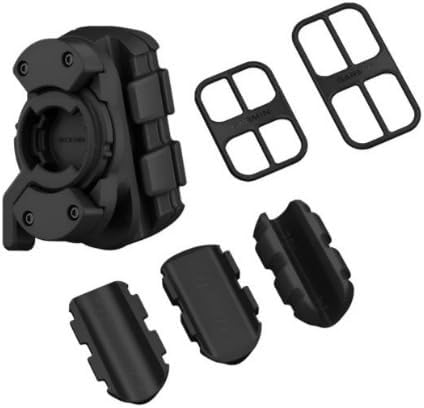
Image: The Varia RCT715 seat post mount kit, including various rubber shims and the mounting bracket.
Sąranka
1. Įrenginio įkrovimas
Before initial use, fully charge the Varia RCT715. Connect the device to a USB power source using the provided USB cable. The charging indicator light will show the charging status.
2. SD kortelės įdėjimas
The device comes with a pre-installed 16 GB SD card. Ensure it is properly seated before use. If replacing, use a compatible microSD card (Class 10 or higher recommended).
3. Prietaiso montavimas
The Varia RCT715 is designed for secure attachment to your bicycle's seat post. Use the included seat post mount kit to ensure proper positioning and stability.
- Select the appropriate rubber shims from the kit to match your seat post diameter (compatible with round seatposts from 27.0 mm to 31.6 mm).
- Attach the mounting bracket to your seat post using the shims and rubber bands, ensuring a tight and secure fit.
- Align the Varia RCT715 with the quarter-turn mount on the bracket and twist clockwise until it locks into place. Ensure the device is vertical and the camera lens faces directly backward.

Image: A hand demonstrating the quarter-turn mounting process of the Varia RCT715 onto a bicycle seatpost.

Image: The Varia RCT715 device securely mounted on a bicycle's seatpost, illustrating its compact and vertical design.
4. Pairing with Compatible Devices
The Varia RCT715 can be paired with Garmin Edge bike computers, select Garmin wearables, or the Varia mobile app on your smartphone.
- Garmin Edge/Wearables: Follow the pairing instructions for your specific Garmin device to add a new sensor. The Varia RCT715 will appear as a radar and light sensor.
- Varia Mobile App: Download the Varia app from your smartphone's app store. Open the app and follow the on-screen instructions to pair your Varia RCT715 via Bluetooth.

Image: A smartphone screen showing the Varia mobile application, used for viewing footage, transferring videos, and customizing camera settings.
Prietaiso valdymas
Maitinimo įjungimas/išjungimas
- To power on, press and hold the power button until the lights illuminate.
- Norėdami išjungti, paspauskite ir palaikykite maitinimo mygtuką, kol užges lemputės.
Radaro funkcionalumas
Galinėview radar detects vehicles approaching from behind up to 153 yards (140 meters) away. Alerts are provided through your paired Garmin device or the Varia app.
- Vizualiniai įspėjimai: On compatible Garmin devices, a colored bar on the side of the screen indicates vehicle proximity and speed.
- Garsiniai įspėjimai: Tones or vibrations notify you of approaching vehicles.

Image: A cyclist riding on a road, with a car approaching from behind, demonstrating the Varia RCT715's ability to detect vehicles.
Kameros funkcionalumas
The integrated camera continuously records video at 1080p (30 fps) or 720p (for extended battery life). It automatically saves footage before, during, and after incidents.
- Automatic Incident Capture: If an incident is detected (e.g., sudden braking or impact), the camera automatically saves the relevant video segment.
- Rankinis įrašymas: You can manually trigger video recording or take photos via the Varia app or a paired Garmin device.
- Vaizdo įrašo raiška: Adjust video resolution settings (1080p or 720p) through the Varia app to manage file size and battery consumption.

Vaizdas: Stambus planas view of the Varia RCT715 mounted on a bicycle, highlighting its tail light and camera, which automatically captures incidents.
Tail Light Modes
The bright tail light offers multiple modes to maximize visibility and battery life.
- Visada įjungta: Nuolatinis apšvietimas.
- Lights and Radar Only: Tail light and radar active, camera off.
- Radar-activated: Camera turns on when an approaching car is detected.
- Dienos blykstė: High-visibility flashing mode for daytime use.
- Naktinis blyksnis: Flashing mode optimized for nighttime visibility.
You can control these modes via the Varia app or a paired Garmin device.
Baterijos veikimo laikas
Battery performance varies based on usage mode:
- Up to 4 hours with radar and tail light on solid high or night flash (1080p recording).
- Up to 5 hours on solid low (1080p recording).
- Up to 6 hours on day flash (1080p recording).
Priežiūra
Prietaiso valymas
Regularly clean the Varia RCT715 to ensure optimal performance. Use a soft, damp cloth to wipe the device, especially the camera lens and radar sensor area. Avoid abrasive cleaners or solvents.
SD kortelių valdymas
The included 16 GB SD card provides storage for recorded footage. Periodically transfer important videos to a computer or cloud storage and format the SD card to maintain performance. Formatting can be done via the Varia app or by removing the card and formatting it on a computer.
Programinės aparatinės įrangos naujiniai
Garmin periodically releases firmware updates to improve device functionality and performance. Connect your Varia RCT715 to the Varia app or Garmin Express on your computer to check for and install available updates.
Trikčių šalinimas
- Įrenginys neįsijungia: Ensure the device is fully charged. If the issue persists, try a different USB cable or power adapter.
- Radaras neaptinka transporto priemonių: Ensure the device is mounted correctly and unobstructed. Check for firmware updates. Verify pairing with your Garmin device or Varia app.
- Kamera neįrašo: Check if the SD card is properly inserted and has sufficient free space. Ensure the camera is enabled in the Varia app settings.
- Ryšio problemos: Ensure Bluetooth is enabled on your smartphone or Garmin device. Try unpairing and re-pairing the Varia RCT715.
- Prasta vaizdo kokybė: Ensure the camera lens is clean. Check the video resolution settings in the Varia app.
Specifikacijos
| Funkcija | Detalė |
|---|---|
| Gaminio matmenys | 1.7 x 4.2 x 1.3 colio |
| Prekės svoris | 5.2 uncijos |
| Modelio numeris | 010-02474-00 |
| Baterijos | 1 ličio jonų baterija (pridedama) |
| Ryšio technologijos | „Bluetooth“, „Wi-Fi“ |
| Ypatingos savybės | Built-in Camera, Automatic Incident Capture, Rearview Radar, Superior Visibility Tail Light, Compact Design |
| Vaizdo įrašymo raiška | 1080p, 720p |
| Montavimo tipas | Sėdynės stulpelio tvirtinimas |
| Kontrolės metodas | App, Garmin Edge, Garmin Wearables |
| Compatible Seatpost Diameter | 27.0 mm to 31.6 mm (round) |
Informacija apie garantiją
Garmin products are typically covered by a one-year limited warranty from the date of purchase, covering defects in materials or workmanship. For specific warranty terms and conditions, please refer to the warranty documentation included with your product or visit the official Garmin websvetainę.
Palaikymas
For additional assistance, detailed FAQs, or to contact customer support, please visit the official Garmin support website. You can also refer to the comprehensive user manual available online: