
1. Įvadas
This manual provides detailed instructions for the installation, operation, and maintenance of your DEKCO Solar Security Camera and Wireless Doorbell Camera system. Please read this manual thoroughly before using the product to ensure proper function and safety. Keep this manual for future reference.
2. Pakuotės turinys
Išpakuodami patikrinkite, ar yra visi komponentai ir ar jie geros būklės.
- DEKCO Solar Security Camera
- Belaidė durų skambučio kamera
- Vidinis varpelio blokas
- Solar Panel (integrated with camera)
- Tvirtinimo laikikliai ir varžtai
- USB įkrovimo laidas
- Vartotojo vadovas (šis dokumentas)
3. Produktas baigtasview
The DEKCO security system combines a solar-powered outdoor camera with a wireless doorbell camera to provide comprehensive home surveillance.
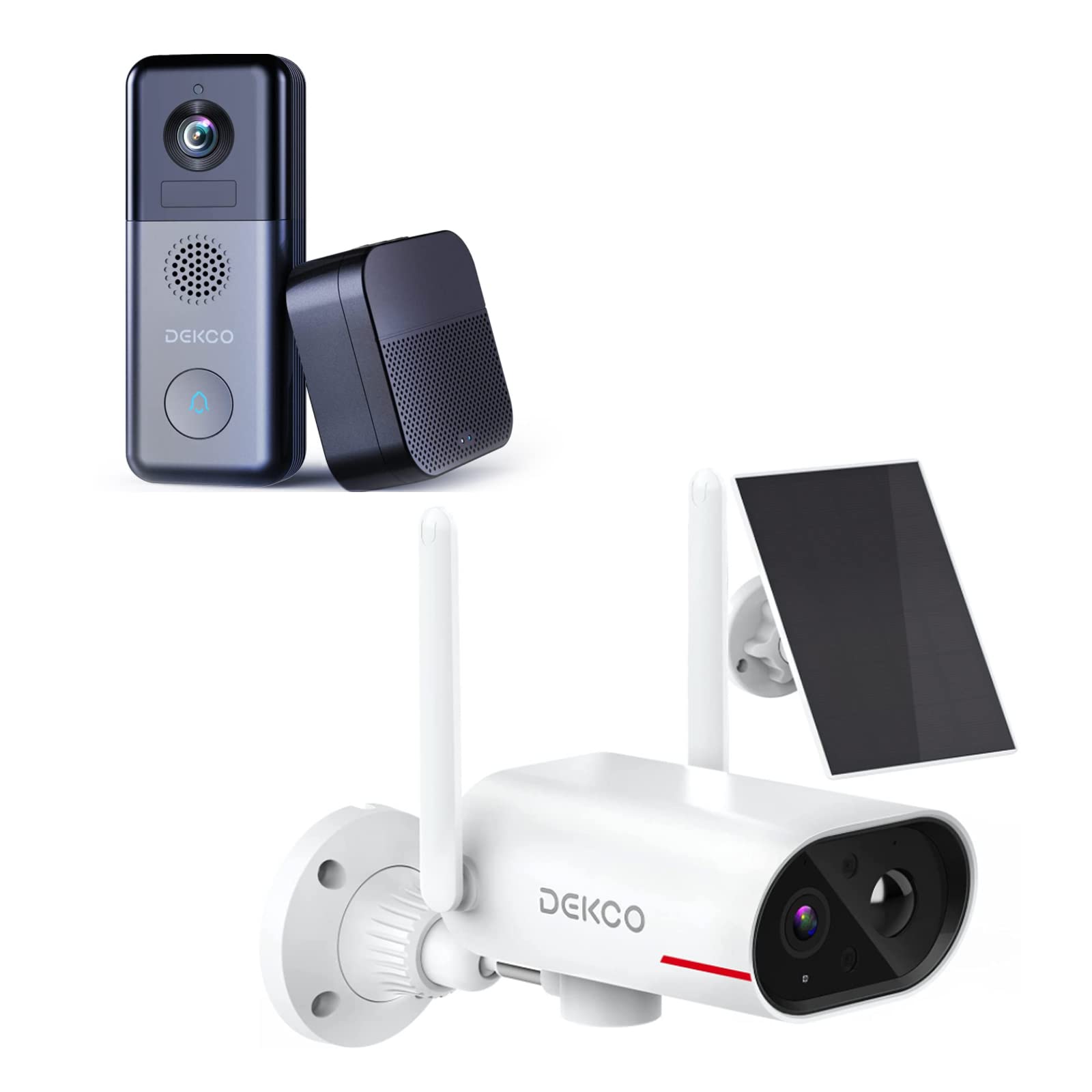
An image showing the DEKCO solar-powered security camera, the wireless doorbell camera, and its indoor chime unit. The security camera is white with two antennas and a solar panel, while the doorbell is dark grey with a camera lens and a call button. The chime is a compact black box.
3.1 Solar Security Camera Features
- 260° Viewdiapazonas: Achieved through a 170° rotating design.
- 100% Wire-Free: Flexible installation without power cables.
- Varomas saulės energija: Integrated solar panel for continuous power with adequate sunlight.
- Naktinis matymas: Features color night vision for clear images in low light.
- Saugykla: Supports Micro SD card and cloud storage (no monthly fees).
- Atsparumo vandeniui įvertinimas: IP65 for outdoor use.
3.2 Wireless Doorbell Camera Features
- 180 dienų baterijos veikimo laikas: Įmontuota 10000 mAh įkraunama baterija ilgam naudojimui.
- Dvipusis garsas: Communicate with visitors remotely.
- Judesio aptikimas: Receive alerts for activity at your door.
- Belaidis varpelis: Connects to an indoor chime unit.
- Atsparumo vandeniui įvertinimas: IP65 for outdoor use.
4. Sąrankos vadovas
Follow these steps to set up your DEKCO security system.
4.1 Programos diegimas
- Download the DEKCO app from your smartphone's app store (available for Android and iOS).
- Registruokitės naujai paskyrai arba prisijunkite, jei jau turite.
4.2 Solar Security Camera Setup
- Pradinis mokestis: Prieš diegdami, visiškai įkraukite kamerą naudodami pridedamą USB laidą.
- Montavimas: Choose a location with good Wi-Fi signal and direct sunlight exposure for the solar panel. Use the mounting bracket and screws to securely attach the camera to a wall. Ensure the camera has a clear view norimos stebėjimo zonos.
- Poravimas: Open the DEKCO app, select 'Add Device', and follow the on-screen instructions to connect the camera to your Wi-Fi network.
4.3 Wireless Doorbell Camera Setup
- Pradinis mokestis: Fully charge the doorbell camera using the provided USB cable.
- Montavimas: Install the doorbell camera at your desired location near your front door using the provided mounting hardware. Ensure it has a clear view ir geras „Wi-Fi“ signalas.
- Poravimas: In the DEKCO app, select 'Add Device' and follow the instructions to connect the doorbell camera to your Wi-Fi network.
- Chime Setup: Plug the indoor chime unit into a power outlet. Follow the app's instructions to pair the chime with the doorbell camera. You can select different chime tones and adjust the volume through the app.
5. Naudojimo instrukcijos
Learn how to use the features of your DEKCO security system.
5.1 Solar Security Camera Operation
- Tiesiogiai View: Open the DEKCO app and select your camera to view gyvas kvailystage. You can manually pan/tilt the camera within its 260° range.
- Judesio aptikimas: The camera is configured for motion-only alerts. Adjust sensitivity settings in the app to optimize detection and minimize false alarms.
- Įrašas: Motion-triggered events are recorded and stored on the Micro SD card (if installed) or in the cloud. Access recordings via the app's playback feature.
- Naktinis matymas: The camera automatically switches to color night vision in low-light conditions.
5.2 Wireless Doorbell Camera Operation
- Atsiliepimas į skambučius: When a visitor presses the doorbell button, your smartphone will receive a notification. Tap the notification to answer and engage in two-way audio communication.
- Judesio aptikimas: The doorbell camera detects motion and sends alerts to your phone. Review motion events in the app.
- Tiesiogiai View: You can initiate a live view of your front door at any time through the DEKCO app.
- Skambučio funkcija: The indoor chime will sound when the doorbell button is pressed. Adjust settings in the app.
6. Priežiūra
Regular maintenance ensures optimal performance and longevity of your devices.
- Lęšių valymas: Periodiškai nuvalykite kameros objektyvus ir saulės bateriją minkšta,amp šluoste dulkėms ir nešvarumams pašalinti. Venkite abrazyvinių valiklių.
- Saulės baterijos efektyvumas: Ensure the solar panel is free from obstructions (leaves, snow, etc.) to maximize charging efficiency.
- Baterijos būklė: While solar-powered, ensure the security camera receives sufficient sunlight. For the doorbell, monitor battery levels via the app and recharge when necessary.
- Firmware atnaujinimai: Check the DEKCO app regularly for firmware updates. Install updates to ensure your devices have the latest features and security enhancements.
7. Problemų sprendimas
Dažniausiai pasitaikančių problemų sprendimus rasite šiame skyriuje.
- Įrenginys neprisijungia prie „Wi-Fi“:
- Ensure your Wi-Fi network is 2.4GHz (5GHz is not supported).
- Patikrinkite „Wi-Fi“ slaptažodžio tikslumą.
- Perkelkite įrenginį arčiau „Wi-Fi“ maršrutizatoriaus.
- Restart your router and the device.
- Nėra judesio aptikimo įspėjimų:
- Patikrinkite, ar programėlės nustatymuose įjungtas judesio aptikimas.
- Sureguliuokite judesio jautrumą.
- Įsitikinkite, kad prietaisas turi aiškų view ir nėra trukdoma.
- Prasta vaizdo kokybė:
- Patikrinkite „Wi-Fi“ signalo stiprumą.
- Nuvalykite fotoaparato objektyvą.
- Durų skambučio baterija greitai išsikrauna:
- Sumažinkite judesio aptikimo jautrumą arba dažnį.
- Prieš naudodami įsitikinkite, kad prietaisas yra visiškai įkrautas.
- Solar Camera Not Charging:
- Ensure the solar panel receives at least 1 hour of direct sunlight daily.
- Nuvalykite saulės baterijos paviršių.
8. Specifikacijos
| Funkcija | Specifikacija |
|---|---|
| Prekės ženklas | DEKCO |
| Modelio numeris | B09TF8K2W8 |
| Ryšio technologija | Belaidis ryšys (Wi-Fi) |
| Maitinimo šaltinis | Solar Powered (Camera), Battery (Doorbell) |
| Doorbell Battery Capacity | 10000 mAh |
| ViewFotografavimo kampas (kamera) | 260° (170° rotating design) |
| Naktinis matymas | Spalvotas naktinis matymas |
| Atsparumo vandeniui įvertinimas | IP65 |
| Suderinami įrenginiai | Išmanusis telefonas („Android“) |
| Įspėjimo tipas | Tik judėjimas |
| Montavimo tipas | Sieninis laikiklis |
| Vaizdo įrašymo formatas | MPEG-4 |
9. Garantija ir palaikymas
For warranty information, technical support, or further assistance, please refer to the DEKCO official website or contact DEKCO customer service directly. Keep your purchase receipt as proof of purchase.