
1. Įvadas
The Sunshine DT-17N Digital Multimeter is a versatile and reliable tool designed for accurate electrical measurements. It is particularly suitable for phone repair technicians and general electronics work, capable of measuring various electrical parameters including voltage, current, resistance, capacitance, and temperature. Its compact design and user-friendly features make it an essential tool for diagnosing and repairing electronic devices.

Figure 1: The Sunshine DT-17N Digital Multimeter, demonstrating its compact size for portability.
2. Saugos informacija
To ensure safe operation and prevent damage to the meter, please read and follow all safety instructions carefully. This multimeter features double insulation protection for enhanced user safety.
- Always ensure the test leads are in good condition and properly connected before taking measurements.
- Netaikyti ttage or current that exceeds the maximum rated values for each range.
- Never use the multimeter if it appears damaged or if the test leads are frayed.
- Dirbdami su volu, būkite atsargūstagaukštesnėje nei 30 V kintamosios srovės RMS, 42 V maksimalios įtampos arba 60 V nuolatinės srovės įtampoje, nes kyla elektros smūgio pavojus.
- Always disconnect power to the circuit and discharge high-voltagPrieš matuodami varžą, laidumą ar diodus, atjunkite kondensatorius.
- Kai pasirodys išsikrovusio akumuliatoriaus indikatorius, nedelsdami pakeiskite bateriją, kad užtikrintumėte tikslius rodmenis.
3. Produktas baigtasview
3.1. Multimeter Components

2 pav.: priekis view of the DT-17N Multimeter, highlighting its main display and controls.
3.2. Ekrano funkcijos
The DT-17N features a large LCD display with a backlight, ensuring clear readability in various lighting conditions.

Figure 3: The multimeter's LCD display with its backlight feature, improving visibility in low-light environments.
- Didelis LCD ekranas: Provides clear numerical readings.
- Foninis apšvietimas: Improves visibility in dark or low-light conditions. Activated by pressing and holding the HOLD button.
- Matavimo vienetas: Displays the appropriate unit (e.g., V, A, Ω, °C/°F).
- Baterijos būsena: Nurodo esamą baterijos lygį.
- Automatic Polarity Display: Shows positive or negative polarity automatically.
3.3. Controls and Input Ports
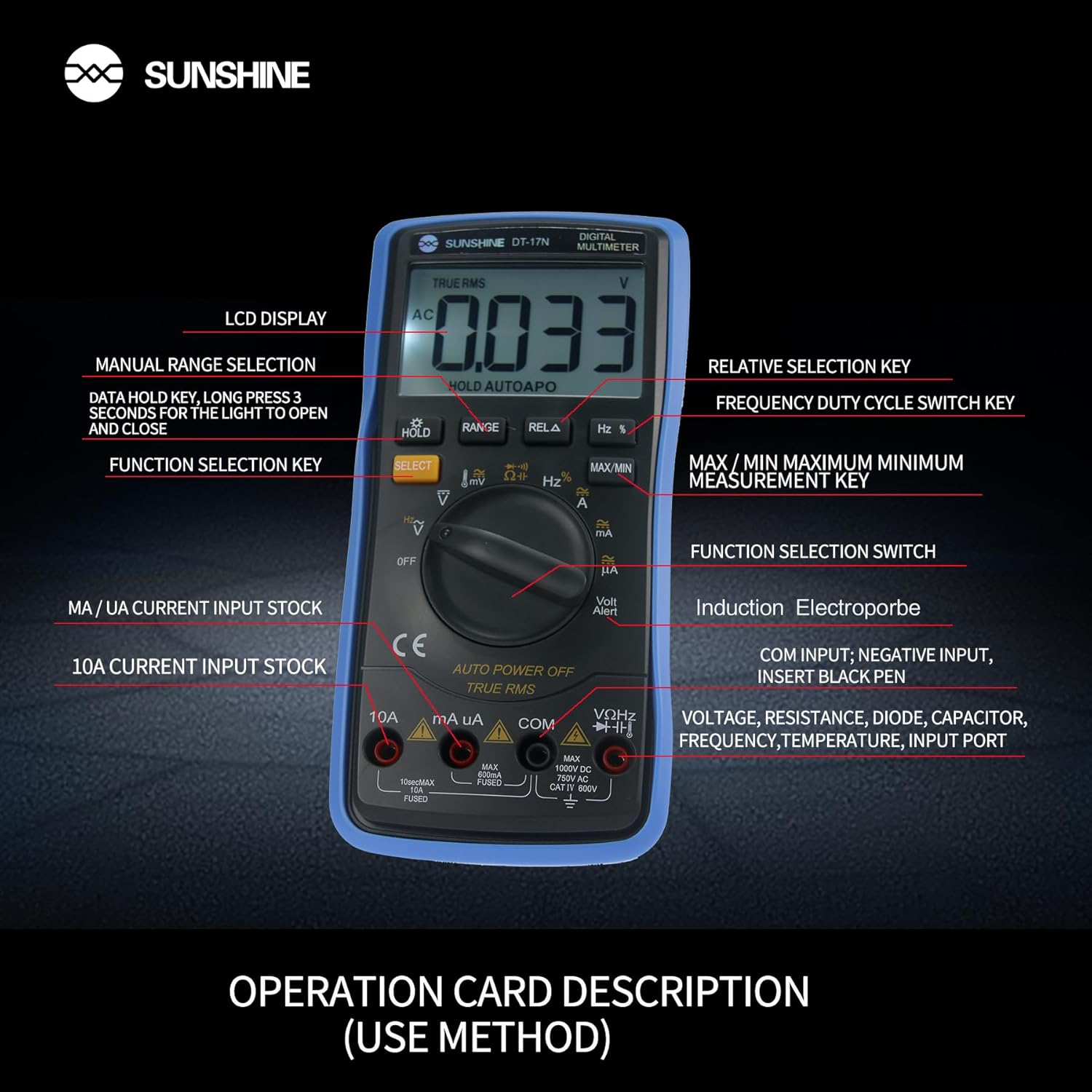
4 pav. Išsamus view of the multimeter's controls and input ports with their respective functions.
- Sukamasis funkcijų jungiklis: Used to select the desired measurement function (e.g., Voltage, Current, Resistance, Temperature).
- SELECT mygtukas: Toggles between different measurement modes within a single rotary switch position (e.g., AC/DC voltage, diodas/tęstinumas).
- LAIKYMO mygtukas: Freezes the current reading on the display. Press and hold to activate/deactivate the backlight.
- RANGE mygtukas: Allows manual selection of measurement ranges, overriding the automatic ranging feature.
- RELA Button (Relative Selection Key): Matuoja skirtumą tarp išsaugotos pamatinės vertės ir dabartinio rodmens.
- Hz % Button (Frequency Duty Cycle Switch Key): Perjungia dažnio ir darbo ciklo matavimus.
- MAX/MIN mygtukas: Displays the maximum or minimum measured value during a measurement session.
- VΩHz Input Port: Prijunkite raudoną bandymo laidą tūriui matuotitage, resistance, frequency, capacitance, diode, and temperature measurements.
- COM įvesties prievadas: Connect the black test lead (common ground) for all measurements.
- mA/uA Input Port: Connect the red test lead for measuring small currents (milliamperes and microamperes).
- 10A Input Port: Connect the red test lead for measuring large currents (up to 10 Amperes).
- Volt Alert (NCV): Nekontaktinis ttage detection feature.
4. Sąranka
4.1. Akumuliatoriaus įdėjimas
The DT-17N is battery-powered. To install or replace the battery:
- Įsitikinkite, kad multimetras yra IŠJUNGTAS.
- Įrenginio gale suraskite baterijų skyriaus dangtelį.
- Atsukite tvirtinimo varžtą (-us) ir nuimkite dangtelį.
- Insert the new battery, observing correct polarity (+ and -).
- Uždėkite baterijų skyriaus dangtelį ir pritvirtinkite jį varžtu (-ais).
4.2. Bandymo laidų prijungimas
Always connect the black test lead to the COM input jack. Connect the red test lead to the appropriate input jack based on the measurement you intend to perform:
- Dėl ttage, Resistance, Capacitance, Frequency, Diode, and Temperature measurements: Connect the red test lead to the VΩHz domkratas.
- For Current measurements (mA/uA): Connect the red test lead to the mA/uA domkratas.
- For High Current measurements (10A): Connect the red test lead to the 10A domkratas.
5. Naudojimo instrukcijos
The Sunshine DT-17N features automatic identification for most ranges, simplifying operation. Use the rotary switch to select the primary function and the SELECT button to toggle sub-functions.
5.1. Measuring Voltage (AC/DC)
- Pasukite sukamąjį jungiklį į padėtį V padėtis.
- Jei reikia, paspauskite mygtuką PASIRINKTI button to toggle between AC (~) and DC (—) voltage.
- Prijunkite juodą bandymo laidą prie COM lizdą ir raudoną bandymo laidą prie VΩHz domkratas.
- Prijunkite bandymo zondus lygiagrečiai prie grandinės ar komponento, kurį norite išmatuoti.
- Perskaitykite ttage reikšmė ekrane.

Figure 5: The multimeter showing a DC millivolt measurement on its display.
5.2. Measuring Current (AC/DC)
Atsargiai: Never connect the multimeter in parallel when measuring current, as this can damage the meter and the circuit. Always connect in series.
- Pasukite sukamąjį jungiklį į padėtį mA/uA or 10A position, depending on the expected current.
- Jei reikia, paspauskite mygtuką PASIRINKTI button to toggle between AC (~) and DC (—) current.
- Prijunkite juodą bandymo laidą prie COM jack. Connect the red test lead to the mA/uA or 10A jack accordingly.
- Atidarykite grandinę ir prijunkite bandymo zondus nuosekliai su apkrova.
- Nuskaitykite dabartinę vertę ekrane.
5.3. Atsparumo matavimas
- Pasukite sukamąjį jungiklį į padėtį Ω padėtis.
- Prijunkite juodą bandymo laidą prie COM lizdą ir raudoną bandymo laidą prie VΩHz domkratas.
- Įsitikinkite, kad grandinėje nėra įtampos ir visi kondensatoriai yra iškrauti.
- Prijunkite bandymo zondus prie komponento, kad išmatuotumėte jo varžą.
- Perskaitykite pasipriešinimo vertę ekrane.
5.4. Talpos matavimas
- Pasukite sukamąjį jungiklį į padėtį Talpa symbol (often shared with diode/continuity).
- Paspauskite PASIRINKTI button until the capacitance mode is active.
- Prijunkite juodą bandymo laidą prie COM lizdą ir raudoną bandymo laidą prie VΩHz domkratas.
- Ensure the capacitor is fully discharged before connecting the test probes.
- Prijunkite bandymo zondus per kondensatorių.
- Ekrane perskaitykite talpos vertę.
5.5. Measuring Frequency / Duty Cycle
- Pasukite sukamąjį jungiklį į padėtį Hz % padėtis.
- Paspauskite Hz % mygtuką, kad perjungtumėte dažnį (Hz) ir darbo ciklą (%).
- Prijunkite juodą bandymo laidą prie COM lizdą ir raudoną bandymo laidą prie VΩHz domkratas.
- Connect the test probes in parallel to the signal source.
- Nuskaitykite dažnio arba darbo ciklo vertę ekrane.
5.6. Temperatūros matavimas
The DT-17N can measure temperature using a K-type thermocouple (not always included, check package contents).

6 pav. Pvzample of temperature measurement using the DT-17N Multimeter with a thermocouple.
- Pasukite sukamąjį jungiklį į padėtį ° C / ° F padėtis.
- Jei reikia, paspauskite mygtuką PASIRINKTI button to choose between Celsius or Fahrenheit.
- Connect the K-type thermocouple to the VΩHz ir COM domkratai, stebint poliškumą.
- Place the thermocouple tip on or in the object whose temperature you wish to measure.
- Nuskaitykite temperatūros vertę ekrane.
5.7. Diode Test and Continuity
- Pasukite sukamąjį jungiklį į padėtį Diodas / tęstinumas simbolis.
- Paspauskite PASIRINKTI button to toggle between Diode Test and Continuity Test.
- Prijunkite juodą bandymo laidą prie COM lizdą ir raudoną bandymo laidą prie VΩHz domkratas.
- Diodų bandymui: prijunkite zondus prie diodo. Ekrane bus rodoma tiesioginė įtampa.tage kritimas. Apkeiskite zondus, kad patikrintumėte, ar nėra nutrūkusios grandinės.
- For Continuity Test: Connect the probes across the circuit or component. A beep indicates continuity (low resistance).
5.8. Nekontaktinis ttage (NCV) aptikimas
NCV funkcija leidžia aptikti kintamosios srovės tūrįtage be tiesioginio kontakto su laidininkais.
- Pasukite sukamąjį jungiklį į padėtį NCV position (often indicated by a Volt Alert symbol).
- Move the top part of the multimeter near the conductor.
- The meter will beep and/or flash an indicator light if AC voltagaptinkamas e.
5.9. Data Hold and Backlight
- Duomenų sulaikymas: Paspauskite LAIKYTI Trumpai paspauskite mygtuką, kad sustabdytumėte dabartinį rodmenį ekrane. Paspauskite dar kartą, kad atleistumėte.
- Foninis apšvietimas: Paspauskite ir palaikykite LAIKYTI button for approximately 3 seconds to turn the display backlight ON or OFF.
5.10. MAX/MIN Measurement
This function records the maximum and minimum values measured during a session.
- Select the desired measurement function (e.g., Voltagir).
- Paspauskite MAX/MIN button. The display will show 'MAX' and the maximum value recorded.
- Paspauskite MAX/MIN again to cycle to 'MIN' and view the minimum value.
- Paspauskite ir palaikykite MAX/MIN norėdami išeiti iš šio režimo.
6. Priežiūra
Tinkama priežiūra užtikrina jūsų multimetro ilgaamžiškumą ir tikslumą.
6.1. Valymas
Nuvalykite dėklą su skelbimuamp šluoste ir švelniu plovikliu. Nenaudokite abrazyvinių medžiagų ar tirpiklių. Prieš naudodami įsitikinkite, kad matuoklis yra visiškai sausas.
6.2. Baterijos keitimas
Refer to Section 4.1 for battery replacement instructions. Always use the specified battery type.
6.3. Holster Care
The multimeter is protected by a thick rubber shockproof holster, designed for durability and a non-slip grip. Keep the holster clean and free from debris.

Figure 7: The durable rubber holster provides protection and a comfortable grip for the multimeter.
7. Problemų sprendimas
If you encounter issues with your DT-17N multimeter, refer to the table below for common problems and solutions.
| Problema | Galima priežastis | Sprendimas |
|---|---|---|
| Nėra ekrano arba ekranas yra pritemdytas | Low or dead battery; Poor battery contact | Replace battery; Check battery contacts |
| Neteisingi rodmenys | Wrong function selected; Improper test lead connection; Damaged test leads; Out of range | Select correct function; Ensure leads are in correct jacks; Replace leads; Select higher range or check specifications |
| Nėra tęstinumo pyptelėjimo | Circuit resistance too high; Continuity mode not selected | Ensure resistance is below threshold; Press SELECT to enter continuity mode |
| Fuse blown (for current measurements) | Overcurrent applied | Replace fuse with specified type and rating; Ensure correct current measurement procedure |
8. Specifikacijos
Technical specifications for the Sunshine DT-17N Digital Multimeter.
| Funkcija | Specifikacija |
|---|---|
| Modelis | DT-17N |
| Matavimo tipas | Multimetras |
| Ekranas | 5999 (5 5/6) counts, Automatic Polarity Display, Backlit LCD |
| Samplingo norma | Maždaug 3 kartų per sekundę |
| Maitinimo šaltinis | Maitinamas baterijomis |
| Minimalus veikimo tūristage | 3 volto (DC) |
| Temperatūros matavimo diapazonas | nuo 0°C iki 1000°C (32°F iki 1832°F) |
| Induction Electroprobe Function | Yes (NCV) |
| Dviguba integruota A/D konversija | Taip |
| Prekės matmenys | 5.51 x 2.76 x 1.18 colio |
| Prekės svoris | 0.55 kilogramo |
| Spalva | Mėlyna |
9. Garantija ir palaikymas
9.1. Informacija apie garantiją
This product comes with a warranty of 3 mėnesių nuo pirkimo datosPrašome išsaugoti pirkimo įrodymą garantiniams reikalavimams. Garantija taikoma gamybos defektams, esant įprastam naudojimui.
9.2. Pagalba klientams
For technical assistance or inquiries regarding your Sunshine DT-17N Digital Multimeter, please contact your retailer or the manufacturer's customer service department. Refer to your purchase documentation for specific contact details.