1. Įvadas
The PALOVUE iSound Wireless Earbuds are designed to provide a superior audio experience with advanced features for daily use. Equipped with Qualcomm CSR and Bluetooth 5.0 technology, these earbuds offer a stable and crystal-clear connection, supporting aptX HD sound quality. The CVC 8.0 Noise Cancelling technology with 4 built-in microphones ensures clear calls by effectively reducing ambient noise. Their ergonomic design and multiple ear-tip sizes provide a comfortable and secure fit for extended wear.
The iSound earbuds feature convenient one-step reconnection and intuitive one-touch operation. With up to 24 hours of playtime using the compact charging case, they are ideal for on-the-go listening. Further customization and control are available through the PALOVUE iSound APP.

Image: PALOVUE iSound Wireless Earbuds resting in their open charging case, showcasindėl jų elegantiško juodo dizaino.
2. Kas yra dėžutėje
Upon opening your PALOVUE iSound package, you will find the following components:
- Belaidžio įkrovimo dėklas
- PALOVUE iSound Earbuds (Left and Right)
- Ear Tips (multiple sizes for a customizable fit)
- Įkrovimo laidas (USB-C)
- Virvelė
- Pakavimo dėžutė
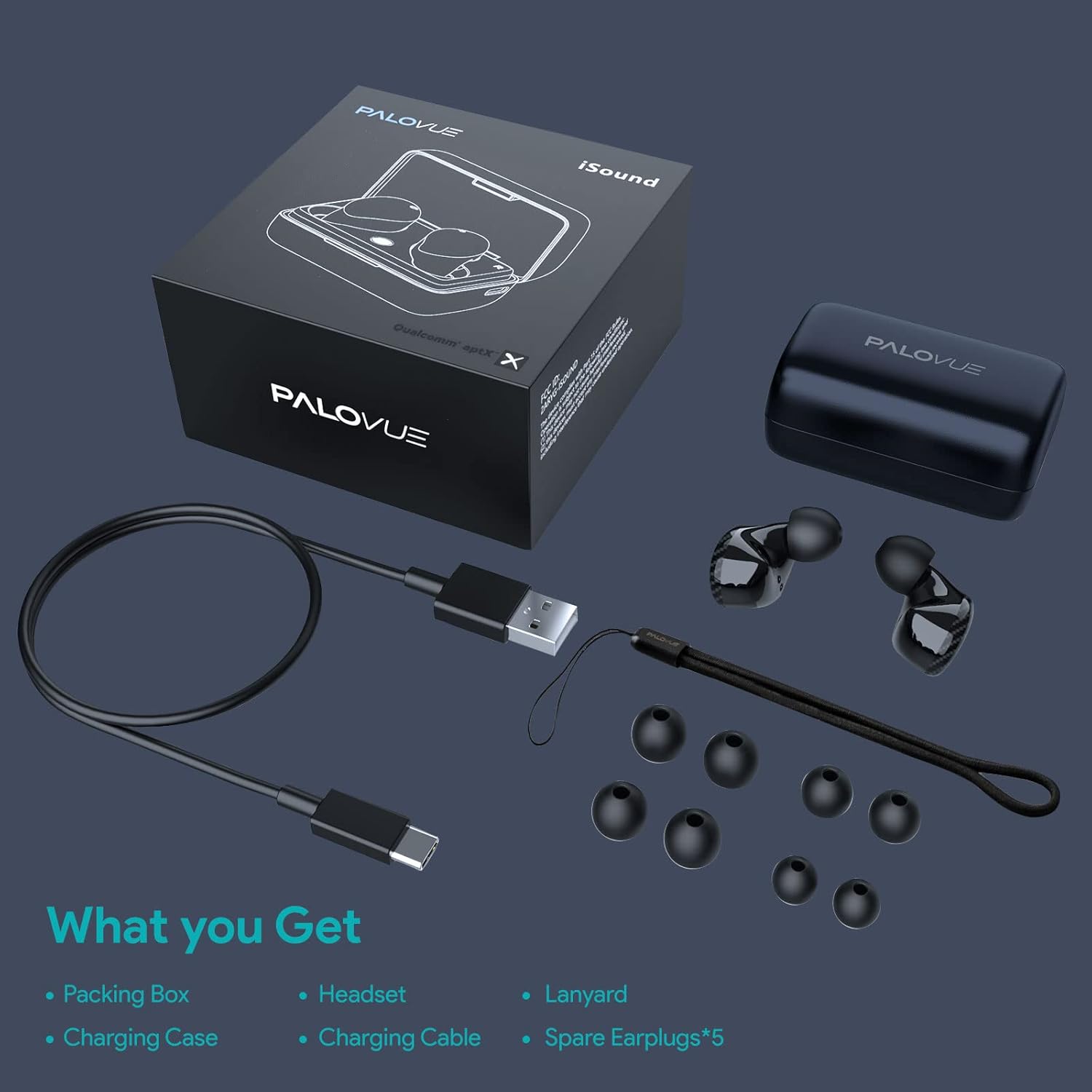
Image: A flat lay showing all items included in the PALOVUE iSound package: the packing box, charging case, earbuds, charging cable, lanyard, and five pairs of spare ear tips.
3. Sąrankos vadovas
3.1 Pradinis įkrovimas
Before first use, ensure both the earbuds and the charging case are fully charged. Place the earbuds into the charging case. Connect the provided USB-C cable to the charging case and a power source. The indicator lights on the case will show charging status. A full charge typically takes approximately 2 hours for the case.
3.2 Susiejimas su jūsų įrenginiu
The PALOVUE iSound earbuds feature one-step reconnection for convenience.
- Atidarykite įkrovimo dėklą. Ausinės automatiškai įsijungs ir pradės veikti susiejimo režimu.
- Išmaniajame telefone arba „Bluetooth“ įrenginyje eikite į „Bluetooth“ nustatymus.
- Ieškokite "PALOVUE iSound" in the list of available devices and select it to connect.
- Prijungus išgirsite garsinį patvirtinimą ir ausinės bus paruoštos naudoti.
- Vėlesniam naudojimui tiesiog atidarykite įkrovimo dėklą ir ausinės automatiškai prisijungs prie paskutinio suporuoto įrenginio.
Video: A detailed guide demonstrating the connection and operation of the PALOVUE iSound earbuds, including initial pairing steps and touch control functions.
4. Ausinių naudojimas
4.1 Jutikliniai valdikliai
The PALOVUE iSound earbuds feature intuitive touch controls on each earbud. The specific functions can be customized via the PALOVUE iSound APP.
| Veiksmas | Kairė ausinė | Dešinė ausinė |
|---|---|---|
| Vienu paspaudimu | Sumažinti garsumą | Padidinti garsumą |
| Dukart bakstelėjimas | Groti / pristabdyti muziką, atsiliepti / baigti skambutį | Groti / pristabdyti muziką, atsiliepti / baigti skambutį |
| Ilgas paspaudimas | Previous Song, Reject Call | Next Song, Reject Call |
Video: A short demonstration of the touch controls for the PALOVUE iSound earbuds, showing how to adjust volume, skip tracks, and manage calls.
4.2 Using the PALOVUE iSound APP
Enhance your experience by downloading the PALOVUE iSound APP. The app allows you to:
- Customize touch control functions (e.g., volume, track control, call management).
- Adjust equalizer (EQ) settings for personalized sound profiles (Male Vocals, Electronic, Jazz, Rock, Classical, Female Vocals, Original, Customize).
- Check battery levels of each earbud.
- Access device information and firmware updates.

Image: A woman wearing PALOVUE iSound earbuds, illustrating their comfortable fit and suitability for daily use.

Paveikslėlis: sprogęs view diagram of the PALOVUE iSound earbud, detailing its internal structure and emphasizing Qualcomm AptX and Deep Bass sound capabilities.
5. Priežiūra
To ensure the longevity and optimal performance of your PALOVUE iSound Wireless Earbuds, follow these maintenance guidelines:
- Valymas: Reguliariai valykite ausines ir įkrovimo dėklą minkštu, sausu, nepūkuotu skudurėliu. Nenaudokite abrazyvinių valiklių ar tirpiklių. Švelniai pašalinkite ausų sierą ar nešvarumus nuo ausų antgalių ir garsiakalbio tinklelio, naudodami mažą, minkštą šepetėlį arba vatos tamponėlį.
- Saugykla: Kai nenaudojate, laikykite ausines įkrovimo dėkle, kad apsaugotumėte jas nuo dulkių, nešvarumų ir fizinių pažeidimų.
- Akumuliatoriaus priežiūra: Avoid fully depleting the battery frequently. For long-term storage, charge the earbuds and case to about 50% to preserve battery health.
- Atsparumas vandeniui: The earbuds are rated IPX4 for water resistance, meaning they are protected against splashing water from any direction. They are designed for sports and can withstand sweat and light rain, but they are not suitable for swimming or submersion in water. Ensure the earbuds are dry before placing them back in the charging case.
Video: A short promotional video highlighting the compact size and powerful features of the iSound True Wireless Earbuds, including their IPX4 water resistance.
6. Problemų sprendimas
If you encounter issues with your PALOVUE iSound Wireless Earbuds, try the following solutions:
6.1 Susiejimo problemos
- Ausinės neprisijungia: Ensure Bluetooth is enabled on your device. Place earbuds back in the case, close it, wait a few seconds, then open it again to re-initiate pairing mode.
- Veikia tik viena ausinė: Try placing both earbuds back in the charging case, closing the lid, and then reopening it. Ensure both earbuds have sufficient charge.
- Ausinės nerodomos „Bluetooth“ sąraše: Turn off Bluetooth on your device, then turn it back on. Restart your device if necessary.
6.2 Garso kokybės problemos
- Mažas garsumas: Increase the volume on both your earbuds (via touch control) and your connected device.
- Iškreiptas garsas: Ensure the earbuds are within Bluetooth range of your device. Check for obstructions between the earbuds and your device.
- Prasta skambučio kokybė: Ensure the microphones are not obstructed. CVC 8.0 Noise Cancelling technology helps, but extreme noise environments can still affect clarity.
6.3 Battery and Charging Issues
- Ausinės neįkraunamos: Ensure the charging contacts on the earbuds and inside the case are clean and dry. Try a different charging cable or power adapter.
- Dėklas neįkraunamas: Patikrinkite, ar įkrovimo laidas ir maitinimo šaltinis veikia tinkamai.
6.4 How to Reset Your Earbuds
Jei kyla nuolatinių problemų, gamyklinių duomenų atkūrimas gali jas išspręsti:
- Įdėkite abi ausines į įkrovimo dėklą.
- Press and hold the reset button on the charging case (usually located inside or near the charging port) until the indicator lights on the earbuds flash red and green alternately.
- Release the button and wait until only the green light flashes, indicating the reset is complete.
- Išimkite ausines iš dėklo ir pabandykite jas iš naujo susieti su savo įrenginiu.
Refer to the "PALOVUE iSound Connection operation guide" video in the Setup section for a visual demonstration of the reset process.
7. Specifikacijos
| Funkcija | Detalė |
|---|---|
| Prekės ženklas | PALOVA |
| Modelio pavadinimas | iSound |
| Ryšio technologija | Belaidis ryšys („Bluetooth 5.0“) |
| Belaidžio ryšio technologija | Bluetooth |
| Lustų rinkinys | Qualcomm CSR QCC3020 |
| Triukšmo valdymas | CVC 8.0 Noise Cancellation (for calls) |
| Mikrofonai | 4 mikrofonai |
| Valdymo tipas | Palieskite valdymą |
| Ausų išdėstymas | Ausyje |
| Formos faktorius | Ausyje |
| Baterijos veikimo laikas (ausinės) | Iki 6 valandų (apytiksliai) |
| Bendras grojimo laikas (su dėklu) | Iki 24 valandų |
| Įkrovimo laikas (dėklas) | 2 valandų |
| Bluetooth diapazonas | Iki 10 metrų (32.8 pėdų) |
| Atsparumo vandeniui lygis | IPX4 (atsparus purslams) |
| Medžiaga | Silicone (Ear Tips) |
| Prekės svoris | 1.76 uncijos |
| Suderinami įrenginiai | Smartphones, Tablets, Laptops, Desktops, Smart TVs, Car Audio Systems |
8. Garantija ir palaikymas
PALOVUE products typically come with a manufacturer's warranty. Please refer to the warranty card included in your product packaging for specific terms and conditions, including warranty period and coverage details. For technical support, troubleshooting assistance, or warranty claims, please contact PALOVUE customer service through their official websvetainėje arba kontaktinę informaciją, pateiktą jūsų produkto dokumentuose.
You can also visit the official PALOVUE store on Amazon for more information and support: PALOVUE Amazon Store.